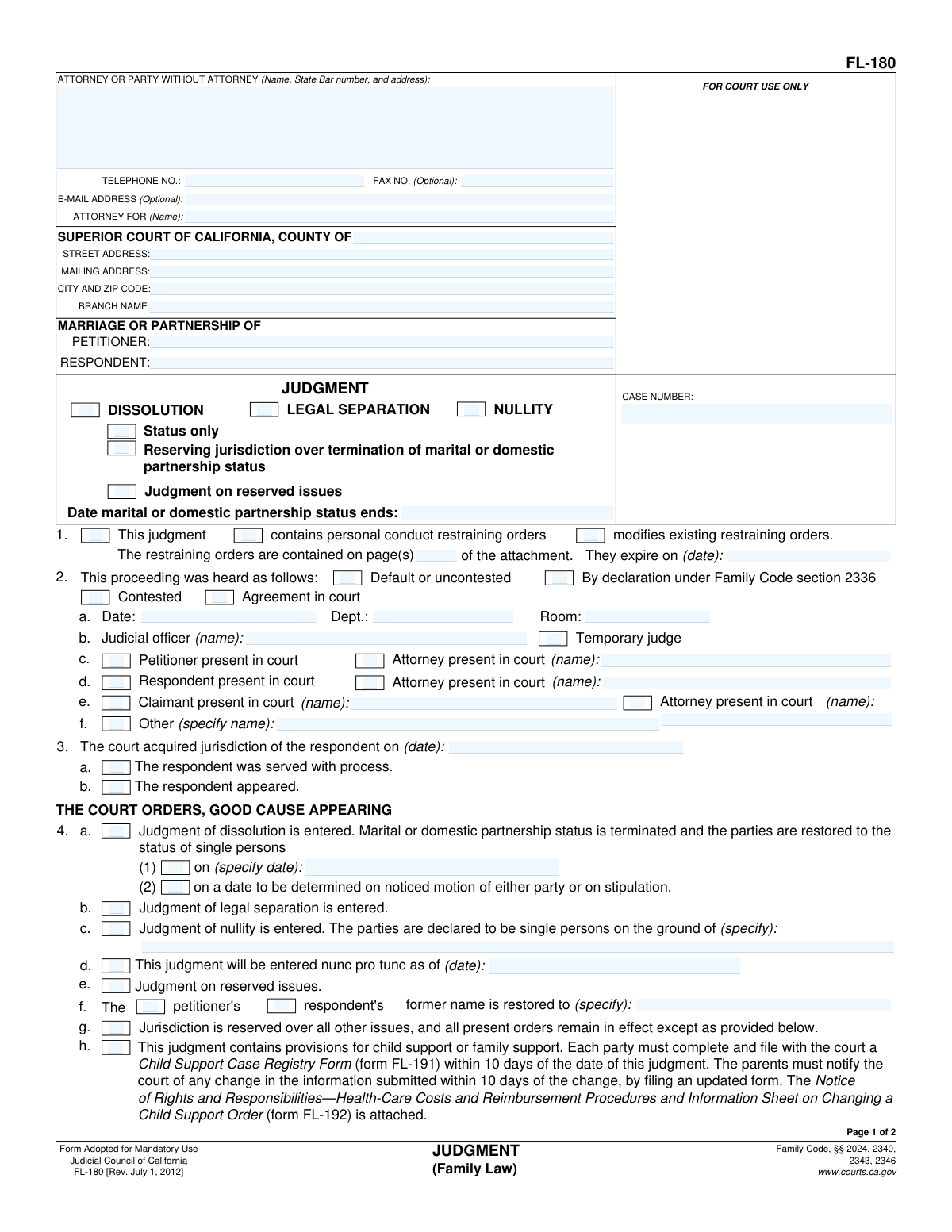
Yes! You can use AI to fill out Form FL-180, Judgment (Family Law)

California Form FL-180, Judgment (Family Law), is a mandatory court document that officially records the court's final decisions in a family law case, such as a divorce, legal separation, or nullity. It legally terminates the marital or domestic partnership status and details all related orders concerning child custody, support, and property division. This form is critical as it creates an enforceable legal order that all parties must follow, and today this form can be filled out quickly and accurately using AI-powered services like Instafill.ai, which can also convert non-fillable PDF versions into interactive fillable forms.
Our AI automatically handles information lookup, data retrieval, formatting, and form filling.
It takes less than a minute to fill out FL-180 using our AI form filling.
Securely upload your data. Information is encrypted in transit and deleted immediately after the form is filled out.

Form specifications

Form name: Form FL-180, Judgment (Family Law)
Number of fields: 116
Number of pages: 1
Language: English
main-image

Instafill Demo: How to fill out PDF forms in seconds with AI

How to Fill Out FL-180 Online for Free in 2026

Are you looking to fill out a FL-180 form online quickly and accurately? Instafill.ai offers the #1 AI-powered PDF filling software of 2026, allowing you to complete your FL-180 form in just 37 seconds or less.
Follow these steps to fill out your FL-180 form online using Instafill.ai:
  1. 1 Navigate to Instafill.ai and upload your FL-180 form, or select it from their library of official documents.
  2. 2 Use the AI assistant to automatically populate your personal and case information, such as names, addresses, and the court case number.
  3. 3 Specify the type of judgment (Dissolution, Legal Separation, or Nullity) and indicate how the case was heard (e.g., by default, uncontested, or contested).
  4. 4 Detail the court's specific orders by checking the relevant boxes and referencing the required attachments for child custody (FL-341), child support (FL-342), spousal support (FL-343), and property division (FL-345).
  5. 5 List the names and birthdates of any children involved in the case and specify if parentage was established.
  6. 6 Review all the entered information for accuracy, ensuring all attachments are correctly referenced and the total number of attached pages is noted.
  7. 7 Download the completed form, ready for the judicial officer's signature and filing with the appropriate California Superior Court.

Our AI-powered system ensures each field is filled out correctly, reducing errors and saving you time.

Why Choose Instafill.ai for Your Fillable FL-180 Form?

Speed

Complete your FL-180 in as little as 37 seconds.

Up-to-Date

Always use the latest 2026 FL-180 form version.

Cost-effective

No need to hire expensive lawyers.

Accuracy

Our AI performs 10 compliance checks to ensure your form is error-free.

Security

Your personal information is protected with bank-level encryption.

Frequently Asked Questions About Form FL-180

This form is the final court order that officially ends your marriage or domestic partnership, grants a legal separation, or nullifies your marriage. It finalizes all the issues in your family law case, such as custody, support, and property division.

One of the parties or their attorney prepares the Judgment form for the judge to review and sign. It reflects the agreements made between the parties or the orders made by the court after a trial.

Dissolution is a divorce, ending the marriage and restoring you to single status. Legal separation divides your finances and property but does not end the marriage. Nullity declares that your marriage was never legally valid.

In section 4.f., you can check the appropriate box and write in the former name you wish to have restored. The judge's signature on the form makes this name change official.

No, you only need to attach the forms that apply to your specific case. For example, if you have children, you will need to attach orders for child custody (FL-341) and child support (FL-342).

If your judgment includes child support, both parents must complete and file Form FL-191 with the court within 10 days. This form registers your case with the state for child support tracking and enforcement.

This means the court has already terminated your marital status but is now ruling on other issues that were 'reserved' or set aside for a later decision, like property division or spousal support.

The judicial officer (the judge or a temporary judge) signs the form on the last page. The judge's signature is what makes the judgment a final and enforceable court order.

Once signed by the judge and filed with the court clerk, the Judgment becomes a final, enforceable court order. Your marital status will officially end on the date specified in section 4.a.

This is a warning that while the court can order one person to pay a joint debt, it cannot change the original contract you had with the creditor. If your ex-spouse fails to pay, the creditor may legally pursue you for payment.

Yes, services like Instafill.ai use AI to accurately auto-fill form fields from your case data, which can save you significant time and help prevent errors. This is especially useful for complex forms with many attachments.

You can use a service like Instafill.ai to fill out the form online. Simply upload the FL-180 PDF, and the platform will allow you to enter your information into the correct fields before downloading the completed document.

If you have a non-fillable or 'flat' PDF, you can upload it to a service like Instafill.ai. Their technology can convert the flat PDF into an interactive, fillable form that you can complete on your computer.

Compliance FL-180
Validation Checks by Instafill.ai

1
Case Number Consistency Across Pages
This check verifies that the 'CASE NUMBER' entered on Page 2 exactly matches the 'CASE NUMBER' entered in the header of Page 1. Maintaining consistent case numbers across all pages is critical for correct document assembly and court filing. A mismatch could lead to the page being associated with the wrong case file, causing significant legal and administrative delays.
2
Exclusive Judgment Type Selection
Validates that exactly one judgment type checkbox ('DISSOLUTION', 'LEGAL SEPARATION', or 'NULLITY') is selected at the top of the form. A judgment can only be of one type. This check prevents ambiguity and ensures the court order is clear and legally precise; failure would result in an invalid and unenforceable judgment.
3
Jurisdiction Date Precedes Judgment Date
Ensures the date the court acquired jurisdiction over the respondent (Item 3) is on or before the final judgment date (Item 5). A court cannot issue a judgment before it has legal jurisdiction over both parties. This validation upholds the legal sequence of events and prevents the creation of a voidable order.
4
Conditional Requirement for Nullity Grounds
This check confirms that if 'Judgment of nullity is entered' (Item 4.c) is selected, the corresponding text field specifying the grounds for the nullity is filled out. The legal basis for a nullity must be explicitly stated on the judgment. If this field is left blank when required, the judgment of nullity is incomplete and will be rejected by the court clerk.
5
Conditional Requirement for Name Restoration
Verifies that if the box to restore a former name is checked for either the petitioner or respondent (Item 4.f), the text field specifying the restored name is not empty. An order to restore a name is meaningless without the actual name being specified. This ensures the order is complete and can be used for official purposes like updating a driver's license or social security records.
6
Child Birthdate Validity
For each child listed in Item 4.i, this validation ensures the 'Birthdate' is a valid date format and that the date is in the past. This prevents data entry errors such as typos or future dates, which are impossible for a living child. Accurate birthdates are essential for determining the duration of child support and custody orders.
7
Child Information Consistency
Checks for logical consistency between the listing of children and orders related to them. If any checkbox related to child custody (Item 4.j) or child support (Item 4.k) is selected, this validation ensures that at least one child is listed in Item 4.i. This prevents the creation of orders for custody or support when no children are identified in the judgment.
8
Attachment Reference Completeness
This validation ensures that if the option 'Previously established in another case' is checked for child custody (Item 4.j(4)) or child support (Item 4.k(4)), the 'Case number' and 'Court' fields are filled in. These details are necessary to properly reference the prior order. Without this information, the reference is incomplete and the terms of the judgment would be ambiguous.
9
Dissolution Status Termination Date Logic
Validates that if a specific date is entered for the termination of marital status (Item 4.a(1)), that date is not before the judgment date. Legally, the marital status cannot be terminated before the judgment is officially entered. This check ensures the order complies with legal timelines and prevents the creation of a logically flawed and invalid order.
10
Attachment Page Count Format
Ensures that the value entered in 'Number of pages attached' (Item 5) is a non-negative integer (e.g., '0', '1', '5'). This field is used by the court to verify that the submission is complete and all referenced documents are present. An invalid entry, such as text or a negative number, would cause processing errors and likely lead to the rejection of the entire filing.
11
Restraining Order Expiration Date
If the judgment indicates it contains personal conduct restraining orders (Item 1), this check validates that the expiration date is a valid date and is in the future. A restraining order must have a clear and future-dated expiration to be enforceable. An expired or invalid date would render the protective order ineffective and require immediate correction.
12
Jurisdiction Basis Selection
This check verifies that in Section 3, at least one of the two checkboxes ('The respondent was served with process' or 'The respondent appeared') is selected. The form must state the basis on which the court acquired jurisdiction over the respondent. Failure to select one of these options leaves the court's authority in question and will result in the judgment being rejected for incompleteness.
13
Email Address Format Validation
Validates that the E-mail Address provided in the attorney/party information block follows a standard email format (e.g., '[email protected]'). While optional, if an email is provided, it should be valid to ensure proper communication from the court and other parties. An invalid format could lead to missed notifications and communications.
14
Hearing Details Completeness
If the proceeding is marked as 'Contested' or 'By declaration' in Section 2, this check ensures that the hearing 'Date', 'Dept.', and 'Judicial officer' name are all provided. These details are essential for the official record of the proceeding. Missing information would create an incomplete record of the hearing where the judgment was made.

Common Mistakes in Completing FL-180

Incorrect Marital Status End Date

In section 4.a.(1), parties often enter a date for the termination of marital status that is legally invalid. This happens when the specified date is less than six months and one day from the date the respondent was served with the petition or made their first appearance. A legally premature date will cause the court clerk to reject the entire judgment package, forcing the parties to correct the form and resubmit, delaying the finality of their divorce.

Accidentally Terminating Spousal Support Jurisdiction

A critical and often irreversible mistake is incorrectly checking box 4.l.(2), which terminates the court's jurisdiction to order spousal support for a party. This can happen through oversight or misunderstanding, especially in uncontested cases. The consequence is permanent; that party can never request spousal support in the future, even if their financial circumstances change drastically. Parties must carefully review this section to ensure it reflects their agreement to either reserve or permanently waive support.

Missing or Inconsistent Attachments

The form requires checking boxes in sections 4.j through 4.n to incorporate orders for custody, support, and property division, referencing other forms (like FL-341, FL-342, FL-345) or a written agreement. A common error is checking a box but failing to physically attach the corresponding document, or having conflicting terms between the judgment and the attachment. This renders the judgment incomplete and unenforceable, leading to rejection by the court and requiring re-filing.

Forgetting the Header on Page 2

Parties frequently complete the first page's header with the case name and number but forget to repeat this information at the top of page 2. While it seems minor, court clerks may reject the document for being incomplete or improperly formatted. If the pages were to become separated during processing, the second page would be unidentifiable, potentially leading to the loss of crucial orders and significant delays in processing the judgment.

Incomplete or Inaccurate Child Information

In section 4.i, filers may misspell a child's name or enter an incorrect birthdate. These errors often occur due to haste or typographical mistakes when filling out the form. An incorrect name or birthdate on a final judgment can create significant problems for future legal and administrative tasks, such as obtaining a passport, enrolling in school, or enforcing support orders, often requiring a complex and costly court process to correct.

Failure to File Required Ancillary Forms

When box 4.h is checked, indicating a child support order exists, parties are mandated to file a separate form, FL-191 (Child Support Case Registry Form), within 10 days. People often overlook this requirement, assuming the judgment itself is sufficient. Failure to file the FL-191 can result in the case not being properly registered for enforcement services and may lead to non-compliance issues with the court.

Improper Name Restoration Request

In section 4.f, a party wishing to have their former name restored may forget to check the box or may fill in the name incorrectly, for example, by just writing 'Maiden Name'. The form requires the full, specific former name to be written out exactly as it should appear in the order. An omission or error here means the name change will not be granted, requiring a separate, later court action to achieve the desired result.

Miscounting Attached Pages

Section 5 requires the filer to state the total number of pages attached to the judgment. People often miscount the pages of their settlement agreements and required forms, or simply leave this field blank. An incorrect page count will cause the court clerk to scrutinize the filing for missing documents and likely reject it, delaying the entry of judgment until the form is corrected and resubmitted.

Incorrectly Identifying the Case Type

At the top of the form, users must select whether the judgment is for a Dissolution, Legal Separation, or Nullity. Additionally, in section 2, they must specify if the matter was resolved by default, uncontested agreement, or a contested trial. Confusion about these legal terms can lead to checking the wrong boxes, which misrepresents the procedural history of the case and will result in the clerk rejecting the judgment for being inconsistent with the court record.

Signing in the Judicial Officer's Signature Block

Parties or their attorneys, in their haste to complete the paperwork, sometimes sign the form in the signature block at the bottom of page 2 reserved for the 'JUDICIAL OFFICER'. The judge is the only person authorized to sign in this location. A party's signature in the wrong place will invalidate the form, leading to immediate rejection and the need to prepare and resubmit the entire judgment package.
Saved over 80 hours a year

“I was never sure if my IRS forms like W-9 were filled correctly. Now, I can complete the forms accurately without any external help.”

Kevin Martin Green

Your data stays secure with advanced protection from Instafill and our subprocessors

Robust compliance program

Transparent business model

You’re not the product. You always know where your data is and what it is processed for.

ISO 27001, HIPAA, and GDPR

Our subprocesses adhere to multiple compliance standards, including but not limited to ISO 27001, HIPAA, and GDPR.

Security & privacy by design

We consider security and privacy from the initial design phase of any new service or functionality. It’s not an afterthought, it’s built-in, including support for two-factor authentication (2FA) to further protect your account.

Fill out FL-180 with Instafill.ai

Worried about filling PDFs wrong? Instafill securely fills form-fl-180-judgment-family-law forms, ensuring each field is accurate.

Related forms by category

California court forms Judicial Council of California Form SC-105, Request for Court Order and Answer (Small Claims), Judicial Council of California Form SC-120, Defendant’s Claim and ORDER to Go to Small Claims Court (Small Claims), Judicial Council of California Form SER-001, Request for Sheriff to Serve Court Papers, Judicial Council of California Form SER-001, Request for Sheriff to Serve Court Papers, Affidavit for Collection of Personal Property California Probate Code Section 13100, Form POS-040, Proof of Service—Civil, Declaration of Facts of Death (California Superior Court), declaration-of-marriage-for-court-proceeding-california-family-law, ADOPT-200, Adoption Request, ADOPT-200, Stepparent Adoption Request, ADOPT-210, Adoption Agreement, ADOPT-310, Contact After Adoption Agreement, Judicial Council of California Form ADOPT-200, Adoption Request, Form ADR-107, Mediation Attendance Sheet, Form ADR-110, Order Appointing Referee, Form ADR-109, Stipulation or Motion for Order Appointing Referee, Form ADR-102, Request for Trial De Novo After Judicial Arbitration, Form ADR-108, Referee's Report (Code Civ. Proc., §§ 638, 639), Form ADR-106, Petition to Confirm, Correct, or Vacate Contractual Arbitration Award, Form ADR-104, Rejection of Award and Request for Trial After Attorney-Client Fee Arbitration · + 434 more →
California legal forms Form FL-115, Proof of Service of Summons (Family Law—Uniform Parentage—Custody and Support), Form FL-140, Declaration of Disclosure (Family Law), Form FL-145, Form Interrogatories—Family Law, Form FL-160, Property Declaration (Family Law), Form FL-191, Child Support Case Registry Form, Form FL-195, Income Withholding for Support, Form FL-141, Declaration Regarding Service of Declaration of Disclosure and Income and Expense Declaration, Form FL-190, Notice of Entry of Judgment (Family Law—Uniform Parentage—Custody and Support), Form FL-341(E), Joint Legal Custody Attachment
family court forms Form 12.995(c), Safety-Focused Parenting Plan, Florida Supreme Court Approved Family Law Form 12.901(b)(3), Petition for Dissolution of Marriage with No Dependent or Minor Child(ren) or Property (02/18), Form N161, Appellant’s notice (All appeals except small claims track appeals and appeals to the Family Division of the High Court), Form N161, Appellant's Notice (All appeals except small claims track appeals and appeals to the Family Division of the High Court), Florida Supreme Court Approved Family Law Form 12.915, Designation of Current Mailing and E-mail Address, declaration-of-marriage-for-court-proceeding-california-family-law, Florida Supreme Court Approved Family Law Form 12.902(d), Uniform Child Custody Jurisdiction and Enforcement Act (UCCJEA) Affidavit, Florida Supreme Court Approved Family Law Form 12.941(a), Petition for Enforcement of Out-of-State Custody Decree and for Order to Pick Up Minor Child(ren), Florida Supreme Court Approved Family Law Form 12.970(a), Petition for Temporary Custody by Extended Family, Adoption Request (Stepparent), Florida Family Law Rules of Procedure Form 12.900(b), Notice of and Consent to Limited Appearance, Florida Family Law Rules of Procedure Form 12.900(d), Termination of Limited Appearance, Florida Family Law Rules of Procedure Form 12.900(e), Acknowledgment of Assistance by Attorney, Florida Family Law Rules of Procedure Form 12.900(g), Agreement Limiting Representation, Florida Family Law Rules of Procedure Form 12.900(h), Notice of Related Cases, Florida Family Law Rules of Procedure Form 12.901(a), Joint Petition for Simplified Dissolution of Marriage, Form 12.902(b), Family Law Financial Affidavit (Short Form), Florida Family Law Rules of Procedure Form 12.902(c), Family Law Financial Affidavit (Long Form), Florida Family Law Rules of Procedure Form 12.902(e), Child Support Guidelines Worksheet, Florida Supreme Court Approved Family Law Form 12.902(f)(1), Marital Settlement Agreement for Dissolution of Marriage with Dependent or Minor Child(ren) · + 46 more →
family law forms Form 12.902(b), Family Law Financial Affidavit (Short Form), Florida Supreme Court Approved Family Law Form 12.901(b)(3), Petition for Dissolution of Marriage with No Dependent or Minor Child(ren) or Property (02/18), Form FL-170, Declaration for Default or Uncontested Dissolution or Legal Separation (Family Law), Form FL-100, Petition—Marriage/Domestic Partnership (Family Law), Florida Supreme Court Approved Family Law Form 12.915, Designation of Current Mailing and E-mail Address, declaration-of-marriage-for-court-proceeding-california-family-law, Florida Supreme Court Approved Family Law Form 12.902(d), Uniform Child Custody Jurisdiction and Enforcement Act (UCCJEA) Affidavit, Florida Family Law Rules of Procedure Form 12.910(a), Summons: Personal Service on an Individual, Florida Supreme Court Approved Family Law Form 12.941(a), Petition for Enforcement of Out-of-State Custody Decree and for Order to Pick Up Minor Child(ren), Florida Supreme Court Approved Family Law Form 12.970(a), Petition for Temporary Custody by Extended Family, Form FL-110, Summons (Family Law), Form FL-120, Response—Marriage/Domestic Partnership (Family Law), ADOPT-200, Adoption Request, ADOPT-200, Stepparent Adoption Request, ADOPT-210, Adoption Agreement, ADOPT-310, Contact After Adoption Agreement, Adoption Assistance Program Nonrecurring Adoption Expense Agreement and Claim, Adoption Request (Stepparent), Adoption and Safe Families Act (ASFA) Survey, Florida Family Law Rules of Procedure Form 12.900(b), Notice of and Consent to Limited Appearance · + 53 more →
legal judgment forms Form FL-190, Notice of Entry of Judgment (Family Law—Uniform Parentage—Custody and Support)
legal separation forms Form FL-170, Declaration for Default or Uncontested Dissolution or Legal Separation, Form FL-170, Declaration for Default or Uncontested Dissolution or Legal Separation (Family Law), Form FL-115, Proof of Service of Summons (Family Law—Uniform Parentage—Custody and Support), Form FL-140, Declaration of Disclosure (Family Law), Form FL-145, Form Interrogatories—Family Law, Form FL-160, Property Declaration (Family Law), Form FL-191, Child Support Case Registry Form, Form FL-195, Income Withholding for Support, Form FL-141, Declaration Regarding Service of Declaration of Disclosure and Income and Expense Declaration, Form FL-190, Notice of Entry of Judgment (Family Law—Uniform Parentage—Custody and Support)