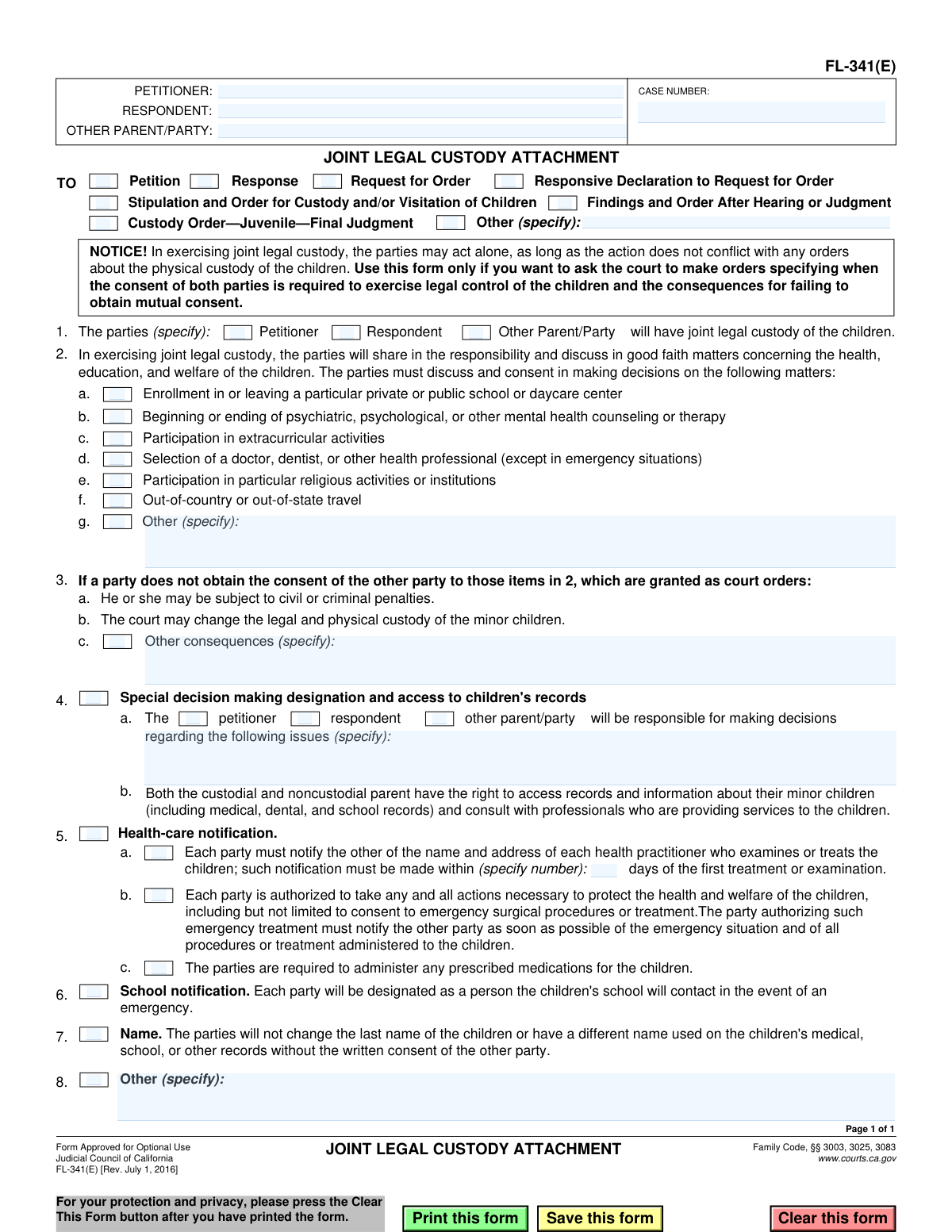
Yes! You can use AI to fill out Form FL-341(E), Joint Legal Custody Attachment
Form FL-341(E) is a legal document used in California family law cases to supplement a custody order. It outlines how parents with joint legal custody will share responsibility and make decisions regarding their children's health, education, and welfare, specifying which matters require mutual consent. This form helps prevent future disputes by clearly defining parental rights and obligations. Today, this form can be filled out quickly and accurately using AI-powered services like Instafill.ai, which can also convert non-fillable PDF versions into interactive fillable forms.
FL-341(E) is part of the
California court forms, California legal forms, family court forms and family law forms categories on Instafill.
Our AI automatically handles information lookup, data retrieval, formatting, and form filling.
It takes less than a minute to fill out FL-341(E) using our AI form filling.
Securely upload your data. Information is encrypted in transit and deleted immediately after the form is filled out.
Form specifications
| Form name: | Form FL-341(E), Joint Legal Custody Attachment |
| Number of fields: | 44 |
| Number of pages: | 1 |
| Language: | English |
Instafill Demo: How to fill out PDF forms in seconds with AI
How to Fill Out FL-341(E) Online for Free in 2026
Are you looking to fill out a FL-341(E) form online quickly and accurately? Instafill.ai offers the #1 AI-powered PDF filling software of 2026, allowing you to complete your FL-341(E) form in just 37 seconds or less.
Follow these steps to fill out your FL-341(E) form online using Instafill.ai:
- 1 Navigate to Instafill.ai and upload your PDF or select Form FL-341(E) from the template library.
- 2 Provide the case information, including the case number and the names of the petitioner, respondent, and other parties.
- 3 Indicate which primary court document this form is an attachment to, such as a Petition, Response, or Request for Order.
- 4 Use the AI assistant to check the boxes specifying which decisions require the consent of both parties, such as school enrollment, travel, and healthcare choices.
- 5 Detail any special decision-making designations, notification requirements, or other specific agreements between the parties in the designated sections.
- 6 Carefully review all the information entered on the form to ensure it accurately reflects the custody agreement and is free of errors.
- 7 Securely download, print, or e-file the completed Joint Legal Custody Attachment for submission to the court.
Our AI-powered system ensures each field is filled out correctly, reducing errors and saving you time.
Why Choose Instafill.ai for Your Fillable FL-341(E) Form?
Speed
Complete your FL-341(E) in as little as 37 seconds.
Up-to-Date
Always use the latest 2026 FL-341(E) form version.
Cost-effective
No need to hire expensive lawyers.
Accuracy
Our AI performs 10 compliance checks to ensure your form is error-free.
Security
Your personal information is protected with bank-level encryption.
Frequently Asked Questions About Form FL-341(E)
This form is used to specify which major decisions about a child's health, education, and welfare require the consent of both parents under a joint legal custody arrangement. It is an attachment to a primary custody order or agreement.
Parents who are establishing a joint legal custody order and want to clearly define the rules for making important decisions for their children should use this form. It helps prevent future conflicts by setting clear expectations.
No, this form is approved for optional use. However, it is highly recommended to clarify which decisions require mutual consent, which can help avoid disagreements and potential court action later.
The form covers significant decisions such as school enrollment, out-of-state travel, participation in extracurricular or religious activities, and choices regarding medical or mental health treatment.
If you anticipate disagreements, you can use Section 3 of the form to designate one parent to have the final say on specific issues. Without this, you may need to return to court for a judge to decide.
If you make a decision that requires consent without obtaining it, you could face civil or criminal penalties. The court may also change the legal and physical custody orders for your children.
Yes, the form includes an "Other (specify)" line in Section 2, allowing you and the other parent to list any additional specific decisions that you agree should require mutual consent.
The form specifies that either parent can authorize emergency medical procedures or treatment without the other's prior consent. However, you must notify the other parent about the emergency and treatment as soon as possible.
This is not a standalone form. You must attach it to another court document, such as a Request for Order (FL-300), a Stipulation and Order, or a Judgment, and file it with the court.
Yes, the form notes that both parents have the right to access their children's medical, dental, and school records, regardless of who has physical custody.
Yes, services like Instafill.ai use AI to help you accurately auto-fill form fields, which can save time and reduce errors. This is especially helpful for ensuring case numbers and names are consistent across documents.
You can use a service like Instafill.ai to fill out the form online. Simply upload the PDF, and the platform will make it an interactive, fillable form that you can complete from your computer.
If you have a non-fillable or 'flat' PDF, you can use a service like Instafill.ai. It can convert the non-fillable PDF into an interactive form that you can easily fill out, save, and print.
Compliance FL-341(E)
Validation Checks by Instafill.ai
1
Case Number Presence and Format
This check ensures the 'CASE NUMBER' field is not empty and conforms to the expected format for the jurisdiction (e.g., alphanumeric, may contain hyphens). The case number is a critical identifier that links this attachment to the correct legal proceeding. If the field is empty or the format is invalid, the form cannot be correctly filed, leading to processing delays or rejection by the court clerk.
2
Principal Parties Identification
Validates that the 'PETITIONER' and 'RESPONDENT' name fields at the top of the form are both filled out. These names identify the primary individuals involved in the custody case. A form submitted without this information is ambiguous and cannot be processed, as it would be unclear to whom the agreement applies.
3
Attachment Context Selection
Ensures that at least one checkbox in section 1 is selected to specify which document this form is an attachment to (e.g., 'Petition', 'Request for Order'). This form is not a standalone document; its legal context is defined by the primary filing it accompanies. Failure to select an option would make the form's purpose unclear and could lead to it being disregarded.
4
Conditional Requirement for 'Other' Decision Matters
If the 'Other (specify)' checkbox in section 2g is checked, this validation ensures the corresponding text field ('OtherDecisions_ft') is not empty. This prevents a user from indicating an 'other' category of decisions requiring consent without specifying what those decisions are. An incomplete entry would create an ambiguous and unenforceable court order.
5
Conditional Requirement for 'Other' Consequences
If the 'Other consequences (specify)' checkbox in section 5d is checked, this validation ensures the corresponding text field ('OtherConsequences_ft') is not empty. This is crucial for clearly defining all penalties for non-compliance with the custody agreement. An empty field would render the 'other consequences' clause meaningless and unenforceable.
6
Special Decision-Maker Designation Completeness
If the 'Special decision making designation' checkbox in section 6 is checked, this validation ensures two conditions are met: one party (Petitioner, Respondent, or Other) is selected, AND the text field specifying the issues ('SpecificIssues_ft') is filled. Granting special authority requires clarity on both who holds the authority and the scope of that authority. An incomplete section would result in a vague and contentious order.
7
Exclusive Selection of Special Decision-Maker
Validates that in section 6, only one party (Petitioner, Respondent, or Other Parent/Party) is selected for special decision-making authority. The purpose of this section is to delegate specific decisions to a single party to avoid conflict. Allowing multiple selections would create a contradictory and ambiguous order, defeating the section's purpose.
8
Health-Care Notification Days Format
If the 'Health-care notification' checkbox in section 7a is checked, this validation confirms that the 'days' field ('DaysNotice_ft') contains a valid, positive integer. This ensures the timeframe for notification is clear and unambiguous. The check prevents non-numeric, zero, or negative values, which would make the clause unenforceable.
9
Conditional Requirement for 'Other' Provisions in Section 8
If the 'Other (specify)' checkbox in section 8 is checked, this validation ensures the associated text field ('OtherSpecify_ft') is filled with details. This prevents an incomplete clause from being added to the agreement. The user must specify the 'other' provision for it to be a valid and enforceable part of the court order.
10
Other Parent/Party Name Requirement
If the 'Other Parent/Party' checkbox is selected in section 6, or if a name is entered in the 'OTHER PARENT/PARTY' field at the top, this check ensures the corresponding party is clearly identified. It is illogical to assign decision-making power to an 'Other Party' without specifying who that party is. This maintains the integrity and clarity of the legal document.
11
At Least One Consent Matter Required
Validates that if the form is being submitted, at least one checkbox from the list of matters requiring consent (section 2, items a-g) is selected. The primary purpose of this attachment is to specify these matters. Submitting the form with none selected would make the attachment redundant and serve no legal purpose.
12
At Least One Consequence for Non-Consent Required
Validates that at least one consequence for failing to obtain consent (section 5, items a-d) is selected. Defining consequences is a key part of the agreement's enforceability. If no consequences are specified, the requirement for consent outlined in section 2 is significantly weakened and may not be taken seriously.
Common Mistakes in Completing FL-341(E)
People often forget to enter the Case Number or use inconsistent names for the Petitioner and Respondent at the top of the form. This happens due to oversight or rushing. An incorrect or missing case number can lead to the document being rejected by the court clerk or misfiled, causing significant delays. To prevent this, always verify that the case number and full legal names match the primary court filings exactly.
In Section 1, filers must check a box to indicate which primary document this form is attached to, such as a 'Request for Order' or 'Stipulation'. Overlooking this step creates legal ambiguity about the form's context and intent. This can confuse the judge and may require additional hearings to clarify, slowing down the entire process. Ensure you select the one correct box that corresponds to your main filing.
The form provides 'Other (specify)' fields to add custom terms, but a common error is writing vague statements like 'all important decisions' or 'any major expenses.' This language is legally unenforceable because it is subjective and open to interpretation, leading to future disputes. Be specific and clear, such as 'Consent for child to obtain a driver's license' or 'Responsibility for paying for the child's cell phone plan'.
Filers sometimes make conflicting choices, such as checking a box in Section 2 to require mutual consent for school enrollment, but then granting one parent sole decision-making authority for education in Section 4. These contradictions make the resulting court order impossible to interpret and enforce. Carefully review all selections to ensure they are consistent; AI-powered form fillers like Instafill.ai can help flag such logical inconsistencies.
In Section 4, a party can be designated as the sole decision-maker for specific issues. A frequent mistake is to check a party (e.g., 'Petitioner') but then fail to write in the specific issues they have authority over in the provided text box. This leaves the clause incomplete and without legal effect, defeating the purpose of the section. Always complete both parts: select the party and clearly define their specific decision-making powers.
Section 6 requires parties to specify the number of days within which they must notify the other parent about a new health practitioner. People often leave this number blank, which makes the notification requirement ambiguous and difficult to enforce. To avoid this, enter a specific and reasonable number of days, such as '5' or '10', to create a clear and binding obligation.
Section 3 contains the phrase 'The parties (specify): ... will have joint legal custody.' Filers sometimes leave this blank, assuming it's implied by the form's title. However, you must explicitly list the full names of both parties (e.g., 'Jane Doe and John Smith') to ensure the order is clear and legally binding for both individuals involved.
When specifying 'Other consequences' in Section 5 for a party's failure to obtain consent, people may write legally invalid or extreme penalties like 'loses all custody.' Courts are unlikely to enforce such terms. Consequences should be reasonable and related to the action, such as 'The party who enrolls the child without consent is solely responsible for all associated tuition and fees'.
This form is used to require mutual consent for specific decisions. A common misunderstanding is to either check no boxes, rendering the form useless, or check every box without careful consideration, creating unnecessary hurdles for everyday co-parenting. Only select the items that represent genuine points of potential conflict that require joint agreement.
Even if filled out perfectly, the form has no legal power if it is not filed correctly. A critical error is forgetting to attach this form (FL-341(E)) to the primary document it supports, like the 'Request for Order' (FL-300) or a final judgment. Always ensure this attachment is included in your filing packet. If you have a non-fillable PDF, tools like Instafill.ai can convert it to a fillable version and help bundle it with other required forms.
Saved over 80 hours a year
“I was never sure if my IRS forms like W-9 were filled correctly. Now, I can complete the forms accurately without any external help.”
Kevin Martin Green
Your data stays secure with advanced protection from Instafill and our subprocessors

Robust compliance program
Transparent business model
You’re not the product. You always know where your data is and what it is processed for.
ISO 27001, HIPAA, and GDPR
Our subprocesses adhere to multiple compliance standards, including but not limited to ISO 27001, HIPAA, and GDPR.
Security & privacy by design
We consider security and privacy from the initial design phase of any new service or functionality. It’s not an afterthought, it’s built-in, including support for two-factor authentication (2FA) to further protect your account.
Fill out FL-341(E) with Instafill.ai
Worried about filling PDFs wrong? Instafill securely fills form-fl-341e-joint-legal-custody-attachment forms, ensuring each field is accurate.