
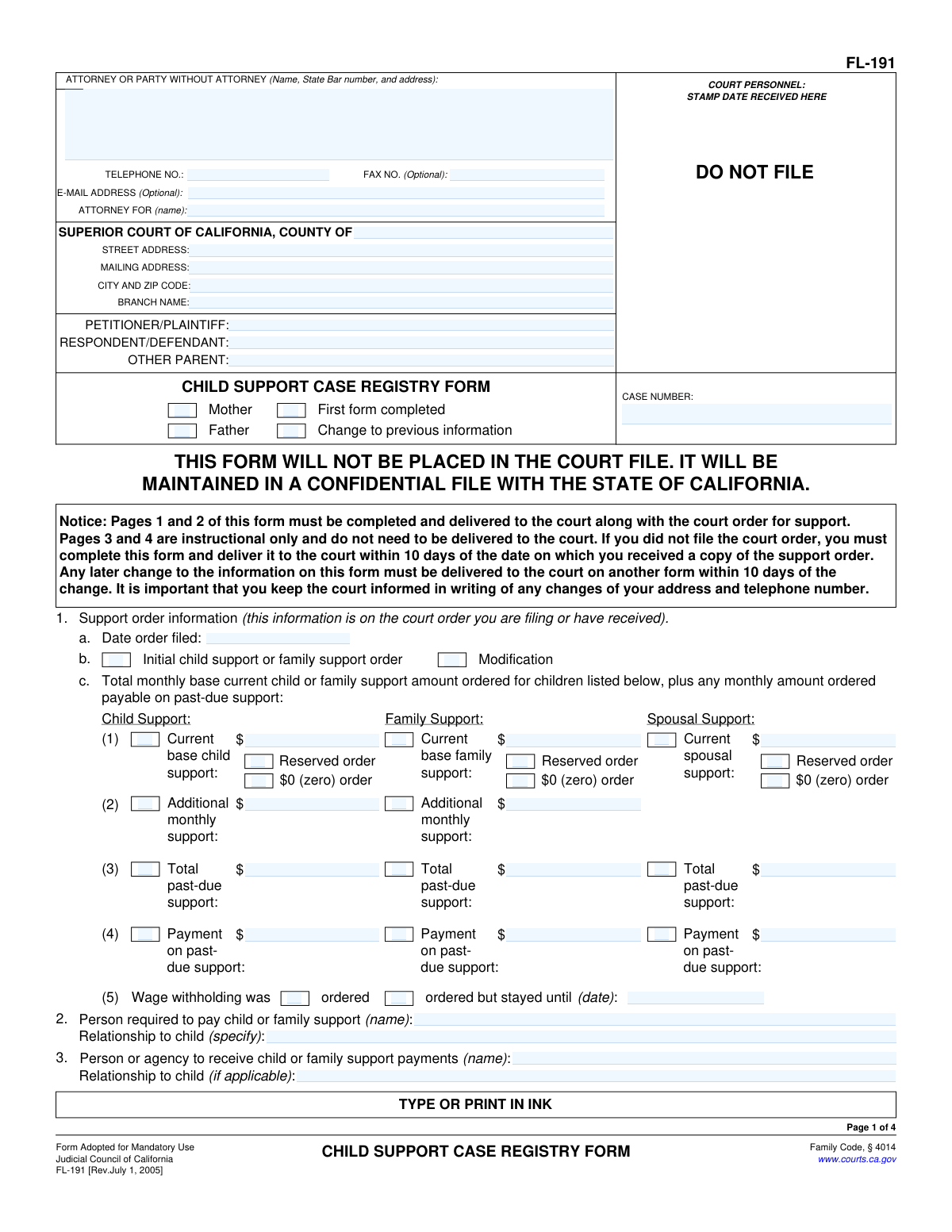
Yes! You can use AI to fill out Form FL-191, Child Support Case Registry Form
Don't type 118 fields by hand. Tell our AI about yourself, or upload a document you already have, and it fills every field in seconds. You check it, then download, print or sign.
The AI does the filling. You just check it.
No typing into boxes, nothing to install.
What this form asks for
The AI fills all of it, from your answers or your documents.
The AI checks your answers before you download
14 checks built for this form, so a wrong date or a missing answer is caught before anyone else sees it.
This check ensures that all Social Security Number fields (for the father, mother, and each child) are entered in the standard XXX-XX-XXXX format. Correct formatting is critical for the national database lookup and record matching as mandated by the Social Security Act. If the format is incorrect, the submission will be rejected with an error message prompting the user to correct the entry.
This validation verifies that the dates of birth entered for the father, mother, and all children are valid calendar dates that occur before the current date. A future date of birth is logically impossible and indicates a data entry error. If a future date is entered, the system will prevent submission and highlight the field for correction.
Based on whether 'Mother' or 'Father' is checked at the top of the form, this validation ensures that the corresponding section (Section 6 for Mother, Section 5 for Father) is fully and accurately completed. The instructions state the filer is required to provide information about themselves. Failure to complete the required section will prevent form submission until the missing information is provided.
For Section 7, this check verifies that the party being restrained (7b) is not the same as a party being protected (7a). For example, if 'Father' is checked in 7b ('From'), 'Father' cannot also be checked in 7a ('The order protects'). This prevents a logical contradiction in the order's details. An error will be displayed if the same party is selected in both fields.
If the primary checkbox in Section 7 ('A restraining order...is in effect') is checked, this validation makes subsections 7a, 7b, and 7c mandatory. The system needs to know who is protected, who is restrained, and when the order expires to be a complete record. If the main box is checked but the details are missing, the user will be prompted to complete all three subsections.
This check ensures the date entered in Section 7c for the restraining order's expiration is a valid date and is in the future. An expired order would not typically be noted as 'in effect', so a past date suggests an error. This ensures the registry has accurate information on current, active protective orders, and will flag past or invalid dates for user review.
And 8 more checks
- Conditional Requirement for Wage Withholding Stay Date
- Mutually Exclusive Support Amount Entry
- Requires Selection of Filer's Role
- Validates Standard Phone Number Format
- Requires Signature and Date for Perjury Declaration
- Logical Date Relationship Between Parent and Child
- Conditional Requirement for Employer Information
- Completeness Check for Child Information
Let AI fill out your FL-191
No typing. Every field filled in seconds, checked, ready to sign.
How to Fill Out FL-191 Online for Free in 2026
What the AI walks you through.
- Navigate to Instafill.ai and upload or select the FL-191 Child Support Case Registry Form.
- Allow the AI to scan and process the form, identifying all the required fields for personal, case, and support order information.
- Follow the guided prompts to enter your personal details, including your name, address, social security number, and employment status, as requested in sections 5 or 6.
- Provide the information for the other parent and the children involved in the support order, including names, dates of birth, and social security numbers.
- Input the specific details from your court order, such as the support amounts, payment schedules, and whether wage withholding was ordered, as outlined in section 1.
- Carefully review all the information entered for accuracy, then electronically sign and date the form to declare the information is true and correct.
- Download the completed, signed FL-191 form, ready for delivery to the court clerk as required.
Common Mistakes in Completing FL-191
The ones the AI is built to catch.
Confusing Support Types and Amounts
Incorrectly Reporting 'Additional Monthly Support'
Mixing Up Total Past-Due Support and Monthly Payments on Arrears
Omitting Required Personal Identifiers
Providing Incomplete or Incorrect Employer Information
Failing to Mark the Form as an Update
Forgetting to Complete the Header on Page 2
Submitting an Unsigned or Undated Form
Misunderstanding the Submission Deadline and Process
Incorrectly Filling Out the Parent Information Sections
Frequently Asked Questions About FL-191
Is it really free for 7 days?
Can I fill other forms too?
How do I cancel?
How does the AI fill out FL-191?
What happens to my information?
How complex is FL-191 to fill out?
What is the purpose of the Child Support Case Registry Form (FL-191)?
Who needs to fill out this form?
When and where do I submit this form?
Will the personal information I provide on this form become public record?
What should I do if my address or employment changes after I've submitted the form?
Am I required to fill in the information for the other parent?
I have a restraining order due to domestic violence. How do I indicate this?
Do I need to fill out this form if my court order is only for spousal support?
Why is my Social Security number required?
What if I have more children than the spaces provided in Section 4?
Can I use an AI tool to help me fill out the FL-191 form?
How can I fill out this form online?
The PDF of the form I have is not fillable. What can I do?
Get your FL-191 filled out by AI
$0 today. Cancel before Oct 31 and you pay nothing.
Other forms like this one
California court forms: Judicial Council of California Form SC-105, Request for Court Order and Answer (Small Claims), Judicial Council of California Form SC-120, Defendant’s Claim and ORDER to Go to Small Claims Court (Small Claims), Judicial Council of California Form SER-001, Request for Sheriff to Serve Court Papers, Judicial Council of California Form SER-001, Request for Sheriff to Serve Court Papers, Affidavit for Collection of Personal Property California Probate Code Section 13100, Form POS-040, Proof of Service—Civil, Declaration of Facts of Death (California Superior Court), declaration-of-marriage-for-court-proceeding-california-family-law, ADOPT-200, Adoption Request, ADOPT-200, Stepparent Adoption Request, ADOPT-210, Adoption Agreement, ADOPT-310, Contact After Adoption Agreement, Judicial Council of California Form ADOPT-200, Adoption Request, Form ADR-107, Mediation Attendance Sheet, Form ADR-110, Order Appointing Referee, Form ADR-109, Stipulation or Motion for Order Appointing Referee, Form ADR-102, Request for Trial De Novo After Judicial Arbitration, Form ADR-108, Referee's Report (Code Civ. Proc., §§ 638, 639), Form ADR-106, Petition to Confirm, Correct, or Vacate Contractual Arbitration Award, Form ADR-104, Rejection of Award and Request for Trial After Attorney-Client Fee Arbitration
family law forms: Form 12.902(b), Family Law Financial Affidavit (Short Form), Florida Supreme Court Approved Family Law Form 12.901(b)(3), Petition for Dissolution of Marriage with No Dependent or Minor Child(ren) or Property (02/18), Form FL-170, Declaration for Default or Uncontested Dissolution or Legal Separation (Family Law), Form FL-100, Petition—Marriage/Domestic Partnership (Family Law), declaration-of-marriage-for-court-proceeding-california-family-law, Florida Supreme Court Approved Family Law Form 12.902(d), Uniform Child Custody Jurisdiction and Enforcement Act (UCCJEA) Affidavit, Florida Family Law Rules of Procedure Form 12.910(a), Summons: Personal Service on an Individual, Florida Supreme Court Approved Family Law Form 12.941(a), Petition for Enforcement of Out-of-State Custody Decree and for Order to Pick Up Minor Child(ren), Florida Supreme Court Approved Family Law Form 12.970(a), Petition for Temporary Custody by Extended Family, Form FL-110, Summons (Family Law), Form FL-120, Response—Marriage/Domestic Partnership (Family Law), ADOPT-200, Adoption Request, ADOPT-200, Stepparent Adoption Request, ADOPT-210, Adoption Agreement, ADOPT-310, Contact After Adoption Agreement, Adoption Assistance Program Nonrecurring Adoption Expense Agreement and Claim, Adoption Request (Stepparent), Adoption and Safe Families Act (ASFA) Survey, Florida Family Law Rules of Procedure Form 12.900(b), Notice of and Consent to Limited Appearance, Florida Family Law Rules of Procedure Form 12.900(d), Termination of Limited Appearance
legal separation forms: Form FL-170, Declaration for Default or Uncontested Dissolution or Legal Separation, Form FL-170, Declaration for Default or Uncontested Dissolution or Legal Separation (Family Law), Form FL-115, Proof of Service of Summons (Family Law—Uniform Parentage—Custody and Support), Form FL-140, Declaration of Disclosure (Family Law), Form FL-145, Form Interrogatories—Family Law, Form FL-160, Property Declaration (Family Law), Form FL-195, Income Withholding for Support, Form FL-141, Declaration Regarding Service of Declaration of Disclosure and Income and Expense Declaration, Form FL-190, Notice of Entry of Judgment (Family Law—Uniform Parentage—Custody and Support), Form FL-180, Judgment (Family Law), Proposed Divorce / Legal Separation Resolution Statement
California legal forms: Form FL-115, Proof of Service of Summons (Family Law—Uniform Parentage—Custody and Support), Form FL-140, Declaration of Disclosure (Family Law), Form FL-145, Form Interrogatories—Family Law, Form FL-160, Property Declaration (Family Law), Form FL-195, Income Withholding for Support, Form FL-141, Declaration Regarding Service of Declaration of Disclosure and Income and Expense Declaration, Form FL-190, Notice of Entry of Judgment (Family Law—Uniform Parentage—Custody and Support), Form FL-180, Judgment (Family Law), Form FL-341(E), Joint Legal Custody Attachment
family court forms: Form 12.995(c), Safety-Focused Parenting Plan, Florida Supreme Court Approved Family Law Form 12.901(b)(3), Petition for Dissolution of Marriage with No Dependent or Minor Child(ren) or Property (02/18), Form N161, Appellant’s notice (All appeals except small claims track appeals and appeals to the Family Division of the High Court), Form N161, Appellant's Notice (All appeals except small claims track appeals and appeals to the Family Division of the High Court), declaration-of-marriage-for-court-proceeding-california-family-law, Florida Supreme Court Approved Family Law Form 12.902(d), Uniform Child Custody Jurisdiction and Enforcement Act (UCCJEA) Affidavit, Florida Supreme Court Approved Family Law Form 12.941(a), Petition for Enforcement of Out-of-State Custody Decree and for Order to Pick Up Minor Child(ren), Florida Supreme Court Approved Family Law Form 12.970(a), Petition for Temporary Custody by Extended Family, Adoption Request (Stepparent), Florida Family Law Rules of Procedure Form 12.900(b), Notice of and Consent to Limited Appearance, Florida Family Law Rules of Procedure Form 12.900(d), Termination of Limited Appearance, Florida Family Law Rules of Procedure Form 12.900(e), Acknowledgment of Assistance by Attorney, Florida Family Law Rules of Procedure Form 12.900(g), Agreement Limiting Representation, Florida Family Law Rules of Procedure Form 12.900(h), Notice of Related Cases, Florida Family Law Rules of Procedure Form 12.901(a), Joint Petition for Simplified Dissolution of Marriage, Form 12.902(b), Family Law Financial Affidavit (Short Form), Florida Family Law Rules of Procedure Form 12.902(c), Family Law Financial Affidavit (Long Form), Florida Family Law Rules of Procedure Form 12.902(e), Child Support Guidelines Worksheet, Florida Supreme Court Approved Family Law Form 12.902(f)(1), Marital Settlement Agreement for Dissolution of Marriage with Dependent or Minor Child(ren), Florida Supreme Court Approved Family Law Form 12.902(f)(2), Marital Settlement Agreement for Dissolution of Marriage with Property but No Dependent or Minor Child(ren)
Let AI fill out your FL-191
Your trial starts once a card is added. You pay nothing before Oct 31.
Our AI already knows this form, all 118 fields of it. Skip the typing: tell it about yourself, or upload what you have, and it fills the whole form in seconds.
- AI fills every field on all 4 pages, checkboxes included
- No typing into boxes: answer a few questions, or upload a document you already have, an old copy of this form, a photo of a document
- The AI checks the answers; you review and change anything before you download
- Download the finished PDF, print it, or sign it online
- Encrypted, and never used to train AI
Cancel before Oct 31 and you pay nothing.
A card is needed to start the trial. Cancel in two clicks from your account.
Terms · Privacy