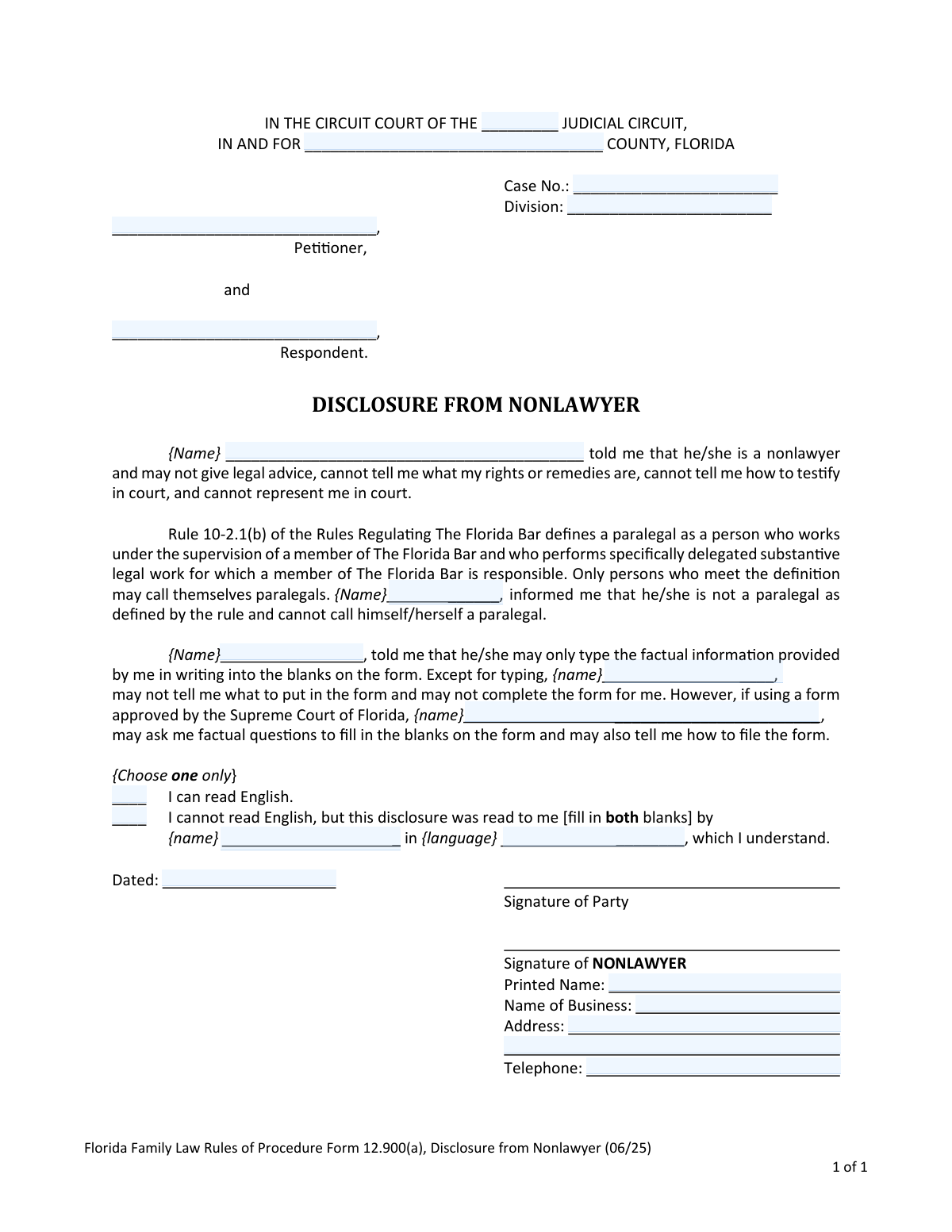
Yes! You can use AI to fill out Florida Family Law Rules of Procedure Form 12.900(a), Disclosure from Nonlawyer

Florida Family Law Form 12.900(a) is a mandatory disclosure used when a nonlawyer helps an individual complete legal documents for a family law case. Its purpose is to ensure the individual understands that the nonlawyer cannot provide legal advice, represent them in court, or tell them what their rights are. Today, this form can be filled out quickly and accurately using AI-powered services like Instafill.ai, which can also convert non-fillable PDF versions into interactive fillable forms.
Form 12.900(a) is part of the Florida court forms category on Instafill.
Our AI automatically handles information lookup, data retrieval, formatting, and form filling.
It takes less than a minute to fill out Form 12.900(a) using our AI form filling.
Securely upload your data. Information is encrypted in transit and deleted immediately after the form is filled out.

Form specifications

Form name: Florida Family Law Rules of Procedure Form 12.900(a), Disclosure from Nonlawyer
Number of fields: 21
Number of pages: 1
Language: English
main-image

Instafill Demo: How to fill out PDF forms in seconds with AI

How to Fill Out Form 12.900(a) Online for Free in 2026

Are you looking to fill out a FORM 12.900(A) form online quickly and accurately? Instafill.ai offers the #1 AI-powered PDF filling software of 2026, allowing you to complete your FORM 12.900(A) form in just 37 seconds or less.
Follow these steps to fill out your FORM 12.900(A) form online using Instafill.ai:
  1. 1 Navigate to Instafill.ai and upload or select the Florida Disclosure from Nonlawyer Form 12.900(a).
  2. 2 Provide the required information about the nonlawyer assisting you, including their full name and business details.
  3. 3 Enter the case information, such as the judicial circuit, county, case number, and the names of the petitioner and respondent.
  4. 4 Indicate whether you can read English or if the disclosure was read to you in another language by the nonlawyer.
  5. 5 Review all the information entered by the AI and yourself to ensure it is accurate and complete.
  6. 6 Electronically sign and date the form in the designated 'Signature of Party' section, and have the nonlawyer sign their section as well.
  7. 7 Download the completed form. Provide a copy to the person being assisted and retain a copy for the nonlawyer's records as required.

Our AI-powered system ensures each field is filled out correctly, reducing errors and saving you time.

Why Choose Instafill.ai for Your Fillable Form 12.900(a) Form?

Speed

Complete your Form 12.900(a) in as little as 37 seconds.

Up-to-Date

Always use the latest 2026 Form 12.900(a) form version.

Cost-effective

No need to hire expensive lawyers.

Accuracy

Our AI performs 10 compliance checks to ensure your form is error-free.

Security

Your personal information is protected with bank-level encryption.

Frequently Asked Questions About Form Form 12.900(a)

This form is used to officially document that a nonlawyer is helping you with your Florida family law paperwork. It ensures you understand that this person cannot provide legal advice, explain your rights, or represent you in court.

This form must be completed and signed whenever anyone who is not a licensed Florida attorney helps you fill out any Florida Family Law form. It must be signed by both you and the nonlawyer before they provide assistance.

A nonlawyer is anyone not in good standing with The Florida Bar, including paralegals not supervised by a Florida attorney, lawyers licensed in other states, or suspended/disbarred Florida lawyers. They can only provide limited, non-legal help with your forms.

A nonlawyer may only type the factual information you provide into the form's blanks. They can ask you factual questions to get this information and tell you how to file the completed form, but they cannot give legal advice.

The nonlawyer who is assisting you is responsible for completing the form with their information. However, you must both sign it to acknowledge that you have been informed of and understand their limited role.

You must be given a signed copy to keep for your personal records. The nonlawyer is also required to keep a copy in your file for at least six years.

If you cannot read English, the disclosure must be read to you in a language you understand. The form has a specific section to record the name of the person who read it to you and the language they used.

A person can only be called a 'paralegal' in Florida if they work under the direct supervision of a Florida Bar attorney. If they are not supervised by an attorney, they are considered a nonlawyer for the purpose of this form and have the same limitations.

No, this disclosure form does not act as a waiver, disclaimer, or limitation of liability. Its primary purpose is to ensure you are fully informed of the nonlawyer's specific limitations before you receive assistance.

You will need the court and case information, the names of the petitioner and respondent, and the full name of the nonlawyer assisting you. The nonlawyer must also provide their printed name, business name, address, and telephone number.

Yes, services like Instafill.ai use AI to accurately auto-fill form fields with the factual information you provide. This can save you time and help reduce errors when completing your paperwork.

You can use a service like Instafill.ai to upload the form and fill it out on your computer. The platform allows you to easily enter your information, such as case details and names, directly into the digital document before printing.

If you have a non-fillable PDF, you can upload it to a platform like Instafill.ai. It can convert flat, non-interactive PDFs into fillable forms that you can easily complete online.

Yes. On any other family law form that the nonlawyer helps you complete, they must also fill out the 'nonlawyer section' typically located at the bottom of that specific form.

Compliance Form 12.900(a)
Validation Checks by Instafill.ai

1
Judicial Circuit Completeness
This check ensures that the field for the Judicial Circuit number is not empty. This information is critical for legal filing, as it directs the document to the correct circuit court within Florida's judicial system. A failure to provide this would result in the form being rejected or misfiled.
2
County Name Validation
This validation verifies that the 'IN AND FOR' county field is filled with a valid Florida county name. Proper county designation is essential for jurisdiction and ensures the legal matter is filed in the correct local courthouse. An invalid or missing county name will lead to filing errors and delays.
3
Case Number Format and Presence
This check validates that the 'Case No.' field is filled and follows a plausible format for a court case number. The case number links this disclosure form to a specific family law case, making it a critical identifier. If the case number is missing or malformed, the document cannot be correctly associated with the case file.
4
Nonlawyer Name Consistency
This validation ensures that the name of the nonlawyer, which is entered in multiple places throughout the document, is consistent in all instances. This consistency is vital for clearly and unambiguously identifying the nonlawyer who is providing assistance and making the disclosure. Discrepancies could create legal confusion about who provided the service.
5
Party Identification Completeness
This check verifies that at least one of the 'Petitioner' or 'Respondent' name fields at the top of the form is completed. This identifies which party to the case is receiving the nonlawyer assistance and signing the disclosure. Without this information, the context and applicability of the form are lost.
6
Mandatory Language Proficiency Selection
This validation ensures that exactly one of the two options under 'Choose one only' (regarding the ability to read English) is selected. This declaration is a critical part of the informed consent process. Failure to make a selection leaves the party's comprehension of the document in question, potentially invalidating the disclosure.
7
Conditional Translator Information Requirement
This check is triggered if the party selects 'I cannot read English.' It verifies that both the name of the person who read the form aloud and the language used are filled in. This is crucial for proving that the disclosure was adequately communicated to a non-English reader, and failure to provide this information would undermine the form's legal standing.
8
Date of Signature Validation
This validation ensures the 'Dated' field contains a valid date in a recognized format (e.g., MM/DD/YYYY) and is not a future date. The date establishes the precise moment the disclosure was signed, which is legally significant. An invalid or future date would render the timing of the signature questionable and could invalidate the document.
9
Party Signature and Printed Name Presence
This check verifies that the party has both signed the document and provided their printed name. The signature indicates formal agreement, while the printed name legibly identifies the signatory. Both are required to confirm the identity of the person acknowledging the disclosure.
10
Nonlawyer Signature and Business Details Completeness
This validation confirms that the nonlawyer has signed the form and that their business name, address, and telephone number are all provided. This information is required for accountability and provides a clear record of the nonlawyer who performed the service. Missing contact details would make it difficult to follow up with or regulate the nonlawyer.
11
Nonlawyer Telephone Number Format
This check ensures the nonlawyer's telephone number is entered in a valid 10-digit format (e.g., XXX-XXX-XXXX). A properly formatted phone number is necessary for ensuring the contact information is accurate and usable for any future communication. An improperly formatted number is effectively the same as missing information.
12
Logical Party Name Consistency
This validation compares the 'Printed Name' of the signing party with the 'Petitioner' and 'Respondent' names at the top of the form. The printed name should match one of the parties listed in the case caption. This check prevents a non-party from signing the disclosure and ensures the person being assisted is correctly identified as a principal in the case.

Common Mistakes in Completing Form 12.900(a)

Incomplete or Incorrect Court Information

Users often struggle to correctly identify the Judicial Circuit, County, Case Number, and Division. This is especially common when a case has not yet been filed, leading to confusion about whether to leave the Case No. and Division fields blank. Incorrectly filling this section can lead to filing rejections or the document being docketed in the wrong case, causing significant delays.

Inconsistent or Missing Nonlawyer Name

The form requires the nonlawyer's name to be written in four separate blanks throughout the document. It is a frequent error for one or more of these blanks to be missed or for the name to be written inconsistently (e.g., 'John Smith' vs. 'John'). This oversight can raise questions about the form's validity and whether the disclosure was properly made and understood.

Incorrectly Identifying Petitioner and Respondent

Individuals new to the legal process may not understand the distinction between 'Petitioner' (the person initiating the case) and 'Respondent' (the person responding to it). They may reverse the names or incorrectly list themselves, which can cause confusion in the court record and may require filing amended documents to correct the error.

Mishandling the Language Proficiency Section

In the 'Choose one only' section regarding English proficiency, users may select both options, select neither, or fail to provide the required details if the second option is chosen. If the disclosure is read to the person, the interpreter's name and the language used are mandatory. An incomplete or improperly handled section can invalidate the entire disclosure.

Missing Signatures or Date

A form is not legally valid without the required signatures and date. Both the party receiving assistance and the nonlawyer must sign, and the form must be dated. Forgetting a signature or the date will lead to automatic rejection and nullifies the purpose of the disclosure, which is to have a record of the agreement before services are rendered.

Incomplete Nonlawyer Contact Information

The nonlawyer's section requires a full business address and telephone number, in addition to their printed name. People often provide partial information, such as omitting the ZIP code, area code, or business name. This makes it difficult for the court or other parties to contact the preparer if needed and can appear unprofessional, potentially inviting scrutiny.

Using an Outdated Form Version

Court forms are updated periodically, as noted by the date in the form's footer (e.g., '06/25'). Using an obsolete version found through a generic internet search is a common mistake that results in the court clerk rejecting the filing. To avoid this, always obtain forms from the official court system website or use a service that provides up-to-date legal forms.

Illegible Handwriting on a Non-Fillable PDF

This form is often provided as a non-fillable PDF, forcing users to print and fill it out by hand. Illegible handwriting, especially for names, addresses, and case numbers, is a primary cause of processing errors and rejections by the clerk's office. To prevent this, it is best to type the information. AI-powered tools like Instafill.ai can convert such flat PDFs into fillable forms, ensuring all entries are clean, legible, and correctly formatted.

Incorrect Timing of Form Completion

The instructions explicitly state this disclosure must be completed and signed by both parties *before* the nonlawyer provides assistance with any other forms. A common procedural error is to fill out and sign this form after the fact, as an afterthought. This violates the rule's intent, which is to ensure informed consent from the outset, and could be problematic if the nonlawyer's role is ever questioned.
Saved over 80 hours a year

“I was never sure if my IRS forms like W-9 were filled correctly. Now, I can complete the forms accurately without any external help.”

Kevin Martin Green

Your data stays secure with advanced protection from Instafill and our subprocessors

Robust compliance program

Transparent business model

You’re not the product. You always know where your data is and what it is processed for.

ISO 27001, HIPAA, and GDPR

Our subprocesses adhere to multiple compliance standards, including but not limited to ISO 27001, HIPAA, and GDPR.

Security & privacy by design

We consider security and privacy from the initial design phase of any new service or functionality. It’s not an afterthought, it’s built-in, including support for two-factor authentication (2FA) to further protect your account.

Fill out Form 12.900(a) with Instafill.ai

Worried about filling PDFs wrong? Instafill securely fills florida-family-law-rules-of-procedure-form-12900a-disclosure-from-nonlawyer forms, ensuring each field is accurate.

Related forms by category

Florida court forms Form 12.995(c), Safety-Focused Parenting Plan, Florida Supreme Court Approved Family Law Form 12.901(b)(3), Petition for Dissolution of Marriage with No Dependent or Minor Child(ren) or Property (02/18), Florida Supreme Court Approved Family Law Form 12.915, Designation of Current Mailing and E-mail Address, Florida Supreme Court Approved Family Law Form 12.902(d), Uniform Child Custody Jurisdiction and Enforcement Act (UCCJEA) Affidavit, Florida Supreme Court Approved Family Law Form 12.941(a), Petition for Enforcement of Out-of-State Custody Decree and for Order to Pick Up Minor Child(ren), Florida Supreme Court Approved Family Law Form 12.970(a), Petition for Temporary Custody by Extended Family, florida-family-law-rules-of-procedure-form-12900b-notice-of-and-consent-to-limited-appearance, florida-family-law-rules-of-procedure-form-12900d-termination-of-limited-appearance, florida-family-law-rules-of-procedure-form-12900e-acknowledgment-of-assistance-by-attorney, Florida Family Law Rules of Procedure Form 12.910(a), Summons: Personal Service on an Individual, Form 12.902(b), Family Law Financial Affidavit (Short Form), florida-supreme-court-approved-family-law-form-12903e-answer-to-supplemental-petition, florida-supreme-court-approved-family-law-form-12904a2-petition-for-support-and-parenting-plan-unconnected-with, florida-supreme-court-approved-family-law-form-12904b-petition-for-support-unconnected-with-dissolution-of-marriage, florida-supreme-court-approved-family-law-form-12905a-supplemental-petition-to-modify-parental-responsibility, florida-supreme-court-approved-family-law-form-12905b-supplemental-petition-for-modification-of-child-support, florida-supreme-court-approved-family-law-form-12905c-supplemental-petition-for-modification-of-alimony, florida-supreme-court-approved-family-law-form-12910b-process-service-memorandum, florida-family-law-rules-of-procedure-form-12911a-subpoena-for-hearing-or-trial-issued-by-clerk, florida-family-law-rules-of-procedure-form-12911b-subpoena-for-hearing-or-trial-issued-by-attorney · + 5 more →