Yes! You can use AI to fill out Exhibit: Out-of-State Party Declaration (Form FM-OSP-302)
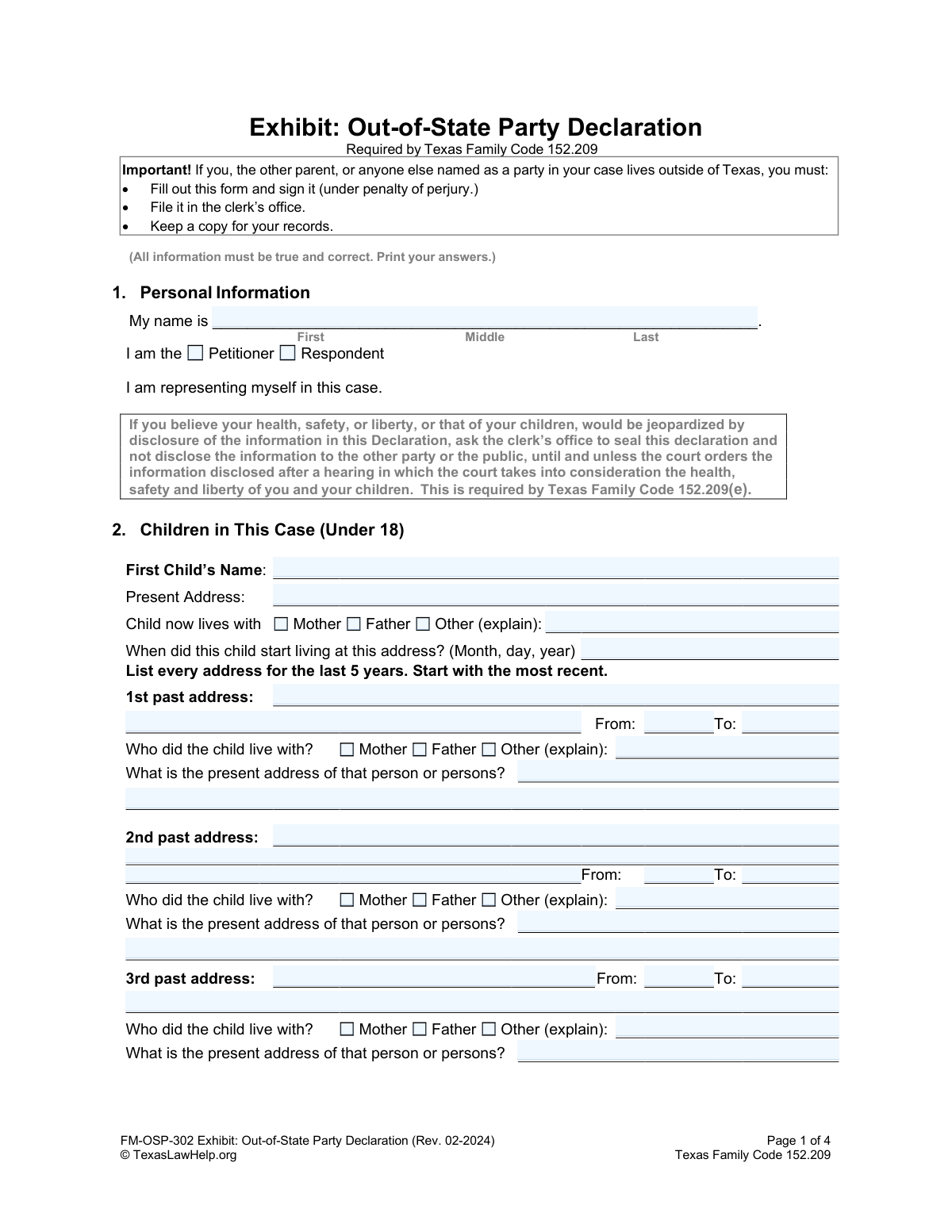
Form FM-OSP-302, the Exhibit: Out-of-State Party Declaration, is a legal document required by Texas Family Code 152.209 in family law cases where a party or child lives outside of Texas. It provides the court with essential information about the children's residential history for the past five years and any other related court cases to help establish jurisdiction. Today, this form can be filled out quickly and accurately using AI-powered services like Instafill.ai, which can also convert non-fillable PDF versions into interactive fillable forms.
FM-OSP-302 is part of the
child custody forms category on Instafill.
Our AI automatically handles information lookup, data retrieval, formatting, and form filling.
It takes less than a minute to fill out FM-OSP-302 using our AI form filling.
Securely upload your data. Information is encrypted in transit and deleted immediately after the form is filled out.
Form specifications
| Form name: | Exhibit: Out-of-State Party Declaration (Form FM-OSP-302) |
| Number of fields: | 174 |
| Number of pages: | 1 |
| Language: | English |
Instafill Demo: How to fill out PDF forms in seconds with AI
How to Fill Out FM-OSP-302 Online for Free in 2026
Are you looking to fill out a FM-OSP-302 form online quickly and accurately? Instafill.ai offers the #1 AI-powered PDF filling software of 2026, allowing you to complete your FM-OSP-302 form in just 37 seconds or less.
Follow these steps to fill out your FM-OSP-302 form online using Instafill.ai:
- 1 Navigate to Instafill.ai and upload or select the Exhibit: Out-of-State Party Declaration (Form FM-OSP-302).
- 2 Provide your personal information in Section 1, identifying yourself as the Petitioner or Respondent.
- 3 In Section 2, enter the required details for each child under 18, including their present address and a complete five-year address history.
- 4 Disclose information about any other court cases concerning the children in Section 3.
- 5 List any other individuals who claim custody or visitation rights in Section 4.
- 6 Carefully review all the information populated by the AI to ensure it is true and correct.
- 7 Complete the declaration section by signing under penalty of perjury, then download the finished document to file with the court clerk.
Our AI-powered system ensures each field is filled out correctly, reducing errors and saving you time.
Why Choose Instafill.ai for Your Fillable FM-OSP-302 Form?
Speed
Complete your FM-OSP-302 in as little as 37 seconds.
Up-to-Date
Always use the latest 2026 FM-OSP-302 form version.
Cost-effective
No need to hire expensive lawyers.
Accuracy
Our AI performs 10 compliance checks to ensure your form is error-free.
Security
Your personal information is protected with bank-level encryption.
Frequently Asked Questions About Form FM-OSP-302
This form is required by Texas Family Code 152.209 to provide the court with information about a child's residence history for the last five years. It helps the court determine if it has jurisdiction over a family law case involving children.
You must fill out this form if you, the other parent, or any other party named in your Texas family law case lives outside of the state of Texas.
For each child under 18, you must provide their present address and a list of every address where they have lived for the past five years. You also need to state the dates they lived at each address and the name of the person(s) they lived with.
The form advises that if you believe disclosing your information would jeopardize your or your child's safety, you can ask the clerk's office to seal the declaration. The court can then hold a hearing to decide if the information should be disclosed.
The form instructs you to make a copy of the child information page for each additional child, complete it, and attach it to the main form.
You must disclose any other court case you've participated in or know about concerning the children, including cases for custody, visitation, child support, domestic violence, protective orders, or adoptions.
The 'Declaration' allows you to sign under penalty of perjury without a notary. The 'Verification' section requires your signature to be witnessed and notarized. You only need to complete one of these sections.
After you complete and sign the form, you must file it with the court clerk's office. It is also important to keep a copy for your personal records.
Provide the most accurate information you can, including the month and year. If you are unsure, it is better to provide your best estimate than to leave it blank.
You should provide the last known address for that person. If you have no address information at all, you can write 'Unknown'.
Yes, services like Instafill.ai use AI to accurately auto-fill form fields from your saved information, which can save you time and help prevent errors.
You can use a service like Instafill.ai to upload the PDF form. Their platform allows you to fill out the form fields digitally, save your progress, and print the completed document.
If you have a non-fillable or 'flat' PDF, you can upload it to a service like Instafill.ai. Their technology can convert it into an interactive, fillable form that you can easily complete on your computer.
Compliance FM-OSP-302
Validation Checks by Instafill.ai
1
Ensures Declarant Role is Selected
This check verifies that the user has selected one of the two roles: 'Petitioner' or 'Respondent' in Section 1. This information is fundamental for identifying the party's role in the legal proceedings. If neither is selected, the form submission will be rejected with a message prompting the user to specify their role.
2
Validates Declarant Name Consistency
This validation compares the full name provided in Section 1 ('My name is') with the full name provided in the 'Declaration In Lieu of Notarized Statement' section. The names must match exactly to ensure the person making the declaration is the same individual identified at the beginning of the form. A mismatch will trigger an error, as it could indicate a clerical error or a fraudulent submission.
3
Requires 'Other' Explanation for Child's Residence
In Section 2, if 'Other' is selected for 'Child now lives with' or 'Who did the child live with?', this check ensures the adjacent explanation text field is not empty. This context is legally required to understand the child's living situation and identify all relevant parties. Failure to provide an explanation will result in a validation error, halting submission until the information is provided.
4
Verifies Child's Past Address Date Chronology
For each past address listed for a child, this check ensures the 'To' date is chronologically after the 'From' date. This maintains the logical integrity of the child's address history. An invalid date range would make the residency timeline nonsensical and legally unusable, so the submission will be blocked until the dates are corrected.
5
Confirms 5-Year Address History Coverage
This validation checks that the date ranges provided for a child's present and past addresses collectively cover the last five years, as required by Texas Family Code 152.209. This history is critical for establishing court jurisdiction. If there are gaps in the 5-year timeline, the form will be flagged as incomplete and require the user to add the missing address information.
6
Validates Present Address Start Date
This check ensures the date provided for 'When did this child start living at this address?' is a valid date that occurs in the past. It also cross-references this date with the most recent 'To' date from the child's past address history to ensure chronological consistency. An invalid or future date will be rejected, as it is logically impossible.
7
Enforces Conditional Entry for Other Court Cases
This validation is triggered by the answers in Section 3. If the user answers 'Yes' to either question about other court cases, the system verifies that at least one complete entry (including County/State, Case Number, and Type of Case) is provided in the subsequent table. This ensures that acknowledged relevant legal history is properly documented. If 'Yes' is selected but no details are provided, the submission will fail.
8
Enforces Conditional Entry for Other Custody Claimants
In Section 4, if the user answers 'Yes' to knowing of other persons who claim custody or visitation, this check ensures that the details (Name, Address, Relationship) for at least one such person are filled out. This is vital for notifying all interested parties as required by law. A 'Yes' answer without corresponding details will block the form submission.
9
Validates Declarant's Date of Birth and Age
This check validates that the 'My date of birth is' field in the Declaration section contains a valid date and that the calculated age of the declarant is 18 years or older. A declaration must be made by a legal adult. If the date is invalid or indicates the person is a minor, the form cannot be legally processed and will be rejected.
10
Ensures Declaration or Verification is Mutually Exclusive
This validation confirms that the user has filled out EITHER the 'Declaration In Lieu of Notarized Statement' section OR the 'Verification' (notary) section, but not both. Completing both creates ambiguity about the method of attestation. The system will return an error if data is present in both sections, requiring the user to clear one before proceeding.
11
Verifies Declaration Section Completeness
If the 'Declaration In Lieu of Notarized Statement' is chosen, this check ensures all its required fields are filled: 'My name is', 'My date of birth is', 'My address is', 'Formally signed in County, State', and 'on this date'. A complete declaration is necessary for it to be legally binding under penalty of perjury. An incomplete section will prevent submission.
12
Requires Child Name for Child Section Data
This check ensures that if any information is entered for a child (e.g., present address, address history), the 'Child's Name' field for that child must also be filled out. This prevents the submission of orphaned data that cannot be associated with a specific child. Any child section with data but no name will trigger a validation error.
Common Mistakes in Completing FM-OSP-302
The form requires a complete list of every address where each child has lived for the past five years. People often fail to go back the full five years or leave gaps between addresses because it can be difficult to recall this information accurately. An incomplete history can lead to the court rejecting the form and delaying the case, as this information is legally required to establish jurisdiction.
The form offers two ways to sign: a 'Declaration' under penalty of perjury and a 'Verification' before a notary. Filers often get confused and fill out the wrong section, or both. This can invalidate the document or cause unnecessary work. To avoid this, most self-represented parties should use the 'Declaration' section; the 'Verification' is for specific circumstances and requires a notary.
The 'Verification' section includes a bold warning: 'Do NOT sign until you are in front of a notary!' Many people sign the form at home out of habit before taking it to be notarized. A notary cannot legally notarize a pre-signed document, which means the form will be rejected by the court clerk, forcing the filer to fill it out and get it notarized all over again.
Section 3 asks about any other court cases involving the children, which filers may interpret too narrowly, omitting things like protective orders or closed cases. Failing to disclose all relevant cases is a serious error that can be considered perjury, severely damaging one's credibility with the court. It is crucial to list every case related to custody, support, or domestic violence, regardless of the state or outcome.
Although the form instructs users to 'Print your answers,' many submit forms with messy or illegible handwriting. If court clerks or judges cannot read critical information like names, addresses, or case numbers, the form may be rejected, causing significant delays. To prevent this, print clearly in block letters. Since this is a non-fillable PDF, using a tool like Instafill.ai to convert it into a fillable version allows you to type your answers for maximum clarity before printing.
In Section 2, when indicating who a child lived with, there is an option for 'Other (explain)'. A common mistake is to check the 'Other' box but neglect to provide the written explanation. This leaves the court guessing about the child's living situation (e.g., with a grandparent, aunt, or in foster care), rendering the form incomplete and requiring clarification.
The form requires dates for when children started living at addresses and for the 5-year address history. People often use inconsistent formats (e.g., MM/DD/YY vs. Month, Day, Year) or create date ranges that have gaps or overlaps. This creates a confusing and unreliable timeline for the court. To avoid this, double-check that all dates are in the requested format and that the 'From' and 'To' dates for past addresses create a continuous five-year history.
The form provides sections for up to three children, with an instruction on page 3 to 'make a copy of this page for each child and attach it' if there are more. Filers with larger families sometimes overlook this instruction and only submit information for the first three children. This results in an incomplete filing that does not cover all children involved in the case, which will be rejected by the court.
When listing present and past addresses, filers sometimes provide incomplete information, such as just a city and state without a street address or zip code. The court requires full, specific addresses to properly verify residency history and establish jurisdiction. Always provide the complete street address, city, state, and zip code for every location listed on the form.
On the first page, the filer must identify their role in the case by checking 'Petitioner' or 'Respondent'. People unfamiliar with legal terms may check the wrong box or leave it blank. This creates confusion about who is filing the document and can cause administrative delays. The Petitioner is the person who initiated the legal case, while the Respondent is the person responding to it.
Saved over 80 hours a year
“I was never sure if my IRS forms like W-9 were filled correctly. Now, I can complete the forms accurately without any external help.”
Kevin Martin Green
Your data stays secure with advanced protection from Instafill and our subprocessors

Robust compliance program
Transparent business model
You’re not the product. You always know where your data is and what it is processed for.
ISO 27001, HIPAA, and GDPR
Our subprocesses adhere to multiple compliance standards, including but not limited to ISO 27001, HIPAA, and GDPR.
Security & privacy by design
We consider security and privacy from the initial design phase of any new service or functionality. It’s not an afterthought, it’s built-in, including support for two-factor authentication (2FA) to further protect your account.
Fill out FM-OSP-302 with Instafill.ai
Worried about filling PDFs wrong? Instafill securely fills exhibit-out-of-state-party-declaration-form-fm-osp-302 forms, ensuring each field is accurate.