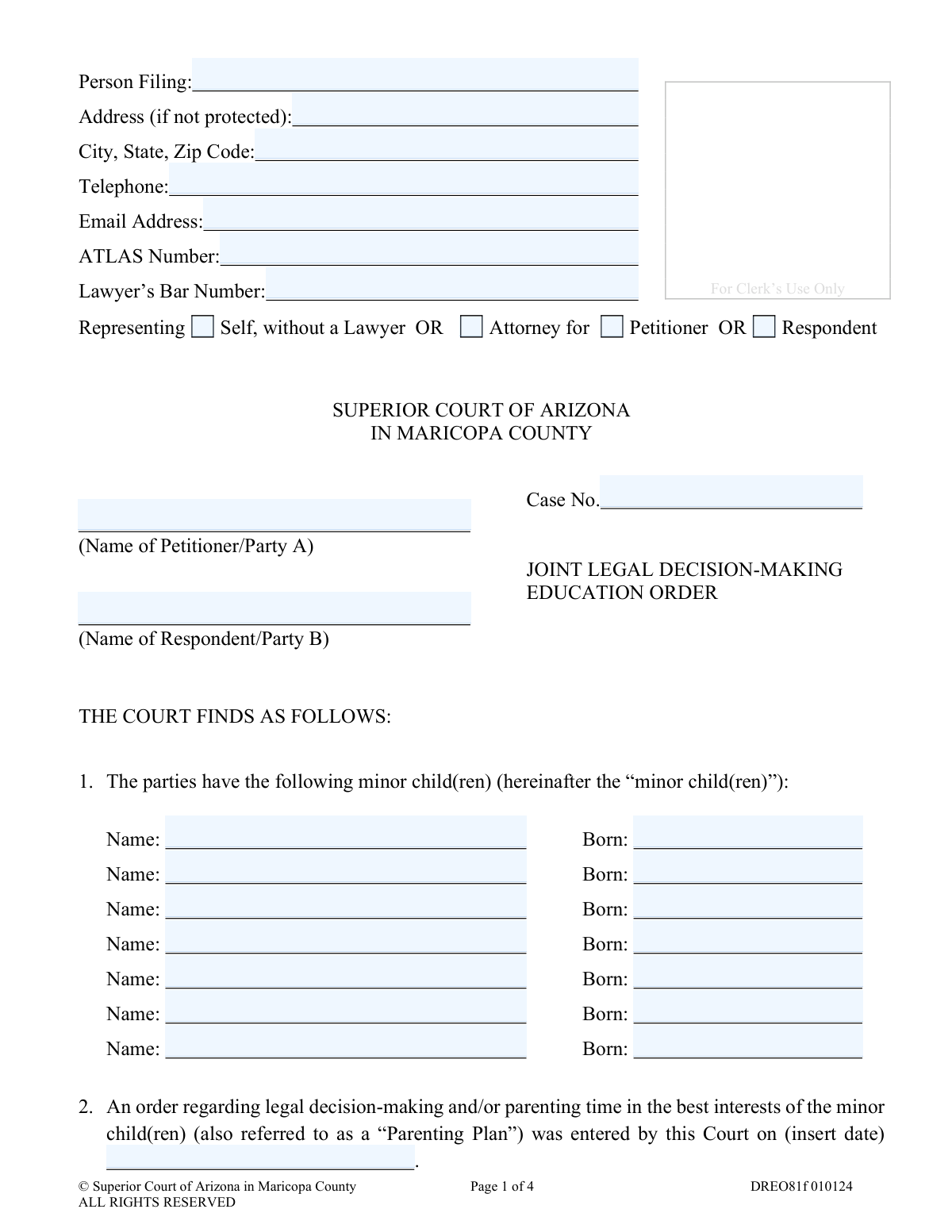
Yes! You can use AI to fill out Joint Legal Decision-Making Education Order
The Joint Legal Decision-Making Education Order is a legal document issued by the Superior Court of Arizona to provide guidance to schools and parents who share joint legal decision-making for their minor children. It outlines specific rights and responsibilities regarding school selection, access to records, parent-teacher conferences, and special services to ensure both parents are equally involved and to minimize conflict. Today, this form can be filled out quickly and accurately using AI-powered services like Instafill.ai, which can also convert non-fillable PDF versions into interactive fillable forms.
DREO81f is part of the
child custody forms, County court forms and superior court forms categories on Instafill.
Our AI automatically handles information lookup, data retrieval, formatting, and form filling.
It takes less than a minute to fill out DREO81f using our AI form filling.
Securely upload your data. Information is encrypted in transit and deleted immediately after the form is filled out.
Form specifications
| Form name: | Joint Legal Decision-Making Education Order |
| Number of fields: | 39 |
| Number of pages: | 1 |
| Language: | English |
Instafill Demo: How to fill out PDF forms in seconds with AI
How to Fill Out DREO81f Online for Free in 2026
Are you looking to fill out a DREO81F form online quickly and accurately? Instafill.ai offers the #1 AI-powered PDF filling software of 2026, allowing you to complete your DREO81F form in just 37 seconds or less.
Follow these steps to fill out your DREO81F form online using Instafill.ai:
- 1 Navigate to Instafill.ai and upload or select the Joint Legal Decision-Making Education Order form.
- 2 Use the AI assistant to input your personal information, case number, and the other party's details in the header section.
- 3 Enter the full names and birthdates of all minor children covered by the order.
- 4 Specify the terms of joint legal decision-making as determined by the court, indicating if one party has final authority on educational matters.
- 5 Detail any additional education-related orders or specific instructions from the court in the provided section.
- 6 Review all the auto-filled information for accuracy, ensuring it aligns with your Parenting Plan and court orders.
- 7 Download the completed document, ready to be signed by a judicial officer and provided to your child's school.
Our AI-powered system ensures each field is filled out correctly, reducing errors and saving you time.
Why Choose Instafill.ai for Your Fillable DREO81f Form?
Speed
Complete your DREO81f in as little as 37 seconds.
Up-to-Date
Always use the latest 2026 DREO81f form version.
Cost-effective
No need to hire expensive lawyers.
Accuracy
Our AI performs 10 compliance checks to ensure your form is error-free.
Security
Your personal information is protected with bank-level encryption.
Frequently Asked Questions About Form DREO81f
This court order clarifies how you and the other parent will handle your child's education-related decisions under a joint legal decision-making arrangement. It provides specific guidance to your child's school on topics like enrollment, access to records, and parent participation, supplementing your main Parenting Plan.
This is a court order, not a form you fill out yourself. It is issued by a judge in a family court case for parents who have been awarded joint legal decision-making for their minor child or children.
You are required to provide a copy of the signed order to your minor child's school, preschool, or institutional childcare provider. This ensures the school is aware of the court's directives regarding both parents' rights and responsibilities.
The form states that if there is a conflict between this order and your current Parenting Plan, the Parenting Plan is the controlling document. This order is meant to supplement, not replace or modify, your existing Parenting Plan.
The order specifies how disagreements are resolved based on what the judge has ordered. It may require mutual agreement for any action to be taken, or it may designate one parent to have the final decision-making authority on educational matters.
No, unless your Parenting Plan or another court order specifically states otherwise. This order directs the school not to use the parenting schedule as a basis for denying either parent access to their child.
You are entitled to access the parent portal. If the school does not provide individual accounts, you and the other parent must create and share a joint login ID and password, which cannot be changed without mutual consent.
These are plans for students needing special education or accommodations. This order allows an evaluation to proceed with just one parent's consent, and it guarantees both parents the right to attend all meetings and access all related records.
Yes, you have an equal right to confer with teachers about your child. You can request a separate parent-teacher conference, and the school may accommodate the request based on its policies.
No, this is a court order that is typically prepared by the court or an attorney for the judge's signature. The information at the top is for court filing purposes to identify who submitted the proposed order to the judge.
While this specific document is a court order, AI-powered services like Instafill.ai can help you prepare the initial petitions or motions that lead to this order. These tools accurately auto-fill your information across multiple legal forms, saving time and reducing errors.
With Instafill.ai, you can upload your case-related forms, and the AI will identify and fill in repetitive information like your name, address, case number, and children's details. You simply review the pre-filled information for accuracy before filing with the court.
Services like Instafill.ai can solve this problem. You can upload a flat, non-fillable PDF, and the platform will convert it into an interactive, fillable form that you can easily complete online.
Compliance DREO81f
Validation Checks by Instafill.ai
1
Case Number Format Validation
This check ensures the 'Case No.' field is not empty and conforms to the expected format for Maricopa County Superior Court, which typically starts with letters followed by numbers (e.g., FC2023-001234). This is critical for correctly associating the order with the existing court case file. A failure would prevent the document from being filed or cause it to be misrouted, delaying the legal process.
2
Representation Status Completeness
Validates that the filer has selected one, and only one, representation status: 'Self, without a Lawyer' OR 'Attorney for'. If 'Attorney for' is selected, a subsequent check must ensure either 'Petitioner' or 'Respondent' is also selected. This prevents ambiguity about who is filing the document and in what capacity.
3
Conditional Lawyer's Bar Number
This validation ensures that if the 'Attorney for' option is selected, the 'Lawyer’s Bar Number' field is filled. Conversely, if 'Self, without a Lawyer' is selected, this field should be empty. This is important for verifying the credentials of legal counsel and is a mandatory piece of information for attorneys filing on behalf of a client.
4
Minor Child Information Completeness
For each of the seven available slots for minor children, this check verifies that if a 'Name' is entered, a corresponding 'Born' date is also provided, and vice versa. An incomplete entry for a child is invalid. This ensures that every child subject to the order is fully identified, which is fundamental to the order's purpose.
5
Child's Date of Birth Validity
This check validates that the 'Born' date for each listed child is a valid calendar date and is in the past. It also calculates the child's age to confirm they are a minor (under 18 years old as of the filing date). An invalid date or a date indicating the person is an adult would make the order inapplicable and legally incorrect.
6
Prior Parenting Plan Date Logic
Ensures the date entered for the existing Parenting Plan in section 2 is a full, valid date that occurs before the current date. An order cannot supplement a plan that does not yet exist. This validation prevents logical errors and ensures the chronological integrity of the case timeline.
7
Exclusive Decision-Making Authority Choice
In section 2 on page 2, this check ensures that exactly one of the two main checkboxes is selected: either 'Joint Decision-making' OR 'Joint Decision-making with a party having... Authority'. Selecting both or neither would create a logical contradiction, making the order unenforceable. The system must enforce this mutual exclusivity.
8
Conditional Final Authority Designation
This validation is dependent on the previous check. If the 'Joint Decision-making with a party having either “Final” or “Presumptive” Authority' box is checked, this rule ensures that either 'Petitioner/Party A' or 'Respondent /Party B' is subsequently checked. Failure to designate a party would render the selection meaningless and the order ambiguous.
9
At Least One Minor Child Listed
This check verifies that at least one minor child, with both a name and date of birth, has been entered in section 1. Since the entire purpose of a 'Joint Legal Decision-Making Education Order' is to govern decisions for minor children, a form with no children listed is invalid and serves no purpose. A failure would prompt the user to add the required information.
10
Petitioner and Respondent Name Requirement
Validates that the 'Name of Petitioner/Party A' and 'Name of Respondent/Party B' fields are both completed. These fields identify the primary parties of the case to whom the order applies. Omitting either name would create critical ambiguity and make the order legally deficient.
11
Email Address Format
This check ensures that the value entered in the 'Email Address' field follows the standard format for an email address (e.g., '[email protected]'). This is important for ensuring that electronic communications and notifications from the court system can be successfully delivered to the filer. An invalid format would result in a warning to the user to correct the entry.
12
Telephone Number Format
Verifies that the 'Telephone' field contains a valid phone number, typically conforming to a 10-digit North American Numbering Plan format. The system may allow for common formatting characters like parentheses, hyphens, or spaces but should validate the underlying number. This ensures the court and other parties have a valid method of contact for the filer.
Common Mistakes in Completing DREO81f
Filers often forget to enter the case number or transcribe it incorrectly, especially on subsequent pages. This happens due to oversight or not having the case documents readily available. An incorrect case number can lead to the document being rejected by the clerk, misfiled, or significant delays in processing the order, as it cannot be linked to the correct family law case. Always double-check the case number against official court documents and ensure it is written on every page as indicated.
It is common for individuals to mistakenly switch the names of the Petitioner (Party A) and the Respondent (Party B). This confusion can create legal ambiguity and may require filing an amended order to correct the record, causing delays and potential confusion for the school. To avoid this, carefully review the original court filings to confirm which party is the Petitioner and which is the Respondent before filling out the form.
In Section 2, filers frequently make errors by either not selecting any option, selecting conflicting options, or failing to specify which party has 'Final' authority after checking that box. This ambiguity makes the order unenforceable and defeats its purpose, often requiring a court hearing to clarify. It is crucial to select only one primary option and, if applicable, clearly designate the party with final authority to ensure the order is clear and effective.
Filers often guess or enter the current date in Section 2 for the existing Parenting Plan, rather than the specific date the original order was entered by the court. This mistake happens when they don't have the original order handy. An incorrect date can cause legal confusion as this document is a supplement to that specific plan, potentially leading a judge to reject the filing. Always reference the original Parenting Plan document to find the exact date it was signed and entered.
Mistakes in a child's name spelling or date of birth are frequent data entry errors. These inaccuracies can cause issues with school enrollment and record-keeping, as the information on the court order may not match the child's birth certificate or school records. Carefully verify all names and birth dates against official documents before submission. AI-powered tools like Instafill.ai can help prevent these errors by saving and reusing verified information across multiple forms.
Individuals representing themselves ('pro se' or 'pro per') sometimes get confused by the legal terminology and check the wrong box for representation status. For example, a self-represented Petitioner might incorrectly check the box for 'Attorney for Petitioner'. This can cause confusion at the clerk's office and may require correction. If you do not have a lawyer, you must check the 'Representing Self, without a Lawyer' box.
The form specifies 'Address (if not protected),' but filers under a protective order may forget or overlook this and provide their confidential address. This is a critical safety error that can have severe consequences by revealing their location. If your address is protected by a court order, you must leave this field blank or follow specific court procedures for protected filers.
The 'Additional Education-Related Orders' section is often left blank, even when parties have specific verbal agreements they want memorialized. This happens because people assume the standard clauses cover everything. Failing to document unique agreements (e.g., specific communication protocols, costs for extracurriculars) makes them unenforceable, leading to future disputes. Any specific, agreed-upon terms related to education should be clearly written in this section.
Many self-represented litigants are unsure what the 'ATLAS Number' is and either leave it blank or enter incorrect information. The ATLAS number is a unique identifier assigned by the Arizona court system for family law cases, and its absence can slow down processing. If you have an ATLAS number from previous filings, ensure it is entered correctly; if you don't have one, it's best to leave it blank rather than guess.
This form is often distributed as a non-fillable PDF, forcing users to print it and fill it out by hand. This leads to illegible handwriting, missed fields, and alignment errors that can cause the form to be rejected. To avoid this, use a tool like Instafill.ai, which can convert flat PDFs into fillable forms, ensuring the final document is clean, legible, and professionally formatted, reducing the chance of clerical rejection.
Saved over 80 hours a year
“I was never sure if my IRS forms like W-9 were filled correctly. Now, I can complete the forms accurately without any external help.”
Kevin Martin Green
Your data stays secure with advanced protection from Instafill and our subprocessors

Robust compliance program
Transparent business model
You’re not the product. You always know where your data is and what it is processed for.
ISO 27001, HIPAA, and GDPR
Our subprocesses adhere to multiple compliance standards, including but not limited to ISO 27001, HIPAA, and GDPR.
Security & privacy by design
We consider security and privacy from the initial design phase of any new service or functionality. It’s not an afterthought, it’s built-in, including support for two-factor authentication (2FA) to further protect your account.
Fill out DREO81f with Instafill.ai
Worried about filling PDFs wrong? Instafill securely fills joint-legal-decision-making-education-order forms, ensuring each field is accurate.