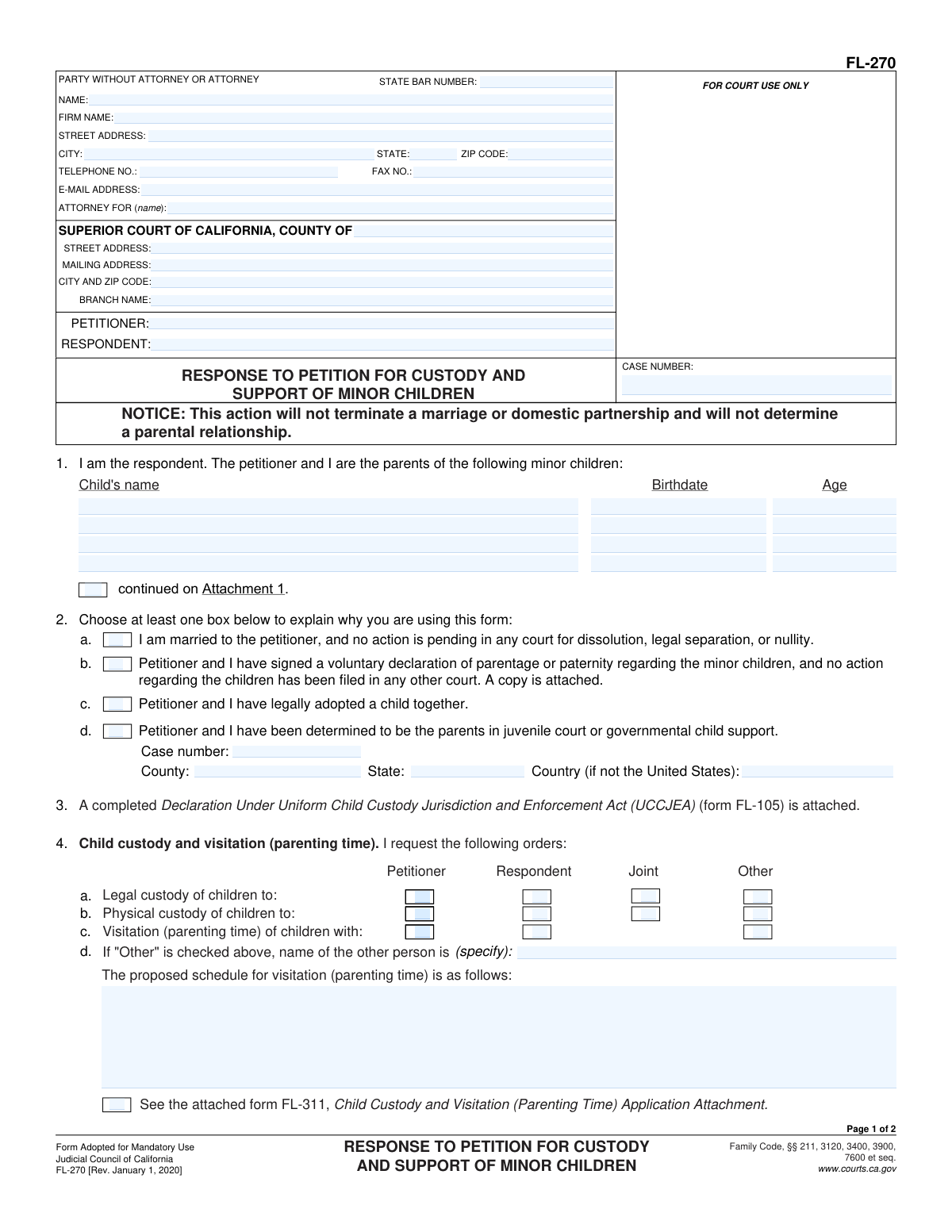
Yes! You can use AI to fill out Form FL-270, Response to Petition for Custody and Support of Minor Children
Form FL-270, Response to Petition for Custody and Support of Minor Children, is a mandatory legal document used in California family law cases. It allows a person (the respondent) to formally answer a petition filed by the other parent regarding child custody, visitation (parenting time), and financial support. Filing this response is crucial for ensuring the court is aware of the respondent's wishes and circumstances before making any orders. Today, this form can be filled out quickly and accurately using AI-powered services like Instafill.ai, which can also convert non-fillable PDF versions into interactive fillable forms.
FL-270 is part of the
California court forms, child custody forms, court response forms, family court forms, family law forms and family petition forms categories on Instafill.
Our AI automatically handles information lookup, data retrieval, formatting, and form filling.
It takes less than a minute to fill out FL-270 using our AI form filling.
Securely upload your data. Information is encrypted in transit and deleted immediately after the form is filled out.
Form specifications
| Form name: | Form FL-270, Response to Petition for Custody and Support of Minor Children |
| Number of fields: | 88 |
| Number of pages: | 1 |
| Language: | English |
Instafill Demo: How to fill out PDF forms in seconds with AI
How to Fill Out FL-270 Online for Free in 2026
Are you looking to fill out a FL-270 form online quickly and accurately? Instafill.ai offers the #1 AI-powered PDF filling software of 2026, allowing you to complete your FL-270 form in just 37 seconds or less.
Follow these steps to fill out your FL-270 form online using Instafill.ai:
- 1 Navigate to Instafill.ai and upload or select Form FL-270.
- 2 Enter the court information, case number, and the names of the petitioner and respondent in the header section.
- 3 Identify the minor children involved in the case by providing their names and birthdates.
- 4 State your response and requests regarding child custody, visitation (parenting time), and child support by checking the appropriate boxes and filling in the required details.
- 5 Indicate your requests concerning attorney's fees and any other orders you are asking the court to make.
- 6 Carefully review all the information you have provided for accuracy, then date and sign the form under penalty of perjury.
- 7 Download the completed, signed document, ready for filing with the appropriate California Superior Court.
Our AI-powered system ensures each field is filled out correctly, reducing errors and saving you time.
Why Choose Instafill.ai for Your Fillable FL-270 Form?
Speed
Complete your FL-270 in as little as 37 seconds.
Up-to-Date
Always use the latest 2026 FL-270 form version.
Cost-effective
No need to hire expensive lawyers.
Accuracy
Our AI performs 10 compliance checks to ensure your form is error-free.
Security
Your personal information is protected with bank-level encryption.
Frequently Asked Questions About Form FL-270
This is a California court form used by a parent (the Respondent) to respond to a legal action started by the other parent (the Petitioner) regarding child custody, visitation (parenting time), and child support.
You should fill out this form if you have been served with a Petition for Custody and Support of Minor Children (Form FL-260) and you want to state your requests for custody and support to the court.
Yes, you must attach a completed Declaration Under Uniform Child Custody Jurisdiction and Enforcement Act (UCCJEA) (Form FL-105). You may also need to attach other forms, like FL-311, to provide more detail about your requested parenting plan.
Legal custody refers to the right to make important decisions for your child (health, education, welfare), while physical custody refers to who the child lives with. You can request that these be shared (joint) or given to one parent (sole).
In Section 4, you can briefly describe the schedule or check the box to attach a more detailed proposal using a form like the Child Custody and Visitation (Parenting Time) Application Attachment (FL-311).
No, this form does not set the final child support amount. It simply allows the court to make orders regarding child support, which will be calculated later based on both parents' financial information.
After you file and serve your response on the other party, the court will typically set a hearing or mediation to address the custody and support issues. Filing this form ensures your side of the case is heard.
No. As stated on the form, this action is only for child custody and support and will not terminate a marriage or domestic partnership. A separate legal action is required for dissolution or legal separation.
You will need the court case number, the full names and birthdates of your children, and the addresses where the children have lived for the past five years (for the attached UCCJEA form).
Yes, services like Instafill.ai use AI to accurately auto-fill form fields, which can save time and help prevent common errors. This is useful for entering your personal details, case number, and other repetitive information.
You can use a service like Instafill.ai to fill out the form online. Simply upload the FL-270 PDF, and the platform will make it an interactive, fillable form that you can complete, save, and download.
If you have a non-fillable or 'flat' PDF, you can upload it to a service like Instafill.ai. The tool can convert the document into an interactive form that you can easily complete on your computer.
Section 1 provides several options to establish why the court has jurisdiction. If your situation is different, such as a previous court order establishing parentage, you should consult with a legal professional to ensure you are proceeding correctly.
Compliance FL-270
Validation Checks by Instafill.ai
1
Mandatory Reason for Filing Selection
Ensures that at least one checkbox is selected in Section 1 (options a, b, c, or d). This is a critical check because this selection establishes the legal basis for the court's jurisdiction and the reason for the response. If no reason is selected, the filing may be rejected for being incomplete or lacking a legal foundation.
2
UCCJEA Declaration Attachment Check
Validates that the checkbox in Section 3 is marked, indicating that the mandatory 'Declaration Under Uniform Child Custody Jurisdiction and Enforcement Act' (Form FL-105) is attached. This form is required in all custody cases to establish jurisdiction over the children. Failure to attach it will likely result in the court clerk rejecting the filing or a judge delaying the case until it is provided.
3
Child Information Completeness
Verifies that if the case involves minor children, at least one child's full name and birthdate are entered in the table in Section 2. This information is fundamental to the entire case, as it identifies the subjects of the custody and support orders. An incomplete list prevents the court from issuing clear and enforceable orders for all children involved.
4
Child's Birthdate and Age Logic
Checks that each child's birthdate is a valid date in a recognized format (e.g., MM/DD/YYYY) and that the child's age is under 18. This confirms the child is a minor, which is a prerequisite for a custody and support case under family law. An invalid date or an age of 18 or over would call into question the court's jurisdiction to make custody orders for that individual.
5
Case Number Consistency
Ensures the 'CASE NUMBER' field is filled out and is identical on both page 1 and page 2 of the form. A consistent and correct case number is essential for the court clerk to file the document in the correct case file. A missing or mismatched number can lead to the document being lost, misfiled, or rejected, causing significant delays.
6
Custody Request Completeness
Validates that the respondent has made a selection for both 'Legal custody' (Section 4a) and 'Physical custody' (Section 4b). These are the primary requests being made in the response. Failing to specify the desired custody arrangement leaves the court without direction on the respondent's position, potentially weakening their case or leading to an unintended outcome.
7
Conditional 'Other' Custody Person Specification
Checks that if the 'Other' checkbox is selected for Legal Custody (4a), Physical Custody (4b), or Visitation (4c), the corresponding text field specifying the name of the 'other' person is filled in. This is necessary for clarity and to ensure any court order is legally precise and enforceable. An order granting custody to an unnamed 'other' person would be invalid.
8
Signature and Date Requirement
Verifies that the respondent has signed the form and entered a date in the signature block on page 2. A signature under penalty of perjury affirms the truthfulness of the statements, and the date establishes when it was signed. An unsigned or undated form is legally invalid and will be rejected by the court.
9
Respondent Name Consistency
Confirms that the typed or printed name under the signature line on page 2 matches the 'RESPONDENT' name listed in the case caption on page 1. This check ensures the person signing the document is the actual party to the case. A mismatch could indicate a filing error or that the wrong person has signed the legal document.
10
Attorney Fees Selection Logic
Ensures that one and only one option is selected in Section 6 regarding attorney fees. The respondent must clearly state their request, whether it's for the petitioner to pay, the respondent to pay, or for each party to pay their own. Selecting multiple conflicting options or no option creates ambiguity that the court cannot act upon.
11
Zip Code Format Validation
Validates that the ZIP Code in the attorney/party address block and the court address block is in a valid 5-digit or 9-digit (ZIP+4) format. Correct formatting is crucial for mail delivery and ensuring the accuracy of court records. An invalid format could lead to returned mail and missed notices or deadlines.
12
Conditional Attachment Verification for Custody Orders
Checks if any of the checkboxes in sections 4e through 4j are marked, and if so, flags that the corresponding form (e.g., FL-312, FL-341(C)) or specified information should be attached or included. This ensures that all requested orders are supported by the necessary detailed attachments. If a box is checked but the attachment is missing, the specific request may be ignored by the court.
Common Mistakes in Completing FL-270
This form is a response, so the case number, court location, and the exact spelling of the Petitioner and Respondent names must match the initial petition perfectly. Mismatches can cause the court clerk to reject the filing or misfile the document, leading to significant delays and potential legal complications. Always double-check this information against the documents you were served with before submitting your response.
Section 3 explicitly states that a completed Declaration Under Uniform Child Custody Jurisdiction and Enforcement Act (UCCJEA) (Form FL-105) is attached. This is not optional. Forgetting to fill out and attach this separate, mandatory form is one of the most common reasons for a filing to be rejected by the court, bringing your case to a halt until it is corrected.
An unsigned or undated legal document is invalid. Many people focus on the details of the requests and forget to complete the signature block on page 2. The court will not accept an unsigned response, which means you will have failed to legally respond to the petition, potentially allowing the petitioner to get a default judgment against you.
In section 4d, simply writing "reasonable visitation" is a common but unhelpful request. This ambiguity often leads to future disagreements and requires more court dates to resolve. To avoid this, propose a specific and detailed schedule, such as 'alternating weekends from Friday at 6:00 p.m. to Sunday at 6:00 p.m., with specified holidays.' A clear plan is more likely to be adopted as an enforceable court order.
It is a frequent error to check boxes in section 4 (e.g., for a holiday schedule on form FL-341(C) or abduction prevention orders on FL-312) but then fail to complete and attach those corresponding forms. Checking the box makes a request, but without the supporting attachment, the court has no details to consider and cannot grant the order. Ensure every form you reference is filled out and included in your filing packet.
If you are representing yourself (in 'pro per'), you must fill out the entire top-left box on page 1 with your own name, address, and phone number. Leaving this section blank is a critical error, as the court and the other party need this information to serve you with official notices. Omitting your contact details can lead to you missing important hearings or deadlines.
Filers often misunderstand the distinction between 'Legal Custody' (the right to make decisions about a child's health, education, and welfare) and 'Physical Custody' (where the child lives). In section 4, they may request one when they mean the other, or not understand the difference between 'Joint' and 'Sole' custody. This confusion can result in court orders that don't reflect the parent's actual intentions.
Section 1 requires you to check at least one box to establish the legal grounds for the court to make custody orders. Forgetting to select the appropriate option (e.g., that you are married to the petitioner, or have signed a voluntary declaration of parentage) can lead to questions about the court's jurisdiction. This oversight can cause delays or rejection of the filing until the basis is clarified.
Data entry errors in the children's information table (Section 2), such as misspelled names or incorrect birthdates, are common. These mistakes create inaccuracies in the official court record that may need to be formally corrected later, adding unnecessary steps to the process. Always verify each child's full legal name and date of birth against an official document like a birth certificate. AI-powered form filling tools like Instafill.ai can help prevent these errors by ensuring data is entered consistently and correctly.
The form may require you to attach specific documents, such as a 'voluntary declaration of parentage' if you check box 1c. People often check the box indicating a document is attached but then forget to include a copy with their filing. This makes the claim unsubstantiated and can weaken your position or cause the filing to be deemed incomplete. If a form is only available as a non-fillable PDF, tools like Instafill.ai can convert it into a fillable version to make completion easier.
Saved over 80 hours a year
“I was never sure if my IRS forms like W-9 were filled correctly. Now, I can complete the forms accurately without any external help.”
Kevin Martin Green
Your data stays secure with advanced protection from Instafill and our subprocessors

Robust compliance program
Transparent business model
You’re not the product. You always know where your data is and what it is processed for.
ISO 27001, HIPAA, and GDPR
Our subprocesses adhere to multiple compliance standards, including but not limited to ISO 27001, HIPAA, and GDPR.
Security & privacy by design
We consider security and privacy from the initial design phase of any new service or functionality. It’s not an afterthought, it’s built-in, including support for two-factor authentication (2FA) to further protect your account.
Fill out FL-270 with Instafill.ai
Worried about filling PDFs wrong? Instafill securely fills form-fl-270-response-to-petition-for-custody-and-support-of-minor-children forms, ensuring each field is accurate.