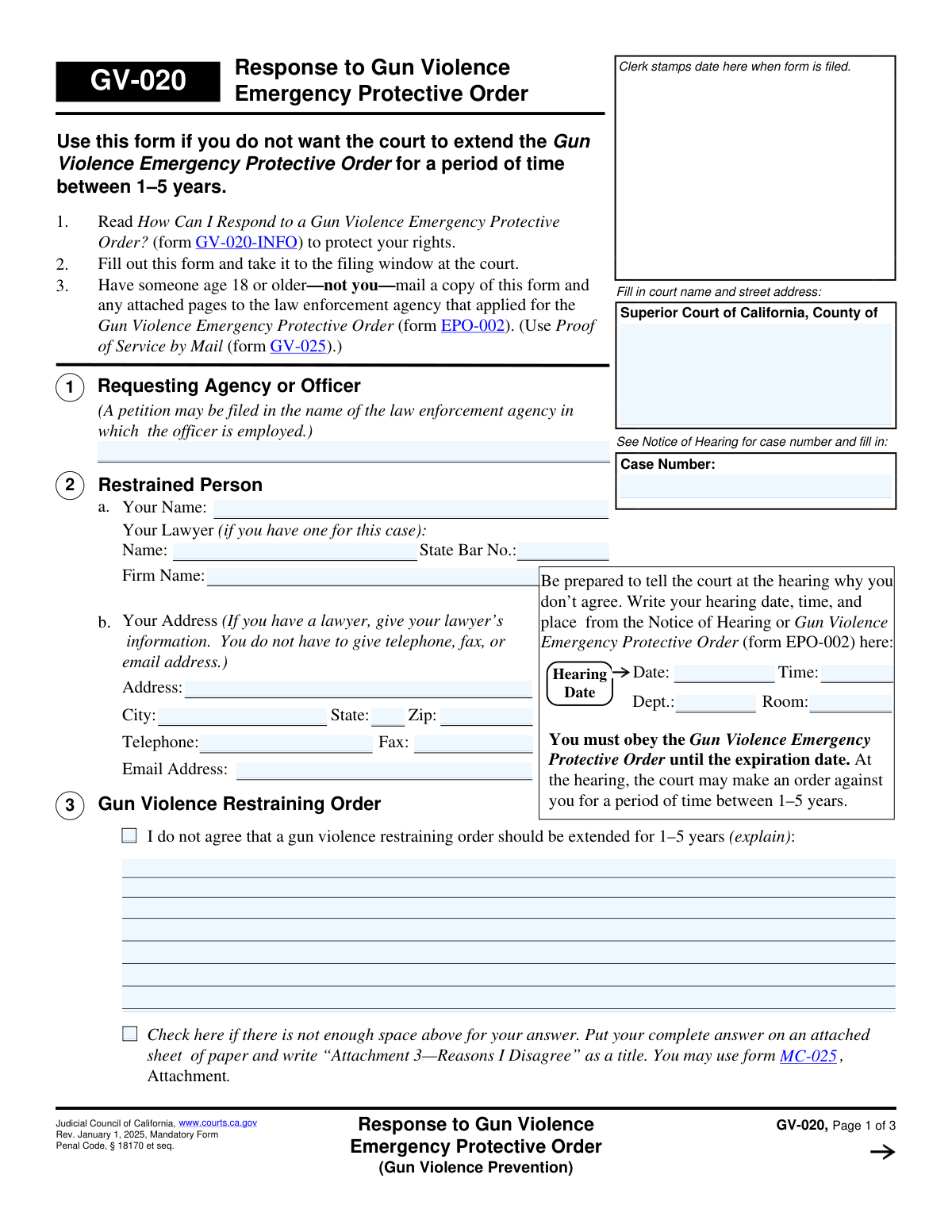
Yes! You can use AI to fill out Judicial Council of California Form GV-020, Response to Gun Violence Emergency Protective Order (Gun Violence Prevention)

Form GV-020, Response to Gun Violence Emergency Protective Order, is a legal document filed in the Superior Court of California by a person who has been served with an emergency protective order related to gun violence. This form allows the individual to state their case, explain why they disagree with the order, and provide justifications or denials regarding the allegations, which is critical for the court hearing that will decide whether to issue a longer-term restraining order. Today, this form can be filled out quickly and accurately using AI-powered services like Instafill.ai, which can also convert non-fillable PDF versions into interactive fillable forms.
Our AI automatically handles information lookup, data retrieval, formatting, and form filling.
It takes less than a minute to fill out GV-020 using our AI form filling.
Securely upload your data. Information is encrypted in transit and deleted immediately after the form is filled out.

Form specifications

Form name: Judicial Council of California Form GV-020, Response to Gun Violence Emergency Protective Order (Gun Violence Prevention)
Number of fields: 50
Number of pages: 1
Language: English
main-image

Instafill Demo: How to fill out PDF forms in seconds with AI

How to Fill Out GV-020 Online for Free in 2026

Are you looking to fill out a GV-020 form online quickly and accurately? Instafill.ai offers the #1 AI-powered PDF filling software of 2026, allowing you to complete your GV-020 form in just 37 seconds or less.
Follow these steps to fill out your GV-020 form online using Instafill.ai:
  1. 1 Navigate to Instafill.ai and upload or select Form GV-020.
  2. 2 Use the AI assistant to automatically fill in your personal details, lawyer information (if any), court name, case number, and hearing information from the Notice of Hearing.
  3. 3 In Section 3, clearly state the reasons why you do not agree that a gun violence restraining order should be extended against you.
  4. 4 Complete Section 4 by either denying the allegations from form EPO-002 or explaining why your actions were justified or excused.
  5. 5 Address Sections 5 and 6 by declaring the status of any firearms, ammunition, and body armor in your possession and attaching any required receipts.
  6. 6 Carefully review all the information you've provided for accuracy, then electronically sign and date the declaration under penalty of perjury.
  7. 7 Download the completed form to file with the court and serve a copy to the relevant law enforcement agency as instructed.

Our AI-powered system ensures each field is filled out correctly, reducing errors and saving you time.

Why Choose Instafill.ai for Your Fillable GV-020 Form?

Speed

Complete your GV-020 in as little as 37 seconds.

Up-to-Date

Always use the latest 2026 GV-020 form version.

Cost-effective

No need to hire expensive lawyers.

Accuracy

Our AI performs 10 compliance checks to ensure your form is error-free.

Security

Your personal information is protected with bank-level encryption.

Frequently Asked Questions About Form GV-020

This form, 'Response to Gun Violence Emergency Protective Order,' is used to tell the court why you disagree with extending an emergency protective order against you. It is your opportunity to present your side of the story before the court decides whether to issue a longer-term restraining order for 1-5 years.

You should fill out this form if you are the 'Restrained Person' named in a Gun Violence Emergency Protective Order (form EPO-002) and you want to contest it at your court hearing.

Your case number, hearing date, time, and location can be found on the 'Notice of Hearing' or the 'Gun Violence Emergency Protective Order' (form EPO-002) that you were served with.

In this section, you should explain the reasons why you believe the court should not extend the protective order against you for 1 to 5 years. Be clear and specific about your arguments.

Section 3 is for arguing why the order shouldn't be extended in the future. Section 4 is for directly addressing the specific incidents mentioned in the original emergency order (form EPO-002), either by denying them or explaining why your actions were justified.

Yes, you must complete Section 5. If you do not own or control any firearms, firearm parts, ammunition, or magazines, you should check box 5a to declare this to the court.

You must file the completed form at the court clerk's office. Then, you must have someone else who is 18 or older—not you—mail a copy to the law enforcement agency that requested the order and complete a 'Proof of Service by Mail' (form GV-025).

If you do not file a response, the court may make its decision at the hearing without hearing your side of the story. You must still obey the temporary order until it expires, and the court can still issue a long-term order against you.

While you are not required to have a lawyer, the form deals with serious legal rights, and it is highly recommended to consult with one. The form includes a space to list your lawyer's information if you have one.

If you run out of space in Sections 3 or 4, check the box indicating you need more space. You can then write your full explanation on a separate sheet of paper, title it appropriately (e.g., 'Attachment 3—Reasons I Disagree'), and attach it to your form.

Yes, AI-powered services like Instafill.ai can help you fill out this form. These tools use AI to accurately populate form fields with your information, which can save time and help reduce errors.

To use Instafill.ai, you would upload the GV-020 form to the platform. The AI will then identify the fields, allowing you to enter your information into an interactive, user-friendly interface to complete the form quickly.

If you have a non-fillable or 'flat' PDF, you can use a service like Instafill.ai. It can convert the non-fillable PDF into an interactive form that you can easily fill out on your computer.

Compliance GV-020
Validation Checks by Instafill.ai

1
Case Number Presence and Format
This check ensures that the 'Case Number' field is not empty and conforms to the expected format for the jurisdiction. The case number is the primary identifier for the legal proceeding, and its absence or incorrect format would prevent the form from being correctly filed and associated with the existing case. A validation failure would halt submission and prompt the user to enter the correct case number from their Notice of Hearing.
2
Hearing Date Validity
Validates that the 'Hearing Date' field contains a complete and valid date. The date should not be in the distant past or an impossible date (e.g., February 30). This information is critical for the respondent to know when to appear in court, and for the court to confirm the correct hearing. If the date is invalid, the user should be prompted to correct it.
3
Restrained Person's Name Is Required
This check verifies that the 'Your Name' field for the Restrained Person in Section 2 is filled out. This is the most fundamental piece of identifying information on the response form. Without the respondent's name, the form is anonymous and legally meaningless, so submission must be blocked until the name is provided.
4
Conditional Lawyer State Bar Number
If a lawyer's name is entered in Section 2a, this validation ensures the 'State Bar No.' field is also filled and contains a numeric value. The State Bar number is the official identifier for a licensed attorney, confirming their eligibility to practice law. A missing or invalid number could indicate an error or an unlicensed representative, requiring correction before the form can be accepted.
5
Conditional Address Requirement
This check enforces the rule that if no lawyer is listed in Section 2a, the respondent's address fields (Street, City, State, Zip) in Section 2b must be completed. This ensures a valid address for service and communication is on file for pro se respondents. If a lawyer is listed, this requirement is waived for the respondent's personal address as the lawyer's address becomes the official point of contact.
6
ZIP Code Format Validation
Verifies that the 'Zip' code field in Section 2b contains a valid 5-digit or 9-digit (ZIP+4) numerical format. An incorrect ZIP code can lead to misdirected or returned mail, delaying important legal correspondence. This validation helps ensure the integrity of the address on file for the respondent or their lawyer.
7
Attachment Declaration Consistency
This check ensures that if any 'Check here if there is not enough space' checkbox (e.g., 'DisagreeOverflow_cb' in Section 3) is ticked, the 'Number of pages attached' field in Section 7 must be greater than zero. This prevents a user from indicating an attachment exists without actually declaring the number of pages, which could lead to lost or overlooked evidence. A mismatch would trigger a warning to the user to either add the page count or uncheck the box.
8
Mutually Exclusive Firearm Declaration
This validation prevents the user from checking both box 5a ('I do not own or control any firearms...') and box 5b ('I have turned in my firearms...'). These two statements are logically contradictory. Allowing both to be selected would create an ambiguous and perjurious declaration, so the system must force the user to choose only one.
9
Firearm Receipt Attachment Logic
In Section 5b, if the user checks the box indicating a receipt 'is attached', this validation confirms that the 'Number of pages attached' in Section 7 is greater than zero. This ensures that the physical or digital receipt, which is crucial evidence of compliance with the order, is actually included with the submission. Failure would prompt the user to attach the receipt or correct their selection.
10
Mutually Exclusive Body Armor Declaration
This check ensures that in Section 6, the user cannot select both checkbox 6a ('I do not own or have any body armor') and 6b ('I have relinquished all body armor...'). These are contradictory statements, and selecting both would make the declaration invalid. The system should require the user to select only one of these options to ensure a clear and legally sound statement.
11
Declaration Signature Requirement
Verifies that the 'Sign your name' field under the perjury declaration is not empty. A signature is required to execute the declaration and make the document legally binding. An unsigned form is invalid and cannot be filed, so this check is critical to the form's purpose.
12
Declaration Date Requirement
This check ensures the 'Date' field next to the respondent's signature is filled with a valid date. The date of signature establishes when the declaration was made, which is legally significant. An absent or invalid date can call the entire document's validity into question, so submission should be blocked until a proper date is entered.
13
Printed Name Requirement for Signatory
Validates that the 'Type or print your name' field is completed. This field clarifies the identity of the signatory, as signatures can often be illegible. It is essential for court clerks and officials to correctly identify the person who signed the document, preventing administrative errors.
14
Lawyer Signature Consistency
This validation ensures that if a lawyer's name is provided in Section 2a, the 'Lawyer's signature' and 'Lawyer's name' fields at the end of the form are also completed. When a party is represented by counsel, the attorney must also sign the filing. This check confirms that the representing attorney has reviewed and endorsed the response, which is a procedural requirement.

Common Mistakes in Completing GV-020

Incorrect or Missing Case Number

Respondents often forget to enter the case number or transcribe it incorrectly from the Notice of Hearing (form EPO-002). This number is required at the top of all three pages. This mistake happens due to oversight or rushing. Without the correct case number, the court clerk cannot link the response to the correct case file, which can lead to the judge never seeing the response before the hearing, effectively nullifying the filing.

Failing to Properly Serve the Form

The form explicitly states that someone else over 18 must mail the form to the law enforcement agency, not the person responding to the order. Many people miss this instruction and mail it themselves, which constitutes improper service. Improper service means the opposing party was not legally notified, and the court may refuse to consider the response, leading to the restraining order being extended by default.

Forgetting to Sign and Date the Form

The signature and date on page 3 are part of a declaration 'under penalty of perjury.' Forgetting to sign or date the form is a frequent and critical error. An unsigned form is legally invalid and will be rejected by the court clerk. This means the entire response is void and will not be considered by the judge, leaving the respondent with no official opposition on record for their hearing.

Mishandling Firearm Relinquishment Proof

In Section 5, if a person indicates they have turned in their firearms, they must also state whether the receipt is attached or has already been filed. A common mistake is to check this box without attaching the receipt or having proof of prior filing. This undermines the respondent's credibility and shows non-compliance with the initial order, which can result in severe legal penalties and negatively influence the judge's decision.

Providing Vague or Emotional Explanations

In Sections 3 and 4, respondents must explain why they disagree with the order or why their actions were justified. People often write emotional, angry, or overly brief statements instead of providing clear, factual, and legally relevant arguments. A judge is looking for facts and a coherent defense, not emotional appeals, so a weak explanation is unlikely to be persuasive and will not help their case.

Improperly Managing Attachments

When more space is needed for Sections 3 or 4, the form requires checking a box and adding a separate page titled 'Attachment 3' or 'Attachment 4.' Common errors include checking the box but forgetting the attachment, or attaching a page without the correct title. This can cause the clerk to misfile the extra information or the judge to overlook it, meaning the respondent's full argument is not considered.

Entering Personal Contact Info When Represented by a Lawyer

Section 2 clearly instructs respondents to provide their lawyer's contact information if they have one. However, people often fill in their own name and address out of habit. This can cause official court notices and correspondence to be sent to the individual instead of their legal counsel, leading to confusion, missed deadlines, and potential legal missteps.

Forgetting the Case Number on Subsequent Pages

The case number field appears on pages 1, 2, and 3. A frequent oversight is filling it in on the first page but forgetting the others. If the pages become separated during court processing, the unnumbered pages cannot be reconnected to the case file. This results in an incomplete filing, and the judge may only see the first page of the response.

Incorrectly Entering Hearing Information

The hearing date, time, and department must be copied from the Notice of Hearing. Transcription errors are common, causing respondents to record the wrong time or location. This can lead to the person missing their court hearing entirely, in which case the judge will likely grant the long-term restraining order without hearing their side of the story. AI-powered tools like Instafill.ai can help prevent this by cross-referencing data from other case documents.

Failing to Complete the Form in its Entirety

Due to the stress of the situation or confusion, individuals sometimes leave critical sections blank, such as the checkboxes in Section 5 regarding firearms or Section 6 about body armor. An incomplete form can be interpreted as an admission or as being uncooperative. To avoid this, it's crucial to review every single field before filing. If the form is a non-fillable PDF, tools like Instafill.ai can convert it into an interactive version with guided steps to ensure all required sections are addressed.
Saved over 80 hours a year

“I was never sure if my IRS forms like W-9 were filled correctly. Now, I can complete the forms accurately without any external help.”

Kevin Martin Green

Your data stays secure with advanced protection from Instafill and our subprocessors

Robust compliance program

Transparent business model

You’re not the product. You always know where your data is and what it is processed for.

ISO 27001, HIPAA, and GDPR

Our subprocesses adhere to multiple compliance standards, including but not limited to ISO 27001, HIPAA, and GDPR.

Security & privacy by design

We consider security and privacy from the initial design phase of any new service or functionality. It’s not an afterthought, it’s built-in, including support for two-factor authentication (2FA) to further protect your account.

Fill out GV-020 with Instafill.ai

Worried about filling PDFs wrong? Instafill securely fills judicial-council-of-california-form-gv-020-response-to-gun-violence-emergency-protective-order-gun-violence-prevention forms, ensuring each field is accurate.

Related forms by category

California court forms Judicial Council of California Form SC-105, Request for Court Order and Answer (Small Claims), Judicial Council of California Form SC-120, Defendant’s Claim and ORDER to Go to Small Claims Court (Small Claims), Judicial Council of California Form SER-001, Request for Sheriff to Serve Court Papers, Judicial Council of California Form SER-001, Request for Sheriff to Serve Court Papers, Affidavit for Collection of Personal Property California Probate Code Section 13100, Form POS-040, Proof of Service—Civil, Declaration of Facts of Death (California Superior Court), declaration-of-marriage-for-court-proceeding-california-family-law, ADOPT-200, Adoption Request, ADOPT-200, Stepparent Adoption Request, ADOPT-210, Adoption Agreement, ADOPT-310, Contact After Adoption Agreement, Judicial Council of California Form ADOPT-200, Adoption Request, Form ADR-107, Mediation Attendance Sheet, Form ADR-110, Order Appointing Referee, Form ADR-109, Stipulation or Motion for Order Appointing Referee, Form ADR-102, Request for Trial De Novo After Judicial Arbitration, Form ADR-108, Referee's Report (Code Civ. Proc., §§ 638, 639), Form ADR-106, Petition to Confirm, Correct, or Vacate Contractual Arbitration Award, Form ADR-104, Rejection of Award and Request for Trial After Attorney-Client Fee Arbitration · + 434 more →
California judicial forms Judicial Council of California Form FL-300, Request for Order, Judicial Council of California Form FL-150, Income and Expense Declaration, Judicial Council of California Form DE-111, Petition for Probate (Probate—Decedents Estates), Judicial Council of California Form SC-104, Proof of Service (Small Claims), Judicial Council of California Form SC-105, Request for Court Order and Answer (Small Claims), Judicial Council of California Form DE-111, Petition for Probate (Probate—Decedents Estates), Judicial Council of California Form SC-104, Proof of Service (Small Claims), Judicial Council of California Form SC-108, Request to Correct or Cancel Judgment and Answer (Small Claims), Judicial Council of California Form SC-120, Defendant’s Claim and ORDER to Go to Small Claims Court (Small Claims), Civil Case Cover Sheet (Judicial Council of California Form CM-010), Civil Case Cover Sheet (Judicial Council of California Form CM-010), Judicial Council of California Form TR-205, Request for Trial by Written Declaration (Trial by Written Declaration—Traffic), Judicial Council of California Form DE-120, Notice of Hearing—Decedent's Estate or Trust, Inventory and Appraisal Attachment (Judicial Council of California Form DE-161, GC-041), CLETS-001, Confidential Information for Law Enforcement (Judicial Council of California), Judicial Council of California Form SER-001, Request for Sheriff to Serve Court Papers, Judicial Council of California Form UD-105, Answer—Unlawful Detainer, CLETS-001, Confidential Information for Law Enforcement (Judicial Council of California), Judicial Council of California Form ADOPT-210, Adoption Agreement, Judicial Council of California Form DE-120, Notice of Hearing—Decedent's Estate or Trust · + 50 more →
court response forms Form MC 03, Answer, Civil, Request for Reasonable Accommodations and Response, MC 70a, Review of Request for Reasonable Accommodations and Response, Form CH-120, Response to Request for Civil Harassment Restraining Orders, Form CH-178, Response to Request for Release of Minor's Confidential Information (Civil Harassment Prevention), Form CH-620, Response to Request to Modify/Terminate Civil Harassment Restraining Order (Civil Harassment Prevention), Form DV-120, Response to Request for Domestic Violence Restraining Order (Domestic Violence Prevention), Form DV-178, Response to Request for Release of Minor's Confidential Information (Domestic Violence Prevention), Form EA-720, Response to Request to Renew Restraining Order (Elder or Dependent Adult Abuse Prevention), Form CR-402, Prosecuting Agency's Response to Petition/Application Under Health and Safety Code Section 11361.8—Adult Crimes, Form CR-417, Response by District Attorney to Petition to Terminate Sex Offender Registration, Form EA-250, Proof of Service of Response by Mail (Elder or Dependent Adult Abuse Prevention), Form EA-320, Response to Request for Elder or Dependent Adult Restraining Order Allowing Contact, Form CH-720, Response to Request to Renew Restraining Order (Civil Harassment Prevention), Form DV-720, Response to Request to Renew Restraining Order (Domestic Violence Prevention), Form EA-120, Response to Request for Elder or Dependent Adult Abuse Restraining Orders, Form FL-220, Response to Petition to Determine Parental Relationship (Uniform Parentage), Form GV-120, Response to Petition for Gun Violence Restraining Order, Form FL-270, Response to Petition for Custody and Support of Minor Children, form-sc-224-response-to-declaration-of-default-in-payment-of-judgment-small-claims
Judicial Council forms Judicial Council of California Form FL-300, Request for Order, Judicial Council of California Form FL-150, Income and Expense Declaration, Judicial Council of California Form DE-111, Petition for Probate (Probate—Decedents Estates), Judicial Council of California Form SC-104, Proof of Service (Small Claims), Judicial Council of California Form SC-105, Request for Court Order and Answer (Small Claims), Judicial Council of California Form DE-111, Petition for Probate (Probate—Decedents Estates), Judicial Council of California Form SC-104, Proof of Service (Small Claims), Judicial Council of California Form SC-108, Request to Correct or Cancel Judgment and Answer (Small Claims), Judicial Council of California Form SC-120, Defendant’s Claim and ORDER to Go to Small Claims Court (Small Claims), Civil Case Cover Sheet (Judicial Council of California Form CM-010), Civil Case Cover Sheet (Judicial Council of California Form CM-010), Judicial Council of California Form TR-205, Request for Trial by Written Declaration (Trial by Written Declaration—Traffic), Judicial Council of California Form DE-120, Notice of Hearing—Decedent's Estate or Trust, Inventory and Appraisal Attachment (Judicial Council of California Form DE-161, GC-041), CLETS-001, Confidential Information for Law Enforcement (Judicial Council of California), Judicial Council of California Form SER-001, Request for Sheriff to Serve Court Papers, Judicial Council of California Form UD-105, Answer—Unlawful Detainer, CLETS-001, Confidential Information for Law Enforcement (Judicial Council of California), Judicial Council of California Form ADOPT-210, Adoption Agreement, Judicial Council of California Form DE-120, Notice of Hearing—Decedent's Estate or Trust · + 52 more →