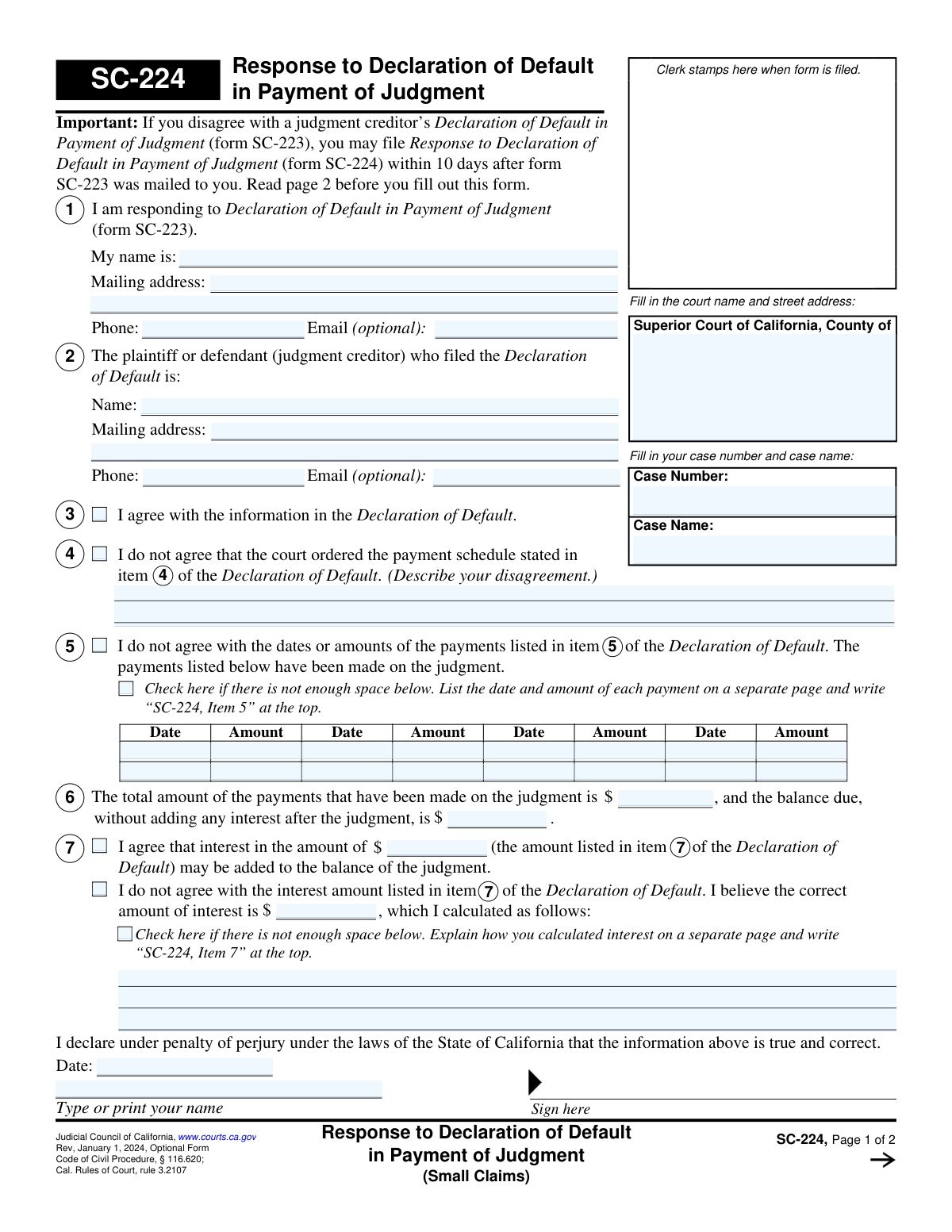
Yes! You can use AI to fill out Form SC-224, Response to Declaration of Default in Payment of Judgment (Small Claims)
Form SC-224, Response to Declaration of Default in Payment of Judgment, is a legal document filed in the Superior Court of California for small claims cases. It is used by a judgment debtor to dispute a creditor's Declaration of Default (Form SC-223), which alleges that the debtor has failed to make payments as ordered by the court. Filing this form allows the debtor to present their side regarding payment history, amounts, or interest calculations. Today, this form can be filled out quickly and accurately using AI-powered services like Instafill.ai, which can also convert non-fillable PDF versions into interactive fillable forms.
SC-224 is part of the
California court forms, court claim forms, court response forms and small claims forms categories on Instafill.
Our AI automatically handles information lookup, data retrieval, formatting, and form filling.
It takes less than a minute to fill out SC-224 using our AI form filling.
Securely upload your data. Information is encrypted in transit and deleted immediately after the form is filled out.
Form specifications
| Form name: | Form SC-224, Response to Declaration of Default in Payment of Judgment (Small Claims) |
| Number of fields: | 51 |
| Number of pages: | 1 |
| Language: | English |
Instafill Demo: How to fill out PDF forms in seconds with AI
How to Fill Out SC-224 Online for Free in 2026
Are you looking to fill out a SC-224 form online quickly and accurately? Instafill.ai offers the #1 AI-powered PDF filling software of 2026, allowing you to complete your SC-224 form in just 37 seconds or less.
Follow these steps to fill out your SC-224 form online using Instafill.ai:
- 1 Navigate to Instafill.ai and upload or select the SC-224 form.
- 2 Provide your personal information, including your name, mailing address, and contact details, for Section 1.
- 3 Enter the name and address of the judgment creditor who filed the Declaration of Default in Section 2.
- 4 Indicate your position by checking the appropriate boxes in Sections 3 through 7, specifying whether you agree with the declaration or detailing your disagreements regarding the payment schedule, amounts paid, or interest calculations.
- 5 If you disagree with the payment or interest details, provide a corrected list of payments made or your own interest calculation in the space provided or on an attached sheet.
- 6 Review all the information auto-filled by the AI to ensure it is accurate and complete.
- 7 Declare under penalty of perjury, date, and sign the form before filing it with the court clerk and serving it on the other parties.
Our AI-powered system ensures each field is filled out correctly, reducing errors and saving you time.
Why Choose Instafill.ai for Your Fillable SC-224 Form?
Speed
Complete your SC-224 in as little as 37 seconds.
Up-to-Date
Always use the latest 2026 SC-224 form version.
Cost-effective
No need to hire expensive lawyers.
Accuracy
Our AI performs 10 compliance checks to ensure your form is error-free.
Security
Your personal information is protected with bank-level encryption.
Frequently Asked Questions About Form SC-224
This form is used to officially disagree with a judgment creditor's claim (filed on form SC-223) that you have defaulted on your court-ordered payment plan for a small claims judgment.
You should fill out this form if you are a judgment debtor who has received a 'Declaration of Default in Payment of Judgment' (SC-223) and you dispute the information it contains.
If you agree with the creditor's declaration or do nothing, the court may order that the entire remaining balance of the judgment is immediately due and collectible, potentially with added interest.
You must file your response within 10 days after the 'Declaration of Default in Payment of Judgment' (form SC-223) was mailed to you by the court clerk.
You will need your court case number and name, your personal contact information, the creditor's information, and specific details about which parts of the default declaration you disagree with, such as payment dates, amounts, or interest calculations.
Use section 4 if you disagree with the creditor's description of the original court-ordered payment schedule. Use section 5 if you disagree with the creditor's list of payments they claim you have or have not made.
If you disagree with the interest claimed, you must state the correct amount and show how you calculated it. This typically involves showing the unpaid principal balance, the dates, and the interest rate used for the calculation.
After completing Form SC-224, you must have it served on all other parties in the case (using form SC-112A, Proof of Service) and then file both the SC-224 and the Proof of Service with the small claims court clerk.
The court will review your response and will either mail a final decision to all parties or send a notice for everyone to attend a court hearing on the matter.
Yes, you can contact your county's small claims advisor for free legal information and assistance with completing the form.
Yes, services like Instafill.ai use AI to auto-fill form fields accurately and save time, helping you complete the form more efficiently.
You can use a service like Instafill.ai to upload the PDF, fill out all the required fields on your computer, and then download the completed document for printing and filing.
If you have a non-fillable PDF, you can use a tool like Instafill.ai, which can convert flat PDFs into interactive, fillable forms that you can easily complete online.
Compliance SC-224
Validation Checks by Instafill.ai
1
Case Information Completeness
This check ensures that both the 'Case Number' and 'Case Name' fields at the top of the form are filled out. These fields are essential for the court clerk to correctly identify and file the document in the corresponding legal case. If this information is missing, the form will be rejected as it cannot be associated with a specific court record.
2
Respondent Identification Requirement
Validates that the respondent's name in Section 1 ('My name is:') is provided. This is a mandatory field to identify the person who is filing the response to the declaration of default. A failure to provide a name makes the document legally insufficient and will result in its rejection by the court.
3
Mutually Exclusive Response Selection
This validation enforces that the user cannot select conflicting responses. Specifically, a user cannot check the box in Section 3 ('I agree') and also check a box in Section 4 or 5 ('I do not agree'). Agreeing and disagreeing simultaneously is logically impossible and would make the form's intent unclear, leading to a validation error.
4
Conditional Requirement for Disagreement Explanation (Section 4)
If the checkbox in Section 4 ('I do not agree that the court ordered the payment schedule...') is selected, this validation ensures that the corresponding text box for describing the disagreement is not empty. The court requires a specific reason for the disagreement to make a ruling. An empty explanation would render the claim unsubstantiated and cause the form submission to be flagged as incomplete.
5
Conditional Requirement for Payment Details (Section 5)
This check is triggered if the user selects the checkbox in Section 5 ('I do not agree with the dates or amounts of the payments...'). It verifies that at least one row in the payment table (containing a date and amount) has been filled out. Simply disagreeing without providing corrected payment information is insufficient for the court to review the claim.
6
Payment Date Format and Validity
Verifies that any date entered into the payment table in Section 5 is in a valid format (e.g., MM/DD/YYYY) and is not a future date. Payments must have occurred in the past, so a future date is a logical error. This ensures the data is accurate and chronologically correct for legal review.
7
Payment Amount Format
Ensures that all 'Amount' fields in the payment table in Section 5, as well as the 'balance due' field, contain valid positive numeric or currency values. Non-numeric characters would prevent accurate calculation and processing of the financial claims. The system should reject any entry that is not a valid monetary figure.
8
Total Payments Consistency Check
This validation cross-references the payment details in Section 5 with the total provided in Section 6. It calculates the sum of all 'Amount' entries in the Section 5 table and verifies that it matches the value entered in Section 6 ('The total amount of the payments...'). A mismatch indicates a calculation error by the user, and the form will be flagged for correction to ensure accuracy.
9
Mutually Exclusive Interest Options (Section 7)
This check ensures that within Section 7, the user selects only one of the two primary options: either agreeing with the interest amount or disagreeing with it. Selecting both options is contradictory and makes the user's position on interest ambiguous. The form should prevent submission until only one choice is made.
10
Conditional Requirement for Interest Disagreement (Section 7)
If the user checks the box in Section 7 to disagree with the interest amount, this validation makes the subsequent fields mandatory. The user must provide their 'correct amount of interest' and the 'calculation' explanation. Failing to provide this information makes the disagreement claim incomplete and invalid, as the court has no basis for review.
11
Signature Date Requirement
This validation confirms that the 'Date' field in the signature block is filled out with a valid date. The signature date is a legal requirement for a declaration under penalty of perjury, attesting to when the document was signed. An unsigned or undated form is legally invalid and will be rejected.
12
Printed Name Consistency
This check verifies that the name entered in the 'Type or print your name' field in the signature block matches the respondent's name provided in Section 1. This ensures the person signing the declaration is the same person identified as the respondent. A mismatch could indicate a potential issue with who is attesting to the facts and may cause the form to be rejected.
13
Phone Number Format Validation
Although the phone number field is optional, this check runs if a value is provided. It ensures the number conforms to a standard phone number format (e.g., 10 digits, with or without parentheses and hyphens). This promotes data quality and ensures the court has a usable contact number if needed, preventing communication errors due to malformed data.
14
Email Address Format Validation
If an email address is provided in Section 1 or 2, this validation verifies that it follows the standard '[email protected]' format. While optional, a valid email is crucial for modern electronic court communications. An invalid format would lead to bounced notifications and communication failures, so this check ensures data integrity for any provided email.
Common Mistakes in Completing SC-224
People often mistype the case number or misspell names in the 'Case Name' field due to simple typos or confusion with other legal matters. An incorrect case number can lead to the clerk rejecting the form or filing it in the wrong case file, causing significant delays and potentially resulting in a default judgment against you. To avoid this, meticulously copy the information from the SC-223 form you received. If the form is a non-fillable PDF, an AI tool like Instafill.ai can convert it into an interactive version to reduce manual entry mistakes.
The form explicitly states it must be filed within 10 days after the Declaration of Default (form SC-223) was mailed. People often miss this deadline by miscalculating the days or simply procrastinating. Missing this strict deadline is fatal to the response, as the court will likely grant the creditor's request and make the full judgment balance due immediately without considering your side of the story.
Filing the form with the court is only half the process; you must also 'serve' (mail) a copy to the judgment creditor and file a Proof of Service (Form SC-112A) with the court. This step is often overlooked because it's detailed in the instructions on page 2, not on the main form page. Failure to serve properly means the other party isn't legally notified, and the court may disregard your response entirely.
A common error is checking box 3 ('I agree with the information in the Declaration of Default') while also filling out sections 4, 5, or 7 to dispute the claims. This happens from rushing or misunderstanding the form's structure. Such a contradiction confuses the court and can lead the judge to disregard your dispute and simply accept your statement of agreement, defeating the purpose of the form.
Sections 4, 5, and 7 require the filer to specify which item number from the original Declaration of Default (form SC-223) they are disputing. People often leave these blanks empty, making it unclear what part of the creditor's claim is being challenged. This ambiguity weakens your argument and may lead the court to dismiss your specific disagreements for lack of clarity.
In Section 5, filers must list every payment made, including the exact date and amount. Mistakes include forgetting payments, using approximate dates, or making simple data entry errors. An incomplete or inaccurate list undermines your credibility and can result in the court accepting the creditor's payment ledger, causing you to be liable for amounts you have already paid.
The form requires calculating the 'total amount of payments' (Section 6) and the remaining 'balance due' (Section 5). Mathematical errors are frequent when done manually under stress, leading to inconsistencies that damage your credibility. If the total in Section 6 doesn't match the sum of itemized payments, the court may default to the creditor's figures. Using a spreadsheet or a form-filling tool with built-in calculation features, like Instafill.ai, can ensure accuracy and prevent these costly mistakes.
Section 7, where one can dispute the interest amount, is highly prone to error. Common mistakes include using the wrong interest rate, calculating interest on interest (compounding), or failing to show the step-by-step calculation as required. An incorrect calculation is easily dismissed by the court, which may then award the full interest amount requested by the creditor. To avoid this, use the official MC-013-INFO sheet for guidance, or rely on advanced form-filling tools like Instafill.ai that can automate complex legal interest calculations.
The filer must sign the form under penalty of perjury, certifying that the information is true and correct. An unsigned form is legally invalid and will be rejected by the court clerk or disregarded by the judge. This simple oversight can be as damaging as not filing the form at all, as it will not be considered a valid response to the default declaration.
When the form asks for a description of a disagreement (e.g., in Section 4 or 7), filers sometimes provide emotional pleas or vague statements like 'the amount is wrong' instead of clear, factual explanations. The court needs specific facts, such as 'The court order dated 1/15/2023 states payments are $50/month, not $100/month as claimed.' Vague responses lack legal weight and are unlikely to persuade a judge.
Saved over 80 hours a year
“I was never sure if my IRS forms like W-9 were filled correctly. Now, I can complete the forms accurately without any external help.”
Kevin Martin Green
Your data stays secure with advanced protection from Instafill and our subprocessors

Robust compliance program
Transparent business model
You’re not the product. You always know where your data is and what it is processed for.
ISO 27001, HIPAA, and GDPR
Our subprocesses adhere to multiple compliance standards, including but not limited to ISO 27001, HIPAA, and GDPR.
Security & privacy by design
We consider security and privacy from the initial design phase of any new service or functionality. It’s not an afterthought, it’s built-in, including support for two-factor authentication (2FA) to further protect your account.
Fill out SC-224 with Instafill.ai
Worried about filling PDFs wrong? Instafill securely fills form-sc-224-response-to-declaration-of-default-in-payment-of-judgment-small-claims forms, ensuring each field is accurate.