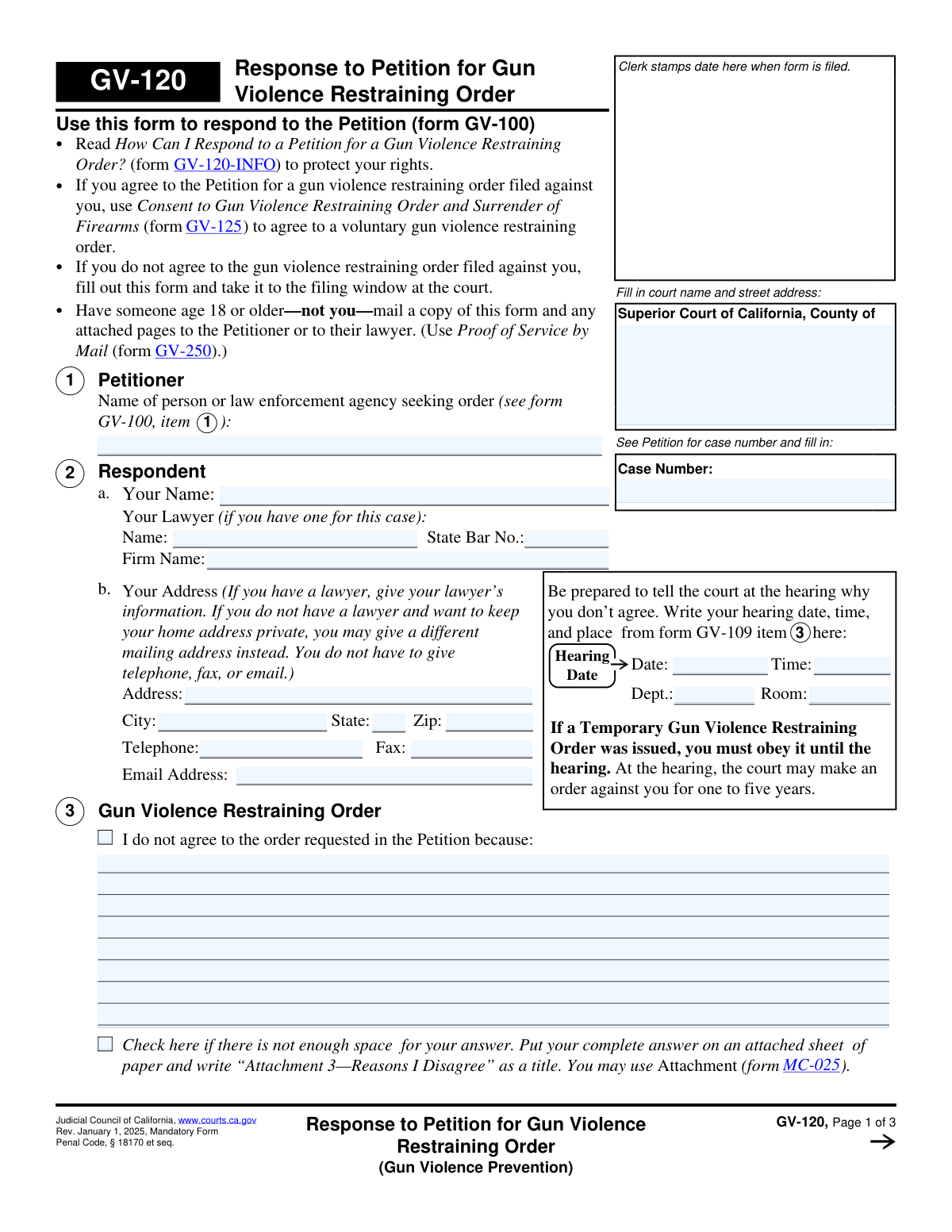
Yes! You can use AI to fill out Form GV-120, Response to Petition for Gun Violence Restraining Order
Form GV-120, Response to Petition for Gun Violence Restraining Order, is a California judicial form used by an individual to formally respond to and contest a gun violence restraining order petition filed against them. It allows the respondent to present their reasons for disagreeing with the order to the court before a hearing. Today, this form can be filled out quickly and accurately using AI-powered services like Instafill.ai, which can also convert non-fillable PDF versions into interactive fillable forms.
GV-120 is part of the
California court forms, court response forms and restraining order forms categories on Instafill.
Our AI automatically handles information lookup, data retrieval, formatting, and form filling.
It takes less than a minute to fill out GV-120 using our AI form filling.
Securely upload your data. Information is encrypted in transit and deleted immediately after the form is filled out.
Form specifications
| Form name: | Form GV-120, Response to Petition for Gun Violence Restraining Order |
| Number of fields: | 49 |
| Number of pages: | 1 |
| Language: | English |
Instafill Demo: How to fill out PDF forms in seconds with AI
How to Fill Out GV-120 Online for Free in 2026
Are you looking to fill out a GV-120 form online quickly and accurately? Instafill.ai offers the #1 AI-powered PDF filling software of 2026, allowing you to complete your GV-120 form in just 37 seconds or less.
Follow these steps to fill out your GV-120 form online using Instafill.ai:
- 1 Navigate to Instafill.ai and upload or select the Form GV-120.
- 2 Enter the court information and the case number exactly as it appears on the Petition (Form GV-100).
- 3 Fill in your personal details as the Respondent, including your lawyer's information if applicable.
- 4 In Section 3, clearly explain the reasons why you do not agree to the restraining order requested in the petition.
- 5 Address the specific accusations in Sections 4 and 5, either denying them or providing justification for your actions.
- 6 Complete the sections regarding your possession of firearms, ammunition, and body armor, indicating your compliance with any temporary orders.
- 7 Review all the information for accuracy, then use the platform's tools to sign and date the form before downloading it for filing and service.
Our AI-powered system ensures each field is filled out correctly, reducing errors and saving you time.
Why Choose Instafill.ai for Your Fillable GV-120 Form?
Speed
Complete your GV-120 in as little as 37 seconds.
Up-to-Date
Always use the latest 2026 GV-120 form version.
Cost-effective
No need to hire expensive lawyers.
Accuracy
Our AI performs 10 compliance checks to ensure your form is error-free.
Security
Your personal information is protected with bank-level encryption.
Frequently Asked Questions About Form GV-120
This form is used to officially respond to a Petition for a Gun Violence Restraining Order (Form GV-100) if you do not agree with the order being requested against you. It allows you to present your reasons for disagreement to the court before the hearing.
You should fill out this form if you are the 'Respondent' named in a Petition for a Gun Violence Restraining Order and you wish to contest it. If you agree with the order, you should use Form GV-125 instead.
If you agree to the gun violence restraining order, do not use this form. You should fill out and file Form GV-125, 'Consent to Gun Violence Restraining Order and Surrender of Firearms,' to voluntarily agree to the order.
Your case number can be found on the Petition (Form GV-100) that was served to you. The date, time, and location of your court hearing are listed in item 3 of the Temporary Gun Violence Restraining Order (Form GV-109).
In Section 3, you should clearly and factually state the reasons why you believe the restraining order should not be granted. If you run out of space, you can attach an additional page, titling it 'Attachment 3—Reasons I Disagree'.
You must sell, store with a licensed dealer, or turn in to law enforcement any firearms, firearm parts, ammunition, and magazines you possess within 24 hours of being served. You must then file a receipt (Form GV-800) with the court as proof.
If you do not own or possess any firearms, firearm parts, ammunition, or magazines, you should check box 6a. Similarly, if you do not own or have any body armor, you should check box 7a.
After completing the form, you must file it with the court clerk. Then, you must have someone who is 18 or older (and not you) mail a copy to the petitioner and complete a Proof of Service by Mail (Form GV-250) to be filed with the court.
You are not required to have a lawyer, and you can represent yourself. However, because a restraining order has serious consequences, you may want to consult with an attorney for legal advice.
If you do not file a response or appear at the hearing, the judge can make a decision based solely on the information the petitioner provided. This could result in a restraining order being issued against you for one to five years.
Yes, services like Instafill.ai use AI to help auto-fill form fields accurately and save time. While AI can assist with filling out your personal information, it cannot provide legal advice for the substantive sections of the form.
Simply upload the GV-120 PDF to the Instafill.ai platform. Their service will convert it into an interactive online form, allowing you to type your answers directly and use AI-powered tools to complete it efficiently.
If you have a flat, non-fillable PDF, you can use a service like Instafill.ai. It specializes in converting such documents into interactive, fillable forms that you can easily complete on your computer.
Compliance GV-120
Validation Checks by Instafill.ai
1
Case Number Presence and Format
Validates that the 'Case Number' field is not empty and conforms to the expected format for the specified court. The case number is the primary identifier for the legal proceeding, and its absence or incorrect format would prevent the document from being correctly filed and associated with the existing case. If validation fails, the user should be prompted to enter a valid case number as it appears on the Petition (form GV-100).
2
Hearing Date is a Valid Future Date
Ensures that the 'Hearing Date' provided in the header is a valid calendar date and occurs in the future. This is critical because the purpose of the form is to respond for a future court hearing. An invalid or past date would cause confusion and could result in the respondent missing their court appearance. The system should reject invalid date formats and dates that are not after the current date.
3
Respondent Name is Required
Checks that the respondent's name in Section 2 ('Your Name') is filled out. This field is essential for identifying the person who is responding to the petition. A submission without the respondent's name is legally incomplete and cannot be processed by the court. If this field is empty, the form submission should be blocked until the name is provided.
4
Lawyer Information Consistency
Verifies that if a lawyer's name is entered in Section 2a, the corresponding 'State Bar No.' field is also filled. This ensures that any listed legal representation is properly and uniquely identified for the court record. Failure to provide a bar number for a named attorney would make it difficult for the court to verify their credentials and contact them, so the user should be prompted to provide it.
5
State Bar Number Format
Validates that the 'State Bar No.' in Section 2a is a numeric value, typically a 6-digit number for California. This check helps ensure the integrity of the data and the validity of the attorney's credentials. An incorrectly formatted number could lead to misidentification of the legal counsel. The system should flag any non-numeric or improperly formatted entries.
6
ZIP Code Format Validation
Ensures the 'Zip' code provided in Section 2b is in a valid 5-digit or 9-digit (ZIP+4) format. A valid ZIP code is crucial for ensuring any mail from the court or other parties is deliverable. An invalid format could lead to returned mail and missed legal notices. The system should prompt the user to correct any entry that does not match the standard U.S. ZIP code format.
7
Mutually Exclusive Firearm Declarations
Checks that the user has not selected both checkbox 6a ('I do not own or control any firearms...') and 6b ('I have turned in my firearms...'). These two statements are logically contradictory. Allowing both to be selected would create an ambiguous and invalid legal declaration. If both are checked, the user must be prompted to select only one of the two options.
8
Firearm Receipt Status Requirement
If checkbox 6b ('I have turned in my firearms...') is selected, this validation ensures that one of the two sub-options ('is attached' or 'has already been filed with the court') is also checked. This is a required clarification to inform the court of the status of the firearm receipt, which is a mandatory part of the process. If 6b is checked but neither sub-option is, the submission should be blocked until a choice is made.
9
Attachment Count Consistency
Verifies that if the 'Number of pages attached' in Section 8 is greater than zero, at least one of the checkboxes indicating an attachment is also checked (e.g., 'Attachment 3', 'Attachment 5', or a receipt in 6b). Conversely, if the page count is zero, no attachment checkboxes should be selected. This cross-reference ensures the form is internally consistent and prevents confusion for the court clerk processing the document. A mismatch should trigger a warning for the user to review their entries.
10
Respondent Signature Date Presence
Ensures that the 'Date' field next to the respondent's signature line is filled out. The date of signature is a critical component of the declaration under penalty of perjury, establishing when the statements were attested to be true. A missing signature date can render the legal declaration invalid. The system should require this field to be completed before submission.
11
Basis for Disagreement Provided
Validates that the respondent has provided a reason for disagreeing with the petition by either filling in the text box in Section 3, checking the denial box in Section 4, or providing an explanation in Section 5. A response form must state the basis for the response. If none of these options are completed, the form is incomplete and should not be accepted, as it fails to provide the court with any information to consider.
12
Court Name Presence
Checks that the 'Superior Court of California, County of' field at the top of the form is completed. This information is fundamental for filing, as it directs the document to the correct jurisdiction and courthouse. Without this information, the clerk's office cannot process or file the response. The submission should be blocked until the county name is provided.
13
Body Armor Declaration Completeness
Verifies that at least one of the checkboxes in Section 7 regarding body armor has been selected. If a Temporary Restraining Order was issued, the respondent is required to declare the status of any body armor in their possession. An incomplete section fails to comply with the court's requirements. The system should prompt the user to make a selection in this section before allowing submission.
14
Attached Pages Count is a Non-Negative Integer
Ensures that the value entered in Section 8 for 'Number of pages attached' is a valid non-negative integer (0, 1, 2, etc.). This field must be a number for the court clerk to correctly account for all submitted pages. Text, decimals, or negative numbers are invalid and would cause processing errors. The input should be restricted to whole numbers.
Common Mistakes in Completing GV-120
Respondents often mistype the case number or forget to fill it in on all pages. This number, found on the Petition (GV-100) or Temporary Restraining Order (GV-109), is the primary identifier linking your response to the correct court file. An incorrect number can lead to your response being rejected by the clerk or misfiled, potentially causing you to miss your hearing and have a final order issued against you. Always double-check the case number on every page before filing.
The form requires you to copy the hearing date, time, and department from form GV-109. People frequently leave this section blank, assuming the court already knows. Forgetting this information can lead to confusion and increases the risk of missing the court date, which would likely result in the judge granting the petitioner's request for a long-term restraining order without hearing your side. Carefully transcribe all hearing details to ensure you are prepared.
In sections 3 and 5, where you explain why you disagree or why your actions were justified, many people write emotional or irrelevant statements instead of clear, factual rebuttals. The court needs specific facts that directly respond to the allegations made in the Petition (form GV-100). To avoid this, focus on providing a point-by-point response to the petitioner's claims, sticking to facts, dates, and evidence you can present.
When there isn't enough space in sections 3 or 5, respondents either try to cram unreadable text into the small box or use an attachment incorrectly. Common errors include failing to check the box indicating an attachment is used, or not titling the attached page as specified (e.g., 'Attachment 3—Reasons I Disagree'). This can cause the court to overlook your full explanation. Always check the box and label attachments clearly as instructed on the form.
This section is critical for compliance with a Temporary Restraining Order. A frequent and serious mistake is checking box 6b ('I have turned in my firearms...') but failing to attach the required receipt (Form GV-800). This failure to provide proof of surrender can be seen as a violation of the court's order, carrying severe legal consequences. Ensure you check the correct boxes and that the required receipt is either attached or has been previously filed, as indicated.
Forgetting to sign and date the form under penalty of perjury on page 3 is one of the most common and fatal errors. An unsigned form is legally invalid and will be rejected by the court clerk, meaning your response is not officially filed. This simple oversight can lead to a default judgment against you. Always review the final page to ensure you have personally signed and dated it in the correct 'Respondent' section.
In Section 2, individuals representing themselves sometimes mistakenly fill in their own name in the 'Your Lawyer' fields. Conversely, those with legal counsel may incorrectly provide their own address instead of their lawyer's, despite instructions to the contrary. This creates confusion for the court and opposing party regarding who should receive legal notices. Fill out only the sections that apply to your representation status.
The form's instructions clearly state that someone else over 18 must mail a copy to the petitioner, and a Proof of Service (Form GV-250) must be filed with the court. Respondents often make the mistake of mailing it themselves or forgetting to file the GV-250 form. Improper service means the court has no official record that the petitioner was notified of your response, which can invalidate it and prevent the judge from considering it at the hearing.
Similar to the firearms section, respondents often make errors when declaring their body armor status. A key mistake is checking box 7c, claiming an exception to the prohibition, but failing to attach a copy of the permission letter from a police chief or sheriff. Without this required documentation, the claim is unsupported and the respondent may be found in violation of the temporary order. Always attach all required proof when claiming an exception.
Judicial Council forms are updated periodically, as indicated by the revision date (e.g., 'Rev. January 1, 2025'). Using an old version of the form can lead to rejection by the court clerk, as it may lack required fields or contain outdated legal language. Always ensure you are using the most current version available from the official court website. AI-powered tools like Instafill.ai can help by providing access to the latest official forms and can convert flat, non-fillable PDFs into fillable versions.
Saved over 80 hours a year
“I was never sure if my IRS forms like W-9 were filled correctly. Now, I can complete the forms accurately without any external help.”
Kevin Martin Green
Your data stays secure with advanced protection from Instafill and our subprocessors

Robust compliance program
Transparent business model
You’re not the product. You always know where your data is and what it is processed for.
ISO 27001, HIPAA, and GDPR
Our subprocesses adhere to multiple compliance standards, including but not limited to ISO 27001, HIPAA, and GDPR.
Security & privacy by design
We consider security and privacy from the initial design phase of any new service or functionality. It’s not an afterthought, it’s built-in, including support for two-factor authentication (2FA) to further protect your account.
Fill out GV-120 with Instafill.ai
Worried about filling PDFs wrong? Instafill securely fills form-gv-120-response-to-petition-for-gun-violence-restraining-order forms, ensuring each field is accurate.