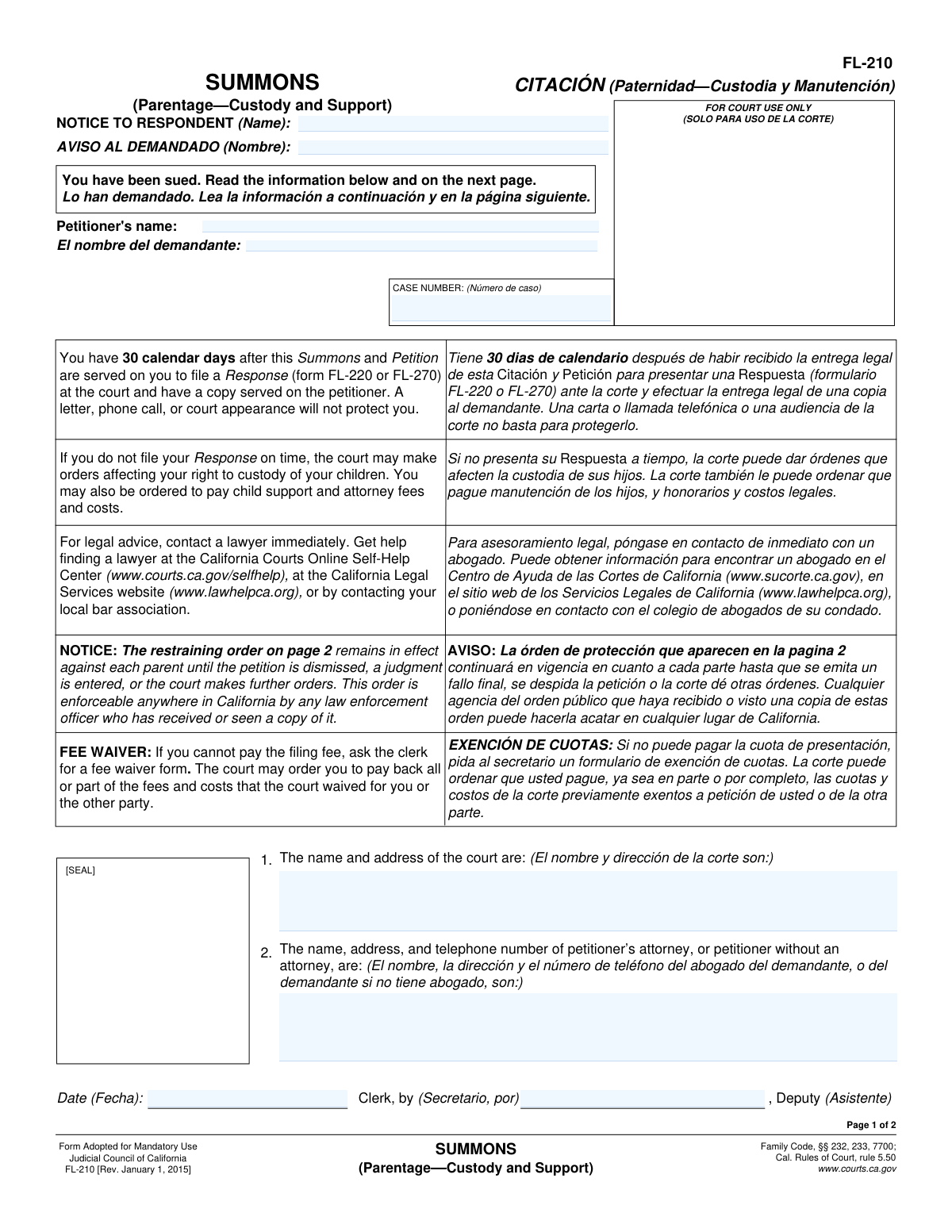
Yes! You can use AI to fill out Form FL-210, Summons (Uniform Parentage—Petition for Custody and Support)
Form FL-210, Summons (Parentage—Custody and Support), is a mandatory California court document used to formally notify a respondent that a lawsuit has been filed against them to establish a parental relationship, child custody, and support orders. It specifies a 30-day deadline for the respondent to file a response and includes a standard restraining order preventing either parent from removing the child from the state. Today, this form can be filled out quickly and accurately using AI-powered services like Instafill.ai, which can also convert non-fillable PDF versions into interactive fillable forms.
FL-210 is part of the
California court forms, family court forms, family law forms and family petition forms categories on Instafill.
Our AI automatically handles information lookup, data retrieval, formatting, and form filling.
It takes less than a minute to fill out FL-210 using our AI form filling.
Securely upload your data. Information is encrypted in transit and deleted immediately after the form is filled out.
Form specifications
| Form name: | Form FL-210, Summons (Uniform Parentage—Petition for Custody and Support) |
| Number of fields: | 12 |
| Number of pages: | 1 |
| Language: | English |
Instafill Demo: How to fill out PDF forms in seconds with AI
How to Fill Out FL-210 Online for Free in 2026
Are you looking to fill out a FL-210 form online quickly and accurately? Instafill.ai offers the #1 AI-powered PDF filling software of 2026, allowing you to complete your FL-210 form in just 37 seconds or less.
Follow these steps to fill out your FL-210 form online using Instafill.ai:
- 1 Navigate to Instafill.ai and upload or select Form FL-210, Summons (Parentage—Custody and Support).
- 2 Enter the name and address of the court where the petition is being filed.
- 3 Provide the full name, address, and telephone number of the petitioner or their attorney.
- 4 Input the name of the respondent being served and the court-assigned case number.
- 5 The AI tool will assist in populating administrative details like the date of issuance by the court clerk.
- 6 Carefully review the entire completed summons, including the standard restraining order on page 2, to ensure all information is correct.
- 7 Download and print the completed FL-210 for official filing with the court and service on the respondent.
Our AI-powered system ensures each field is filled out correctly, reducing errors and saving you time.
Why Choose Instafill.ai for Your Fillable FL-210 Form?
Speed
Complete your FL-210 in as little as 37 seconds.
Up-to-Date
Always use the latest 2026 FL-210 form version.
Cost-effective
No need to hire expensive lawyers.
Accuracy
Our AI performs 10 compliance checks to ensure your form is error-free.
Security
Your personal information is protected with bank-level encryption.
Frequently Asked Questions About Form FL-210
Form FL-210 is a Summons, which is an official notice that a court case has been filed against you to establish parentage, child custody, and child support. You are the 'Respondent' in this case and must take action.
You have 30 calendar days from the date you were served to file a formal Response (Form FL-220 or FL-270) with the court and provide a copy to the petitioner. A simple letter, phone call, or court appearance is not a sufficient legal response.
If you do not file a Response within 30 days, the court can make legally binding orders about your parental rights, child custody, and child support without your input.
This is an automatic order that immediately prohibits both parents from taking the child out of California or applying for a passport for the child. This requires either written consent from the other parent or a new court order.
No, this standard order does not, by itself, change existing custody or visitation. It only restricts out-of-state travel and passport applications for the child.
The Petitioner is the person who started the court case. The Respondent, which is you if you received this form, is the person being sued who must respond to the case.
You can ask the court clerk for a fee waiver form. If you meet the financial requirements, the court may waive the fees for filing your response.
It is strongly recommended that you seek legal advice from a lawyer immediately, as this case involves your parental rights and financial obligations. The form provides resources for finding legal assistance.
The case number and the court's name and address are located in the boxes at the top of the first page. This information is essential for filing your response.
Yes, services like Instafill.ai use AI to help you accurately auto-fill the required response forms, such as Form FL-220. This can save you time and help prevent common errors.
You can upload the necessary response form to the Instafill.ai platform. The service will then guide you through the fields, helping you enter your information correctly before you print the completed form for filing with the court.
Services like Instafill.ai can convert non-fillable PDFs into interactive, fillable forms. You can upload the flat PDF, and the tool will make it easy to type your information directly into the fields.
The restraining order remains in effect until a final judgment is entered in your case, the petition is dismissed, or the court makes a different order.
Compliance FL-210
Validation Checks by Instafill.ai
1
Ensures Respondent's Name is Provided
This check verifies that the 'NOTICE TO RESPONDENT (Name)' field is not empty. It is critically important to identify the individual being sued for the summons to be legally valid and properly served. A failure in this validation would halt processing, as a summons without a named respondent is unenforceable.
2
Ensures Petitioner's Name is Provided
This validation confirms that the 'Petitioner's name' field has been filled out. The respondent must know the identity of the person or party initiating the legal action. If this field is blank, the form is incomplete and cannot be properly filed or served.
3
Validates Case Number Presence and Format
This check ensures the 'CASE NUMBER' field is not empty and conforms to a plausible format for a court case number (e.g., contains a mix of letters and numbers). The case number is the primary identifier for all court filings and proceedings related to this matter. An invalid or missing case number would make it impossible to track the case within the court system.
4
Verifies Court Name and Address are Complete
This validation checks that the field for the court's name and address is fully populated. The respondent needs this information to know which court has jurisdiction and where to file their response documents. Incomplete information could lead to the respondent failing to file on time, violating their due process rights.
5
Ensures Petitioner or Attorney Contact Block is Filled
This check verifies that the block for the petitioner's or their attorney's name, address, and telephone number is not empty. This contact information is legally required for service of subsequent documents and communication between the parties. A failure means the respondent cannot legally notify the petitioner of their response.
6
Validates Phone Number in Petitioner/Attorney Contact Block
This validation extracts and checks for a validly formatted 10-digit telephone number within the petitioner or attorney contact information block. While not always used for formal service, a phone number is crucial for informal communication between parties or their counsel. An invalid format could hinder communication and delay proceedings.
7
Validates Address in Petitioner/Attorney Contact Information
This check ensures the petitioner or attorney's contact information includes a plausible mailing address, including a street, city, state, and ZIP code. This address is the official 'address of record' for mailing legal documents, and its absence or invalidity would make proper legal service impossible. The validation may check for keywords like 'St', 'Ave', or a 5-digit ZIP code.
8
Ensures Summons Issue Date is Provided
This validation confirms that the 'Date' field, indicating when the summons was officially issued by the court clerk, is not blank. This date is legally significant as it marks the formal commencement of the action against the respondent. A missing date invalidates the summons.
9
Validates Summons Issue Date is a Valid, Non-Future Date
This check ensures the 'Date' of issuance is in a recognized format (e.g., MM/DD/YYYY) and is not a date in the future. The date must represent the day the clerk actually issued the summons, so it must be on or before the current date. A future date is a logical impossibility and would render the document invalid.
10
Verifies Deputy Clerk's Name is Entered
This validation checks that the 'Clerk, by (Secretario, por)' field, which is for the deputy clerk's signature or name, is filled. The clerk's stamp and signature/name are what give the summons its official authority from the court. An unsigned or un-named summons is not an official court document.
11
Validates Respondent's Name Format
This check ensures the respondent's name contains at least two separate words (presumably a first and last name) and does not contain numbers or excessive special characters. The purpose is to ensure a full legal name is used, which is necessary for proper identification and legal enforcement. An abbreviated name or a name with invalid characters could lead to challenges in service or enforcement.
12
Validates Petitioner's Name Format
This validation ensures the petitioner's name is formatted as a full legal name, containing at least a first and last name and avoiding invalid characters like numbers. Using a full legal name is essential for establishing the party's standing in the case. This check helps prevent the use of nicknames or incomplete names that could cause confusion.
13
Verifies Court Address Contains Key Components
This check parses the court address field to ensure it contains essential components of a valid address, such as a street name, city, and a ZIP code. This goes beyond a simple completeness check to increase confidence that the provided address is functional. An invalid court address could prevent the respondent from filing their response correctly, potentially leading to a default judgment.
14
Ensures Logical Consistency of Petitioner Name
This validation compares the petitioner's name in the header ('Petitioner's name:') with the name listed in the contact information block (field #2). If the contact block does not list an attorney, these two names should match. This logical check prevents inconsistencies that could create confusion about who the petitioner is and whether they are represented by counsel.
Common Mistakes in Completing FL-210
Petitioners often use a nickname, a previous last name, or an incomplete legal name for the respondent in the 'NOTICE TO RESPONDENT' field. This is a critical error because the summons must be served on the correct legal person, and a name mismatch can be grounds for the respondent to challenge the validity of the service. An invalid service can delay the case for months or even lead to its dismissal, requiring the petitioner to start the process over. To avoid this, always use the respondent's full legal name as it appears on official documents like a driver's license or birth certificate.
Petitioners, especially those representing themselves, may be unsure which courthouse to file in and mistakenly list the wrong court location or even the wrong county. Filing in the incorrect court can lead to the case being rejected, transferred, or dismissed for lack of jurisdiction, causing significant delays and wasted filing fees. Before filling out the form, you must confirm the proper Superior Court and its specific address based on the residency requirements for parentage cases in your jurisdiction.
Seeing a blank box, a person might mistakenly try to fill in sections reserved for the court clerk, such as the 'CASE NUMBER' field or the 'Date' and 'Clerk, by' signature lines. This happens because they want to be thorough, but it actually creates more work for the court clerk, who may have to reject the form and ask for a clean copy. This delays the official filing of the case. Leave any area marked 'FOR COURT USE ONLY' or 'SOLO PARA USO DE LA CORTE' completely blank.
In the stressful context of a family law dispute, self-represented litigants can easily mix up the legal terms 'Petitioner' (the person filing the lawsuit) and 'Respondent' (the person being sued). They might put their own name in the 'NOTICE TO RESPONDENT' field or vice-versa. This fundamental error creates significant confusion, will cause the filing to be rejected by the clerk, and demonstrates a misunderstanding of the legal process. Carefully read each field's label to ensure you are entering the correct person's information in the correct role.
The FL-210 Summons is not a standalone document; its purpose is to notify the respondent that a lawsuit has been started and what they must do. A common mistake is to file only the Summons without the accompanying Petition (e.g., FL-200, Petition to Establish Parental Relationship). The court clerk cannot issue a summons without the underlying petition that details the lawsuit's claims. This results in an immediate rejection of the filing, and the petitioner must return with the complete set of required documents.
Legal forms are updated periodically, and courts require the most current version, indicated by the revision date in the footer (e.g., 'FL-210 [Rev. January 1, 2015]'). A petitioner might find and use an old version from an unreliable website or a previous case. Submitting an obsolete form is a common reason for the court clerk to reject a filing on the spot, forcing the petitioner to redo all the paperwork. Always download the latest version of any legal form directly from the official judicial council or court website.
The petitioner might forget to include their full address, use a P.O. Box when a physical address is required for service, or provide an incorrect phone number. This is problematic because the court and the other party will use this information to send crucial legal documents and notices. Missing these notices could result in missed deadlines or hearings, potentially harming the outcome of your case. Always double-check that your name, current mailing address, and phone number are complete and accurate.
When filling out the form by hand, petitioners may use messy handwriting, make errors, and leave cross-outs or use correction fluid. This can make the document difficult for the court clerk and the respondent to read, leading to data entry errors or an inability to understand the notice. An unprofessional-looking form may be scrutinized more heavily or even rejected by the clerk. It is best to type the information using a fillable PDF to ensure clarity. If the form is a non-fillable PDF, tools like Instafill.ai can convert it into a fillable version, ensuring a clean and legible submission.
This form is a fillable PDF, but users often make technical mistakes. They might fill it out in a web browser and save it, only to find the saved file is blank, or they might forget to clear previous data. Filing a blank or improperly formatted form will lead to rejection and delay. To avoid this, use a dedicated PDF reader, save your progress correctly, and print a final version for review before submitting. AI-powered tools like Instafill.ai can manage the data entry and formatting automatically, helping to prevent these digital errors.
Saved over 80 hours a year
“I was never sure if my IRS forms like W-9 were filled correctly. Now, I can complete the forms accurately without any external help.”
Kevin Martin Green
Your data stays secure with advanced protection from Instafill and our subprocessors

Robust compliance program
Transparent business model
You’re not the product. You always know where your data is and what it is processed for.
ISO 27001, HIPAA, and GDPR
Our subprocesses adhere to multiple compliance standards, including but not limited to ISO 27001, HIPAA, and GDPR.
Security & privacy by design
We consider security and privacy from the initial design phase of any new service or functionality. It’s not an afterthought, it’s built-in, including support for two-factor authentication (2FA) to further protect your account.
Fill out FL-210 with Instafill.ai
Worried about filling PDFs wrong? Instafill securely fills form-fl-210-summons-uniform-parentagepetition-for-custody-and-support forms, ensuring each field is accurate.