
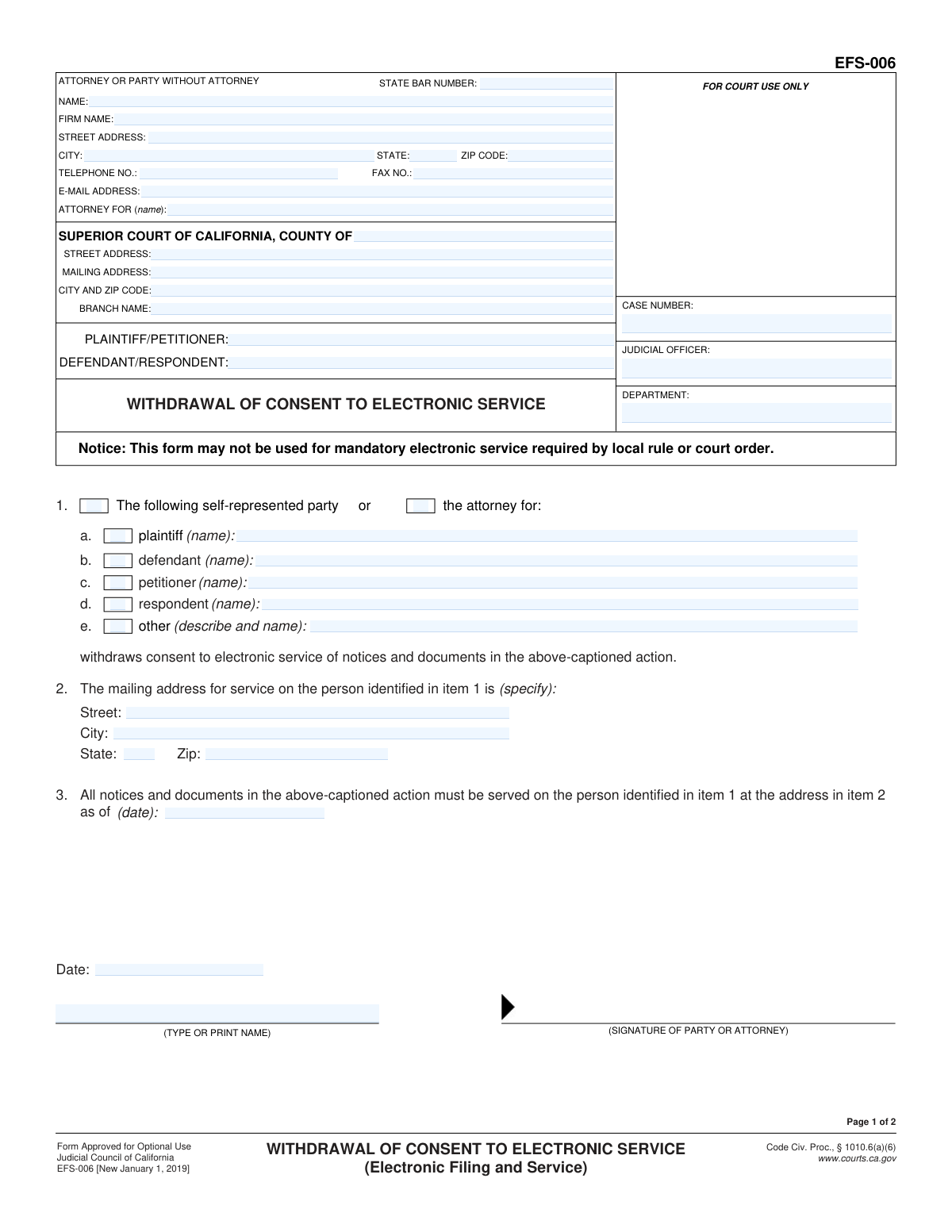
Yes! You can use AI to fill out Form EFS-006, Withdrawal of Consent to Electronic Service (Electronic Filing and Service)
Don't type 54 fields by hand. Tell our AI about yourself, or upload a document you already have, and it fills every field in seconds. You check it, then download, print or sign.
The AI does the filling. You just check it.
No typing into boxes, nothing to install.
What this form asks for
The AI fills all of it, from your answers or your documents.
The AI checks your answers before you download
12 checks built for this form, so a wrong date or a missing answer is caught before anyone else sees it.
Checks that the 'CASE NUMBER' field is not empty and is populated on both pages. It should also verify that the entered value conforms to the standard format for California court case numbers, which is crucial for correctly routing and filing the document. A missing or malformed case number will lead to rejection by the court clerk.
This validation confirms that one and only one party type checkbox (plaintiff, defendant, petitioner, respondent, or other) is selected in item 1. It also ensures that the corresponding name field for the selected party is filled out. This prevents ambiguity about who is withdrawing consent and ensures the form is actionable.
This check ensures that the entire mailing address in item 2, including Street, City, State, and Zip, is fully completed. This address is the primary purpose of the form, as it dictates where all future physical documents must be sent. An incomplete address would render the withdrawal ineffective and cause critical service failures.
This check ensures the date in item 3 is a valid date and is not in the past relative to the filing date. This is important for establishing a clear and legally sound transition from electronic to physical service. An invalid or past date would create confusion about when the change in service method takes effect.
This validation checks if the 'ATTORNEY FOR' field is filled. If it is, the 'STATE BAR NUMBER' field becomes mandatory and must contain a numeric value. This is essential for verifying the credentials of the attorney submitting the form on behalf of a client.
This check compares the 'CASE NUMBER', 'PLAINTIFF/PETITIONER', and 'DEFENDANT/RESPONDENT' fields on page 1 with their corresponding fields on page 2. This ensures that both pages of the document pertain to the same legal case, preventing misfiling or confusion. A mismatch would invalidate the second page of the document.
And 6 more checks
- Validates All Proof of Service Details
- Ensures Logical Proof of Service Date Chronology
- Validates Format of All Email Addresses
- Ensures Page 1 Signature Fields are Complete
- Requires Description for 'Other' Party
- Verifies Declarant's Address on Proof of Service
Let AI fill out your EFS-006
No typing. Every field filled in seconds, checked, ready to sign.
How to Fill Out EFS-006 Online for Free in 2026
What the AI walks you through.
- Navigate to Instafill.ai and upload the EFS-006 form or select it from the template library.
- Provide the case information, including the county, court address, case number, and party names (Plaintiff/Petitioner and Defendant/Respondent).
- Enter your information as the attorney or self-represented party, including your name, address, and state bar number if applicable.
- In Section 1, check the box that corresponds to your role in the case (e.g., plaintiff, defendant) and enter the name of the party you represent or your own name.
- In Section 2, specify the full mailing address where you will now receive service of all documents.
- Enter the effective date for the withdrawal of consent in Section 3, then sign and date the form.
- Review the entire document for accuracy, then download the completed form to file with the court and serve on all other parties.
Common Mistakes in Completing EFS-006
The ones the AI is built to catch.
Incorrect or Incomplete Case Information
Using the Form When Prohibited
Ambiguous Party Identification in Item 1
Omitting the New Mailing Address for Service
Missing or Ambiguous Effective Date
Using the Wrong Proof of Service Form
Incomplete Proof of Service Details
Missing Signatures on Withdrawal or Declaration
Confusing Filer Information with Opposing Party
Submitting an Illegible Handwritten Form
Frequently Asked Questions About EFS-006
Is it really free for 7 days?
Can I fill other forms too?
How do I cancel?
How does the AI fill out EFS-006?
What happens to my information?
How complex is EFS-006 to fill out?
What is the purpose of Form EFS-006?
Who needs to fill out this form?
Are there situations where I cannot use this form to stop electronic service?
What information do I need to have ready to complete this form?
How do I fill out Section 2, the mailing address for service?
What date should I enter in Section 3?
What do I do after I sign the form?
Who fills out the 'Proof of Electronic Service' on page 2?
What is the difference between serving by mail and serving electronically for this form?
Can AI tools help me fill out Form EFS-006?
How do I use Instafill.ai to complete this form online?
What should I do if the PDF of this form is not fillable?
Get your EFS-006 filled out by AI
$0 today. Cancel before Nov 1 and you pay nothing.
Other forms like this one
California court forms: Judicial Council of California Form SC-105, Request for Court Order and Answer (Small Claims), Judicial Council of California Form SC-120, Defendant’s Claim and ORDER to Go to Small Claims Court (Small Claims), Judicial Council of California Form SER-001, Request for Sheriff to Serve Court Papers, Judicial Council of California Form SER-001, Request for Sheriff to Serve Court Papers, Affidavit for Collection of Personal Property California Probate Code Section 13100, Form POS-040, Proof of Service—Civil, Declaration of Facts of Death (California Superior Court), declaration-of-marriage-for-court-proceeding-california-family-law, ADOPT-200, Adoption Request, ADOPT-200, Stepparent Adoption Request, ADOPT-210, Adoption Agreement, ADOPT-310, Contact After Adoption Agreement, Judicial Council of California Form ADOPT-200, Adoption Request, Form ADR-107, Mediation Attendance Sheet, Form ADR-110, Order Appointing Referee, Form ADR-109, Stipulation or Motion for Order Appointing Referee, Form ADR-102, Request for Trial De Novo After Judicial Arbitration, Form ADR-108, Referee's Report (Code Civ. Proc., §§ 638, 639), Form ADR-106, Petition to Confirm, Correct, or Vacate Contractual Arbitration Award, Form ADR-104, Rejection of Award and Request for Trial After Attorney-Client Fee Arbitration
court filing forms: Debtor’s(s’) Chapter 13 Plan (Containing a Motion for Valuation), Form MC 98, Statement of Grievance Regarding e-Filing Access Plan, Form MC 502, Notice of Filing of Transcript and Affidavit of Mailing, Form MC 503, Motion to Change Time for Filing Transcript on Appeal, Form MC 514, Receipt of Prepaid Filing Fees for MiFILE Transaction, Form EFS-005-JV/JV-141, Electronic Service: Consent, Withdrawal of Consent, Address Change (Juvenile), Form EFS-020, Proposed Order (Cover Sheet), Form EFS-005-CV, Consent to Electronic Service and Notice of Electronic Service Address, Judicial Council of California, Form EFS-007, Request for Exemption from Mandatory Electronic Filing and Service, Form EFS-010, Notice of Change of Electronic Service Address, Form EFS-008, Order of Exemption from Mandatory Electronic Filing and Service, Form VL-125, Order on Application to Vacate Prefiling Order and Remove Plaintiff/Petitioner from Judicial Council Vexatious Litigant List, Form VL-120, Application for Order to Vacate Prefiling Order and Remove Plaintiff/Petitioner From Judicial Council Vexatious Litigant List, Form VL-100, Prefiling Order—Vexatious Litigant, New Jersey Judiciary, Appellate Division, Request for Extension of Transcript Filing, New Jersey Judiciary – Tax Court Supplemental eCourts Proof of Service (used for service after electronic filing), Victim’s Assistance and Survivor Protection Act (VASPA) Filing Packet, Superior Court of Arizona in Maricopa County, Protected Address Request for eFiling Only
Let AI fill out your EFS-006
Your trial starts once a card is added. You pay nothing before Nov 1.
Our AI already knows this form, all 54 fields of it. Skip the typing: tell it about yourself, or upload what you have, and it fills the whole form in seconds.
- AI fills every field on both pages, checkboxes included
- No typing into boxes: answer a few questions, or upload a document you already have, an old copy of this form, a photo of a document
- The AI checks the answers; you review and change anything before you download
- Download the finished PDF, print it, or sign it online
- Encrypted, and never used to train AI
Cancel before Nov 1 and you pay nothing.
A card is needed to start the trial. Cancel in two clicks from your account.
Terms · Privacy