
Yes! You can use AI to fill out Form EFS-020, Proposed Order (Cover Sheet)
Don't type 41 fields by hand. Tell our AI about yourself, or upload a document you already have, and it fills every field in seconds. You check it, then download, print or sign.
The AI does the filling. You just check it.
No typing into boxes, nothing to install.
What this form asks for
The AI fills all of it, from your answers or your documents.
The AI checks your answers before you download
14 checks built for this form, so a wrong date or a missing answer is caught before anyone else sees it.
Compares the 'CASE NUMBER' field on Page 1 with the 'CASE NUMBER' field on Page 2 to ensure they are identical. This is a critical cross-field validation to prevent the proof of service from being associated with the wrong case file. A mismatch would cause significant administrative confusion and could invalidate the service.
Checks if the 'STATE BAR NO.' field contains only numeric digits. This ensures the number is a valid identifier for an attorney licensed in California, which is crucial for verifying the filer's credentials. An invalid format could lead to misidentification of the filing attorney and rejection of the document.
Ensures that the 'E-MAIL ADDRESS' fields for the filer and the person being served contain a valid email format (e.g., [email protected]). This is critical for electronic communication and service notifications from the court. An invalid email will cause communication failures and may invalidate the proof of service.
Verifies that either the 'PLAINTIFF/PETITIONER' or 'DEFENDANT/RESPONDENT' field is filled out. A case must have at least one primary party on each side for the filing to be associated with the correct legal action. Failure to provide this information will result in the form being rejected as incomplete.
Checks that all ZIP code fields contain a valid 5-digit or 9-digit (ZIP+4) format. Correct ZIP codes are essential for mail delivery of court notices and documents if electronic methods fail. An incorrect ZIP code can lead to returned mail and delays in the legal process.
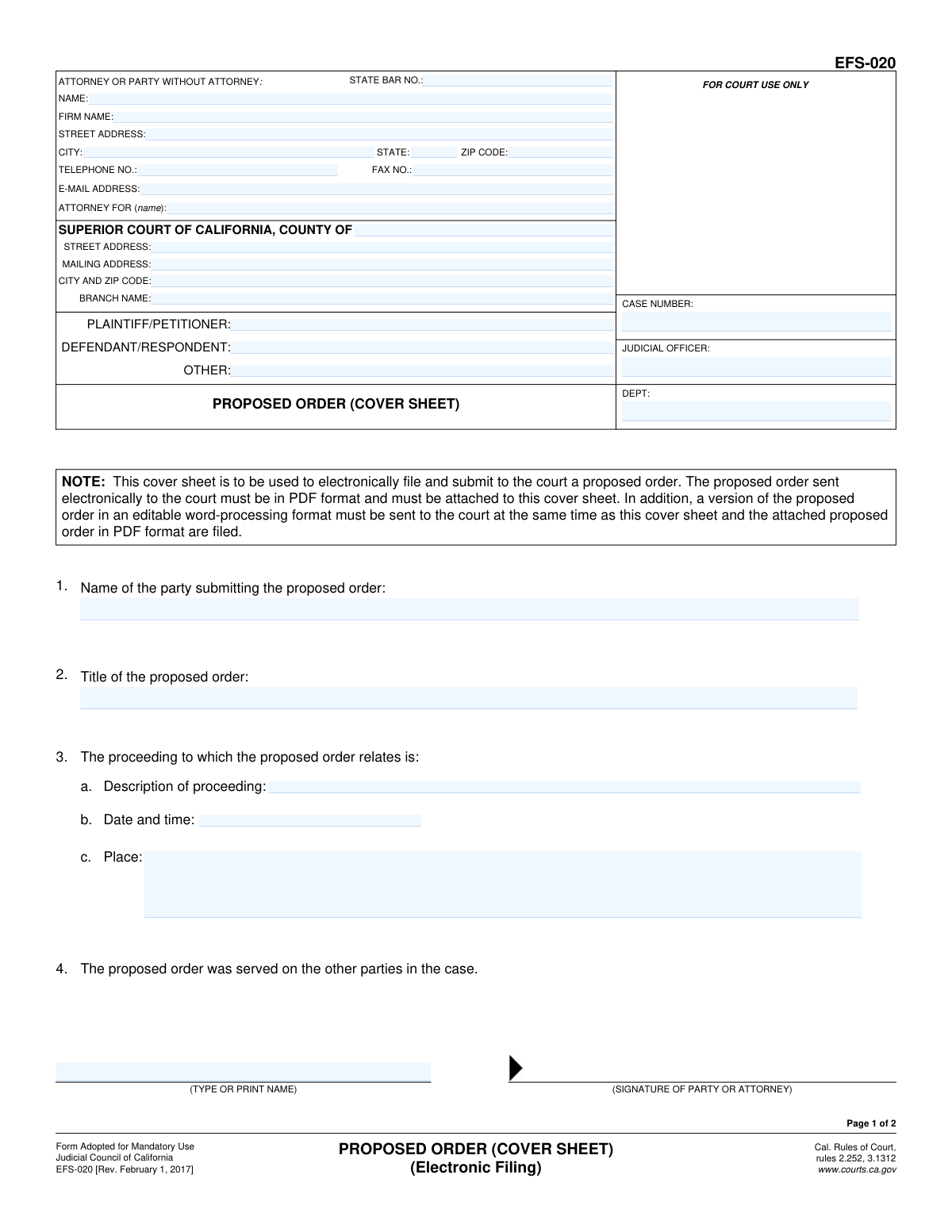
Validates that the field 'Name of the party submitting the proposed order' (Item 1) is not empty. The court needs to know which party is proposing the order to properly process the request and attribute the filing. A missing submitter name makes the form incomplete and ambiguous.
And 8 more checks
- Requires Title of Proposed Order
- Validates Proceeding Date and Time Format
- Requires Declarant's Address for Proof of Service
- Validates Date of Electronic Service
- Requires Declaration Date on Proof of Service
- Confirms Required Attachments are Present
- Ensures Attorney Information is Complete
- Validates Logical Consistency of Service and Declaration Dates
Let AI fill out your EFS-020
No typing. Every field filled in seconds, checked, ready to sign.
How to Fill Out EFS-020 Online for Free in 2026
What the AI walks you through.
- Navigate to Instafill.ai and upload or select Form EFS-020, the Proposed Order (Cover Sheet).
- Use the AI assistant to input the case number, judicial officer, and department for the specific court case.
- Provide your information as the attorney or party without an attorney, including your name, State Bar number, firm name, and contact details.
- Enter the details of the Superior Court of California, including the county, address, and branch name, as well as the names of the plaintiff and defendant.
- Describe the proposed order by stating the submitting party's name, the title of the order, and the details of the proceeding it relates to.
- Complete the 'Proof of Electronic Service' section on page two, specifying who was served, their electronic address, and the date of service.
- Review all the information for accuracy, then download the completed EFS-020 to file electronically with the court, along with the required attachments.
Common Mistakes in Completing EFS-020
The ones the AI is built to catch.
Forgetting to Attach Both PDF and Editable Order Versions
Entering an Incorrect or Incomplete Case Number
Using a Generic Title for the Proposed Order
Party to the Case Signing the Proof of Service
Providing Incomplete Court Location Details
Omitting Details of the Related Proceeding
Incomplete Proof of Electronic Service Information
Using Inconsistent Plaintiff/Defendant Names
Missing Signatures or Dates
Incorrectly Identifying the Submitting Party
Frequently Asked Questions About EFS-020
Is it really free for 7 days?
Can I fill other forms too?
How do I cancel?
How does the AI fill out EFS-020?
What happens to my information?
How complex is EFS-020 to fill out?
What is the purpose of Form EFS-020, the Proposed Order (Cover Sheet)?
Who needs to fill out this form?
What documents must I submit along with this cover sheet?
Why do I have to provide the proposed order in both PDF and an editable format?
What is the 'Proof of Electronic Service' on page 2 for?
Do I have to serve the other parties before I file the proposed order with the court?
How do I submit Form EFS-020?
Can I use this form if I am filing my documents in person or by mail?
What information goes in the 'Description of proceeding' field?
What happens after I submit the proposed order?
Can AI tools help me fill out Form EFS-020?
How can I fill out this form online?
The PDF version of this form I found is not fillable. What can I do?
Get your EFS-020 filled out by AI
$0 today. Cancel before Nov 1 and you pay nothing.
Other forms like this one
California court forms: Judicial Council of California Form SC-105, Request for Court Order and Answer (Small Claims), Judicial Council of California Form SC-120, Defendant’s Claim and ORDER to Go to Small Claims Court (Small Claims), Judicial Council of California Form SER-001, Request for Sheriff to Serve Court Papers, Judicial Council of California Form SER-001, Request for Sheriff to Serve Court Papers, Affidavit for Collection of Personal Property California Probate Code Section 13100, Form POS-040, Proof of Service—Civil, Declaration of Facts of Death (California Superior Court), declaration-of-marriage-for-court-proceeding-california-family-law, ADOPT-200, Adoption Request, ADOPT-200, Stepparent Adoption Request, ADOPT-210, Adoption Agreement, ADOPT-310, Contact After Adoption Agreement, Judicial Council of California Form ADOPT-200, Adoption Request, Form ADR-107, Mediation Attendance Sheet, Form ADR-110, Order Appointing Referee, Form ADR-109, Stipulation or Motion for Order Appointing Referee, Form ADR-102, Request for Trial De Novo After Judicial Arbitration, Form ADR-108, Referee's Report (Code Civ. Proc., §§ 638, 639), Form ADR-106, Petition to Confirm, Correct, or Vacate Contractual Arbitration Award, Form ADR-104, Rejection of Award and Request for Trial After Attorney-Client Fee Arbitration
court filing forms: Debtor’s(s’) Chapter 13 Plan (Containing a Motion for Valuation), Form MC 98, Statement of Grievance Regarding e-Filing Access Plan, Form MC 502, Notice of Filing of Transcript and Affidavit of Mailing, Form MC 503, Motion to Change Time for Filing Transcript on Appeal, Form MC 514, Receipt of Prepaid Filing Fees for MiFILE Transaction, Form EFS-005-JV/JV-141, Electronic Service: Consent, Withdrawal of Consent, Address Change (Juvenile), Form EFS-006, Withdrawal of Consent to Electronic Service (Electronic Filing and Service), Form EFS-005-CV, Consent to Electronic Service and Notice of Electronic Service Address, Judicial Council of California, Form EFS-007, Request for Exemption from Mandatory Electronic Filing and Service, Form EFS-010, Notice of Change of Electronic Service Address, Form EFS-008, Order of Exemption from Mandatory Electronic Filing and Service, Form VL-125, Order on Application to Vacate Prefiling Order and Remove Plaintiff/Petitioner from Judicial Council Vexatious Litigant List, Form VL-120, Application for Order to Vacate Prefiling Order and Remove Plaintiff/Petitioner From Judicial Council Vexatious Litigant List, Form VL-100, Prefiling Order—Vexatious Litigant, New Jersey Judiciary, Appellate Division, Request for Extension of Transcript Filing, New Jersey Judiciary – Tax Court Supplemental eCourts Proof of Service (used for service after electronic filing), Victim’s Assistance and Survivor Protection Act (VASPA) Filing Packet, Superior Court of Arizona in Maricopa County, Protected Address Request for eFiling Only
Let AI fill out your EFS-020
Your trial starts once a card is added. You pay nothing before Nov 1.
Our AI already knows this form, all 41 fields of it. Skip the typing: tell it about yourself, or upload what you have, and it fills the whole form in seconds.
- AI fills every field on both pages, checkboxes included
- No typing into boxes: answer a few questions, or upload a document you already have, an old copy of this form, a photo of a document
- The AI checks the answers; you review and change anything before you download
- Download the finished PDF, print it, or sign it online
- Encrypted, and never used to train AI
Cancel before Nov 1 and you pay nothing.
A card is needed to start the trial. Cancel in two clicks from your account.
Terms · Privacy