
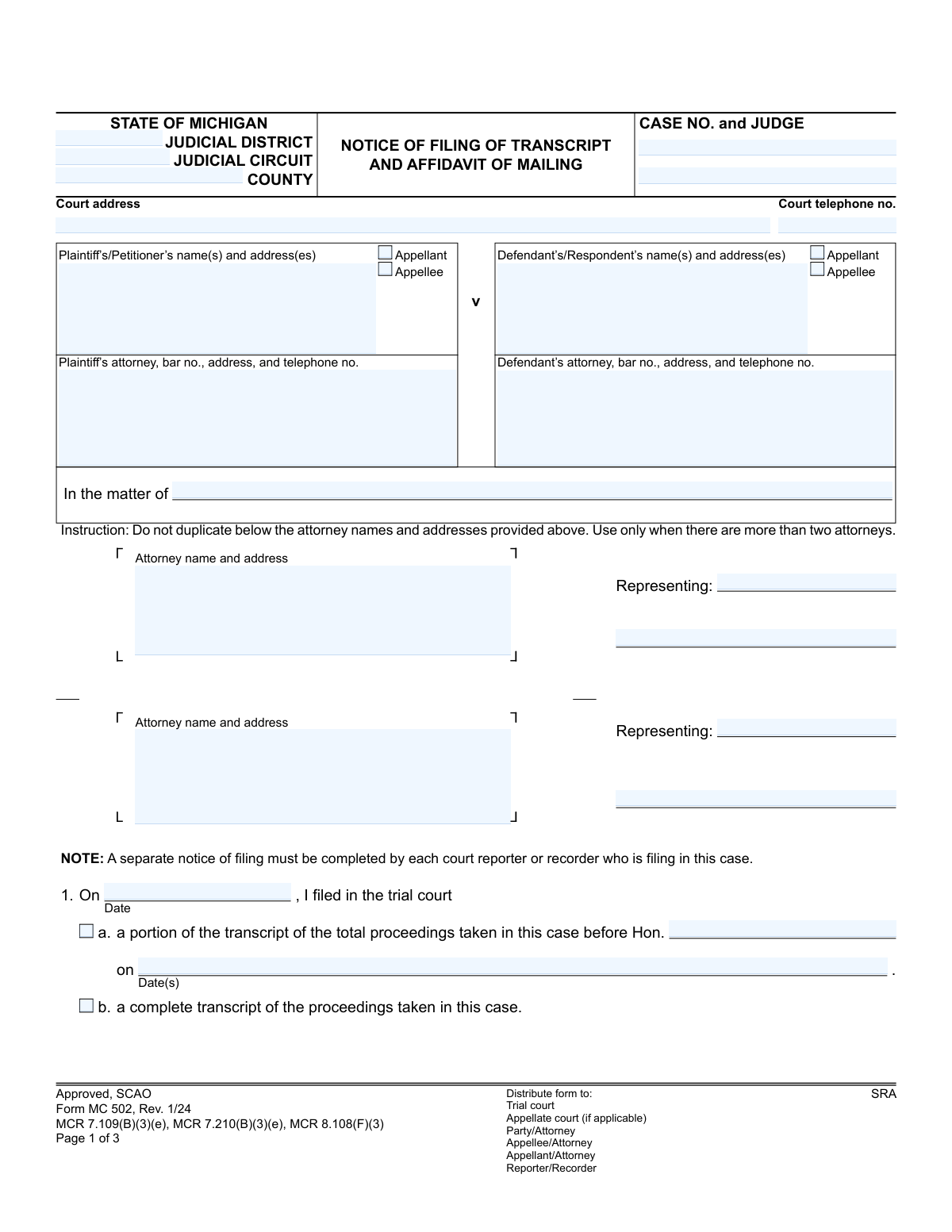
Yes! You can use AI to fill out Form MC 502, Notice of Filing of Transcript and Affidavit of Mailing
Don't type 77 fields by hand. Tell our AI about yourself, or upload a document you already have, and it fills every field in seconds. You check it, then download, print or sign.
The AI does the filling. You just check it.
No typing into boxes, nothing to install.
What this form asks for
The AI fills all of it, from your answers or your documents.
The AI checks your answers before you download
14 checks built for this form, so a wrong date or a missing answer is caught before anyone else sees it.
This check ensures that the user selects either checkbox 'a' (a portion of the transcript) or checkbox 'b' (a complete transcript), but not both. This is crucial for clarity on what has been filed with the court. If both or neither are selected, the form is ambiguous and should be rejected for correction.
This validation triggers if the user selects 'a. a portion of the transcript.' It verifies that the corresponding fields for the Judge's name ('Hon.') and the date(s) of the proceedings are filled. Without this information, the filing is incomplete and does not specify which part of the proceedings the transcript covers.
This check confirms that the 'Case No.' entered on page 1, page 2, and page 3 are identical. This is a critical data integrity check to ensure all pages of the document pertain to the same legal case. A mismatch could lead to misfiling and significant legal complications.
This validation ensures the 'notified all parties date' on page 2 is on or after the transcript 'filing date' on page 1. It is logically impossible to notify parties of a filing before the filing has occurred. This check prevents clerical errors and ensures the timeline of events is legally sound.
This check verifies that the notary public's commission expiration date is after the 'Subscribed and sworn to before me' date. A notary cannot perform a valid notarial act with an expired commission. This validation is essential for the legal validity of the affidavit.
For each party listed in the 'Affidavit of Mailing' section on page 3, this check ensures that exactly one method of service (e.g., personal service, first-class mail) has been selected. Failing to indicate the method of service invalidates the proof of service for that party. The system should require one selection per listed recipient.
And 8 more checks
- Required Signature Presence
- Attorney Bar Number Format
- Appellant/Appellee Designation Logic
- Completeness of Reporter/Recorder Details
- Logical Date Sequence for Mailing and Notarization
- Court Telephone Number Format
- Completeness of Case Header Information
- Completeness of Party Information
Let AI fill out your MC 502
No typing. Every field filled in seconds, checked, ready to sign.
How to Fill Out MC 502 Online for Free in 2026
What the AI walks you through.
- Navigate to Instafill.ai and upload or select the MC 502 form.
- Use the AI assistant to automatically populate case details such as the court address, case number, judge, and party information.
- Enter the date the transcript was filed and specify whether it is a complete or partial transcript of the proceedings.
- Complete the Affidavit of Mailing section by indicating which parties were served, the date of service, and the method of delivery (e.g., personal service, first-class mail).
- Digitally sign and date the form in the designated reporter/recorder signature fields.
- If required, have the affidavit notarized. The form includes a section for a notary public's signature and seal.
- Review all entered information for accuracy before downloading, printing, and distributing the completed form to the court and all relevant parties.
Common Mistakes in Completing MC 502
The ones the AI is built to catch.
Inconsistent or Missing Case Number
Incorrectly Identifying Appellant/Appellee
Ambiguous Transcript Description in Section 1
Omitting Details for Partial Transcript Filing
Missing Court Reporter/Recorder Certification Number
Incomplete Affidavit of Mailing
Incorrectly Marking the Method of Service
Failing to Attach Required Mail Receipts
Improper Notarization of the Affidavit
Incomplete Notary Public Information
Frequently Asked Questions About MC 502
Is it really free for 7 days?
Can I fill other forms too?
How do I cancel?
How does the AI fill out MC 502?
What happens to my information?
How complex is MC 502 to fill out?
What is the purpose of Form MC 502, Notice of Filing of Transcript?
Who is responsible for filling out and filing this form?
What is the difference between the 'Notice of Filing' and the 'Affidavit of Mailing'?
What information do I need to have ready to complete this form?
Do I need to file a complete transcript, or can it be a portion?
Does the Affidavit of Mailing need to be notarized?
Who gets a copy of the completed Form MC 502?
What do 'Appellant' and 'Appellee' mean?
What should I do if there are more than two attorneys in the case?
Can I use an AI tool to help me fill out this form?
How can I fill out Form MC 502 online?
My PDF copy of this form is not fillable. What can I do?
Get your MC 502 filled out by AI
$0 today. Cancel before Nov 10 and you pay nothing.
Other forms like this one
Michigan court forms: Form MC 03, Answer, Civil, Form MC 02, Appearance, Form MC 6, Notice to Appear, Form MC 01, Summons, State of Michigan, Form MC 01a, Complaint, Form MC 01b, Motion for Second Summons and Order, State of Michigan Blank Court Form, Form MC 07, Default Request and Entry, Form MC 07a, Default Request, Entry, and Judgment (Sum Certain), Form MC 09, Dismissal, Form MC 09a, Dismissal, Nonservice/No Progress, Form MC 10, Judgment, Civil, Form MC 11, Subpoena, Order to Appear and/or Produce, Request and Writ for Garnishment (Periodic), Form MC 13, Request and Writ for Garnishment (Nonperiodic), Form MC 14, Garnishee Disclosure, Form MC 15, Motion and Affidavit for Installment Payments/To Amend Order for Installment Payments, Form MC 15a, Order Regarding Installment Payments, Form MC 16, Motion to Set Aside Order for Installment Payments, State of Michigan, Form MC 16a, Order on Motion to Set Aside Order for Installment Payments
court filing forms: Debtor’s(s’) Chapter 13 Plan (Containing a Motion for Valuation), Form MC 98, Statement of Grievance Regarding e-Filing Access Plan, Form MC 503, Motion to Change Time for Filing Transcript on Appeal, Form MC 514, Receipt of Prepaid Filing Fees for MiFILE Transaction, Form EFS-005-JV/JV-141, Electronic Service: Consent, Withdrawal of Consent, Address Change (Juvenile), Form EFS-006, Withdrawal of Consent to Electronic Service (Electronic Filing and Service), Form EFS-020, Proposed Order (Cover Sheet), Form EFS-005-CV, Consent to Electronic Service and Notice of Electronic Service Address, Judicial Council of California, Form EFS-007, Request for Exemption from Mandatory Electronic Filing and Service, Form EFS-010, Notice of Change of Electronic Service Address, Form EFS-008, Order of Exemption from Mandatory Electronic Filing and Service, Form VL-125, Order on Application to Vacate Prefiling Order and Remove Plaintiff/Petitioner from Judicial Council Vexatious Litigant List, Form VL-120, Application for Order to Vacate Prefiling Order and Remove Plaintiff/Petitioner From Judicial Council Vexatious Litigant List, Form VL-100, Prefiling Order—Vexatious Litigant, New Jersey Judiciary, Appellate Division, Request for Extension of Transcript Filing, New Jersey Judiciary – Tax Court Supplemental eCourts Proof of Service (used for service after electronic filing), Victim’s Assistance and Survivor Protection Act (VASPA) Filing Packet, Superior Court of Arizona in Maricopa County, Protected Address Request for eFiling Only
Let AI fill out your MC 502
Your trial starts once a card is added. You pay nothing before Nov 10.
Our AI already knows this form, all 77 fields of it. Skip the typing: tell it about yourself, or upload what you have, and it fills the whole form in seconds.
- AI fills every field on all 3 pages, checkboxes included
- No typing into boxes: answer a few questions, or upload a document you already have, an old copy of this form, a photo of a document
- The AI checks the answers; you review and change anything before you download
- Download the finished PDF, print it, or sign it online
- Encrypted, and never used to train AI
Cancel before Nov 10 and you pay nothing.
A card is needed to start the trial. Cancel in two clicks from your account.
Terms · Privacy