
Yes! You can use AI to fill out Form APP-002, Notice of Appeal/Cross-Appeal (Unlimited Civil Case)
Don't type 44 fields by hand. Tell our AI about yourself, or upload a document you already have, and it fills every field in seconds. You check it, then download, print or sign.
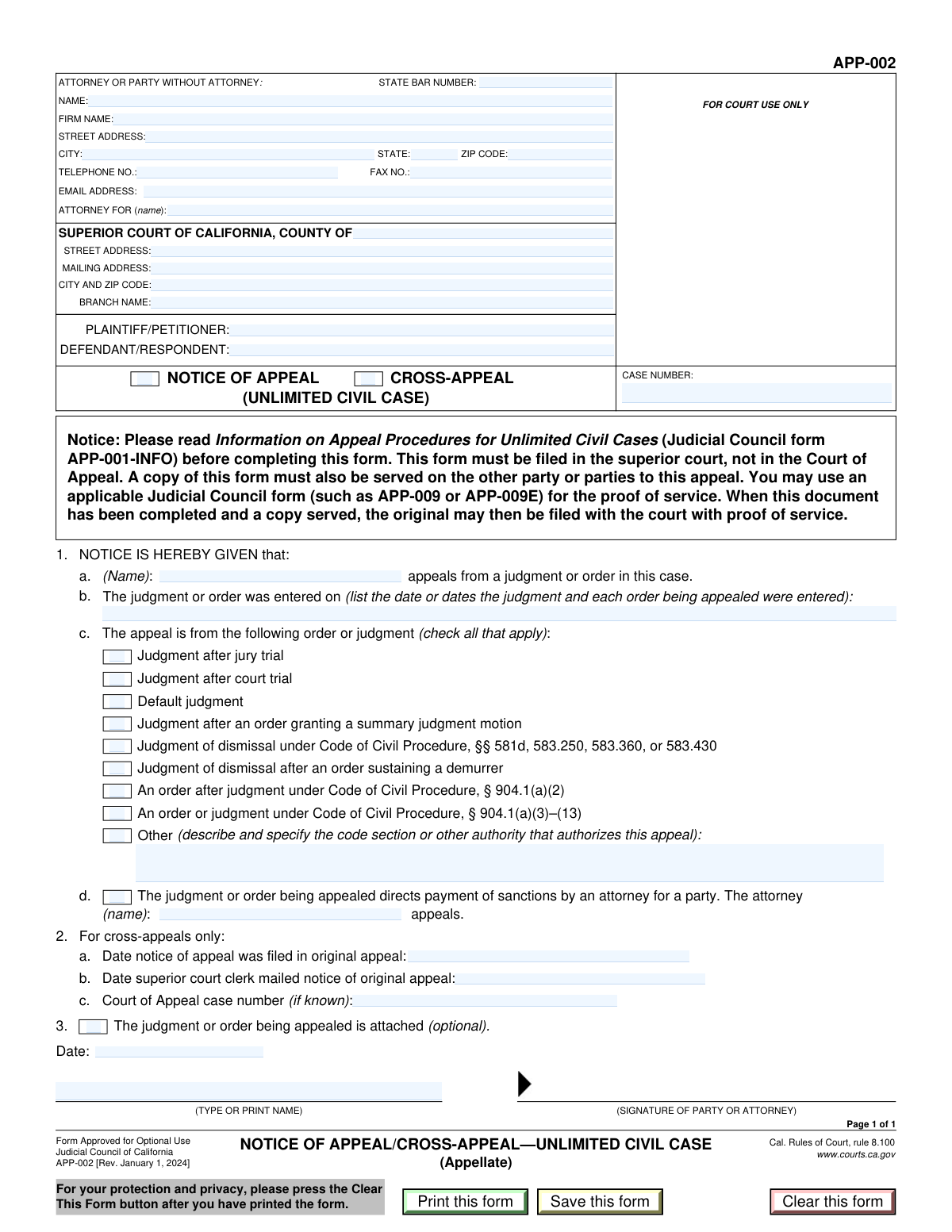
The AI does the filling. You just check it.
No typing into boxes, nothing to install.
What this form asks for
The AI fills all of it, from your answers or your documents.
The AI checks your answers before you download
13 checks built for this form, so a wrong date or a missing answer is caught before anyone else sees it.
This check ensures that the user selects either 'Notice of Appeal (Unlimited Civil Case)' or 'Cross-Appeal', but not both. These two appeal types are mutually exclusive and selecting both would create a logical conflict in the filing. If both are selected, the form should display an error prompting the user to choose only one.
This validation verifies that the 'Appellant Name' provided in the 'Notice Information' section exactly matches one of the parties listed as either 'Plaintiff/Petitioner' or 'Defendant/Respondent'. This is critical to ensure the appealing party is a valid party to the original case. A mismatch could lead to the rejection of the appeal.
This check enforces a conditional rule: if the 'Other' checkbox is selected under 'Reason for Appeal', the corresponding text field 'Other Reason for Appeal' must not be empty. This ensures that when a non-standard reason for appeal is chosen, a proper description and legal authority are provided as required. Failure to provide a description would make the filing incomplete.
This validation ensures that if the 'Cross-Appeal' checkbox is selected, the 'Date Notice of Appeal Filed in Original Appeal' and 'Date Superior Court Clerk Mailed Notice of Original Appeal' fields are both completed. These dates are essential for establishing the timeliness and context of the cross-appeal. If the box is checked but the dates are missing, the form is incomplete.
This check validates that the 'Judgment or Order Entry Dates' field contains a validly formatted date that occurs on or before the current date. A future date is not logically possible for a judgment that has already been entered. This prevents data entry errors and ensures the timeline of events is accurate.
This validation ensures that at least one checkbox is selected from the 'Reason for Appeal' section. The form requires a specific legal basis for the appeal to be identified. If no reason is selected, the court will not know the grounds for the appeal, leading to its rejection.
And 7 more checks
- Conditional Requirement for Sanctioned Attorney Name
- Attorney Representation Identification
- Case Number Format and Presence
- Signature Date Logical Check
- Signer Name Consistency
- Email Address Format Validation
- State and Zip Code Format Validation
Let AI fill out your APP-002
No typing. Every field filled in seconds, checked, ready to sign.
How to Fill Out APP-002 Online for Free in 2026
What the AI walks you through.
- Navigate to Instafill.ai and upload your Form APP-002 or select it from the template library.
- Provide your information as the attorney or self-represented party, including your name, address, and State Bar number if applicable.
- Enter the Superior Court information, including the county and branch name, and input the case name and number.
- Specify the appellant's name and indicate whether you are filing a Notice of Appeal or a Cross-Appeal, providing the date(s) of the judgment or order being appealed.
- Select the specific reason for the appeal from the provided list, such as a judgment after a jury trial or an order after judgment, describing it further if 'Other' is chosen.
- Indicate if sanctions are involved and if the judgment or order is attached to the notice.
- Review all entered information for accuracy, then date and sign the document before downloading it for filing with the court.
Common Mistakes in Completing APP-002
The ones the AI is built to catch.
Entering an Incorrect Judgment or Order Entry Date
Confusing an Appeal with a Cross-Appeal
Failing to Attach the Appealed Judgment or Order
Incomplete or Vague 'Other' Reason for Appeal
Using Inconsistent or Incorrect Party Names
Omitting the 'Attorney For' Name
Incorrect Court Branch Information
Missing or Invalid Signature and Date
Confusing the Appellant with the Attorney
Failing to Identify the Sanctioned Attorney
Frequently Asked Questions About APP-002
Is it really free for 7 days?
Can I fill other forms too?
How do I cancel?
How does the AI fill out APP-002?
What happens to my information?
How complex is APP-002 to fill out?
What is the purpose of the Notice of Appeal (Unlimited Civil Case) form?
Who needs to fill out this form?
What is the difference between a 'Notice of Appeal' and a 'Cross-Appeal'?
What information do I need to have ready before I start filling out the form?
Do I need to attach any other documents to this form?
What should I do if my reason for appealing is not listed in the checkboxes?
Can I file this form if I do not have an attorney?
Where do I find the 'Judgment or Order Entry Dates'?
What does the 'Sanctions' section refer to?
Where do I submit this form once it's completed?
Can AI help me fill out this Notice of Appeal form?
How can I fill this form out online?
What can I do if the PDF form I have is not fillable?
Get your APP-002 filled out by AI
$0 today. Cancel before Nov 18 and you pay nothing.
Other forms like this one
civil appeal forms: Designation of Record on Appeal (Civil) (Maricopa County Justice Courts, Arizona) (Form APP 8150-702), Civil Appeal Case Information Statement, Form APP-005, Abandonment of Appeal (Unlimited Civil Case), Form APP-010, Respondent's Designation of the Record on Appeal (Unlimited Civil Case), Form APP-003, Notice Designating Record on Appeal (Unlimited Civil Case), Form APP-014, Appellant's Proposed Statement on Appeal (Unlimited Civil Case), Form APP-103, Appellant's Notice Designating Record on Appeal (Unlimited Civil Case), Form APP-015, Order on Proposed Statement on Appeal (Limited Civil Case), Form APP-014, Appellant's Proposed Statement on Appeal (Limited Civil Case), Form APP-004, Civil Case Information Statement—Appeal (Unlimited Civil Case), Form APP-110, Respondent's Notice of Election/Designation of Record on Appeal (Limited Civil Case), Form APP-104, Appellant's Proposed Statement on Appeal (Limited Civil Case), Judicial Council of California, Form APP-102, Notice of Appeal/Cross-Appeal—Limited Civil Case
Let AI fill out your APP-002
Your trial starts once a card is added. You pay nothing before Nov 18.
Your bank declined that card, so the trial did not start and nothing was charged. Please try another card.
Our AI already knows this form, all 44 fields of it. Skip the typing: tell it about yourself, or upload what you have, and it fills the whole form in seconds.
- AI fills every field on the form, checkboxes included
- No typing into boxes: answer a few questions, or upload a document you already have, an old copy of this form, a photo of a document
- The AI checks the answers; you review and change anything before you download
- Download the finished PDF, print it, or sign it online
- Encrypted, and never used to train AI
Cancel before Nov 18 and you pay nothing.
A card is needed to start the trial. We check it with a $19.99 hold that is released right away. Cancel in two clicks from your account.
Terms · Privacy