
Instafill.ai
7 days free
AI form filling · 15 fields · 1 page · done in seconds

Yes! You can use AI to fill out MC 282a, Domestic Violence Screening

Don't type 15 fields by hand. Tell our AI about yourself, or upload a document you already have, and it fills every field in seconds. You check it, then download, print or sign.
7 days free, then $19.99/month · Cancel anytime
AI fills it, no typingEncrypted, never used to train AICancel in two clicks
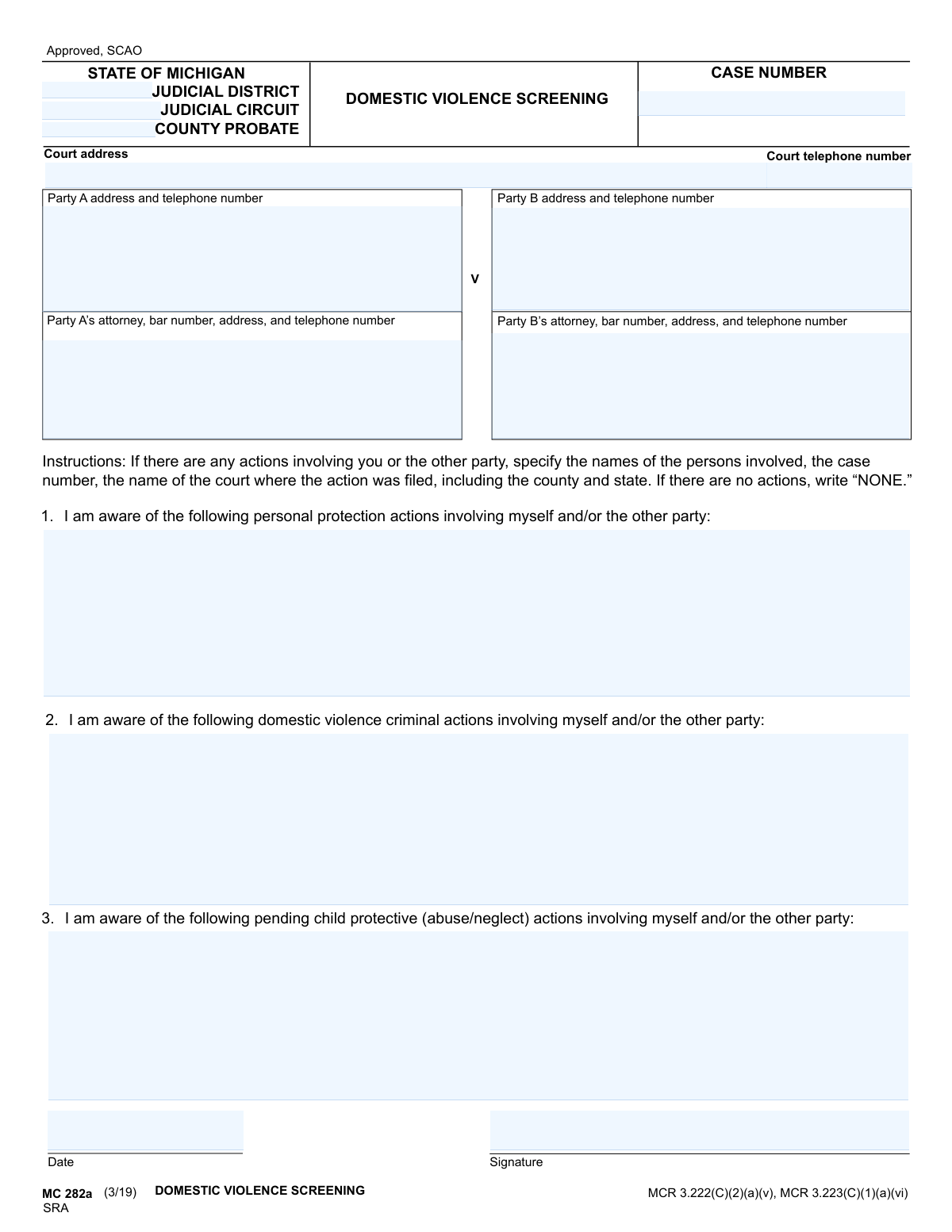
MC 282a, Domestic Violence Screening, page 1
Simple · 28/100Form Complexity Index

The AI does the filling. You just check it.

No typing into boxes, nothing to install.

Tell the AI about youAnswer a few questions in plain words, or upload a document you already have. That is all the typing there is.
AI fills every field in secondsIt puts each answer in the right box on every page, checkboxes included.
Check it and downloadReview every field, change anything, then download, print or sign the PDF.

What this form asks for

The AI fills all of it, from your answers or your documents.

The MC 282a is a State of Michigan court form used to screen for domestic violence in judicial proceedings. It requires parties to disclose any past or pending personal protection orders, domestic violence criminal actions, or child protective cases involving themselves or the other party. This information is crucial for the court to ensure the safety of all involved and make informed decisions. Today, this form can be filled out quickly and accurately using AI-powered services like Instafill.ai, which can also convert non-fillable PDF versions into interactive fillable forms.
Fillable fields15
Pages1
Form Complexity IndexSimple, 28/100

The AI checks your answers before you download

12 checks built for this form, so a wrong date or a missing answer is caught before anyone else sees it.

Validates Michigan Case Number Format

This check ensures the 'Case Number' field conforms to the standard Michigan court case numbering format, which typically includes the year and a unique identifier. This is critical for correctly identifying and filing the document within the court's system. An invalid format could lead to the document being rejected or misfiled, causing significant delays in the legal process.

Ensures Court Jurisdiction is Specified

This validation verifies that at least one of the 'Judicial District,' 'Judicial Circuit,' or 'County Probate' fields is completed. Specifying the jurisdiction is mandatory for the court to accept and process the screening document. Failure to provide this information makes it impossible to determine the correct court, leading to immediate rejection of the form.

Validates Court Telephone Number Format

This check ensures the 'Court telephone number' is a valid 10-digit phone number, including area code, with optional formatting. A correct phone number is essential for parties or attorneys who may need to contact the court for information regarding the case. An invalid number hinders communication and can cause confusion.

Requires Party A's Address and Telephone Number

This validation confirms that the 'Party A address and telephone number' field is not empty and contains both address and phone number components. This contact information is fundamental for all official correspondence and service of process. Missing this information would halt the legal process, as the court and other parties would have no way to contact Party A.

Requires Party B's Address and Telephone Number

This validation confirms that the 'Party B address and telephone number' field is not empty. Similar to Party A, this contact information is essential for serving legal documents and ensuring all parties can be reached. An omission could violate due process rights and lead to case dismissal or delays.

Validates Attorney Bar Number Format

If an attorney is listed for either Party A or Party B, this check validates that the bar number provided follows the official state format (e.g., a 'P' followed by numbers for Michigan). The bar number uniquely identifies the attorney and confirms their license to practice law. An incorrect bar number could indicate an error or misrepresentation, and the filing may be rejected until corrected.

And 6 more checks
  • Ensures Personal Protection Actions Field is Not Blank
  • Ensures Domestic Violence Actions Field is Not Blank
  • Ensures Child Protective Actions Field is Not Blank
  • Verifies Signature Field is Completed
  • Validates Signature Date Format and Plausibility
  • Ensures Completeness of Attorney Information

Let AI fill out your MC 282a

No typing. Every field filled in seconds, checked, ready to sign.

7 days free, then $19.99/month · Cancel anytime

How to Fill Out MC 282a Online for Free in 2026

What the AI walks you through.

  1. Navigate to Instafill.ai and upload the MC 282a form or select it from their template library.
  2. Provide your personal information for Party A or Party B, including your address and attorney details if applicable.
  3. Enter the specific court and case information, such as the judicial district, county, and case number, into the designated fields.
  4. Carefully answer the three screening questions, providing details about any personal protection, domestic violence, or child protective actions as requested.
  5. If there are no relevant actions to report for a specific question, write "NONE" in the corresponding section as instructed on the form.
  6. Review all the information populated by the AI to ensure it is accurate and complete.
  7. Electronically sign and date the form before downloading the completed document for filing with the court.

Common Mistakes in Completing MC 282a

The ones the AI is built to catch.

Incomplete or Incorrect Court Identification
Users often leave the 'Judicial District,' 'Judicial Circuit,' or 'County Probate' fields blank or guess the information. This happens because they may not know which court has jurisdiction for their specific case. An incorrect filing can lead to rejection of the document and significant delays, requiring the filer to start the process over in the correct jurisdiction. To avoid this, always verify the exact court name and division from existing case documents or by contacting the court clerk's office before filling out the form.
Leaving Action Sections Blank Instead of Writing 'NONE'
The form explicitly instructs users to write 'NONE' if there are no prior actions to report, but many people leave these sections blank instead. A blank field is ambiguous and may be interpreted as an oversight, causing the court to question if the form is complete. This can lead to rejection or a request for clarification, delaying the case. To prevent this, carefully read all instructions and write 'NONE' in sections 1, 2, and 3 if you have no relevant actions to list.
Providing Vague Details of Prior Actions
When listing a prior action, filers might write a vague description like 'PPO case last year' without the required details. The instructions demand specific information: names, case number, and the full court name, county, and state. Vague information is not actionable for the court and defeats the purpose of the screening, potentially weakening a party's position. Before filling out the form, gather all relevant legal documents to ensure you can provide the complete and accurate case number and court information for each action listed.
Confusing Party A and Party B Roles
Individuals often get confused about whether they are 'Party A' or 'Party B,' especially if they are the respondent in a case. They may incorrectly fill their own information into the opposing party's section. This creates confusion for court staff and can lead to notices and official correspondence being sent to the wrong people. To avoid this, refer to the initial court filing (the complaint or petition) to confirm whether you are the petitioner/plaintiff (usually Party A) or the respondent/defendant (usually Party B).
Miscategorizing Prior Legal Actions
A common error is listing an action in the wrong section, such as putting a child protective services case (Section 3) into the domestic violence criminal actions section (Section 2). This occurs because the legal distinctions can be unclear to a layperson. Miscategorization can mislead the judge about the legal nature of past events, potentially impacting decisions on custody or safety. Carefully read the title of each section and place personal protection orders in section 1, criminal cases in section 2, and child abuse/neglect cases in section 3.
Submitting an Unsigned or Undated Form
Forgetting to sign or date the form is a frequent and critical error, often happening due to stress or haste. An unsigned or undated legal document is invalid and will be immediately rejected by the court clerk. This means the filing is not processed, and the clock on any legal timelines is not started, causing significant delays until a properly executed form is submitted. Always perform a final review of the entire document, paying special attention to the signature and date lines at the bottom before filing.
Using an Incorrect or Incomplete Case Number
Filers may enter the case number with a typo, omit the year prefix, or forget the case type suffix (e.g., '-DM'). Case numbers are complex, making them prone to data entry errors. An incorrect case number means the document cannot be electronically or manually linked to the correct case file, causing it to be rejected or lost in the system. To prevent this, meticulously copy the case number from an official court document or notice. AI-powered tools like Instafill.ai can help by storing and accurately auto-filling complex information like case numbers to prevent typos.
Omitting the Attorney's Bar Number
When a party is represented by an attorney, filers sometimes provide the attorney's name and address but omit their state bar number. The filer may not have this information handy or may not realize its importance. The bar number is a unique identifier required for official court records and communications. Its absence can delay processing as court staff may need to look it up, or it could cause issues with proper notification. Always ask your attorney for their full details, including their bar number, and keep it with your case paperwork.
Using Illegible Handwriting on a Printed Form
This form is often a non-fillable PDF, forcing users to print and complete it by hand, which can result in illegible entries. If court clerks cannot read names, addresses, or case numbers, the form is likely to be rejected. Even if accepted, it can lead to critical data entry errors, such as mailing notices to the wrong address. To ensure clarity, print neatly in block capitals. Alternatively, a service like Instafill.ai can convert the non-fillable PDF into an interactive, fillable form, allowing you to type your answers for perfect legibility before printing for signature.
Providing Outdated Contact Information
People may inadvertently list an old address or phone number for themselves or the other party, often filling it from memory. This is a critical mistake, as the court and opposing party use this information to serve official legal notices. Using outdated information can lead to missed court dates, default judgments, and other severe legal consequences because you were not properly notified. Always double-check and provide the most current, accurate address and telephone number for yourself and the last known good address for the other party.

Frequently Asked Questions About MC 282a


Is it really free for 7 days?
Yes. You pay $0 today. Cancel before Nov 11 and you are never charged. Keep it, and it is $19.99 a month for 5 fills of your MC 282a.
Can I fill other forms too?
This plan is for your MC 282a: your own AI agent fills it as often as 5 times a month. To fill other forms and upload your own, choose a Professional plan from your account.
How do I cancel?
From your account, in two clicks, any time. No email, no call.
How does the AI fill out MC 282a?
You answer a few questions in plain words, or upload a document you already have. The AI reads what you give it and puts each answer into the right field of MC 282a, on every page, in seconds. It checks the answers against the form's own rules, and you review and change anything before you download, print or sign.
What happens to my information?
It is encrypted in transit and at rest, and it is never used to train AI.
How complex is MC 282a to fill out?
MC 282a has a Form Complexity Index of 28 out of 100, in the simple tier: 15 fillable fields across 1 page. Instafill.ai's AI fills it in under a minute, with every field there for you to review before you download.
What is the purpose of the Domestic Violence Screening form (MC 282a)?
This form is used by Michigan courts to screen for any history of domestic violence, personal protection orders, or child protective actions involving the parties in a legal case, such as a divorce or custody dispute.
Who is required to fill out this form?
Typically, both parties (Party A and Party B) in a domestic relations case are required to complete and file this form with the court as part of their case proceedings.
What should I do if I have no past actions to report in a section?
The form instructions specify that if you are not aware of any relevant actions for a particular section, you should write the word "NONE" in that space.
What is the difference between a 'personal protection action' and a 'domestic violence criminal action'?
A personal protection action is a civil restraining order (PPO), while a domestic violence criminal action is a criminal case initiated by a prosecutor after an alleged crime has occurred.
What if I don't know the exact case number for a past action?
You should provide as much information as you can remember, such as the names of the persons involved, the approximate year, and the county and state where the case was filed.
Do I need to list actions that occurred in a different state?
Yes, you must disclose all relevant actions, regardless of the state in which they occurred. Be sure to specify the court, county, and state for each action listed.
What does 'pending child protective actions' mean?
This refers to any current and ongoing investigations or court cases involving a child welfare agency, like Child Protective Services (CPS), regarding allegations of child abuse or neglect.
Do I still need to list a case if it was dismissed?
Yes, you should list any actions you are aware of, even if they were later dismissed. The form asks for a history of filed actions, not just the final outcomes.
Where do I submit the completed Domestic Violence Screening form?
You must file the signed and dated form with the court handling your case, which is identified by the court address and case number at the top of the form.
Can AI tools help me complete this form?
Yes, services like Instafill.ai use AI to auto-fill form fields accurately and save time, which can be especially helpful for repetitive information like names and addresses.
How can I fill out this form online?
You can use a service like Instafill.ai to upload the MC 282a form and fill it out electronically. This allows you to type your answers directly before printing the completed form for signature.
The PDF of this form I downloaded is not fillable. What can I do?
If you have a non-fillable or 'flat' PDF, Instafill.ai can convert it into an interactive, fillable form. This makes it easy to complete on your computer without needing to print and write by hand.
Who are Party A and Party B?
Party A and Party B are the two main individuals involved in the court case. You will be one party, and the other person in your case (such as your spouse in a divorce) will be the other.
Encrypted in transit and at restNever used to train AIDelete your forms any time

Get your MC 282a filled out by AI

$0 today. Cancel before Nov 11 and you pay nothing.

Other forms like this one

domestic violence forms: Form DV-100, Request for Domestic Violence Restraining Order, Dakota County CDA New Admissions Informal Review Request Form (Housing Choice Voucher Program) and HUD Form 5382, Certification of Domestic Violence, Dating Violence, Sexual Assault, or Stalking, and Alternate Documentation, DV-100, Request for Domestic Violence Restraining Order (Domestic Violence Prevention), Form DV-200, Proof of Personal Service (CLETS) (Domestic Violence Prevention), Judicial Council of California Form DV-110, Temporary Restraining Order (CLETS-TRO) (Domestic Violence Prevention), Form DV-109, Notice of Court Hearing (Domestic Violence Prevention), Form DV-101, Description of Abuse (Domestic Violence Prevention), Form DV-108, Request for Orders to Prevent Child Abduction (Domestic Violence Prevention), Form DV-116, Order on Request to Continue Court Hearing (Temporary Restraining Order) (CLETS-TRO) (Domestic Violence Prevention), Form DV-130, Restraining Order After Hearing (Order of Protection) (Domestic Violence Prevention), Form DV-105, Request for Child Custody and Visitation Orders (Domestic Violence Prevention), Form DV-140, Child Custody and Visitation Order (Domestic Violence Prevention), Form DV-145, Order to Prevent Child Abduction (Domestic Violence Prevention), State of Michigan Form MC 282, Domestic Violence Screening for Referral to Mediation, Form CR-161, Criminal Protective Order—Other Than Domestic Violence (CLETS—CPO), Form CR-162, Order to Surrender Firearms, Firearm Parts, and Ammunition in Domestic Violence Case (CLETS—CPO), Form CR-102, Domestic Violence Plea Form With Waiver of Rights—Misdemeanor (Criminal), Form CR-160, Criminal Protective Order—Domestic Violence (CLETS—CPO), Form DV-120, Response to Request for Domestic Violence Restraining Order (Domestic Violence Prevention), Judicial Council of California, Form DV-177, Notice of Request for Release of Minor's Confidential Information (Domestic Violence Prevention)

Michigan court forms: Form MC 03, Answer, Civil, Form MC 02, Appearance, Form MC 6, Notice to Appear, Form MC 01, Summons, State of Michigan, Form MC 01a, Complaint, Form MC 01b, Motion for Second Summons and Order, State of Michigan Blank Court Form, Form MC 07, Default Request and Entry, Form MC 07a, Default Request, Entry, and Judgment (Sum Certain), Form MC 09, Dismissal, Form MC 09a, Dismissal, Nonservice/No Progress, Form MC 10, Judgment, Civil, Form MC 11, Subpoena, Order to Appear and/or Produce, Request and Writ for Garnishment (Periodic), Form MC 13, Request and Writ for Garnishment (Nonperiodic), Form MC 14, Garnishee Disclosure, Form MC 15, Motion and Affidavit for Installment Payments/To Amend Order for Installment Payments, Form MC 15a, Order Regarding Installment Payments, Form MC 16, Motion to Set Aside Order for Installment Payments, State of Michigan, Form MC 16a, Order on Motion to Set Aside Order for Installment Payments

7 days free, then $19.99/month · Cancel anytime