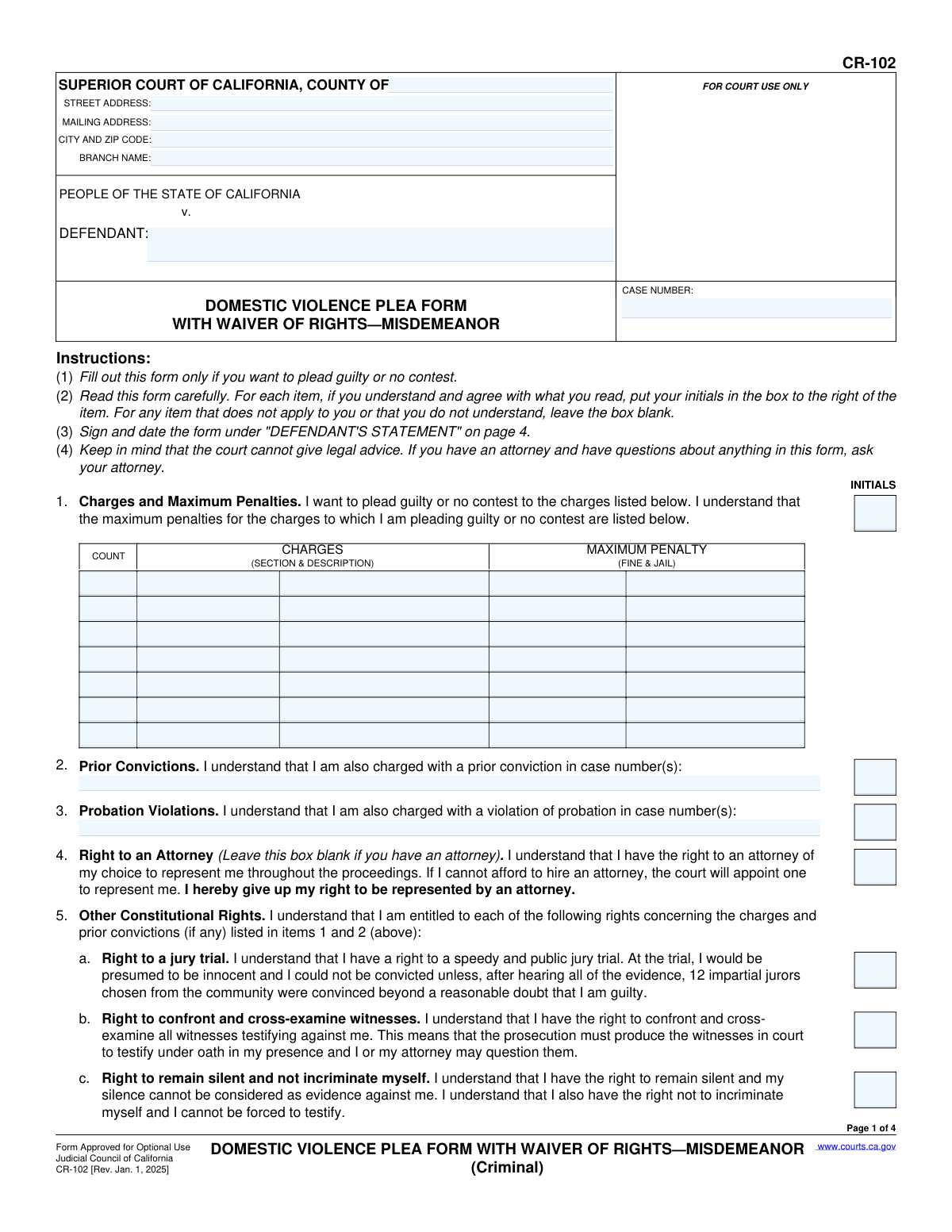
Yes! You can use AI to fill out Form CR-102, Domestic Violence Plea Form With Waiver of Rights—Misdemeanor (Criminal)

The California Form CR-102, Domestic Violence Plea Form With Waiver of Rights—Misdemeanor, is a critical legal document used in criminal court proceedings. It allows a defendant to formally enter a plea of guilty or no contest, while simultaneously documenting their understanding and voluntary waiver of key constitutional rights, such as the right to a jury trial and the right to remain silent. This ensures the plea is made knowingly and intelligently, outlining all potential consequences. Today, this form can be filled out quickly and accurately using AI-powered services like Instafill.ai, which can also convert non-fillable PDF versions into interactive fillable forms.
CR-102 is part of the California court forms and domestic violence forms categories on Instafill.
Our AI automatically handles information lookup, data retrieval, formatting, and form filling.
It takes less than a minute to fill out CR-102 using our AI form filling.
Securely upload your data. Information is encrypted in transit and deleted immediately after the form is filled out.

Form specifications

Form name: Form CR-102, Domestic Violence Plea Form With Waiver of Rights—Misdemeanor (Criminal)
Number of fields: 93
Number of pages: 1
Language: English
main-image

Instafill Demo: How to fill out PDF forms in seconds with AI

How to Fill Out CR-102 Online for Free in 2026

Are you looking to fill out a CR-102 form online quickly and accurately? Instafill.ai offers the #1 AI-powered PDF filling software of 2026, allowing you to complete your CR-102 form in just 37 seconds or less.
Follow these steps to fill out your CR-102 form online using Instafill.ai:
  1. 1 Navigate to Instafill.ai and upload the CR-102 form or select it from their library of templates.
  2. 2 Use the AI assistant to automatically fill in the court and case information, including the county, case number, and defendant's name.
  3. 3 Carefully review each item from section 1 through 9. Place your initials in the corresponding boxes to confirm you understand the charges, your constitutional rights, and the consequences of your plea.
  4. 4 In section 10, check the box to indicate whether you are pleading 'GUILTY' or 'NO CONTEST'.
  5. 5 Complete the 'DEFENDANT'S STATEMENT' on page 4 by typing or printing your name, signing, and dating the form.
  6. 6 If applicable, have your attorney and/or interpreter complete and sign their respective statements on the form.
  7. 7 Download the completed form and file it with the court as directed by your attorney or the judicial officer.

Our AI-powered system ensures each field is filled out correctly, reducing errors and saving you time.

Why Choose Instafill.ai for Your Fillable CR-102 Form?

Speed

Complete your CR-102 in as little as 37 seconds.

Up-to-Date

Always use the latest 2026 CR-102 form version.

Cost-effective

No need to hire expensive lawyers.

Accuracy

Our AI performs 10 compliance checks to ensure your form is error-free.

Security

Your personal information is protected with bank-level encryption.

Frequently Asked Questions About Form CR-102

This form is used by a defendant in California to plead guilty or no contest to a misdemeanor domestic violence charge. It documents that you understand the charges, the consequences, and the constitutional rights you are giving up by entering the plea.

Only a defendant who has decided to plead guilty or no contest in a misdemeanor domestic violence case should complete this form. It is critical to review this form with your attorney before filling it out.

A 'no contest' plea has the same criminal penalties as a guilty plea, but it generally cannot be used as an admission of fault in a related civil lawsuit. A guilty plea can be used against you in both criminal and civil cases.

Waiving your rights means you are voluntarily giving up key legal protections, including the right to a jury trial, the right to confront witnesses, and the right to remain silent. The form ensures you understand these rights before you give them up to enter a plea.

You must read each item and place your initials in the box only if you understand and agree with the statement. If you do not understand an item or it does not apply to your case, leave the box blank and ask your attorney for clarification.

Pleading guilty or no contest can have severe consequences for non-citizens, including deportation, denial of admission to the U.S., and denial of naturalization. It is essential to consult with an immigration attorney to understand the specific risks for your situation.

No, a conviction for misdemeanor domestic violence will prohibit you from owning, purchasing, or possessing firearms, firearm parts, and ammunition. This ban lasts for a minimum of 10 years under state and federal law and can be a lifetime ban.

If granted probation, you will be required to complete a minimum of 36 months of probation, obey a protective order, complete a 52-week batterer's treatment program, and pay various fines and fees. Other conditions like community service may also apply.

The form strongly advises you to have legal counsel, as you are waiving significant rights. If you cannot afford an attorney, the court is required to appoint one to represent you, and you should not fill out this form without their guidance.

After you and your attorney sign the form, you will present it to the judge, who will ask you questions to confirm you understand your plea. The court will then accept your plea, and it will be officially entered into the case record.

Yes, services like Instafill.ai use AI to help you accurately auto-fill your personal and case information, saving time and reducing errors. However, AI cannot provide legal advice, so you must consult your attorney about the legal consequences of your plea.

You can upload the CR-102 PDF to the Instafill.ai platform, which will make it an interactive, fillable form. You can then type your information directly into the fields, save it, and print it for signing and submission.

If you have a non-fillable or 'flat' PDF, you can use a service like Instafill.ai to convert it into an interactive form. This allows you to easily type your information instead of having to print and fill it out by hand.

Compliance CR-102
Validation Checks by Instafill.ai

1
Case Number Consistency
This check ensures that the 'CASE NUMBER' entered on page 1 is identical to the case numbers on all subsequent pages. Inconsistent case numbers can lead to the plea being filed under the wrong case, causing significant legal and administrative errors. If the numbers do not match, the form submission should be flagged for manual review and correction.
2
Defendant Name Consistency
Verifies that the 'Defendant' name is identical across all pages where it is required (pages 1, 2, 3, and 4). This is crucial for correctly identifying the individual entering the plea and maintaining the integrity of the court record. A mismatch could invalidate the form or associate the plea with the wrong individual.
3
Mandatory Plea Selection
Ensures that in Item 10, exactly one of the two options, 'GUILTY' or 'NO CONTEST', is selected. A plea form is invalid without a plea. This check prevents submissions that are ambiguous or incomplete, which would require the court to reject the form and delay proceedings.
4
Charge Information Completeness
Validates that for every row in the 'Charges' table (Item 1) where a 'COUNT' number is entered, the corresponding 'CHARGES (SECTION & DESCRIPTION)' and 'MAXIMUM PENALTY' fields are also filled. This ensures that the defendant is acknowledging a complete and specific charge. An incomplete row would make it unclear what charge the plea applies to.
5
Defendant's Statement Completion
Checks that the 'Date', 'TYPE OR PRINT NAME', and 'SIGNATURE OF DEFENDANT' fields in the 'DEFENDANT'S STATEMENT' section on page 4 are all completed. The defendant's signature and the date are fundamental to authenticating the plea and waiver of rights. An unsigned or undated form is legally invalid.
6
Attorney Representation Logic
This is a conditional check that verifies the logical consistency related to legal representation. If the 'ATTORNEY'S STATEMENT' on page 4 is signed, the system must confirm that the initials box for 'Right to an Attorney' (Item 4) is left blank, as instructed. Conversely, if the attorney statement is signed, the initials for 'Discussion with my attorney' (Item 8a) should be present.
7
Probation Violation Consistency
Verifies that if a case number is entered for 'Probation Violations' (Item 3), then the corresponding initials boxes for acknowledging rights and admitting the violation (Items 6 and 12) are also initialed. This ensures the defendant explicitly acknowledges and admits to the specific probation violations listed. Failure to do so would make the admission of violation ambiguous.
8
Interpreter Language Specification
This check applies if the 'INTERPRETER'S STATEMENT' on page 4 is used. If the 'Other' checkbox for language is selected, this validation ensures the adjacent text field specifying the language is not empty. This is critical for the court record to accurately reflect the language into which the form was translated, which is essential for verifying the defendant's understanding.
9
Core Constitutional Rights Waiver
Confirms that the defendant has initialed all three core constitutional rights being waived in Item 5: 'Right to a jury trial' (5a), 'Right to confront and cross-examine witnesses' (5b), and 'Right to remain silent' (5c). A plea is not knowing and intelligent without the explicit waiver of these fundamental rights. The form is invalid if any of these are missing.
10
Date Format and Plausibility
Validates that all date fields on the form (Defendant's, Attorney's, Interpreter's, and Court's statements) are in a valid format (e.g., MM/DD/YYYY) and represent a plausible, non-future date. This ensures data integrity and proper chronological recording of events. An invalid date format would cause data entry errors, and a future date is logically impossible.
11
Minimum Charge Requirement
Ensures that at least one full row in the 'Charges' table (Item 1) is completed. A plea form cannot be processed without at least one charge to which the defendant is pleading guilty or no contest. This check prevents the submission of an empty or purposeless form.
12
Conditional Prior Conviction Admission
Verifies that if a case number is provided in the 'Prior Convictions' section (Item 2), the defendant has also initialed the section to 'freely and voluntarily admit the prior convictions' (Item 11). This links the listed priors to a formal admission by the defendant. Without the corresponding initials, the admission is not formally recorded.

Common Mistakes in Completing CR-102

Inconsistent or Incomplete Case Information on Subsequent Pages

Defendants often fill out the case number and their name on the first page but forget to repeat this information in the headers of pages 2, 3, and 4. This oversight can lead to administrative chaos if pages are separated, causing filing delays or requiring the form to be redone. To avoid this, meticulously check the header of every single page before submission. AI-powered tools like Instafill.ai can prevent this by automatically populating recurring information across all pages of the document.

Incorrectly Initialing the 'Right to an Attorney' Waiver

Item 4 explicitly states, 'Leave this box blank if you have an attorney.' However, defendants represented by counsel frequently initial this box out of habit, creating a legal contradiction. This error forces the court to stop the proceedings to clarify whether the defendant is actually trying to fire their attorney and represent themselves, causing unnecessary delays and confusion.

Submitting an Illegible Handwritten Form

Many individuals print the non-fillable PDF and complete it by hand, resulting in illegible entries for critical data like case numbers, penal code sections, and names. A court clerk or judge may reject an unreadable form, forcing the entire process to start over. This can be avoided by using a tool like Instafill.ai, which can convert a flat PDF into a fillable version, ensuring all entries are typed, clear, and legible.

Blanket Initialing Without Full Comprehension

The form is a dense legal document where each initial signifies the waiver of a fundamental right. Under stress, individuals may initial every box without reading or understanding the severe, lifelong consequences related to firearms, child custody, and immigration (item 7). This undermines the legal standard that a plea must be knowing and voluntary, and can lead to future legal challenges. It is vital to have an attorney explain any point of confusion before initialing.

Omitting the Plea Selection in Item 10

Item 10 requires the defendant to check a box for either 'GUILTY' or 'NO CONTEST.' It is a surprisingly common and critical error to leave this section blank, check both boxes, or otherwise fail to make a clear selection. An ambiguous plea selection invalidates the entire purpose of the form, leading to immediate rejection by the court and halting the case.

Confusing Signature and Printed Name Fields

On page 4, the form requires both a legal signature and a separate printed name. People frequently make the simple mistake of signing on the 'print name' line or printing their name where the signature should go. This clerical error can cause the form to be rejected for failing to meet legal execution standards, requiring the defendant to complete and sign a new form.

Entering Inaccurate Prior Conviction Case Numbers

In items 2 and 3, defendants must list the exact case numbers for prior convictions or probation violations. Errors such as typos, transposed digits, or guessing the number are common. An incorrect case number makes the admission legally invalid for that specific prior, which can disrupt the negotiated sentence and require the plea to be amended and re-entered, causing significant delays.

Neglecting the Interpreter's Statement When Required

If an interpreter is used to translate the form for the defendant, the 'Interpreter's Statement' on page 4 must be fully completed and signed. Forgetting this step or leaving it incomplete raises serious due process concerns about whether the defendant truly understood the rights they were waiving. A judge is likely to reject the plea if there is any doubt about the defendant's comprehension.

Failing to Specify 'Other' Conditions of the Plea

The form contains 'Other' fields (e.g., items 7c(8) and 7i) for specifying unique, negotiated terms of the plea agreement, such as specific classes or no-contact order details. Failing to write these terms into the form means they are not officially part of the court record. This omission can lead to future disputes about the sentence, as the court will only enforce what is written in the plea agreement.

Misunderstanding the Consequences of a 'No Contest' Plea

Defendants sometimes select 'No Contest' (nolo contendere) under the false impression that it is a lesser form of guilt. While item 7a explains it cannot be used in a related civil case, defendants often fail to grasp that for all criminal purposes—including sentencing, immigration consequences, and future enhancements—it is identical to a guilty plea. This misunderstanding can lead to regret when the full consequences are realized.
Saved over 80 hours a year

“I was never sure if my IRS forms like W-9 were filled correctly. Now, I can complete the forms accurately without any external help.”

Kevin Martin Green

Your data stays secure with advanced protection from Instafill and our subprocessors

Robust compliance program

Transparent business model

You’re not the product. You always know where your data is and what it is processed for.

ISO 27001, HIPAA, and GDPR

Our subprocesses adhere to multiple compliance standards, including but not limited to ISO 27001, HIPAA, and GDPR.

Security & privacy by design

We consider security and privacy from the initial design phase of any new service or functionality. It’s not an afterthought, it’s built-in, including support for two-factor authentication (2FA) to further protect your account.

Fill out CR-102 with Instafill.ai

Worried about filling PDFs wrong? Instafill securely fills form-cr-102-domestic-violence-plea-form-with-waiver-of-rightsmisdemeanor-criminal forms, ensuring each field is accurate.

Related forms by category

California court forms Judicial Council of California Form SC-105, Request for Court Order and Answer (Small Claims), Judicial Council of California Form SC-120, Defendant’s Claim and ORDER to Go to Small Claims Court (Small Claims), Judicial Council of California Form SER-001, Request for Sheriff to Serve Court Papers, Judicial Council of California Form SER-001, Request for Sheriff to Serve Court Papers, Affidavit for Collection of Personal Property California Probate Code Section 13100, Form POS-040, Proof of Service—Civil, Declaration of Facts of Death (California Superior Court), declaration-of-marriage-for-court-proceeding-california-family-law, ADOPT-200, Adoption Request, ADOPT-200, Stepparent Adoption Request, ADOPT-210, Adoption Agreement, ADOPT-310, Contact After Adoption Agreement, Judicial Council of California Form ADOPT-200, Adoption Request, Form ADR-107, Mediation Attendance Sheet, Form ADR-110, Order Appointing Referee, Form ADR-109, Stipulation or Motion for Order Appointing Referee, Form ADR-102, Request for Trial De Novo After Judicial Arbitration, Form ADR-108, Referee's Report (Code Civ. Proc., §§ 638, 639), Form ADR-106, Petition to Confirm, Correct, or Vacate Contractual Arbitration Award, Form ADR-104, Rejection of Award and Request for Trial After Attorney-Client Fee Arbitration · + 169 more →
domestic violence forms Form DV-100, Request for Domestic Violence Restraining Order, Dakota County CDA New Admissions Informal Review Request Form (Housing Choice Voucher Program) and HUD Form 5382, Certification of Domestic Violence, Dating Violence, Sexual Assault, or Stalking, and Alternate Documentation, DV-100, Request for Domestic Violence Restraining Order (Domestic Violence Prevention), Form DV-200, Proof of Personal Service (CLETS) (Domestic Violence Prevention), Judicial Council of California Form DV-110, Temporary Restraining Order (CLETS-TRO) (Domestic Violence Prevention), Form DV-109, Notice of Court Hearing (Domestic Violence Prevention), Form DV-101, Description of Abuse (Domestic Violence Prevention), Form DV-108, Request for Orders to Prevent Child Abduction (Domestic Violence Prevention), Form DV-116, Order on Request to Continue Court Hearing (Temporary Restraining Order) (CLETS-TRO) (Domestic Violence Prevention), Form DV-130, Restraining Order After Hearing (Order of Protection) (Domestic Violence Prevention), Form DV-105, Request for Child Custody and Visitation Orders (Domestic Violence Prevention), Form DV-140, Child Custody and Visitation Order (Domestic Violence Prevention), Form DV-145, Order to Prevent Child Abduction (Domestic Violence Prevention), State of Michigan Form MC 282, Domestic Violence Screening for Referral to Mediation, MC 282a, Domestic Violence Screening, Form CR-161, Criminal Protective Order—Other Than Domestic Violence (CLETS—CPO), Form CR-162, Order to Surrender Firearms, Firearm Parts, and Ammunition in Domestic Violence Case (CLETS—CPO), Form CR-160, Criminal Protective Order—Domestic Violence (CLETS—CPO), Form DV-120, Response to Request for Domestic Violence Restraining Order (Domestic Violence Prevention), Judicial Council of California, Form DV-177, Notice of Request for Release of Minor's Confidential Information (Domestic Violence Prevention) · + 9 more →