
Yes! You can use AI to fill out Judicial Council of California, Form DV-177, Notice of Request for Release of Minor's Confidential Information (Domestic Violence Prevention)
Don't type 22 fields by hand. Tell our AI about yourself, or upload the listing or an old lease, and it fills every field in seconds. You check it, then download, print or sign.
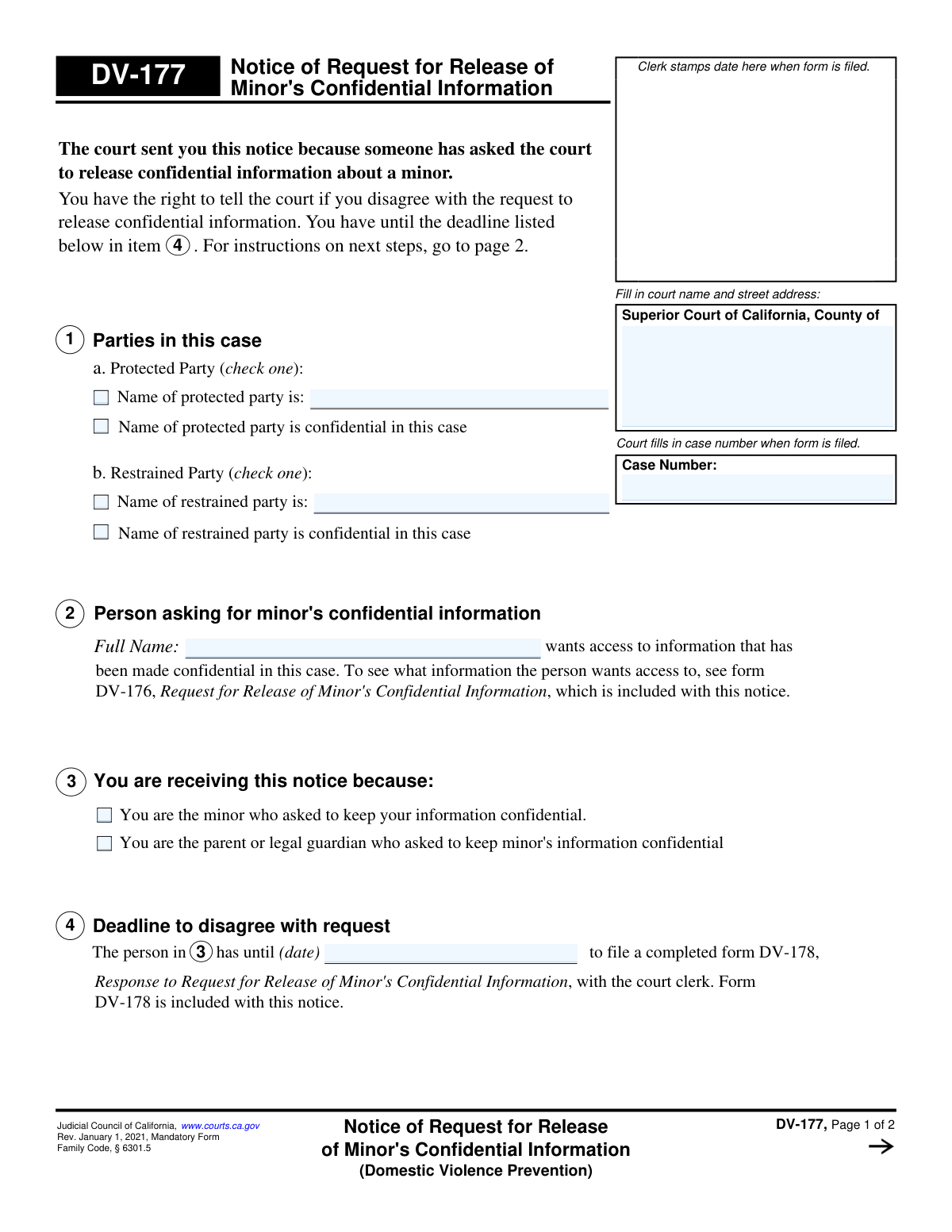
The AI does the filling. You just check it.
No typing into boxes, nothing to install.
What this form asks for
The AI fills all of it, from your answers or your documents.
The AI checks your answers before you download
12 checks built for this form, so a wrong date or a missing answer is caught before anyone else sees it.
This check verifies that the 'Case Number' entered on page 1 is identical to the 'Case Number' on page 2. Maintaining consistency is crucial for document integrity and ensures that all pages are correctly associated with the same legal case. A mismatch could lead to filing errors and confusion in court records.
This validation ensures that for the Protected Party in section 1a, either the party's name is provided or the 'confidential' option is selected, but not both. This prevents contradictory information from being submitted. If neither or both options are checked, the form is considered incomplete or invalid.
If the checkbox 'Name of protected party is:' is selected in section 1a, this validation confirms that the corresponding name field is not empty. This is essential for correctly identifying the party involved in the notice. Failure to provide the name when indicated makes the section incomplete and the notice ambiguous.
This check ensures that for the Restrained Party in section 1b, either the name is provided or the 'confidential' option is selected, but not both. This rule prevents ambiguous or conflicting data entry. An invalid selection would require correction before the form can be processed.
This check verifies that the 'Full Name' field in section 2, identifying the person asking for the minor's information, is filled out. This information is fundamental to the purpose of the notice, as it informs the recipient who is making the request. An empty field would render the notice meaningless and un-actionable.
This validation ensures that at least one of the checkboxes in section 3 is selected, identifying whether the notice is for the minor or their parent/guardian. This is critical for legal service and ensuring the correct party is notified of their rights. If no recipient is identified, the purpose of the notice is defeated.
And 6 more checks
- Validates Deadline Date Format and Plausibility
- Verifies Deadline Date is After Mailing Date
- Verifies Mailing Date is On or After DV-160 Filing Date
- Ensures Clerk's Signature Date is On or After Mailing Date
- Validates Completeness of Clerk's Certificate
- Ensures Court Name and County are Provided
Let AI fill out your DV-177
No typing. Every field filled in seconds, checked, ready to sign.
How to Fill Out DV-177 Online for Free in 2026
What the AI walks you through.
- Navigate to Instafill.ai and upload your DV-177 form or select it from the template library.
- Provide the Superior Court name, county, and case number in the designated fields as guided by the AI.
- Identify the protected and restrained parties in the case by checking the appropriate boxes and entering their names.
- Enter the full name of the person who is requesting access to the minor's confidential information.
- Indicate who is receiving the notice by checking the box for either the minor or their parent/legal guardian.
- Review all the information you've entered for accuracy, using the AI's validation checks to ensure completeness.
- Download the completed form to print and file with the court clerk, ensuring you meet the deadline specified on the notice.
Common Mistakes in Completing DV-177
The ones the AI is built to catch.
Misunderstanding the Purpose of Form DV-177
Missing the Response Deadline
Failing to Review the Attached Request (Form DV-176)
Entering an Incorrect or Incomplete Case Number
Omitting or Using Incorrect Court Information
Confusing the 'Protected Party' and 'Restrained Party'
Accidentally Exposing a Confidential Name
Using Illegible Handwriting
Attempting to Fill a Non-Interactive PDF Form
Relying on a Miscalculated Deadline from the Clerk
Frequently Asked Questions About DV-177
Is it really free for 7 days?
Can I fill other forms too?
How do I cancel?
How does the AI fill out DV-177?
What happens to my information?
How complex is DV-177 to fill out?
Why did I receive Form DV-177?
What is the purpose of Form DV-177?
Do I need to fill out Form DV-177?
Who is asking for my child's information?
What specific information is being requested to be released?
What do I do if I disagree with the release of this information?
What happens if I do nothing and don't respond?
How do I find my deadline to object to this request?
What are forms DV-176 and DV-178?
How will I know the judge's final decision?
Can I use an AI tool to help me with these forms?
The PDF form I received isn't fillable. What can I do?
How can I use Instafill.ai to fill out my response form online?
Get your DV-177 filled out by AI
$0 today. Cancel before Nov 1 and you pay nothing.
Other forms like this one
California court forms: Judicial Council of California Form SC-105, Request for Court Order and Answer (Small Claims), Judicial Council of California Form SC-120, Defendant’s Claim and ORDER to Go to Small Claims Court (Small Claims), Judicial Council of California Form SER-001, Request for Sheriff to Serve Court Papers, Judicial Council of California Form SER-001, Request for Sheriff to Serve Court Papers, Affidavit for Collection of Personal Property California Probate Code Section 13100, Form POS-040, Proof of Service—Civil, Declaration of Facts of Death (California Superior Court), declaration-of-marriage-for-court-proceeding-california-family-law, ADOPT-200, Adoption Request, ADOPT-200, Stepparent Adoption Request, ADOPT-210, Adoption Agreement, ADOPT-310, Contact After Adoption Agreement, Judicial Council of California Form ADOPT-200, Adoption Request, Form ADR-107, Mediation Attendance Sheet, Form ADR-110, Order Appointing Referee, Form ADR-109, Stipulation or Motion for Order Appointing Referee, Form ADR-102, Request for Trial De Novo After Judicial Arbitration, Form ADR-108, Referee's Report (Code Civ. Proc., §§ 638, 639), Form ADR-106, Petition to Confirm, Correct, or Vacate Contractual Arbitration Award, Form ADR-104, Rejection of Award and Request for Trial After Attorney-Client Fee Arbitration
Judicial Council forms: Judicial Council of California Form FL-300, Request for Order, Judicial Council of California Form FL-150, Income and Expense Declaration, Judicial Council of California Form SC-104, Proof of Service (Small Claims), Judicial Council of California Form SC-105, Request for Court Order and Answer (Small Claims), Judicial Council of California Form DE-111, Petition for Probate (Probate—Decedents Estates), Judicial Council of California Form SC-104, Proof of Service (Small Claims), Judicial Council of California Form SC-108, Request to Correct or Cancel Judgment and Answer (Small Claims), Judicial Council of California Form SC-120, Defendant’s Claim and ORDER to Go to Small Claims Court (Small Claims), Civil Case Cover Sheet (Judicial Council of California Form CM-010), Civil Case Cover Sheet (Judicial Council of California Form CM-010), Judicial Council of California Form TR-205, Request for Trial by Written Declaration (Trial by Written Declaration—Traffic), Judicial Council of California Form DE-120, Notice of Hearing—Decedent's Estate or Trust, Inventory and Appraisal Attachment (Judicial Council of California Form DE-161, GC-041), CLETS-001, Confidential Information for Law Enforcement (Judicial Council of California), Judicial Council of California Form SER-001, Request for Sheriff to Serve Court Papers, Judicial Council of California Form UD-105, Answer—Unlawful Detainer, CLETS-001, Confidential Information for Law Enforcement (Judicial Council of California), Judicial Council of California Form ADOPT-210, Adoption Agreement, Judicial Council of California Form DE-120, Notice of Hearing—Decedent's Estate or Trust, Inventory and Appraisal (Judicial Council of California) (Form DE-160/GC-040)
domestic violence forms: Form DV-100, Request for Domestic Violence Restraining Order, Dakota County CDA New Admissions Informal Review Request Form (Housing Choice Voucher Program) and HUD Form 5382, Certification of Domestic Violence, Dating Violence, Sexual Assault, or Stalking, and Alternate Documentation, DV-100, Request for Domestic Violence Restraining Order (Domestic Violence Prevention), Form DV-200, Proof of Personal Service (CLETS) (Domestic Violence Prevention), Judicial Council of California Form DV-110, Temporary Restraining Order (CLETS-TRO) (Domestic Violence Prevention), Form DV-109, Notice of Court Hearing (Domestic Violence Prevention), Form DV-101, Description of Abuse (Domestic Violence Prevention), Form DV-108, Request for Orders to Prevent Child Abduction (Domestic Violence Prevention), Form DV-116, Order on Request to Continue Court Hearing (Temporary Restraining Order) (CLETS-TRO) (Domestic Violence Prevention), Form DV-130, Restraining Order After Hearing (Order of Protection) (Domestic Violence Prevention), Form DV-105, Request for Child Custody and Visitation Orders (Domestic Violence Prevention), Form DV-140, Child Custody and Visitation Order (Domestic Violence Prevention), Form DV-145, Order to Prevent Child Abduction (Domestic Violence Prevention), State of Michigan Form MC 282, Domestic Violence Screening for Referral to Mediation, MC 282a, Domestic Violence Screening, Form CR-161, Criminal Protective Order—Other Than Domestic Violence (CLETS—CPO), Form CR-162, Order to Surrender Firearms, Firearm Parts, and Ammunition in Domestic Violence Case (CLETS—CPO), Form CR-102, Domestic Violence Plea Form With Waiver of Rights—Misdemeanor (Criminal), Form CR-160, Criminal Protective Order—Domestic Violence (CLETS—CPO), Form DV-120, Response to Request for Domestic Violence Restraining Order (Domestic Violence Prevention)
California judicial forms: Judicial Council of California Form FL-300, Request for Order, Judicial Council of California Form FL-150, Income and Expense Declaration, Judicial Council of California Form SC-104, Proof of Service (Small Claims), Judicial Council of California Form SC-105, Request for Court Order and Answer (Small Claims), Judicial Council of California Form DE-111, Petition for Probate (Probate—Decedents Estates), Judicial Council of California Form SC-104, Proof of Service (Small Claims), Judicial Council of California Form SC-108, Request to Correct or Cancel Judgment and Answer (Small Claims), Judicial Council of California Form SC-120, Defendant’s Claim and ORDER to Go to Small Claims Court (Small Claims), Civil Case Cover Sheet (Judicial Council of California Form CM-010), Civil Case Cover Sheet (Judicial Council of California Form CM-010), Judicial Council of California Form TR-205, Request for Trial by Written Declaration (Trial by Written Declaration—Traffic), Judicial Council of California Form DE-120, Notice of Hearing—Decedent's Estate or Trust, Inventory and Appraisal Attachment (Judicial Council of California Form DE-161, GC-041), CLETS-001, Confidential Information for Law Enforcement (Judicial Council of California), Judicial Council of California Form SER-001, Request for Sheriff to Serve Court Papers, Judicial Council of California Form UD-105, Answer—Unlawful Detainer, CLETS-001, Confidential Information for Law Enforcement (Judicial Council of California), Judicial Council of California Form ADOPT-210, Adoption Agreement, Judicial Council of California Form DE-120, Notice of Hearing—Decedent's Estate or Trust, Inventory and Appraisal (Judicial Council of California) (Form DE-160/GC-040)
Let AI fill out your DV-177
Your trial starts once a card is added. You pay nothing before Nov 1.
Our AI already knows this form, all 22 fields of it. Skip the typing: tell it about yourself, or upload what you have, and it fills the whole form in seconds.
- AI fills every field on both pages, checkboxes included
- No typing into boxes: answer a few questions, or upload the listing or an old lease, an old copy of this form, a photo of a document
- The AI checks the answers; you review and change anything before you download
- Download the finished PDF, print it, or sign it online
- Encrypted, and never used to train AI
Cancel before Nov 1 and you pay nothing.
A card is needed to start the trial. Cancel in two clicks from your account.
Terms · Privacy