
Yes! You can use AI to fill out State of Michigan Form MC 282, Domestic Violence Screening for Referral to Mediation
Don't type 15 fields by hand. Tell our AI about yourself, or upload a document you already have, and it fills every field in seconds. You check it, then download, print or sign.
The AI does the filling. You just check it.
No typing into boxes, nothing to install.
What this form asks for
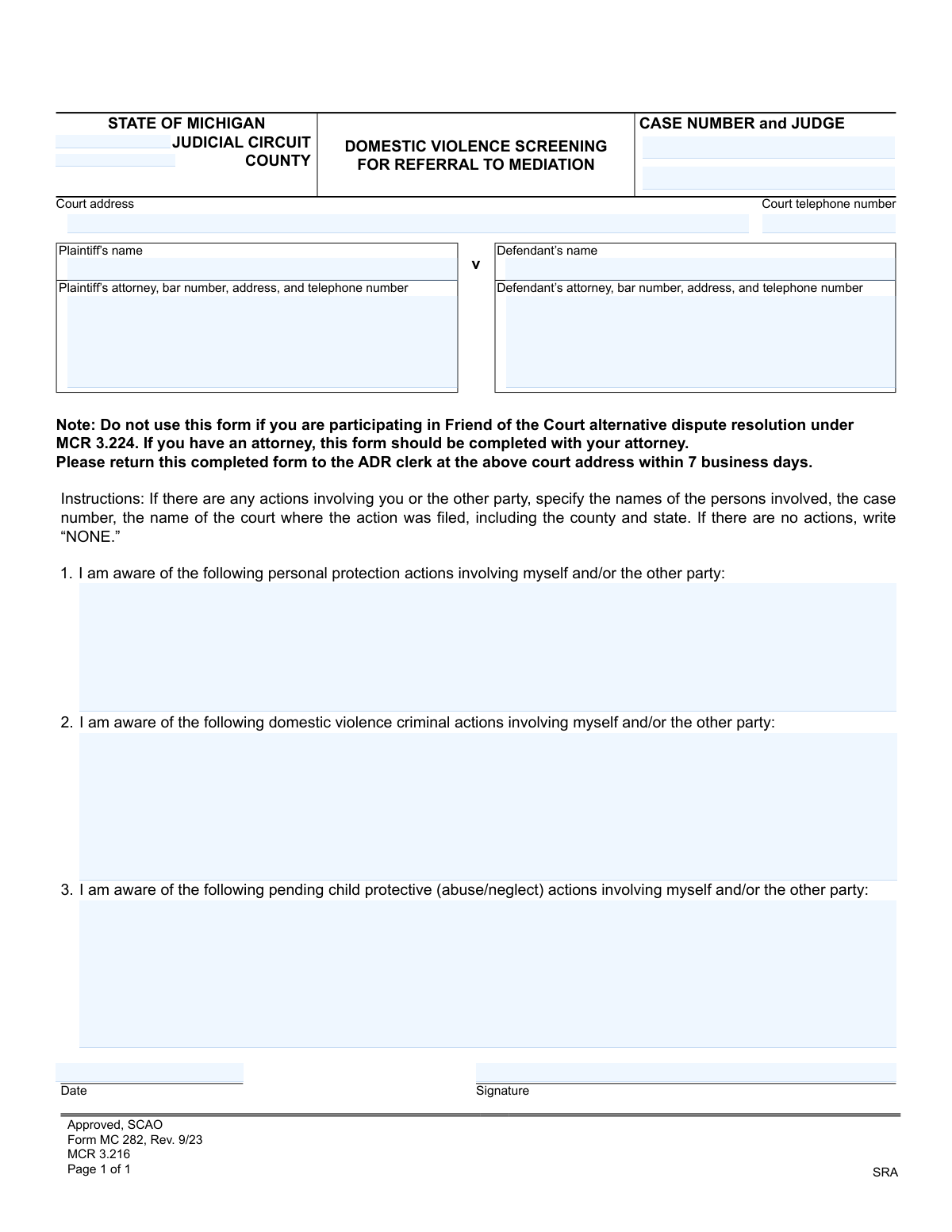
The AI fills all of it, from your answers or your documents.
The AI checks your answers before you download
12 checks built for this form, so a wrong date or a missing answer is caught before anyone else sees it.
This check ensures the Case Number field follows the standard Michigan court format, typically including the year and a unique identifier (e.g., 23-12345-DM). Correct formatting is critical for associating the screening form with the precise case file in the court's system. An invalid format will cause a rejection, preventing filing errors and processing delays.
This validation confirms that the Plaintiff's Name field is not empty. The plaintiff is a primary party to the case, and their name is fundamental for identifying the case and the individuals involved. The form cannot be processed without this core identifying information and will be returned as incomplete.
This check verifies that the Defendant's Name field has been filled out. Like the plaintiff, the defendant is a primary party whose name is required for proper case identification and record-keeping. A missing defendant name would render the form incomplete and unusable for court proceedings.
This check confirms that the date field contains a valid calendar date (e.g., MM/DD/YYYY) and is not a future date or a date unreasonably far in the past. This is important for establishing when the screening form was completed and signed. An invalid or future date would be rejected to prevent submission of post-dated or erroneously dated documents.
This validation ensures that the bar number for both the plaintiff's and defendant's attorneys, if provided, starts with a 'P' followed by a sequence of digits (e.g., P12345). This is critical for correctly identifying and verifying the attorneys of record with the State Bar of Michigan. An incorrect bar number could prevent the system from linking the form to the correct legal representative.
This validation ensures that both the Judicial Circuit and County fields are completed. This information defines the legal jurisdiction of the court handling the case, which is fundamental for all legal processing. An omission could lead to the form being rejected or misfiled in the wrong jurisdiction.
And 6 more checks
- Verifies Signature is Present
- Ensures Completeness of Attorney Information
- Validates Content of Action History Fields
- Ensures Court Telephone Number is a Valid Format
- Checks for Plausibility in Action Details
- Verifies Judge's Name is Provided
Let AI fill out your MC 282
No typing. Every field filled in seconds, checked, ready to sign.
How to Fill Out MC 282 Online for Free in 2026
What the AI walks you through.
- Navigate to Instafill.ai and upload the MC 282 form or select it from the template library.
- Provide the court and case information, including the judicial circuit, county, case number, and judge's name.
- Enter the full names and contact information for the plaintiff, defendant, and their attorneys if applicable.
- Disclose any personal protection actions involving yourself or the other party, specifying names, case numbers, and court details.
- Report any domestic violence criminal actions, providing the names of those involved, case numbers, and the court where the action was filed.
- Detail any pending child protective (abuse/neglect) actions, including all relevant case and court information.
- Carefully review all entered information for accuracy, then electronically sign and date the form before submitting it to the ADR clerk as instructed.
Common Mistakes in Completing MC 282
The ones the AI is built to catch.
Leaving Fields Blank Instead of Writing 'NONE'
Providing Incomplete Details for Prior Court Actions
Forgetting to Sign or Date the Form
Entering an Incorrect Case Number or Judge Name
Failing to Disclose Out-of-State or Old Cases
Ignoring the 7-Business-Day Submission Deadline
Using the Wrong Form for a Friend of the Court Case
Omitting the Attorney's Bar Number and Contact Info
Submitting Illegible Handwritten Information
Completing the Form Without Consulting an Attorney (When Represented)
Frequently Asked Questions About MC 282
Is it really free for 7 days?
Can I fill other forms too?
How do I cancel?
How does the AI fill out MC 282?
What happens to my information?
How complex is MC 282 to fill out?
What is the purpose of the Domestic Violence Screening for Referral to Mediation form (MC 282)?
Who needs to fill out this form?
Where and when do I submit the completed form?
What should I do if there have been no domestic violence or other actions to report?
If I list a history of domestic violence, will mediation be automatically canceled?
What does the note about 'Friend of the Court alternative dispute resolution' mean?
The form says I should complete it with my attorney. What if I don't have one?
What kind of information do I need to provide for past legal actions?
What is a 'personal protection action'?
Can I use an AI tool to help me fill out this form?
How can I fill out the MC 282 form online?
The PDF version of the form I found is not fillable. What can I do?
What happens after I submit this form?
Get your MC 282 filled out by AI
$0 today. Cancel before Nov 10 and you pay nothing.
Other forms like this one
domestic violence forms: Form DV-100, Request for Domestic Violence Restraining Order, Dakota County CDA New Admissions Informal Review Request Form (Housing Choice Voucher Program) and HUD Form 5382, Certification of Domestic Violence, Dating Violence, Sexual Assault, or Stalking, and Alternate Documentation, DV-100, Request for Domestic Violence Restraining Order (Domestic Violence Prevention), Form DV-200, Proof of Personal Service (CLETS) (Domestic Violence Prevention), Judicial Council of California Form DV-110, Temporary Restraining Order (CLETS-TRO) (Domestic Violence Prevention), Form DV-109, Notice of Court Hearing (Domestic Violence Prevention), Form DV-101, Description of Abuse (Domestic Violence Prevention), Form DV-108, Request for Orders to Prevent Child Abduction (Domestic Violence Prevention), Form DV-116, Order on Request to Continue Court Hearing (Temporary Restraining Order) (CLETS-TRO) (Domestic Violence Prevention), Form DV-130, Restraining Order After Hearing (Order of Protection) (Domestic Violence Prevention), Form DV-105, Request for Child Custody and Visitation Orders (Domestic Violence Prevention), Form DV-140, Child Custody and Visitation Order (Domestic Violence Prevention), Form DV-145, Order to Prevent Child Abduction (Domestic Violence Prevention), MC 282a, Domestic Violence Screening, Form CR-161, Criminal Protective Order—Other Than Domestic Violence (CLETS—CPO), Form CR-162, Order to Surrender Firearms, Firearm Parts, and Ammunition in Domestic Violence Case (CLETS—CPO), Form CR-102, Domestic Violence Plea Form With Waiver of Rights—Misdemeanor (Criminal), Form CR-160, Criminal Protective Order—Domestic Violence (CLETS—CPO), Form DV-120, Response to Request for Domestic Violence Restraining Order (Domestic Violence Prevention), Judicial Council of California, Form DV-177, Notice of Request for Release of Minor's Confidential Information (Domestic Violence Prevention)
Michigan court forms: Form MC 03, Answer, Civil, Form MC 02, Appearance, Form MC 6, Notice to Appear, Form MC 01, Summons, State of Michigan, Form MC 01a, Complaint, Form MC 01b, Motion for Second Summons and Order, State of Michigan Blank Court Form, Form MC 07, Default Request and Entry, Form MC 07a, Default Request, Entry, and Judgment (Sum Certain), Form MC 09, Dismissal, Form MC 09a, Dismissal, Nonservice/No Progress, Form MC 10, Judgment, Civil, Form MC 11, Subpoena, Order to Appear and/or Produce, Request and Writ for Garnishment (Periodic), Form MC 13, Request and Writ for Garnishment (Nonperiodic), Form MC 14, Garnishee Disclosure, Form MC 15, Motion and Affidavit for Installment Payments/To Amend Order for Installment Payments, Form MC 15a, Order Regarding Installment Payments, Form MC 16, Motion to Set Aside Order for Installment Payments, State of Michigan, Form MC 16a, Order on Motion to Set Aside Order for Installment Payments
Let AI fill out your MC 282
Your trial starts once a card is added. You pay nothing before Nov 10.
Our AI already knows this form, all 15 fields of it. Skip the typing: tell it about yourself, or upload what you have, and it fills the whole form in seconds.
- AI fills every field on the form, checkboxes included
- No typing into boxes: answer a few questions, or upload a document you already have, an old copy of this form, a photo of a document
- The AI checks the answers; you review and change anything before you download
- Download the finished PDF, print it, or sign it online
- Encrypted, and never used to train AI
Cancel before Nov 10 and you pay nothing.
A card is needed to start the trial. Cancel in two clicks from your account.
Terms · Privacy