Yes! You can use AI to fill out Mediation Disclosure Notification and Acknowledgment
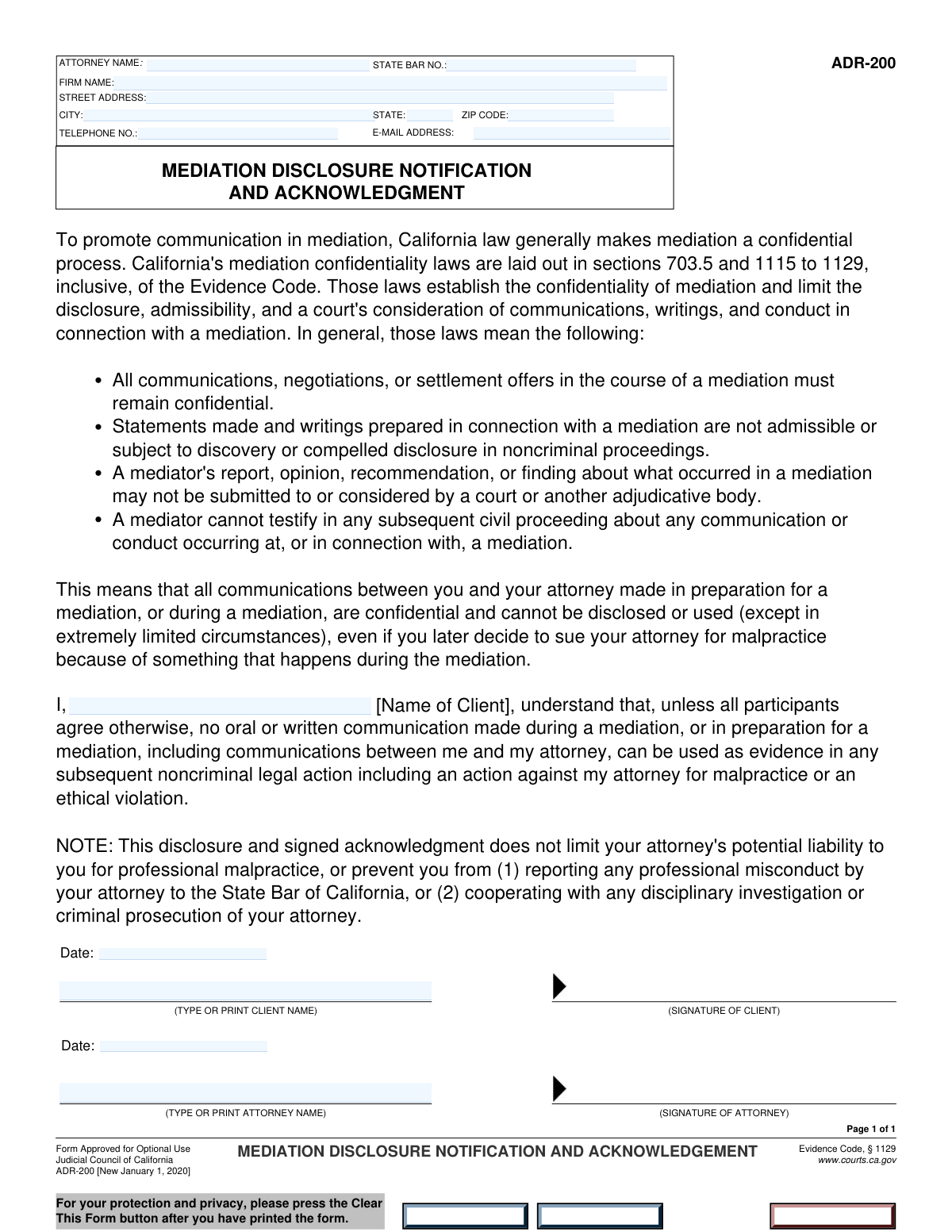
The Mediation Disclosure Notification and Acknowledgment is a crucial legal document ensuring a client is fully informed by their attorney about the nature of the mediation process. It serves as a formal record, signed by both the attorney and client, confirming the client's understanding of the mediator's role and the confidentiality rules. Today, this form can be filled out quickly and accurately using AI-powered services like Instafill.ai, which can also convert non-fillable PDF versions into interactive fillable forms.
Our AI automatically handles information lookup, data retrieval, formatting, and form filling.
It takes less than a minute to fill out Mediation Disclosure Form using our AI form filling.
Securely upload your data. Information is encrypted in transit and deleted immediately after the form is filled out.
Form specifications
| Form name: | Mediation Disclosure Notification and Acknowledgment |
| Number of fields: | 17 |
| Number of pages: | 1 |
| Language: | English |
| Categories: | disclosure forms |
Instafill Demo: How to fill out PDF forms in seconds with AI
How to Fill Out Mediation Disclosure Form Online for Free in 2026
Are you looking to fill out a MEDIATION DISCLOSURE FORM form online quickly and accurately? Instafill.ai offers the #1 AI-powered PDF filling software of 2026, allowing you to complete your MEDIATION DISCLOSURE FORM form in just 37 seconds or less.
Follow these steps to fill out your MEDIATION DISCLOSURE FORM form online using Instafill.ai:
- 1 Navigate to Instafill.ai and upload your Mediation Disclosure Notification and Acknowledgment form or select it from our template library.
- 2 Use the AI assistant to automatically populate the 'Attorney Information' section, including your name, firm, state bar number, and contact details.
- 3 Enter the client's full name in the 'Client Acknowledgement' section.
- 4 Carefully review all the entered information for accuracy, ensuring all names and dates are correct.
- 5 Electronically sign the document in the 'Attorney Signature' field and provide the date.
- 6 Securely share the form with your client for their electronic signature and date in the 'Client Signature' section.
- 7 Once all parties have signed, save the completed form for your records or print a copy.
Our AI-powered system ensures each field is filled out correctly, reducing errors and saving you time.
Why Choose Instafill.ai for Your Fillable Mediation Disclosure Form Form?
Speed
Complete your Mediation Disclosure Form in as little as 37 seconds.
Up-to-Date
Always use the latest 2026 Mediation Disclosure Form form version.
Cost-effective
No need to hire expensive lawyers.
Accuracy
Our AI performs 10 compliance checks to ensure your form is error-free.
Security
Your personal information is protected with bank-level encryption.
Frequently Asked Questions About Form Mediation Disclosure Form
This form serves as a formal record that an attorney has provided their client with required disclosures about the mediation process, and that the client has received and acknowledged this information.
Both the attorney and their client must complete their respective sections. The attorney provides their professional details, and the client signs to acknowledge receipt of the disclosure.
A State Bar Number is a unique ID assigned to licensed attorneys. The attorney can find this number on their bar membership card or by looking up their profile on their state's official bar association website.
No, both fields should contain the same full name of the client. The first instance identifies the client, while the second confirms the identity of the person signing the document.
Yes, the dates can be different. This often occurs if the attorney and client are not in the same location and sign the document on separate days.
The attorney will need their full name, firm name, State Bar Number, business address, telephone number, and email address to complete this section.
Submission instructions are not on the form, but your attorney will typically file it with the court or keep it in your official case file as required by local rules.
This form is specifically designed for an attorney-client relationship. If you are representing yourself (pro se), this form is likely not applicable, and you should consult the court for the proper procedure.
Yes, services like Instafill.ai use AI to accurately auto-fill form fields with your saved information, which saves time and helps prevent errors. You can upload the form, and the AI will populate the fields for you.
Simply upload the PDF form to the Instafill.ai platform. Its AI will automatically populate your information, and you can then review, complete any remaining fields, sign, and download the finished document.
If you have a flat or non-fillable PDF, you can use a tool like Instafill.ai. It can convert the document into an interactive, fillable form that you can easily complete and sign online.
The 'Clear' button will erase all the information you have entered into the form fields, allowing you to start over from a blank slate.
Compliance Mediation Disclosure Form
Validation Checks by Instafill.ai
1
Attorney Name Consistency Check
This validation ensures the printed attorney name in the signature section exactly matches the attorney name provided in the initial information section. This is critical for verifying that the person signing the document is the same attorney identified at the top of the form. A mismatch could invalidate the acknowledgment and will require the user to correct the name in one of the fields.
2
Client Name Consistency Check
This check verifies that the 'Client Printed Name' in the signature area is identical to the 'Client Name' in the acknowledgment section. Consistency is essential to confirm the identity of the client who is acknowledging the disclosure. If the names do not match, the form submission will be blocked until the discrepancy is resolved.
3
State Bar Number Presence
This validation ensures the 'State Bar Number' field is not empty. The state bar number is a unique identifier crucial for verifying an attorney's license and good standing with the bar association. A missing number prevents proper verification and will block the form from being submitted.
4
Email Address Format Validation
This check ensures the 'Email Address' field contains a value in a standard email format, such as '[email protected]'. Proper formatting is essential for ensuring that electronic communications and documents sent to this address will be delivered successfully. An invalid format will prevent form submission and require the user to correct the entry.
5
US Phone Number Format Validation
This validation verifies that the 'Telephone Number' field contains a valid 10-digit number, allowing for common formatting like parentheses, spaces, or hyphens. A valid phone number is necessary for direct contact with the attorney. If the entry does not conform to a standard 10-digit number, the user will be prompted to correct it.
6
US Zip Code Format Validation
This check ensures the 'Zip Code' field contains either a 5-digit or a 9-digit (ZIP+4) numeric value. A correctly formatted zip code is vital for the mailability of legal documents and correspondence. An incorrect format will result in a validation error, requiring the user to enter a valid US zip code.
7
Signature Date Chronology
This validation confirms that the attorney's 'Acknowledgment Date' is on or after the client's 'Signature Date'. Logically, the attorney acknowledges the client's signature, so their signature date cannot precede the client's. This check prevents logical impossibilities in the legal timeline and will flag an error if the dates are out of order.
8
Future Date Prevention for Signatures
This check ensures that both the client's 'Signature Date' and the attorney's 'Acknowledgment Date' are not in the future. Dates of signature must reflect the actual time of signing, which cannot be a future event. This is critical for the legal validity of the document, and any future date will be rejected.
9
Attorney Information Completeness
This validation verifies that all fields within the 'Attorney Information' section are filled out, including name, firm, full address, state bar number, phone, and email. Complete information is required for proper identification, verification, and contact purposes. If any field is left blank, the form submission will be blocked with a message indicating which fields are missing.
10
Valid Date Format Check
This validation ensures that both the 'Signature Date' and 'Acknowledgment Date' fields are entered in a recognized date format, such as MM/DD/YYYY. Consistent and valid date formatting is crucial for accurate record-keeping and to prevent data corruption. The system will reject any entry that cannot be parsed as a valid date.
11
State Abbreviation Validation
This check verifies that the 'State' field contains a valid two-letter US state or territory abbreviation from a predefined list. Using a standardized abbreviation ensures data consistency and prevents errors in mailing addresses. An invalid entry will trigger an error, prompting the user to select a valid state.
12
Address Component Completeness
This validation ensures that if any part of the attorney's address (Street Address, City, State, Zip Code) is filled, all other parts are also filled. A partial address is unusable for mailing or location verification purposes. This check enforces the submission of a complete address, preventing incomplete data from being saved.
Common Mistakes in Completing Mediation Disclosure Form
This form requires the attorney's name in two separate sections: 'Attorney Information' at the top and 'Attorney Signature' at the bottom. A common error is to fill out one field but forget the other, or to use different name variations (e.g., 'John A. Doe' vs. 'John Doe'). This inconsistency can cause confusion and require clarification, delaying the process. To avoid this, ensure the attorney's full, legal name is entered identically in both the information and printed signature fields.
Attorneys sometimes enter their state bar number incorrectly from memory or make a simple typo. An incorrect or missing bar number is a critical error, as it can prevent or delay the verification of the attorney's credentials and good standing with the bar. Always double-check this number against an official record or bar card before submission to ensure the document is processed without issue.
A simple typo in an email address, such as 'gmal.com' instead of 'gmail.com,' is one of the most frequent and consequential mistakes. This error will prevent the attorney from receiving crucial electronic notifications, documents, and updates regarding the mediation. It is essential to proofread the email address character by character for accuracy before finalizing the form to ensure all communications are received.
The form has two distinct date fields: 'Signature Date' for the client and 'Acknowledgment Date' for the attorney. People often mistakenly enter the same date in both, even if signing on different days, or fill in the date for the wrong party. This creates legal confusion about when each party provided their acknowledgment. Ensure the date entered in each field accurately reflects the day that specific individual signed the document.
Users frequently make typos in the street address, city, or zip code, or they might omit a suite or office number. An incomplete or incorrect address can lead to returned mail and significant delays in communication regarding the mediation. It's crucial to enter the full, accurate physical address for the law firm and proofread it carefully before submitting the form. AI-powered tools like Instafill.ai can help validate addresses to prevent this.
Attorneys who are solo practitioners sometimes leave the 'Firm Name' field blank, assuming it does not apply to them. This omission creates ambiguity, as it's unclear if it was an oversight or intentional. To avoid processing delays while the receiving party seeks clarification, solo practitioners should enter their own name followed by 'Solo Practitioner' or simply re-enter their full name as the firm name.
If the form is a non-fillable PDF, people often print it and fill it out by hand, which can result in illegible handwriting. Unclear names, dates, and bar numbers can lead to data entry errors, communication failures, and may require the form to be filled out all over again. To avoid this, use a tool like Instafill.ai, which can convert flat PDFs into fillable digital forms, allowing you to type all information clearly and accurately.
Users may enter dates in various formats, such as 'MM-DD-YY' or 'DD/MM/YYYY,' which can create confusion, especially with international parties. An ambiguous format like '05/06/24' could mean either May 6th or June 5th, a critical detail on a legal document. To prevent misinterpretation, always use the full four-digit year (YYYY) and a clear format like MM/DD/YYYY, or write out the month to eliminate any doubt.
The form requires the client's name in two places: the 'Client Acknowledgement' section and the 'Client Printed Name' field in the signature block. It's common for these names to be entered inconsistently (e.g., using a middle initial in one but not the other) or for one to be left blank. This can raise questions about the identity of the signatory, so it's vital to enter the client's full legal name identically in both fields for clarity and legal validity.
Digital forms often include a 'Clear' or 'Reset' button near the 'Save' or 'Print' buttons. Users can accidentally click this button, instantly erasing all entered information and forcing them to start over from scratch. To avoid this frustrating mistake, always double-check which button you are clicking and save your progress frequently if the form allows. Using a form-filling tool can also help by saving your data securely as you go.
Saved over 80 hours a year
“I was never sure if my IRS forms like W-9 were filled correctly. Now, I can complete the forms accurately without any external help.”
Kevin Martin Green
Your data stays secure with advanced protection from Instafill and our subprocessors

Robust compliance program
Transparent business model
You’re not the product. You always know where your data is and what it is processed for.
ISO 27001, HIPAA, and GDPR
Our subprocesses adhere to multiple compliance standards, including but not limited to ISO 27001, HIPAA, and GDPR.
Security & privacy by design
We consider security and privacy from the initial design phase of any new service or functionality. It’s not an afterthought, it’s built-in, including support for two-factor authentication (2FA) to further protect your account.
Fill out Mediation Disclosure Form with Instafill.ai
Worried about filling PDFs wrong? Instafill securely fills mediation-disclosure-notification-and-acknowledgment forms, ensuring each field is accurate.