Yes! You can use AI to fill out Newly Contracted Provider Training Attestation Form

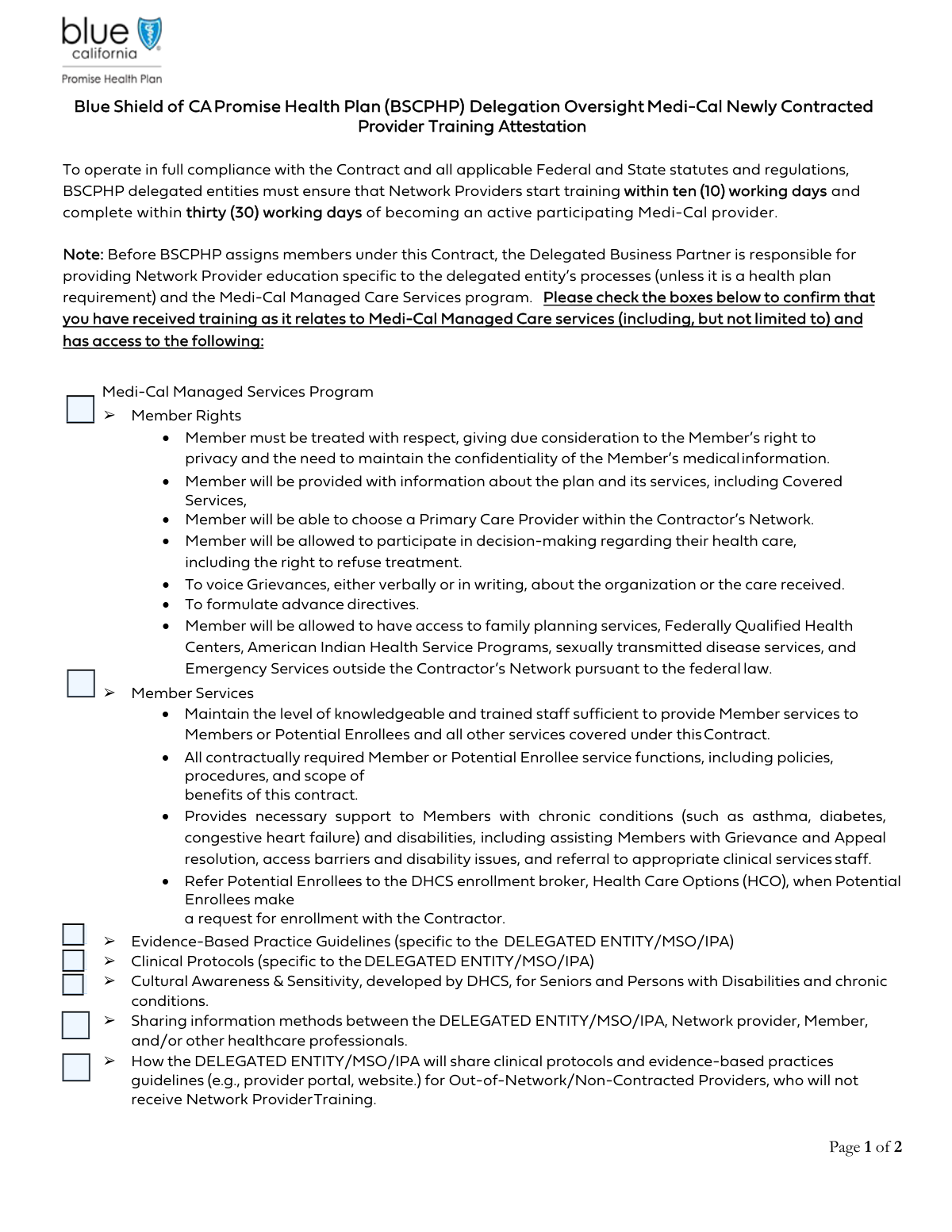
The Newly Contracted Provider Training Attestation Form is a document used to confirm that a new healthcare provider has successfully completed all required training modules. It's a critical compliance document for providers joining a managed care organization (MCO), independent practice association (IPA), or similar delegated entity, ensuring they understand key protocols, member rights, and practice guidelines. Today, this form can be filled out quickly and accurately using AI-powered services like Instafill.ai, which can also convert non-fillable PDF versions into interactive fillable forms.
Our AI automatically handles information lookup, data retrieval, formatting, and form filling.
It takes less than a minute to fill out Provider Training Attestation using our AI form filling.
Securely upload your data. Information is encrypted in transit and deleted immediately after the form is filled out.

Form specifications

Form name: Newly Contracted Provider Training Attestation Form
Number of fields: 26
Number of pages: 2
Language: English
main-image

Instafill Demo: How to fill out PDF forms in seconds with AI

How to Fill Out Provider Training Attestation Online for Free in 2026

Are you looking to fill out a PROVIDER TRAINING ATTESTATION form online quickly and accurately? Instafill.ai offers the #1 AI-powered PDF filling software of 2026, allowing you to complete your PROVIDER TRAINING ATTESTATION form in just 37 seconds or less.
Follow these steps to fill out your PROVIDER TRAINING ATTESTATION form online using Instafill.ai:
  1. 1 Navigate to Instafill.ai and upload your Newly Contracted Provider Training Attestation Form or select it from a template library.
  2. 2 In the first section, check the boxes to confirm receipt of training on topics like Evidence-Based Practice Guidelines, Cultural Awareness, and Member Rights.
  3. 3 Complete the 'Newly Contracted Provider Attestation' section by entering your name, NPI number, training completion date, and contract effective date.
  4. 4 Add your electronic signature and the current date in the designated provider signature fields.
  5. 5 Proceed to the 'Office Manager/Trainer Attestation' and 'Delegated Entity/MSO/IPA Representative Attestation' sections, filling in the required names, titles, and dates.
  6. 6 Ensure all required signatures (Provider, Office Manager/Trainer, and Delegated Entity Representative) are applied in the correct fields.
  7. 7 Review the entire form for accuracy and completeness, then download, print, or securely share the final attested document.

Our AI-powered system ensures each field is filled out correctly, reducing errors and saving you time.

Why Choose Instafill.ai for Your Fillable Provider Training Attestation Form?

Speed

Complete your Provider Training Attestation in as little as 37 seconds.

Up-to-Date

Always use the latest 2026 Provider Training Attestation form version.

Cost-effective

No need to hire expensive lawyers.

Accuracy

Our AI performs 10 compliance checks to ensure your form is error-free.

Security

Your personal information is protected with bank-level encryption.

Frequently Asked Questions About Form Provider Training Attestation

This form serves as a legal attestation to confirm that a newly contracted provider has received all required training on key topics like clinical guidelines, member rights, and cultural sensitivity.

The form must be completed and signed by three parties: the newly contracted provider, their Office Manager or Trainer, and an authorized representative from the Delegated Entity/MSO/IPA.

Do not check the box for any training you have not yet completed. You must contact your MSO/IPA or office manager to receive the required training before you can accurately complete and sign this attestation.

This refers to the organization, such as a Managed Services Organization (MSO) or Independent Practice Association (IPA), that manages your network participation and contract on behalf of a health plan.

The National Provider Identifier (NPI) is a unique 10-digit ID number for healthcare providers. If you don't know yours, you can look it up on the official NPPES NPI Registry website.

You should enter the specific date on which you finished all the required training modules. This date may be earlier than the date you are signing the form.

The 'Date Signed' is the current date you are signing the form. The 'Contract Effective Date' is the official start date of your provider agreement with the MSO/IPA.

The three sections are required to ensure accountability from all parties. The provider attests to receiving the training, the manager/trainer attests to providing it, and the MSO/IPA representative attests to the provider's compliance.

Submit the fully completed and signed form back to the Delegated Entity/MSO/IPA that issued it. Follow their specific instructions for submission, which could be via email, fax, or an online portal.

Failure to submit this mandatory attestation can delay the activation of your contract or even jeopardize your status as a network provider. It is a critical step in the onboarding process.

Yes, services like Instafill.ai use AI to accurately auto-fill form fields with your information, which saves time and helps prevent errors. You are still responsible for verifying all information is correct before signing.

To use Instafill.ai, you just upload the form to its platform. The AI will make the fields fillable, and you can type in your information, add your digital signature, and download the completed PDF.

If you have a non-fillable or 'flat' PDF, you can use a service like Instafill.ai. It can convert the document into an interactive, fillable form so you can easily complete it on your computer.

Compliance Provider Training Attestation
Validation Checks by Instafill.ai

1
Ensures All Training Confirmation Checkboxes are Marked
This validation verifies that all checkboxes related to training confirmation, such as 'Evidence-Based Practice Guidelines' and 'Cultural Awareness & Sensitivity', are checked. This is critical to confirm the provider has completed all mandatory training modules required for compliance. An unchecked box would result in an incomplete attestation, preventing form submission until all required training is acknowledged.
2
Validates National Provider Identifier (NPI) Number Format
This check ensures the 'NPI Number' field contains exactly a 10-digit number, conforming to the standard format for National Provider Identifiers. The NPI is a unique identifier crucial for regulatory compliance and provider identification within the healthcare system. The system will reject any entry that is not a 10-digit number to prevent data entry errors and ensure data integrity.
3
Verifies Training Completion Date is a Valid Past Date
This validation confirms that the 'Training Completion Date' is a valid date in a standard format (e.g., MM/DD/YYYY) and is not a future date. It is essential for auditing and compliance to have an accurate, plausible record of when the training was completed. The form submission will be blocked if the date is invalid or in the future, ensuring the attestation is factually correct.
4
Ensures Provider Signing Date is On or After Training Completion Date
This logical check compares the provider's 'Date Signed' with the 'Training Completion Date'. It verifies that the signature date is on or after the date the training was completed, as one cannot attest to completing something before it has happened. This validation prevents logical impossibilities and ensures the timeline of events is valid, rejecting submissions with contradictory dates.
5
Confirms Presence of All Three Required Signatures
This is a final completeness check to ensure that signatures from the Provider, the Office Manager/Trainer, and the Delegated Entity Representative are all captured. All three signatures are required to create a fully executed and legally binding attestation document. The form submission process cannot be completed until all three signature fields are filled, preventing incomplete records.
6
Validates Conditional Logic for 'Sharing Protocols' Training
This validation enforces the rule that the 'Sharing Clinical Protocols and Guidelines for Out-of-Network Providers' checkbox can only be checked if the 'Evidence-Based Practice Guidelines' and 'Clinical Protocols' checkboxes are also checked. This maintains logical consistency, as the training on sharing protocols is dependent on having received the protocols themselves. An error will be flagged if this box is checked without its prerequisites.
7
Ensures Provider's Full Name is Provided
This check ensures that the 'Provider Name (Newly Contracted Provider Attestation)' field is not empty. The full name of the newly contracted provider is essential for legal identification on this attestation document. Submitting the form without the provider's name would render the attestation invalid and require the user to complete the field before proceeding.
8
Verifies Office Manager/Trainer Attestation Date is Logically Sound
This check ensures the 'Attestation Date Signed' for the Office Manager/Trainer is a valid date and occurs on or after the provider's 'Training Completion Date'. This confirms the manager is attesting to an event that has already occurred. The form would be rejected if the date is invalid, in the future, or precedes the training completion, maintaining a logical sequence of events.
9
Ensures Consistency Between Attesting and Printed Representative Names
This validation compares the 'Attesting Representative Name' and the 'Printed Representative Name' fields to ensure they contain matching values. This check prevents clerical errors and confirms the identity of the person signing on behalf of the delegated entity. A mismatch would trigger an error, prompting the user to correct the information before submission.
10
Verifies Represented Entity's Legal Name is Provided
This check ensures the 'Represented Entity Name' field is not empty. The full legal name of the DELEGATED ENTITY/MSO/IPA is crucial for identifying the organization responsible for the attestation. An incomplete form without this information would be legally ambiguous and must be rejected until the entity name is supplied.
11
Ensures Representative's Title is Provided
This validation checks that the 'Representative Title' field is filled out. The title, such as 'Compliance Officer' or 'Medical Director', is important as it establishes the individual's authority to sign on behalf of the entity. The form submission will fail without this information, as the signer's capacity to bind the organization would be unknown.
12
Validates Contract Effective Date is a Valid Date
This check verifies that the 'Contract Effective Date' is a valid date in a recognized format. This date is a key piece of information for determining when the provider's obligations under the contract begin. An invalid format would cause data processing issues, so the system must enforce a standard date format for record-keeping accuracy.
13
Ensures Chronological Order of All Attestation Dates
This comprehensive validation cross-references all date fields on the form, including the training completion date and all three signature dates. It ensures that all signing dates are on or after the training completion date, and that they follow a logical sequence. This check maintains the chronological integrity of the entire attestation process, preventing the submission of a form with a contradictory timeline.

Common Mistakes in Completing Provider Training Attestation

Incomplete Training Attestation Checkboxes

Users often overlook one or more checkboxes, failing to attest to all required training modules like 'Cultural Awareness' or 'Member Rights'. This happens due to rushing or assuming some items are optional. An incomplete attestation will cause the form to be rejected, delaying the provider's contract activation and ability to provide services.

Incorrect Signatory in Attestation Sections

The form requires three distinct signatures: the Provider, the Office Manager/Trainer, and the Delegated Entity Representative. A common error is having the wrong person sign a section, or one person signing all three. This invalidates the legal attestation and will require the form to be re-signed by all correct parties, causing significant delays.

Mismatched or Illogical Dates

Applicants frequently enter dates that are illogical, such as a 'Training Completion Date' that is after the 'Date Signed'. This error casts doubt on the validity of the attestation and will flag the form for manual review and correction. To avoid this, carefully check that all dates are entered in the correct fields and follow a logical chronological order.

Invalid NPI Number Entry

Entering an incorrect or incomplete 10-digit National Provider Identifier (NPI) is a frequent and critical mistake. This can be due to a simple typo or transposing digits. An invalid NPI will cause an immediate failure in the system's ability to process the attestation, halting the entire contracting process until a corrected form is submitted.

Using Abbreviations for Entity Names

In the 'Represented Entity Name' field, users often enter a common abbreviation or a 'Doing Business As' (DBA) name instead of the full legal entity name. This creates a mismatch with official records, leading to verification failures and processing delays. Always use the complete legal name of the MSO/IPA as it appears on official contracts and documents.

Confusing Signature with Printed Name

Users sometimes type their name in the signature field instead of providing a valid electronic or wet signature, and may also leave the 'Printed Representative Name' field blank. A typed name is not a legal signature, and its absence can render the attestation void. Ensure you use a proper signature method and always fill in the separate 'Printed Name' field for clarity.

Ignoring Conditional Field Logic

Many fields are conditional, such as the 'Sharing Clinical Protocols...' checkbox which depends on two other checkboxes being selected. Users often miss these dependencies, leading to an illogical form that gets rejected. Carefully read all instructions, especially those beginning with 'Fill only if...', to ensure the form is completed correctly. AI-powered tools like Instafill.ai can help by automatically managing these dependencies.

Inconsistent Date Formatting

Applicants enter dates in various formats like MM/DD/YY, Month Day, YYYY, or M/D/YYYY across different fields. This inconsistency can cause data import errors on the receiving end, requiring manual correction and delaying processing. To prevent this, use the standard MM/DD/YYYY format for all date entries. If the form is a non-fillable PDF, a tool like Instafill.ai can convert it and enforce consistent formatting.

Leaving Attestation Sections Blank

A frequent error is submitting the form with one of the three main attestation sections (Provider, Office Manager, or Delegated Entity) entirely blank. This usually happens when the form is passed between individuals and one party fails to complete their part. An incomplete form cannot be processed and will be returned, halting the provider's credentialing.

Mixing Up Contract and Attestation Dates

Users may mistakenly enter the 'Contract Effective Date' into the 'Date Signed' field, or vice versa. These dates serve different legal and administrative purposes, and mixing them up can create compliance and record-keeping problems. Double-check each date field's label to ensure you are entering the correct information, whether it's the date of signature, training completion, or contract effectiveness.
Saved over 80 hours a year

“I was never sure if my IRS forms like W-9 were filled correctly. Now, I can complete the forms accurately without any external help.”

Kevin Martin Green

Your data stays secure with advanced protection from Instafill and our subprocessors

Robust compliance program

Transparent business model

You’re not the product. You always know where your data is and what it is processed for.

ISO 27001, HIPAA, and GDPR

Our subprocesses adhere to multiple compliance standards, including but not limited to ISO 27001, HIPAA, and GDPR.

Security & privacy by design

We consider security and privacy from the initial design phase of any new service or functionality. It’s not an afterthought, it’s built-in, including support for two-factor authentication (2FA) to further protect your account.

Fill out Provider Training Attestation with Instafill.ai

Worried about filling PDFs wrong? Instafill securely fills newly-contracted-provider-training-attestation-form forms, ensuring each field is accurate.