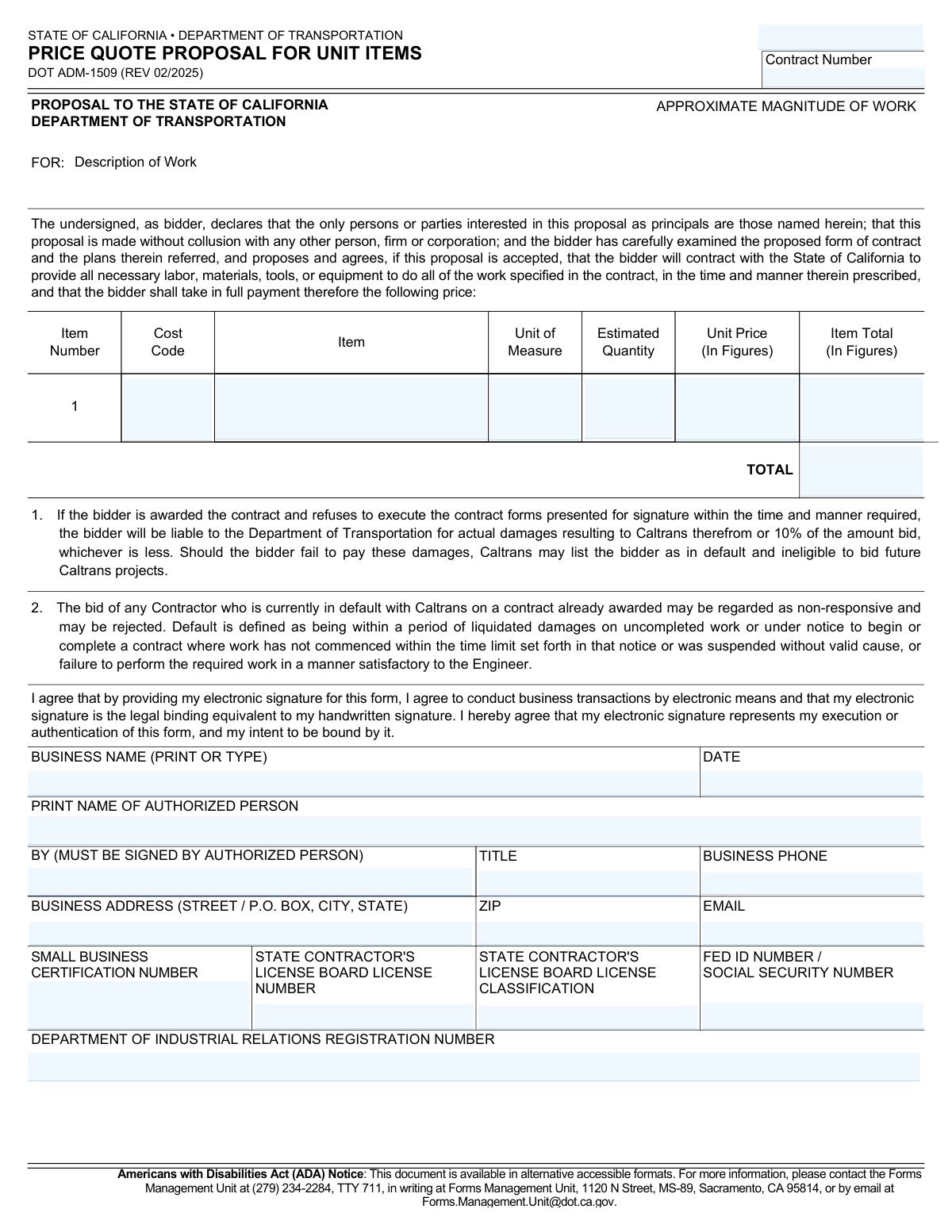
Yes! You can use AI to fill out Form DOT ADM-1509, Price Quote Proposal for Unit Items

Form DOT ADM-1509, the Price Quote Proposal for Unit Items, is a document used by the State of California Department of Transportation (Caltrans) for bidders to submit their proposals for contracts. Bidders use this form to detail the costs for specific items, including labor, materials, and equipment, for a given project. Today, this form can be filled out quickly and accurately using AI-powered services like Instafill.ai, which can also convert non-fillable PDF versions into interactive fillable forms.
Our AI automatically handles information lookup, data retrieval, formatting, and form filling.
It takes less than a minute to fill out DOT ADM-1509 using our AI form filling.
Securely upload your data. Information is encrypted in transit and deleted immediately after the form is filled out.

Form specifications

Form name: Form DOT ADM-1509, Price Quote Proposal for Unit Items
Number of pages: 2
Language: English
main-image

Instafill Demo: How to fill out PDF forms in seconds with AI

How to Fill Out DOT ADM-1509 Online for Free in 2026

Are you looking to fill out a DOT ADM-1509 form online quickly and accurately? Instafill.ai offers the #1 AI-powered PDF filling software of 2026, allowing you to complete your DOT ADM-1509 form in just 37 seconds or less.
Follow these steps to fill out your DOT ADM-1509 form online using Instafill.ai:
  1. 1 Navigate to Instafill.ai and upload or select the DOT ADM-1509 form.
  2. 2 Allow the AI to scan the document and identify all the required fields, such as business information, contract details, and pricing tables.
  3. 3 Provide your business details, including legal name, address, contact information, and relevant certification or license numbers.
  4. 4 Enter the specific contract number and a description of the work as specified in the project documents.
  5. 5 Carefully fill in the itemized price quote table, entering the description, unit of measure, estimated quantity, and unit price for each line item.
  6. 6 Input your Federal ID or Social Security Number, State Contractor's License information, and Department of Industrial Relations registration number.
  7. 7 Review all entered information for accuracy, then provide your electronic signature, printed name, title, and the date to finalize the proposal.

Our AI-powered system ensures each field is filled out correctly, reducing errors and saving you time.

Why Choose Instafill.ai for Your Fillable DOT ADM-1509 Form?

Speed

Complete your DOT ADM-1509 in as little as 37 seconds.

Up-to-Date

Always use the latest 2026 DOT ADM-1509 form version.

Cost-effective

No need to hire expensive lawyers.

Accuracy

Our AI performs 10 compliance checks to ensure your form is error-free.

Security

Your personal information is protected with bank-level encryption.

Frequently Asked Questions About Form DOT ADM-1509

This form, the 'Price Quote Proposal for Unit Items,' is used by contractors to submit an official bid to the California Department of Transportation (Caltrans) for projects that are priced based on individual work items.

Any contractor, business, or individual wishing to bid on a Caltrans contract that requires pricing per unit must complete and submit this form as their official proposal.

Yes, the form's Personal Information Notice states that disclosure of the requested information is mandatory. Failing to provide all required details will prevent your eligibility and may delay or prevent the processing of your bid.

To calculate the 'Item Total,' you must multiply the 'Estimated Quantity' provided by Caltrans by the 'Unit Price' you are proposing for that specific item. The result is the total cost for that line item.

This is a registration number required for any contractor bidding on or performing work for a public works contract in California. You must be registered with the DIR to be awarded the contract.

If your business is not a certified Small Business, you can leave the 'Small Business Certification Number' field blank. This certification is not required for all bidders, but it may be relevant for certain contract goals.

This information is collected to facilitate the processing of your proposal and review your eligibility for the program, as authorized by state and federal law. The information is kept confidential and disclosed only to authorized Caltrans employees.

If you are awarded the contract and refuse to sign the required forms, you will be liable for damages to Caltrans, up to 10% of your bid amount. You may also be listed as in default, making you ineligible for future Caltrans projects.

Yes, the form explicitly states that by providing an electronic signature, you agree it is the legal binding equivalent of your handwritten signature and shows your intent to be bound by the proposal.

Yes, services like Instafill.ai use AI to help you fill out forms accurately and efficiently. These tools can auto-fill your recurring business information, reducing manual entry and saving you time.

Simply upload the DOT ADM-1509 PDF to the Instafill.ai platform. The AI will make the form fillable online, and you can use its features to automatically populate your business details, complete calculations, and sign the document electronically.

If you have a non-fillable or 'flat' PDF, you can use a service like Instafill.ai to instantly convert it into an interactive, fillable form. This allows you to type directly into the fields and complete it on your computer.

For an accessible format, you can contact the Caltrans Forms Management Unit at (279) 234-2284 or by email at [email protected].

Default includes being behind schedule on an uncompleted contract or failing to perform work satisfactorily. The form states that if you are currently in default on another Caltrans contract, your bid may be considered non-responsive and rejected.

Compliance DOT ADM-1509
Validation Checks by Instafill.ai

1
Item Total Calculation Verification
This check ensures that for each line item, the 'Item Total' is the correct product of the 'Estimated Quantity' and the 'Unit Price'. This is a critical check to prevent mathematical errors that could lead to an incorrect bid amount. If the calculated total does not match the entered total, the submission should be flagged for review or correction, as it directly impacts the financial accuracy of the proposal.
2
Bid Total Summation Accuracy
This validation confirms that the final 'TOTAL' bid amount is the exact sum of all individual 'Item Total' fields. This ensures the overall bid is mathematically sound and accurately reflects the sum of its parts. An incorrect total could lead to contract disputes or the bid being rejected as non-responsive.
3
Federal ID or SSN Format Validation
This check validates that the 'FED ID NUMBER / SOCIAL SECURITY NUMBER' field conforms to the standard format for either a Federal Employer Identification Number (EIN) (XX-XXXXXXX) or a Social Security Number (SSN) (XXX-XX-XXXX). Proper formatting is essential for tax reporting and vendor identification within state financial systems. An invalid format will prevent the system from processing the vendor's information correctly.
4
Proposal Date Logical and Format Check
This validation ensures the 'DATE' field is a valid calendar date and is not set in the future. Submitting a proposal with a future date is illogical and could cause processing errors or questions about the bid's validity. The check confirms the bid was signed on or before the submission deadline, which is a fundamental requirement for consideration.
5
Signature and Printed Name Consistency
This check verifies that the name entered in the 'BY (MUST BE SIGNED BY AUTHORIZED PERSON)' field matches the name in the 'PRINT NAME OF AUTHORIZED PERSON' field. This ensures the electronic signature is being applied by the individual who is explicitly named as the authorized representative. A mismatch could invalidate the signature and render the entire proposal legally non-binding.
6
Mandatory Business Information Completeness
This validation ensures that all required business contact fields, including 'BUSINESS NAME', 'BUSINESS ADDRESS', 'ZIP', 'BUSINESS PHONE', and 'EMAIL', are filled out. This information is essential for all official communication, contract awarding, and legal notices. Incomplete information will delay processing and could result in the proposal being deemed non-responsive.
7
Business Phone Number Format
This check validates that the 'BUSINESS PHONE' number follows a standard North American format (e.g., (XXX) XXX-XXXX or XXX-XXX-XXXX). A correctly formatted phone number is crucial for ensuring the Department of Transportation can reliably contact the bidder. An invalid number could lead to missed communications regarding the bid status or contract award.
8
Business Email Address Format
This validation ensures the 'EMAIL' field contains a structurally valid email address (e.g., [email protected]). As email is a primary method for official correspondence, a valid address is critical for sending notifications, contract documents, and other important information. Failure to provide a valid email could result in the bidder missing critical deadlines or information.
9
ZIP Code Format Validation
This check verifies that the 'ZIP' code field contains a valid 5-digit or 9-digit (ZIP+4) US postal code. A correct ZIP code is necessary for mail delivery of physical documents and for verifying the business's location. An incorrect ZIP code can lead to returned mail and significant delays in communication.
10
Required License and Registration Number Presence
This validation confirms that the 'STATE CONTRACTOR'S LICENSE BOARD LICENSE NUMBER' and 'DEPARTMENT OF INDUSTRIAL RELATIONS REGISTRATION NUMBER' fields are not empty. These numbers are mandatory for verifying that the bidder is legally qualified and registered to perform work in the State of California. Missing numbers will result in the bid being rejected as the bidder's eligibility cannot be confirmed.
11
Positive Numeric Values for Bid Items
This check ensures that all numeric input fields for bid items, specifically 'Estimated Quantity' and 'Unit Price', contain values greater than zero. It is not logical to bid a negative or zero price or quantity for an item. This validation prevents data entry errors that would make the bid nonsensical and invalid.
12
Item Row Integrity Check
This validation ensures that if any part of a line item row is filled (e.g., 'Item' description), then all other required fields in that same row ('Unit of Measure', 'Estimated Quantity', 'Unit Price') must also be completed. This prevents incomplete or ambiguous line items from being submitted. An incomplete row cannot be calculated and would make the total bid inaccurate, likely causing the proposal to be rejected.

Common Mistakes in Completing DOT ADM-1509

Mathematical Errors in Price Calculations

Bidders often make manual calculation errors when multiplying the 'Unit Price' by the 'Estimated Quantity' to get the 'Item Total', or when summing all 'Item Total' amounts to arrive at the final 'TOTAL'. These errors can lead to an inaccurate bid amount, which may cause the proposal to be deemed non-responsive and rejected. To avoid this, carefully double-check all calculations or use a spreadsheet. AI-powered tools like Instafill.ai can automatically perform these calculations, eliminating the risk of human error.

Missing or Unauthorized Signature

A proposal is frequently submitted without the signature of an authorized person in the 'BY' field, or it is signed by an individual not legally empowered to bind the company. This is a critical failure that renders the entire proposal invalid and leads to immediate rejection. Always ensure the form is signed by a principal or officer of the company listed on official records. Since this form is a non-fillable PDF, a tool like Instafill.ai can convert it to a fillable version, making it easier to apply a valid electronic signature.

Using an Inconsistent or Incorrect Business Name

Bidders may enter a 'doing business as' (DBA) name or an abbreviation instead of the full, legal business name as registered with the state. This discrepancy between the proposal and official records, like the contractor's license, can cause processing delays or disqualification. The business name on the proposal must exactly match the name on the contractor's license and other legal documents.

Omitting or Mistyping Required License Numbers

The form requires several specific numbers, including the State Contractor's License, DIR Registration, and Federal ID. Bidders often leave these fields blank or enter incorrect or expired numbers, which is grounds for immediate disqualification on a public works project. Before submitting, verify that all required numbers are current, active, and entered correctly. Form-filling tools can store and accurately populate this recurring information, reducing the chance of typos.

Discrepancy Between Printed Name and Signature

This error occurs when the printed name of the authorized person does not match the name of the individual who signs the proposal. This can happen when an assistant fills out the form but the owner signs it, creating confusion about who is legally attesting to the bid. This ambiguity can lead to the bid being questioned or rejected. The person who signs the 'BY' field must be the same person whose name is entered in the 'PRINT NAME OF AUTHORIZED PERSON' field.

Failing to Enter the Contract Number

Bidders sometimes overlook the 'Contract Number' field at the top of the form, especially when rushing. Without this number, the procurement office cannot associate the bid with the correct project, causing significant processing delays. In a competitive bidding situation, this could lead to the proposal being set aside and missed. Always verify the contract number from the original bid solicitation documents and enter it clearly.

Listing an Incorrect License Classification

A contractor might list a license classification that does not cover the specific scope of work described in the bid solicitation. State regulations require contractors to hold the appropriate license classification for the work they perform. Submitting a bid with an incorrect classification will result in the bid being deemed non-responsive and rejected. Always check the bid requirements and verify your license classification is appropriate for the project.

Mismatched Units of Measure in Item Pricing

Bidders may misread the required 'Unit of Measure' (e.g., linear feet, square yards, each) and base their 'Unit Price' on a different unit. This fundamental error completely invalidates the item pricing and the total bid amount, leading to automatic rejection. It is crucial to carefully read the item description and specified unit of measure for each line item before calculating the price.

Incorrectly Using an SSN for a Business Entity

The form asks for a 'FED ID NUMBER / SOCIAL SECURITY NUMBER'. Corporations, LLCs, and partnerships should always provide their Federal Employer Identification Number (EIN), not the owner's Social Security Number (SSN). Using an SSN for a formal business entity is incorrect and can cause tax reporting and identity verification issues, potentially delaying contract award. Sole proprietors may use their SSN, but all other business types must use their EIN.

Submitting Illegible or Incomplete Information

When filling out a non-fillable PDF by hand, information can be illegible, or fields can be accidentally skipped. Unclear handwriting in critical fields like pricing, names, or license numbers can lead to the bid being misinterpreted or rejected because the information cannot be verified. To prevent this, it's best to use a fillable version of the form. AI tools like Instafill.ai can convert flat PDFs into fillable forms, ensuring all entries are typed, legible, and complete before submission.
Saved over 80 hours a year

“I was never sure if my IRS forms like W-9 were filled correctly. Now, I can complete the forms accurately without any external help.”

Kevin Martin Green

Your data stays secure with advanced protection from Instafill and our subprocessors

Robust compliance program

Transparent business model

You’re not the product. You always know where your data is and what it is processed for.

ISO 27001, HIPAA, and GDPR

Our subprocesses adhere to multiple compliance standards, including but not limited to ISO 27001, HIPAA, and GDPR.

Security & privacy by design

We consider security and privacy from the initial design phase of any new service or functionality. It’s not an afterthought, it’s built-in, including support for two-factor authentication (2FA) to further protect your account.

Fill out DOT ADM-1509 with Instafill.ai

Worried about filling PDFs wrong? Instafill securely fills form-dot-adm-1509-price-quote-proposal-for-unit-items forms, ensuring each field is accurate.