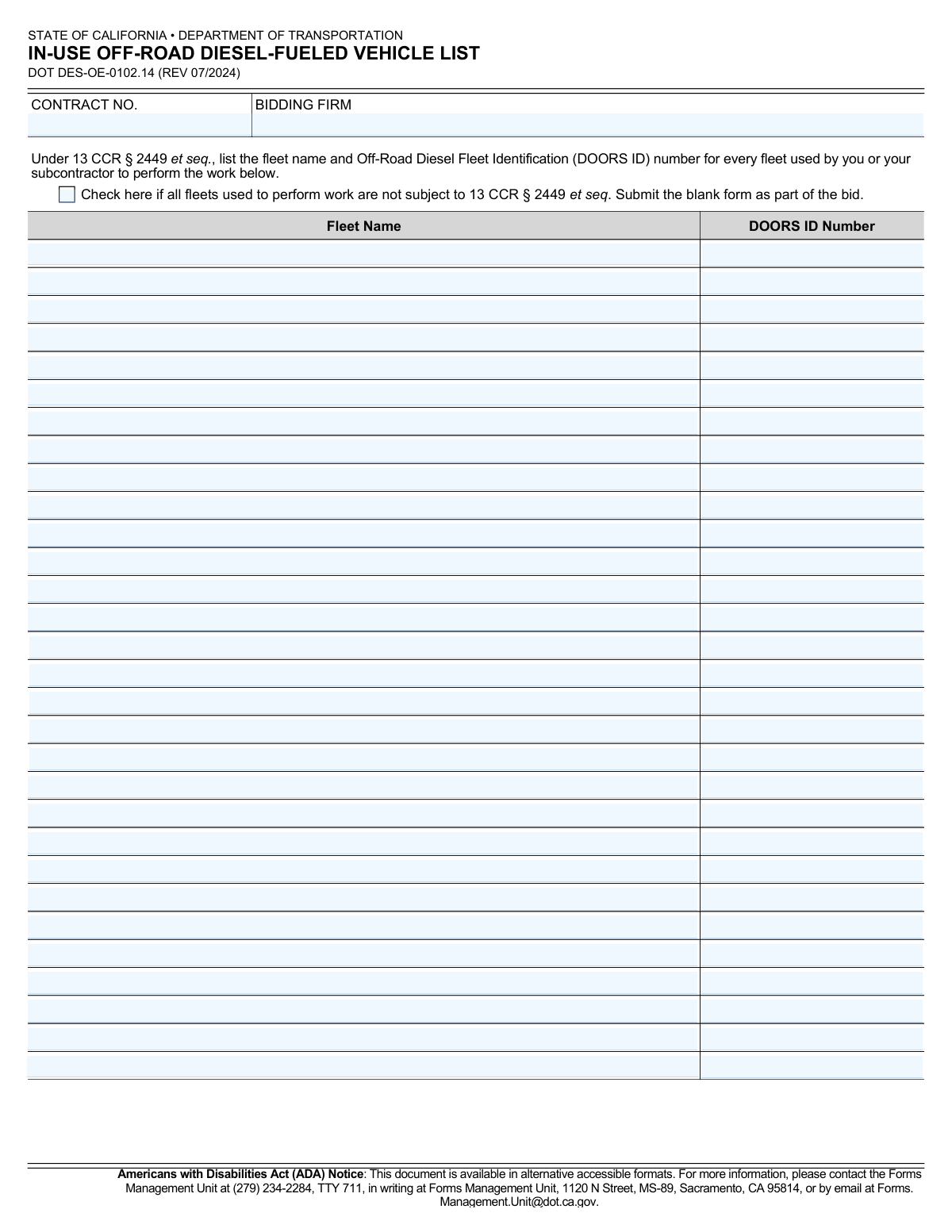
Yes! You can use AI to fill out Form DOT DES-OE-0102.14, IN-USE OFF-ROAD DIESEL-FUELED VEHICLE LIST
Form DOT DES-OE-0102.14, the In-Use Off-Road Diesel-Fueled Vehicle List, is a mandatory document for any firm bidding on a California Department of Transportation contract. It serves to verify that the bidding firm and its subcontractors comply with California's air quality regulations (13 CCR § 2449) by listing all off-road diesel fleets and their official Diesel Off-Road Online Reporting System (DOORS) ID numbers. Today, this form can be filled out quickly and accurately using AI-powered services like Instafill.ai, which can also convert non-fillable PDF versions into interactive fillable forms.
Our AI automatically handles information lookup, data retrieval, formatting, and form filling.
It takes less than a minute to fill out DOT DES-OE-0102.14 using our AI form filling.
Securely upload your data. Information is encrypted in transit and deleted immediately after the form is filled out.
Form specifications
| Form name: | Form DOT DES-OE-0102.14, IN-USE OFF-ROAD DIESEL-FUELED VEHICLE LIST |
| Number of pages: | 1 |
| Language: | English |
Instafill Demo: How to fill out PDF forms in seconds with AI
How to Fill Out DOT DES-OE-0102.14 Online for Free in 2026
Are you looking to fill out a DOT DES-OE-0102.14 form online quickly and accurately? Instafill.ai offers the #1 AI-powered PDF filling software of 2026, allowing you to complete your DOT DES-OE-0102.14 form in just 37 seconds or less.
Follow these steps to fill out your DOT DES-OE-0102.14 form online using Instafill.ai:
- 1 Navigate to Instafill.ai and upload or select Form DOT DES-OE-0102.14.
- 2 Enter the Bidding Firm name and the specific Contract Number in the designated fields.
- 3 Determine if your fleets are subject to 13 CCR § 2449. If not, check the provided box and proceed to the final step.
- 4 If your fleets are subject, use the AI-guided interface to input the Fleet Name and corresponding DOORS ID Number for the first fleet.
- 5 Continue adding entries for all fleets used by your firm and any subcontractors for the project.
- 6 Review the completed form to ensure all fleet information is accurate and complete before finalizing.
- 7 Download the filled form to include with your official bid submission.
Our AI-powered system ensures each field is filled out correctly, reducing errors and saving you time.
Why Choose Instafill.ai for Your Fillable DOT DES-OE-0102.14 Form?
Speed
Complete your DOT DES-OE-0102.14 in as little as 37 seconds.
Up-to-Date
Always use the latest 2026 DOT DES-OE-0102.14 form version.
Cost-effective
No need to hire expensive lawyers.
Accuracy
Our AI performs 10 compliance checks to ensure your form is error-free.
Security
Your personal information is protected with bank-level encryption.
Frequently Asked Questions About Form DOT DES-OE-0102.14
This form is used to list all in-use off-road diesel-fueled vehicle fleets that you and your subcontractors will use for a specific Caltrans contract. It is required to ensure compliance with California's air quality regulations (13 CCR § 2449).
Any firm bidding on a California Department of Transportation (Caltrans) contract is required to complete and submit this form as part of their bid package.
DOORS stands for Diesel Off-Road Online Reporting System. The DOORS ID is a unique fleet identification number assigned by the California Air Resources Board (CARB), which you can find in your fleet's official registration documents.
Yes, you must list every fleet used to perform the work, which includes fleets owned by your firm and any fleets used by your subcontractors on the project.
Check the box only if all fleets used for the contract work, including your subcontractors', are not subject to the regulation 13 CCR § 2449. If you check it, you must submit the otherwise blank form with your bid.
For each fleet subject to the regulation, you must enter the official Fleet Name and its corresponding DOORS ID number in the spaces provided.
The form has space for thirty fleets. If you need to list more, you should attach an additional copy of the form with the remaining fleet information filled out.
This form must be completed and submitted along with all other required documents as part of your official bid package for the specified contract.
Fleets subject to the regulation are required to be registered with CARB and have a DOORS ID. If a fleet is not registered, it may not be compliant, and you should contact CARB to resolve its status before listing it on the form.
Yes, services like Instafill.ai use AI to accurately auto-fill form fields, which can save time and reduce errors, especially when listing numerous fleets.
You can upload the DOT DES-OE-0102.14 PDF to the Instafill.ai platform. The service will make the document fillable online, allowing you to easily type in your bidding firm, contract number, and all fleet details.
If you have a non-fillable or 'flat' PDF, you can use a service like Instafill.ai. It can convert the static document into an interactive, fillable form that you can complete and save on your computer.
The Contract Number is the unique identifier for the project you are bidding on. This number is provided in the official bid solicitation documents from the Department of Transportation.
Compliance DOT DES-OE-0102.14
Validation Checks by Instafill.ai
1
Contract Number Presence
This check ensures that the 'Contract No.' field is not empty. The contract number is a critical identifier for associating the bid with a specific project. If this field is left blank, the form submission will be rejected as it cannot be processed or filed correctly.
2
Bidding Firm Name Presence
This validation verifies that the 'Bidding Firm' field has been filled out. This information is essential for identifying the company submitting the bid. A failure to provide the firm's name would make the submission anonymous and invalid, leading to its rejection.
3
Conditional Fleet Information Requirement
This check validates that if the 'All fleets not subject' checkbox is unchecked, at least one 'Fleet Name' and its corresponding 'DOORS ID Number' are provided. This is important because an unchecked box signifies that there are subject fleets to declare. If no fleets are listed, the form is considered incomplete and will be flagged for correction.
4
Exclusive Checkbox and Fleet Data
This validation ensures that if the 'All fleets not subject' checkbox is checked, all 'Fleet Name' and 'DOORS ID Number' fields are left empty. The form instructions specify that a blank form should be submitted in this scenario. Submitting both a checked box and fleet data creates a contradiction, which will cause the form to fail validation.
5
Paired Fleet Name and DOORS ID
This check verifies that for every row where a 'Fleet Name' is entered, the corresponding 'DOORS ID Number' field is also filled in. A fleet entry is incomplete without its official identification number, which is necessary for regulatory verification. An incomplete pair will result in a validation error, requiring the user to provide the missing ID.
6
Paired DOORS ID and Fleet Name
This validation is the counterpart to the previous one, ensuring that if a 'DOORS ID Number' is provided, its corresponding 'Fleet Name' is also entered. The ID number alone is not sufficient for identification purposes; the associated fleet name is required for context and clarity. A submission with an ID but no name will be considered incomplete and rejected.
7
DOORS ID Number Format
This check validates that the 'DOORS ID Number' field contains only numeric characters. The DOORS ID is a specific identification number issued by the state, and it is expected to follow a numerical format. Submitting non-numeric characters could cause data processing errors and will result in a validation failure.
8
Contract Number Format Plausibility
This check ensures the 'Contract No.' field contains a plausible format, such as alphanumeric characters and potentially hyphens, without special symbols. While the exact format may vary, this prevents the entry of clearly invalid data. An invalid format could indicate a typo and will prompt the user to review their entry.
9
Sequential Fleet Entry
This validation ensures that fleet entries are made sequentially without gaps. For example, a user cannot enter information for the 'Third Fleet' if the 'Second Fleet' fields are empty. This rule promotes orderly data entry and prevents accidental omissions in the list. A detected gap will trigger an error, asking the user to fill the list from the top down.
10
Unique DOORS ID Numbers
This check verifies that all entered 'DOORS ID Number' values are unique within the form. Listing the same fleet ID multiple times is redundant and likely a data entry error. This validation helps ensure the accuracy and integrity of the fleet list, preventing duplicate records from being processed.
11
Bidding Firm Name Validity
This validation checks that the 'Bidding Firm' name is a non-empty string with a reasonable length (e.g., between 2 and 150 characters). This prevents submissions with single-character or excessively long names that are likely erroneous. If the name falls outside the acceptable range, the user will be prompted to correct it.
12
Fleet Name Validity
This check ensures that any entered 'Fleet Name' is a non-empty string of a reasonable length. Similar to the bidding firm name, this prevents invalid entries that could be typos or placeholders. This validation is applied to every fleet name field that is filled out to maintain data quality across all entries.
13
Duplicate Fleet Entry Check
This validation checks for duplicate rows where both the 'Fleet Name' and 'DOORS ID Number' are identical to another row on the form. Submitting the exact same fleet information twice is redundant and points to a data entry mistake. The system should flag these duplicates and require the user to remove the redundant entry before submission.
Common Mistakes in Completing DOT DES-OE-0102.14
Bidders either check this box while also listing fleets, or fail to check it when they have no subject fleets, submitting a blank form. This creates a contradiction or ambiguity that can lead to bid rejection for non-compliance. To avoid this, check the box only if no fleets are subject to the regulation and leave the list blank; otherwise, leave the box unchecked and complete the fleet list.
The form explicitly requires listing fleets used by both the bidding firm and its subcontractors, a detail that is frequently overlooked. Forgetting to gather and include information for subcontractors leads to an incomplete and non-compliant submission. This can result in bid disqualification, so firms must proactively request the Fleet Name and DOORS ID from all subcontractors before submitting the bid.
This common data entry error involves transposing digits, using an outdated ID, or simply mistyping the number assigned by the Diesel Off-Road Online Reporting System. An incorrect DOORS ID prevents the agency from verifying compliance with 13 CCR § 2449, which can invalidate the entire bid. Always double-check each ID against official registration documents before submission; using an AI form-filler like Instafill.ai can help validate number formats to catch potential errors.
When filling out the list, a bidder may accidentally enter a valid DOORS ID next to the wrong fleet name, especially when managing a long list of their own and subcontractor fleets. This error makes verification impossible and suggests poor record-keeping, potentially leading to rejection. Carefully review each row to ensure the correct DOORS ID is paired with its corresponding official fleet name.
A bidder with no subject fleets might submit the form completely blank, without checking the 'All fleets not subject...' box. The instructions require the box to be checked to clarify the reason for the blank list. An ambiguously blank form can be interpreted as an incomplete submission and may be rejected for failing to provide necessary compliance information.
Firms sometimes enter a common name, abbreviation, or 'Doing Business As' (DBA) name instead of the official fleet name registered in the DOORS system. This discrepancy hinders the verification process and can cause compliance issues or rejection. Always use the exact, full legal name of the fleet as it appears on official DOORS registration documents to ensure a perfect match.
Bidders may list a fleet name but forget to enter the corresponding DOORS ID, or vice-versa, leaving an incomplete row. Each listed fleet must have both pieces of information to be considered a valid entry for compliance verification. Incomplete rows will be flagged and can lead to the entire bid being deemed non-responsive.
This form is often provided as a non-fillable PDF, leading to manual completion where handwriting can be unclear, especially for long names and numbers. Illegible entries for the Bidding Firm, Contract No., or DOORS IDs can be misread, causing processing delays or rejection. To prevent this, use a tool like Instafill.ai to convert the flat PDF into a fillable format for clean, typed entries.
Simple typos or using an internal project code instead of the official 'Contract No.' can cause the form to be misfiled or rejected. Similarly, using a DBA instead of the legal entity name listed on the bid documents for 'Bidding Firm' creates a mismatch. Always cross-reference these details with the master bid package to ensure they are identical; AI-powered tools can help by auto-populating these fields consistently across all bid documents.
Saved over 80 hours a year
“I was never sure if my IRS forms like W-9 were filled correctly. Now, I can complete the forms accurately without any external help.”
Kevin Martin Green
Your data stays secure with advanced protection from Instafill and our subprocessors

Robust compliance program
Transparent business model
You’re not the product. You always know where your data is and what it is processed for.
ISO 27001, HIPAA, and GDPR
Our subprocesses adhere to multiple compliance standards, including but not limited to ISO 27001, HIPAA, and GDPR.
Security & privacy by design
We consider security and privacy from the initial design phase of any new service or functionality. It’s not an afterthought, it’s built-in, including support for two-factor authentication (2FA) to further protect your account.
Fill out DOT DES-OE-0102.14 with Instafill.ai
Worried about filling PDFs wrong? Instafill securely fills form-dot-des-oe-010214-in-use-off-road-diesel-fueled-vehicle-list forms, ensuring each field is accurate.