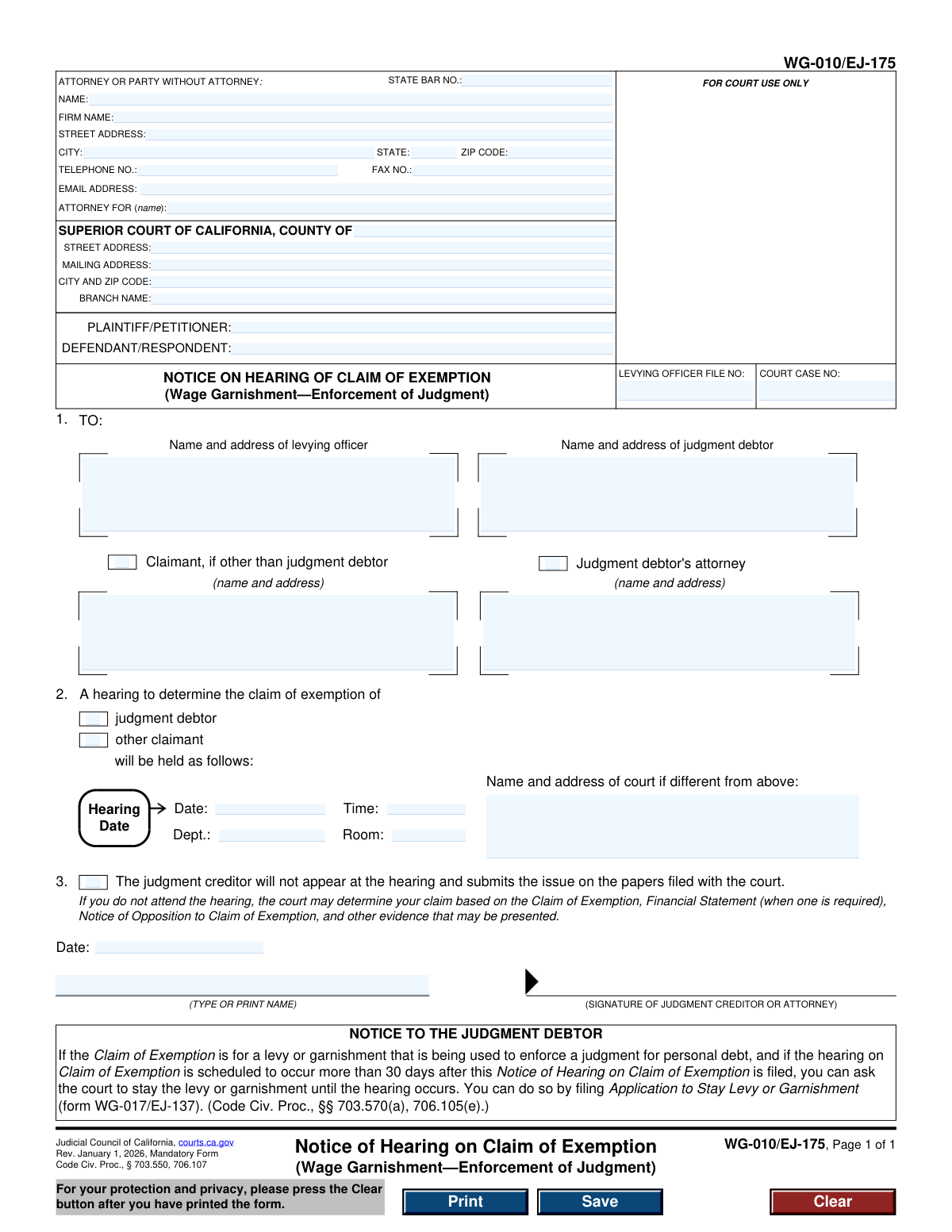
Yes! You can use AI to fill out Form WG-010/EJ-175, Notice of Hearing on Claim of Exemption (Wage Garnishment—Enforcement of Judgment)
Form WG-010/EJ-175, the Notice of Hearing on Claim of Exemption, is a mandatory legal document in California used by a judgment creditor to set a court date to challenge a debtor's claim that their wages should be exempt from garnishment. It officially informs the debtor, the levying officer, and the court of the scheduled hearing details, ensuring all parties are aware of the proceedings to resolve the exemption claim. Today, this form can be filled out quickly and accurately using AI-powered services like Instafill.ai, which can also convert non-fillable PDF versions into interactive fillable forms.
WG-010/EJ-175 is part of the
California court forms, court claim forms and judgment enforcement forms categories on Instafill.
Our AI automatically handles information lookup, data retrieval, formatting, and form filling.
It takes less than a minute to fill out WG-010/EJ-175 using our AI form filling.
Securely upload your data. Information is encrypted in transit and deleted immediately after the form is filled out.
Form specifications
| Form name: | Form WG-010/EJ-175, Notice of Hearing on Claim of Exemption (Wage Garnishment—Enforcement of Judgment) |
| Number of fields: | 39 |
| Number of pages: | 1 |
| Language: | English |
Instafill Demo: How to fill out PDF forms in seconds with AI
How to Fill Out WG-010/EJ-175 Online for Free in 2026
Are you looking to fill out a WG-010/EJ-175 form online quickly and accurately? Instafill.ai offers the #1 AI-powered PDF filling software of 2026, allowing you to complete your WG-010/EJ-175 form in just 37 seconds or less.
Follow these steps to fill out your WG-010/EJ-175 form online using Instafill.ai:
- 1 Navigate to Instafill.ai and upload or select the WG-010/EJ-175 form.
- 2 Use the AI assistant to automatically populate your personal and case information, including court details, case number, and levying officer file number.
- 3 Enter the names and addresses of all parties to be notified, such as the levying officer, judgment debtor, and claimant.
- 4 Input the specific details for the scheduled hearing, including the date, time, department, room, and court address.
- 5 Indicate if the judgment creditor will not appear at the hearing and will submit the issue on the papers filed.
- 6 Review all entered information for accuracy, then have the judgment creditor or their attorney electronically sign and date the form.
- 7 Download the completed form to file with the court and serve on the appropriate parties.
Our AI-powered system ensures each field is filled out correctly, reducing errors and saving you time.
Why Choose Instafill.ai for Your Fillable WG-010/EJ-175 Form?
Speed
Complete your WG-010/EJ-175 in as little as 37 seconds.
Up-to-Date
Always use the latest 2026 WG-010/EJ-175 form version.
Cost-effective
No need to hire expensive lawyers.
Accuracy
Our AI performs 10 compliance checks to ensure your form is error-free.
Security
Your personal information is protected with bank-level encryption.
Frequently Asked Questions About Form WG-010/EJ-175
This form, the 'Notice of Hearing on Claim of Exemption,' is used by a judgment creditor to schedule a court hearing to dispute a debtor's claim that their wages should be exempt from garnishment.
The judgment creditor (the person or entity owed money) or their attorney must fill out and file this form if they wish to oppose the debtor's Claim of Exemption.
Receiving this form means the creditor is challenging your request to protect your wages from garnishment. It notifies you of the specific date, time, and location of the court hearing where a judge will decide the matter.
You will need the court case number, the levying officer's file number, the names and addresses of all parties, and the hearing details (date, time, department) which you must get from the court clerk.
It is strongly recommended that you attend the hearing to explain to the judge why your wages should be exempt. If you don't attend, the court will make a decision based only on the submitted paperwork.
This box is for the judgment creditor to indicate they will not personally appear at the hearing. By checking it, they agree to let the court decide the issue based on the documents filed by both parties.
Yes, if the hearing is scheduled more than 30 days after this notice was filed, you can file form WG-017/EJ-137, 'Application to Stay Levy or Garnishment,' to ask the court to pause the garnishment until the hearing date.
The judgment creditor must serve (legally deliver) a copy of the filed notice to the judgment debtor, the levying officer (e.g., the Sheriff's Department), and any other claimant listed on the form.
Yes, services like Instafill.ai use AI to help you accurately auto-fill form fields with your case information, saving you time and reducing the risk of errors.
You can use a service like Instafill.ai to upload the PDF. Their platform allows you to fill in all the required fields interactively online, after which you can download the completed document for filing.
If you have a non-fillable or 'flat' PDF, you can upload it to Instafill.ai. The service can convert the document into an interactive, fillable form that you can complete on your computer.
This number is assigned by the sheriff or marshal's office handling the wage garnishment. You can find it on other legal documents you received regarding the garnishment, such as the Earnings Withholding Order.
If the creditor fails to file a Notice of Opposition and this Notice of Hearing within the legal deadline (usually 10 days), the levying officer must stop the garnishment and release your withheld wages.
Compliance WG-010/EJ-175
Validation Checks by Instafill.ai
1
Court Case Number Presence
This check ensures that the 'COURT CASE NO:' field (CaseNumber) is not empty. The case number is a critical identifier that links the notice to the correct legal proceeding in the court system. Failure to provide it would make the form impossible to file and process correctly, leading to rejection by the court clerk.
2
Party Identification Completeness
Validates that both the 'PLAINTIFF/PETITIONER' (Party1) and 'DEFENDANT/RESPONDENT' (Party2) fields are filled out. These fields identify the primary parties of the lawsuit, which is fundamental information for any legal document. An incomplete form will cause confusion and will likely be rejected.
3
Attorney Bar Number Format
Ensures that the 'STATE BAR NO.' field (AttyBarNo_dc), if provided, contains only numeric characters. State Bar numbers are unique numerical identifiers for licensed attorneys. Submitting a non-numeric or incorrectly formatted number could prevent the court from verifying the attorney's credentials.
4
Conditional Attorney Representation
This check verifies that if an attorney's name is provided in the 'ATTORNEY OR PARTY WITHOUT ATTORNEY' section, the 'ATTORNEY FOR (name)' field (AttyFor) is also completed. It is legally required to state which party the attorney represents. Omitting this information creates ambiguity and can invalidate the filing.
5
Mandatory Recipient Information
Verifies that the name and address fields for the 'levying officer' and 'judgment debtor' in section 1 are both filled. As a notice, the form's primary purpose is to inform these specific parties of the hearing. If this information is missing, the notice cannot be served, defeating its purpose.
6
Conditional Claimant Details
If the checkbox for 'Claimant, if other than judgment debtor' in section 1 is checked, this validation ensures the corresponding name and address field is filled. This is necessary to properly notify all relevant parties involved in the claim of exemption. Failure to provide the claimant's details when indicated would result in an incomplete and ineffective notice.
7
Exclusive Hearing Subject Selection
This check ensures that in section 2, exactly one of the two checkboxes ('judgment debtor' or 'other claimant') is selected. The form requires a clear, unambiguous indication of whose claim of exemption is being heard. Selecting none or both would make the notice unclear and legally deficient.
8
Hearing Details Completeness
Validates that the 'Date' (HearingDate) and 'Time' (HearingTime) fields for the hearing in section 2 are both completed. These details are the most critical pieces of information on the notice, as they inform the recipient when and where to appear. An omission would render the notice useless.
9
Future Hearing Date Validation
Ensures the date entered in the 'Hearing Date' field is a valid date that occurs in the future, after the date of filing. A hearing cannot be scheduled for a past date, and sufficient notice must be given to all parties. An invalid or past date would lead to immediate rejection of the form.
10
Signature and Printed Name Requirement
This check verifies that both the signature date ('Date1') and the typed or printed name of the signatory ('Print1') are provided at the bottom of the form. A signature, along with a date and printed name, is required to attest to the authenticity and timing of the document. An unsigned or undated form is not legally valid.
11
Logical Date Consistency
This validation confirms that the signature date ('Date1') is on or before the scheduled hearing date ('HearingDate'). It is logically impossible to sign a notice for a hearing that has already passed. This check prevents nonsensical data entry and ensures the document's timeline is coherent.
12
Email Address Format Validation
Checks that the value entered in the 'EMAIL ADDRESS' field follows the standard format for an email address (e.g., '[email protected]'). While not always mandatory, providing a valid email ensures a reliable method of electronic communication and service. An invalid format could lead to missed communications from the court or other parties.
13
ZIP Code Format
Ensures that all ZIP code fields ('AttyZip', 'CityZip') contain a valid 5-digit or 9-digit (ZIP+4) numeric format. Correctly formatted ZIP codes are essential for accurate mail delivery by the postal service. Incorrect formats can lead to returned mail and failed service of the notice.
14
County Name Validation
This check validates that the 'COUNTY OF' field (CrtCounty) contains the name of a recognized California county. The form must be filed in the correct jurisdiction's Superior Court. An incorrect or misspelled county name will cause the form to be misrouted or rejected, delaying the legal process.
Common Mistakes in Completing WG-010/EJ-175
Filers often enter the Court Case Number or Levying Officer File Number incorrectly, or leave them blank. This usually happens due to transcription errors or not having the source documents readily available. An incorrect number can lead to the notice being rejected by the court clerk or misfiled, causing significant delays in scheduling the hearing and enforcing the judgment.
A frequent mistake is incorrectly swapping the names of the plaintiff and defendant in the party information section. This error stems from confusion or carelessness when transferring information from the original judgment. It creates ambiguity in the court record, can be grounds for the notice to be deemed defective, and may require filing a corrected version, which wastes time and resources.
Users may list the wrong court county, branch name, or address, especially in counties with multiple court locations. This happens when filers assume the hearing will be at the courthouse closest to them, rather than the one where the case is venued. Filing at the wrong court will result in outright rejection, forcing the filer to start the process over and potentially miss legal deadlines.
In Section 1, filers sometimes forget to include the full name and address for all required parties, such as the levying officer (e.g., Sheriff's Department) or the judgment debtor's attorney. This oversight leads to improper service, which can cause the hearing to be postponed or nullify any orders made at the hearing. Always verify all parties of record who must receive legal notice.
Mistakes in the hearing date, time, or department number in Section 2 are common and have serious consequences. A simple typo can cause the debtor and other parties to miss the hearing, leading the court to make a decision based on incomplete information. To avoid this, verbally confirm the details with the court clerk and double-check the entries on the form before filing and serving it.
An unsigned or undated form is legally invalid and will be rejected by the court clerk. This mistake often happens when filers are in a rush and overlook the final signature block at the bottom of the page. This simple error halts the entire process, requiring the filer to correct, re-sign, and re-file the document, which can jeopardize timely notice.
Filers may incorrectly check the box in Section 3, indicating they will not appear at the hearing, without understanding the implications. This waives their right to present oral arguments, potentially weakening their case. Conversely, failing to check it when not planning to attend can be viewed negatively by the court. This decision should be a conscious, strategic choice, not an accident.
Many people find this form as a non-fillable PDF, print it, and fill it out by hand. Illegible handwriting for names, addresses, or case numbers can lead to data entry errors by court staff, misdirected mail, or rejection of the filing. To prevent this, use a service like Instafill.ai, which can convert flat PDFs into easily fillable forms, ensuring all text is clear and professional.
The top section for the attorney or party's information is often filled with outdated addresses, phone numbers, or typos. This prevents the court and other parties from sending important correspondence, which can lead to missed deadlines or default judgments. Using a tool like Instafill.ai can help by auto-populating this section with verified, up-to-date contact information, reducing the risk of error.
In Section 2, the form asks whether the claim of exemption was filed by the 'judgment debtor' or an 'other claimant.' Filers may automatically check 'judgment debtor' without verifying who actually signed the original Claim of Exemption form. If a third party (like a spouse) filed the claim, this error makes the notice technically inaccurate and could be used to challenge the proceeding.
Saved over 80 hours a year
“I was never sure if my IRS forms like W-9 were filled correctly. Now, I can complete the forms accurately without any external help.”
Kevin Martin Green
Your data stays secure with advanced protection from Instafill and our subprocessors

Robust compliance program
Transparent business model
You’re not the product. You always know where your data is and what it is processed for.
ISO 27001, HIPAA, and GDPR
Our subprocesses adhere to multiple compliance standards, including but not limited to ISO 27001, HIPAA, and GDPR.
Security & privacy by design
We consider security and privacy from the initial design phase of any new service or functionality. It’s not an afterthought, it’s built-in, including support for two-factor authentication (2FA) to further protect your account.
Fill out WG-010/EJ-175 with Instafill.ai
Worried about filling PDFs wrong? Instafill securely fills form-wg-010ej-175-notice-of-hearing-on-claim-of-exemption-wage-garnishmentenforcement-of-judgment forms, ensuring each field is accurate.