
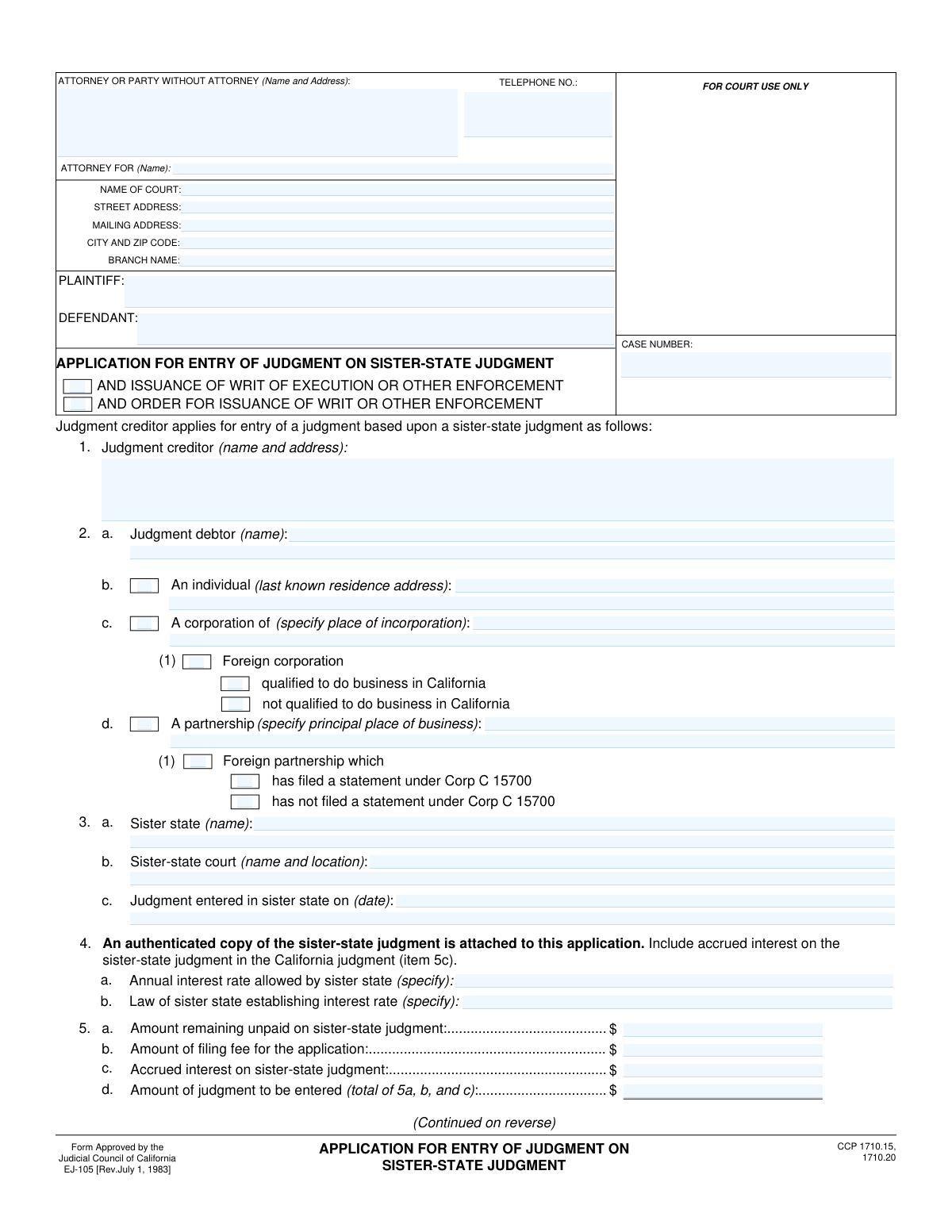
Yes! You can use AI to fill out Form EJ-105, Application for Entry of Judgment on Sister-State Judgment
Don't type 55 fields by hand. Tell our AI about yourself, or upload a document you already have, and it fills every field in seconds. You check it, then download, print or sign.
The AI does the filling. You just check it.
No typing into boxes, nothing to install.
What this form asks for
The AI fills all of it, from your answers or your documents.
The AI checks your answers before you download
14 checks built for this form, so a wrong date or a missing answer is caught before anyone else sees it.
This validation ensures that only one type of judgment debtor is selected from the options in section 2: 'An individual' (2b), 'A corporation' (2c), or 'A partnership' (2d). Selecting more than one type creates ambiguity about the debtor's legal status. If this check fails, the user should be prompted to select only one debtor type that accurately represents the party.
This check verifies that if a debtor type is selected in section 2, the corresponding detail fields are completed. For example, if 'A corporation' (2c) is checked, the 'place of incorporation' must be filled. This is crucial for properly identifying and serving the judgment debtor. A failure would trigger a message requiring the user to fill in the specific details for the chosen debtor type.
This validation confirms that the date entered in item 3c, 'Judgment entered in sister state on (date)', is a valid, fully-formatted date that occurs in the past. A future or invalid date would render the application logically incorrect and legally void. If the date is invalid, the system should reject the entry and prompt for a correct past date.
This is a logical cross-check to verify that the 'Amount of judgment to be entered' (5d) is the correct sum of the 'Amount remaining unpaid' (5a), 'Amount of filing fee' (5b), and 'Accrued interest' (5c). An incorrect total can lead to legal challenges and delays in enforcement. If the sum is incorrect, the system should automatically recalculate the total or flag the field for user correction.
This check ensures that if an 'Annual interest rate' is specified in item 4a, then the 'Law of sister state establishing interest rate' (4b) field must also be filled. This provides the legal justification for the interest being claimed. Without this citation, the claim for interest is unsubstantiated and may be denied by the court.
This validation ensures that if a value greater than zero is entered for 'Accrued interest' (5c), then the 'Annual interest rate allowed by sister state' (4a) field must also be filled. It is logically inconsistent to claim accrued interest without specifying the rate at which it accrued. Failure would prompt the user to either remove the accrued interest amount or provide the corresponding interest rate.
And 8 more checks
- Case Number Consistency Across Pages
- Writ of Execution Justification
- Signature Date Presence and Validity
- Printed Name Requirement for Signature
- Logical Sister State Check
- Corporation/Partnership Status Selection
- Required Party Information Completeness
- Currency Field Format Validation
Let AI fill out your EJ-105
No typing. Every field filled in seconds, checked, ready to sign.
How to Fill Out EJ-105 Online for Free in 2026
What the AI walks you through.
- Navigate to Instafill.ai and upload or select the EJ-105 form.
- Provide the court and case information, along with the details for the attorney or party filing the application.
- Enter the full names and addresses for both the judgment creditor (the person owed) and the judgment debtor (the person who owes).
- Specify the details of the original sister-state judgment, including the state, court, date of judgment, and attach an authenticated copy.
- Calculate and input the financial details, including the unpaid amount of the sister-state judgment, filing fees, and any accrued interest.
- If applicable, complete the section to request immediate issuance of a writ of execution, providing justification for the urgency.
- Review all auto-filled and entered information for accuracy, then electronically sign and date the declaration before downloading the completed form for filing.
Common Mistakes in Completing EJ-105
The ones the AI is built to catch.
Miscalculating Interest and Total Judgment Amount
Failure to Attach an Authenticated Judgment Copy
Incomplete Sister-State Interest Rate Information
Incorrect Debtor Entity Classification
Forgetting to Sign or Date the Application
Omitting Header Information on Page Two
Using Inconsistent Party Names
Weak or Missing Grounds for Ex Parte Writ
Using an Ambiguous Sister-State Court Name
Improper Formatting of Monetary Amounts
Frequently Asked Questions About EJ-105
Is it really free for 7 days?
Can I fill other forms too?
How do I cancel?
How does the AI fill out EJ-105?
What happens to my information?
How complex is EJ-105 to fill out?
What is the purpose of Form EJ-105, Application for Entry of Judgment on Sister-State Judgment?
Who should file this form?
What is a 'sister-state judgment'?
What documents do I need to submit with Form EJ-105?
How do I calculate the 'accrued interest' for Section 5c?
What is the purpose of Section 6, 'Application for issuance of a writ of execution'?
What happens after I file this application?
Is there a time limit to file this application in California?
What information do I need about the judgment debtor?
How do I calculate the total amount to be entered in Section 5d?
Can I use an AI tool to help me fill out Form EJ-105?
How can I fill out this form online using Instafill.ai?
What should I do if the PDF of Form EJ-105 I have is not fillable?
Get your EJ-105 filled out by AI
$0 today. Cancel before Nov 1 and you pay nothing.
Other forms like this one
California state forms: Judicial Council of California Form DE-111, Petition for Probate (Probate—Decedents Estates), DS 1891, Applicant/Vendor Disclosure Statement (State of California Department of Developmental Services), Judicial Council of California Form DE-120, Notice of Hearing—Decedent's Estate or Trust, Judicial Council of California Form DE-120, Notice of Hearing—Decedent's Estate or Trust, Murrieta Police Department Citizen Complaint Form (California Penal Code § 148.6 Advisory Statement), California Department of Social Services, Sworn Statement, State of California Department of Transportation California Civil Rights Laws Certification, State of California Department of Transportation Darfur Contracting Act Certification, Form DOT ADM-0077, State of California Department of Transportation, Contract Requirements, State of California Department of Transportation Subcontractor List, State of California Department of Transportation, Certified DVBE Summary, Bidder Declaration GSPD-05-105, State of California Level of Care Rate Determination Protocol Matrix, State of California Accessible Form, State of California Form SOC 321, Request for Order and Consent - Paramedical Services, State of California Darfur Contracting Act Certification, State of California Department of Veterans Affairs COMMERCIALLY USEFUL FUNCTION (CUF) CERTIFICATION FORM, Form ADR-100, Statement of Agreement or Nonagreement, Civil Appeal Case Information Statement, Form APP-014, Appellant's Proposed Statement on Appeal (Unlimited Civil Case)
California court forms: Judicial Council of California Form SC-105, Request for Court Order and Answer (Small Claims), Judicial Council of California Form SC-120, Defendant’s Claim and ORDER to Go to Small Claims Court (Small Claims), Judicial Council of California Form SER-001, Request for Sheriff to Serve Court Papers, Judicial Council of California Form SER-001, Request for Sheriff to Serve Court Papers, Affidavit for Collection of Personal Property California Probate Code Section 13100, Form POS-040, Proof of Service—Civil, Declaration of Facts of Death (California Superior Court), declaration-of-marriage-for-court-proceeding-california-family-law, ADOPT-200, Adoption Request, ADOPT-200, Stepparent Adoption Request, ADOPT-210, Adoption Agreement, ADOPT-310, Contact After Adoption Agreement, Judicial Council of California Form ADOPT-200, Adoption Request, Form ADR-107, Mediation Attendance Sheet, Form ADR-110, Order Appointing Referee, Form ADR-109, Stipulation or Motion for Order Appointing Referee, Form ADR-102, Request for Trial De Novo After Judicial Arbitration, Form ADR-108, Referee's Report (Code Civ. Proc., §§ 638, 639), Form ADR-106, Petition to Confirm, Correct, or Vacate Contractual Arbitration Award, Form ADR-104, Rejection of Award and Request for Trial After Attorney-Client Fee Arbitration
judgment enforcement forms: Form AT-180/EJ-185, Notice of Lien (Attachment—Enforcement of Judgment), Form WG-017/EJ-137, Application to Stay Levy or Garnishment (Wage Garnishment—Enforcement of Judgment), Form EJ-141, Application and Order to Appear for Examination—Consumer Debt, Form EJ-150, Notice of Levy (Enforcement of Judgment), Form EJ-158, Declaration Regarding Notice and Service for Ex Parte Application for Order on Deposit Account Exemption, Form EJ-190, Application for and Renewal of Judgment, Form EJ-100, Acknowledgment of Satisfaction of Judgment, Form EJ-146, Notice of Motion and Motion to Require Examination—Consumer Debt, Form EJ-147, Application and Order to Require Examination After Submission of Financial Statement—Consumer Debt, Form EJ-160, Claim of Exemption (Enforcement of Judgment), Form EJ-180, Notice of Hearing on Right to Homestead Exemption (Enforcement of Judgment), Form EJ-182, Declaration for Rehearing on Homestead Exemption (Enforcement of Judgment), Form EJ-001, Abstract of Judgment—Civil and Small Claims, Declaration of Address Verification (Wage Garnishment—Enforcement of Judgment), Form WG-010/EJ-175, Notice of Hearing on Claim of Exemption (Wage Garnishment—Enforcement of Judgment), Form EJ-195, Notice of Renewal of Judgment, Form WG-007/EJ-165, Financial Statement (Wage Garnishment—Enforcement of Judgment)
Let AI fill out your EJ-105
Your trial starts once a card is added. You pay nothing before Nov 1.
Our AI already knows this form, all 55 fields of it. Skip the typing: tell it about yourself, or upload what you have, and it fills the whole form in seconds.
- AI fills every field on both pages, checkboxes included
- No typing into boxes: answer a few questions, or upload a document you already have, an old copy of this form, a photo of a document
- The AI checks the answers; you review and change anything before you download
- Download the finished PDF, print it, or sign it online
- Encrypted, and never used to train AI
Cancel before Nov 1 and you pay nothing.
A card is needed to start the trial. Cancel in two clicks from your account.
Terms · Privacy