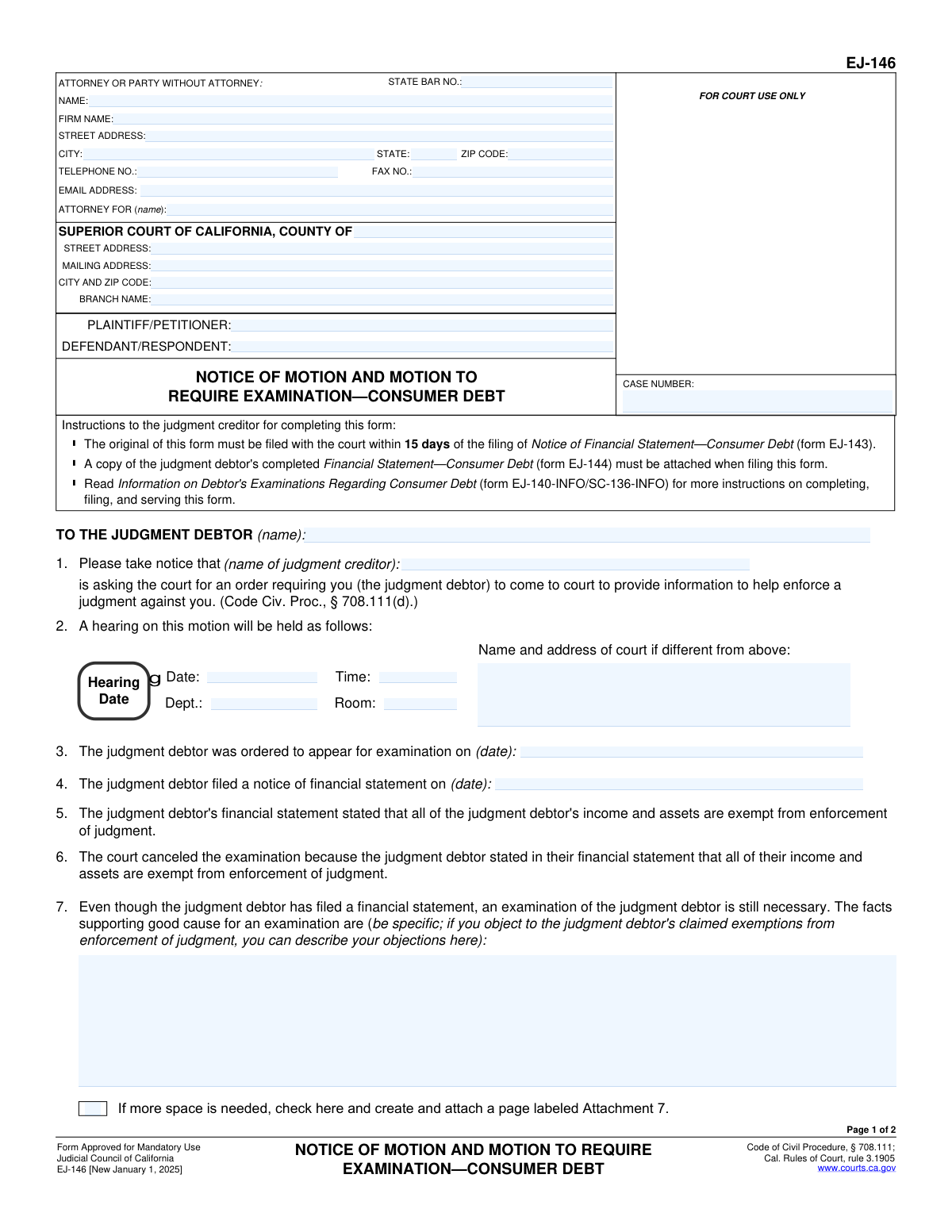
Yes! You can use AI to fill out Form EJ-146, Notice of Motion and Motion to Require Examination—Consumer Debt

Form EJ-146, Notice of Motion and Motion to Require Examination—Consumer Debt, is a legal document filed in California courts by a judgment creditor. It is used to ask the court to compel a debtor to appear for an examination about their finances when the creditor believes there is good cause, even if the debtor has already filed a financial statement claiming their assets are exempt. This motion is a crucial step for creditors seeking to enforce a judgment on a consumer debt. Today, this form can be filled out quickly and accurately using AI-powered services like Instafill.ai, which can also convert non-fillable PDF versions into interactive fillable forms.
EJ-146 is part of the California court forms, consumer debt forms and judgment enforcement forms categories on Instafill.
Our AI automatically handles information lookup, data retrieval, formatting, and form filling.
It takes less than a minute to fill out EJ-146 using our AI form filling.
Securely upload your data. Information is encrypted in transit and deleted immediately after the form is filled out.

Form specifications

Form name: Form EJ-146, Notice of Motion and Motion to Require Examination—Consumer Debt
Number of fields: 49
Number of pages: 1
Language: English
main-image

Instafill Demo: How to fill out PDF forms in seconds with AI

How to Fill Out EJ-146 Online for Free in 2026

Are you looking to fill out a EJ-146 form online quickly and accurately? Instafill.ai offers the #1 AI-powered PDF filling software of 2026, allowing you to complete your EJ-146 form in just 37 seconds or less.
Follow these steps to fill out your EJ-146 form online using Instafill.ai:
  1. 1 Navigate to Instafill.ai and upload or select Form EJ-146.
  2. 2 Enter the case number, court information, and the names of the plaintiff and defendant in the top caption section.
  3. 3 Provide your information as the filing party (attorney or self-represented) and identify the judgment debtor to whom the notice is directed.
  4. 4 Fill in the hearing details, including the date, time, and location. Also, enter the dates of the original examination order and the debtor's financial statement filing.
  5. 5 In Section 7, clearly state the facts supporting 'good cause' for the examination. If the debt is secured by property, complete Sections 8 and 9 with the relevant details.
  6. 6 Review all the information you have entered for accuracy, then date and sign the declaration under penalty of perjury.
  7. 7 Download the completed form for your records and file it with the court, ensuring you attach a copy of the debtor's Financial Statement (Form EJ-144) as required.

Our AI-powered system ensures each field is filled out correctly, reducing errors and saving you time.

Why Choose Instafill.ai for Your Fillable EJ-146 Form?

Speed

Complete your EJ-146 in as little as 37 seconds.

Up-to-Date

Always use the latest 2026 EJ-146 form version.

Cost-effective

No need to hire expensive lawyers.

Accuracy

Our AI performs 10 compliance checks to ensure your form is error-free.

Security

Your personal information is protected with bank-level encryption.

Frequently Asked Questions About Form EJ-146

This form is used by a judgment creditor to ask the court to compel a judgment debtor to attend a court examination, even after the debtor has filed a financial statement claiming all their assets and income are exempt from collection.

A judgment creditor (the person owed money) must fill out this form if they want to challenge a debtor's claim of total exemption and proceed with a court examination to find assets to collect on the judgment.

Yes, the original form must be filed with the court within 15 days of the date the judgment debtor filed their Notice of Financial Statement—Consumer Debt (form EJ-143).

You must attach a copy of the judgment debtor's completed Financial Statement—Consumer Debt (form EJ-144) when you file Form EJ-146 with the court.

In Section 7, you must specifically explain why you believe an examination is still necessary. This is where you can state your objections to the debtor's claimed exemptions or provide information suggesting they have undisclosed assets.

Complete Section 8 if your judgment involves debt secured by property (like a car or house) and you believe the debtor has provided inaccurate information about the property's location, condition, insurance, or tax status.

Not necessarily. You can check the box in Section 10 to indicate that you will not appear at the hearing and are asking the court to make a decision based on the documents you have filed.

The court will schedule a hearing, as noted in Section 2, to decide whether to grant your motion. If granted, the court will issue an order requiring the judgment debtor to appear for an examination.

You should read the 'Information on Debtor's Examinations Regarding Consumer Debt' (form EJ-140-INFO/SC-136-INFO) for more detailed instructions on completing, filing, and serving this motion.

Yes, services like Instafill.ai use AI to help you accurately auto-fill form fields with your case information, which saves time and helps prevent errors.

Simply upload the EJ-146 PDF to the Instafill.ai platform. The service will make the form interactive, allowing you to type your information directly into the fields or use AI to populate them from your saved data.

You can use a tool like Instafill.ai, which can convert flat, non-fillable PDFs into interactive forms. This allows you to easily type in your information, save, and print the completed document.

Compliance EJ-146
Validation Checks by Instafill.ai

1
Case Number Consistency
This check ensures that the 'CASE NUMBER' field is present and identical on both page 1 and page 2. The case number is the primary identifier for the legal proceeding, and any discrepancy can lead to misfiling or rejection of the document by the court clerk. Failure to provide a consistent case number will result in a validation error, requiring the user to correct the entry before submission.
2
Party Name Consistency Across Pages
Validates that the 'PLAINTIFF/PETITIONER' and 'DEFENDANT/RESPONDENT' names are identical in the caption sections of page 1 and page 2. Consistent party identification is critical for legal clarity and to ensure the motion is applied to the correct individuals or entities in the case. If the names do not match, the form will be flagged as inconsistent, preventing potential confusion or legal challenges.
3
Mandatory Justification for Motion (Item 7)
Ensures that the text field in Item 7, which explains the 'good cause' for the examination, is not empty. This justification is the legal basis for the motion, and its absence makes the motion baseless and subject to immediate denial by the court. The system will prevent submission if this field is left blank, as it is the most critical part of the motion.
4
Conditional Requirement for Item 9 Explanation
This check verifies that if the checkbox in Item 8 is checked (indicating the debt is secured), the corresponding explanation text box in Item 9 must be filled out. The facts in Item 9 are necessary to support the claim made in Item 8. An empty explanation for a checked item would render the claim unsubstantiated, so the form submission will be blocked until the description is provided.
5
Declaration Date and Name Presence
Validates that the 'Date' and 'TYPE OR PRINT NAME' fields within the 'DECLARATION' section on page 2 are both completed. A declaration under penalty of perjury is legally invalid without the declarant's name and the date of signing. This information affirms the truthfulness of the statements on the form, and its absence will prevent filing.
6
Hearing Date Validity
Checks that the 'Date' provided for the hearing in Item 2 is a valid future date. A hearing cannot be scheduled for a past date, as this would be a logical and practical impossibility. The system will reject any date that is on or before the current date to ensure the motion is scheduled correctly.
7
Attachment 7 Reference Check
If the checkbox in Item 7 ('If more space is needed...') is checked, this validation confirms that a corresponding file or document labeled 'Attachment 7' is included with the submission. Checking the box creates an expectation of an attachment; failing to provide it makes the filing incomplete and may cause the court to disregard any information not present on the form itself. The system should warn the user that an attachment is expected.
8
Item 8 Checkbox Dependency
Ensures that if any of the sub-checkboxes (8a, 8b, or 8c) are checked, the main checkbox for Item 8 ('The judgment concerns debt that is secured...') is also checked. The sub-items are specific details of the main claim, so they cannot be true if the main claim is not also asserted. This prevents logically inconsistent submissions.
9
Completeness of Attorney Information
Verifies that if an attorney's name is entered, their State Bar Number ('STATE BAR NO.') and the party they represent ('ATTORNEY FOR') are also provided. This information is required by the court to identify the legal counsel of record and confirm their standing to file the motion. Incomplete attorney information can lead to the document's rejection.
10
State Bar Number Format
This validation checks that the 'STATE BAR NO.' field contains only numeric digits. California State Bar numbers are numerical, and entering non-numeric characters would indicate an error. This ensures data integrity and proper identification of the attorney in the court's records.
11
Identification of Parties in Motion (Item 1)
Ensures that the names of the 'JUDGMENT DEBTOR' and 'judgment creditor' are filled in Item 1. These fields explicitly state who the motion is directed to and who is filing it. Omitting this information would make the notice fundamentally ambiguous and legally deficient, so the form cannot be submitted without it.
12
Cross-Field Party Role Verification
This check validates that the name entered for the 'JUDGMENT DEBTOR' in Item 1 matches the 'DEFENDANT/RESPONDENT' name in the caption, and the 'judgment creditor' name matches the 'PLAINTIFF/PETITIONER'. This logical cross-check ensures the roles of the parties are consistent throughout the document. A mismatch could indicate a significant error and will block submission.
13
Logical Date Sequence (Items 3 and 4)
If both dates in Item 3 ('judgment debtor was ordered to appear') and Item 4 ('judgment debtor filed a notice of financial statement') are provided, this check ensures the date in Item 4 is on or after the date in Item 3. This reflects the proper chronological order of events described in the form. An illogical sequence suggests a data entry error and should be flagged for correction.
14
Mandatory County of Court
Validates that the 'COUNTY OF' field in the court information section is filled out. This is the minimum information required to route the document to the correct superior court jurisdiction within California. Without the county, the document cannot be filed, so this field is mandatory for submission.

Common Mistakes in Completing EJ-146

Incorrect Case or Party Information

Filers often enter the wrong case number, misspell party names, or reverse the Plaintiff and Defendant roles. These errors occur due to typos or referencing outdated case documents. A mistake in this core identifying information can lead to the motion being misfiled, rejected by the clerk, or being unenforceable because it's not correctly linked to the case file. Double-checking all information against the official judgment is crucial; AI-powered tools like Instafill.ai can help by auto-populating and validating this data from a central case file to ensure consistency.

Failing to Attach the Debtor's Financial Statement

The form instructions explicitly require that a copy of the judgment debtor's completed Financial Statement (Form EJ-144) be attached when filing. Filers, especially those in a hurry, frequently forget to include this crucial attachment. Without the debtor's financial statement, the court has no context for the motion, and the filing will be deemed incomplete and rejected, causing significant delays. Always create a checklist of required documents before heading to the clerk's office or submitting electronically.

Vague or Unsubstantiated 'Good Cause' Statement

In Item 7, filers must provide specific facts explaining why an examination is necessary despite the debtor's financial statement. A common mistake is to write a generic or emotional plea instead of a concrete, factual argument, such as pointing out inconsistencies or objecting to specific exemption claims. A weak statement will likely result in the motion being denied. To avoid this, clearly list the discrepancies or reasons you believe the debtor's statement is incomplete or inaccurate.

Improper Signature and Declaration

This form has multiple signature lines that can be confusing. An attorney might sign the declarant line, or a pro se filer might forget to sign the declaration under penalty of perjury. Forgetting to date the signature is another frequent error that can invalidate the document. These mistakes can lead to the court rejecting the motion for being improperly executed. It is essential to carefully read who must sign each section and ensure the signature is dated.

Missing the 15-Day Filing Deadline

The instructions state this motion must be filed within 15 days of the filing of the Notice of Financial Statement (Form EJ-143). This is a strict procedural deadline that is easily missed if the filer is not organized. Missing this deadline invalidates the motion, forcing the creditor to lose their opportunity to challenge the debtor's claims and require an examination based on this specific procedure. To prevent this, immediately calendar the deadline upon receipt of the debtor's notice.

Mishandling Attachments for Additional Space

When more space is needed for Item 7 or 9, filers might check the 'Attachment' box but forget to include the actual attachment page, or vice-versa. Another common error is failing to properly label the attached page as 'Attachment 7' or 'Attachment 9'. This creates confusion for the court clerk and judge, and the supplemental information may be disregarded. Always ensure that any referenced attachments are physically included and correctly labeled.

Incomplete or Incorrect Court Information

Filers often make mistakes in the court information section, such as using a mailing address instead of the required street address for the specific courthouse or omitting the branch name. This can cause the document to be routed to the wrong location or rejected by the filing clerk, delaying the case. Using a tool like Instafill.ai can help prevent this by storing and correctly populating accurate court address details for different branches.

Omitting Critical Dates

Items 3 and 4 require the filer to input the date the debtor was ordered to appear for examination and the date the debtor filed their notice of financial statement. People often leave these fields blank or guess the dates. These dates establish the timeline and legal basis for the motion. Omitting them makes the motion incomplete and likely to be rejected, as the court cannot verify the procedural history.

Incorrectly Using the Secured Debt Section

In Item 8, filers may incorrectly check boxes related to secured property when the judgment does not involve a secured debt. Furthermore, in Item 9, they may fail to provide a specific, factual description to support the boxes checked in Item 8. Simply restating 'the debtor has not provided information' is insufficient. You must describe what information is missing or inaccurate, otherwise this section of the motion will be disregarded by the court.
Saved over 80 hours a year

“I was never sure if my IRS forms like W-9 were filled correctly. Now, I can complete the forms accurately without any external help.”

Kevin Martin Green

Your data stays secure with advanced protection from Instafill and our subprocessors

Robust compliance program

Transparent business model

You’re not the product. You always know where your data is and what it is processed for.

ISO 27001, HIPAA, and GDPR

Our subprocesses adhere to multiple compliance standards, including but not limited to ISO 27001, HIPAA, and GDPR.

Security & privacy by design

We consider security and privacy from the initial design phase of any new service or functionality. It’s not an afterthought, it’s built-in, including support for two-factor authentication (2FA) to further protect your account.

Fill out EJ-146 with Instafill.ai

Worried about filling PDFs wrong? Instafill securely fills form-ej-146-notice-of-motion-and-motion-to-require-examinationconsumer-debt forms, ensuring each field is accurate.

Related forms by category

California court forms Judicial Council of California Form SC-105, Request for Court Order and Answer (Small Claims), Judicial Council of California Form SC-120, Defendant’s Claim and ORDER to Go to Small Claims Court (Small Claims), Judicial Council of California Form SER-001, Request for Sheriff to Serve Court Papers, Judicial Council of California Form SER-001, Request for Sheriff to Serve Court Papers, Affidavit for Collection of Personal Property California Probate Code Section 13100, Form POS-040, Proof of Service—Civil, Declaration of Facts of Death (California Superior Court), declaration-of-marriage-for-court-proceeding-california-family-law, ADOPT-200, Adoption Request, ADOPT-200, Stepparent Adoption Request, ADOPT-210, Adoption Agreement, ADOPT-310, Contact After Adoption Agreement, Judicial Council of California Form ADOPT-200, Adoption Request, Form ADR-107, Mediation Attendance Sheet, Form ADR-110, Order Appointing Referee, Form ADR-109, Stipulation or Motion for Order Appointing Referee, Form ADR-102, Request for Trial De Novo After Judicial Arbitration, Form ADR-108, Referee's Report (Code Civ. Proc., §§ 638, 639), Form ADR-106, Petition to Confirm, Correct, or Vacate Contractual Arbitration Award, Form ADR-104, Rejection of Award and Request for Trial After Attorney-Client Fee Arbitration · + 268 more →
consumer debt forms Form EJ-141, Application and Order to Appear for Examination—Consumer Debt, form-ej-147-application-and-order-to-require-examination-after-submission-of-financial-statementconsumer-debt
judgment enforcement forms Form AT-180/EJ-185, Notice of Lien (Attachment—Enforcement of Judgment), Form WG-017/EJ-137, Application to Stay Levy or Garnishment (Wage Garnishment—Enforcement of Judgment), Form EJ-141, Application and Order to Appear for Examination—Consumer Debt, Form EJ-150, Notice of Levy (Enforcement of Judgment), Form EJ-158, Declaration Regarding Notice and Service for Ex Parte Application for Order on Deposit Account Exemption, Form EJ-190, Application for and Renewal of Judgment, form-ej-100-acknowledgment-of-satisfaction-of-judgment, form-ej-105-application-for-entry-of-judgment-on-sister-state-judgment, form-ej-147-application-and-order-to-require-examination-after-submission-of-financial-statementconsumer-debt, form-ej-160-claim-of-exemption-enforcement-of-judgment, form-ej-180-notice-of-hearing-on-right-to-homestead-exemption-enforcement-of-judgment, form-ej-182-declaration-for-rehearing-on-homestead-exemption-enforcement-of-judgment