
Yes! You can use AI to fill out Form EJ-158, Declaration Regarding Notice and Service for Ex Parte Application for Order on Deposit Account Exemption
Don't type 99 fields by hand. Tell our AI about yourself, or upload a document you already have, and it fills every field in seconds. You check it, then download, print or sign.
The AI does the filling. You just check it.
No typing into boxes, nothing to install.
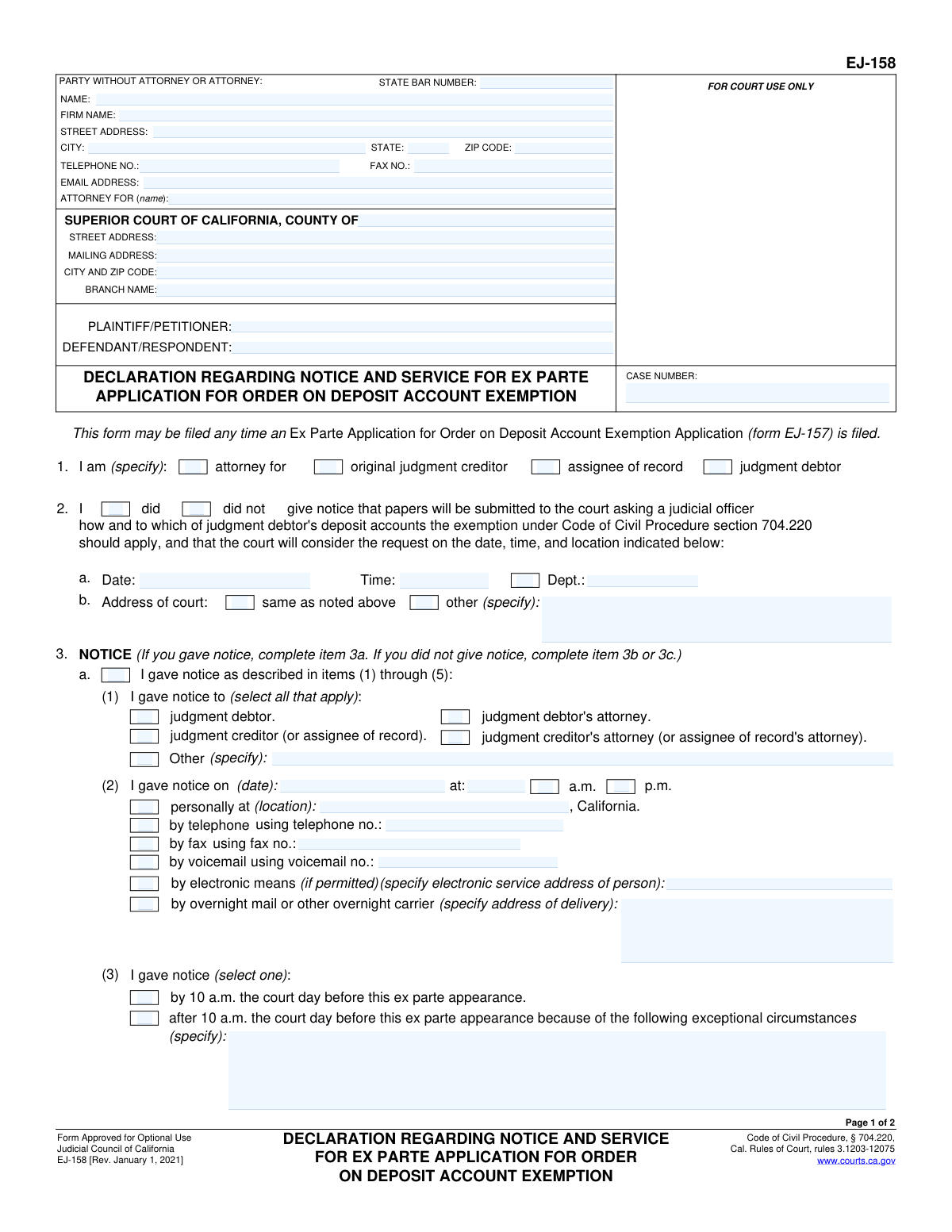
What this form asks for
The AI fills all of it, from your answers or your documents.
The AI checks your answers before you download
14 checks built for this form, so a wrong date or a missing answer is caught before anyone else sees it.
This check ensures that the 'CASE NUMBER' entered on page 1 matches the 'CASE NUMBER' on page 2. Case numbers are unique identifiers for court proceedings, and inconsistency can lead to misfiling or rejection of the document. If the numbers do not match, the system should flag an error, preventing submission until the user corrects the discrepancy.
Validates that the user has selected exactly one role in Section 1 ('I am (specify)'). The form requires identifying whether the declarant is the attorney, judgment creditor, assignee, or judgment debtor. This information is fundamental to understanding the context of the declaration, and failure to select a role makes the form incomplete and legally insufficient.
Ensures that in Section 2, the user selects either 'did' or 'did not' give notice, but not both. This choice dictates the entire logic of Section 3. This validation prevents a contradictory state where the user claims to have both given and not given notice, which would make the declaration nonsensical.
This is a logical check tied to Section 2. If the user selects 'did give notice', then the details in Section 3a (person notified, date, time, method) must be completed. Conversely, if 'did not give notice' is selected, Section 3a must be left blank. This ensures the user provides the necessary evidence for the action they claim to have taken.
This is a logical check tied to Section 2. If the user selects 'did not give notice', then they must complete either Section 3b (request for waiver) or Section 3c (unable to provide notice). The form cannot be submitted if 'did not give notice' is checked without one of these corresponding explanations. This ensures the legal justification for failing to provide notice is documented.
In Section 3a(2), if a checkbox for a method of notice is selected (e.g., 'by telephone', 'by fax', 'by electronic means'), the corresponding text field for that method's details (e.g., 'using telephone no.:', 'using fax no.:', 'specify electronic service address') must be filled. This validation ensures that the claim of how notice was given is substantiated with specific, actionable information. An empty detail field would render the selection meaningless.
And 8 more checks
- Exceptional Circumstances Explanation for Late Notice
- Service Recipient Specification
- Service Method and Detail Field Correlation
- Logical Consistency for 'Documents Not Served'
- State Bar Number Format
- Email Address Format Validation
- Declaration Date Presence and Validity
- Printed Name Requirement for Signature
Let AI fill out your EJ-158
No typing. Every field filled in seconds, checked, ready to sign.
How to Fill Out EJ-158 Online for Free in 2026
What the AI walks you through.
- Navigate to Instafill.ai and upload your Form EJ-158, or select it from their library of official California court forms.
- Enter the case information at the top, including the court name, case number, and the names of the plaintiff and defendant.
- Provide your information as the declarant, specifying whether you are the attorney, judgment creditor, or another party.
- Complete Section 2 and 3 to declare whether you gave notice of the application. If notice was given, detail who was notified, the date, time, and method.
- If you did not give notice, complete either section 3b or 3c to request a waiver or explain the efforts you made to provide notice.
- Fill out Section 4 to describe the service of the related application documents (Form EJ-157) on the opposing parties.
- Review all entered information for accuracy, then date and sign the declaration under penalty of perjury before filing it with the court.
Common Mistakes in Completing EJ-158
The ones the AI is built to catch.
Incorrect or Inconsistent Case Information
Omitting Header Information on Page 2
Confusing Legal Notice with Document Service
Making Contradictory Selections
Providing Insufficient Justification for Lack of Notice
Incomplete Proof of Notice or Service Details
Vague Description of Financial Accounts
Missing Signature or Date
Incorrectly Identifying the Declarant's Role
Failing to Explain 'Exceptional Circumstances' for Late Notice
Frequently Asked Questions About EJ-158
Is it really free for 7 days?
Can I fill other forms too?
How do I cancel?
How does the AI fill out EJ-158?
What happens to my information?
How complex is EJ-158 to fill out?
What is the purpose of Form EJ-158?
Who needs to fill out this form?
Do I have to file this form with Form EJ-157?
What does 'ex parte' mean in the context of this form?
What is the difference between sections 3a, 3b, and 3c?
What is the difference between 'notice' in section 3 and 'service' in section 4?
What qualifies as an 'exceptional circumstance' to waive notice in section 3b?
How do I properly document the notice I gave in section 3a?
Where do I file the completed Form EJ-158?
What happens if I don't give notice and don't have a good reason?
Can an AI tool help me fill out this form?
How can I use Instafill.ai to complete this form online?
The PDF version of Form EJ-158 I found is not fillable. What can I do?
Get your EJ-158 filled out by AI
$0 today. Cancel before Nov 1 and you pay nothing.
Other forms like this one
California court forms: Judicial Council of California Form SC-105, Request for Court Order and Answer (Small Claims), Judicial Council of California Form SC-120, Defendant’s Claim and ORDER to Go to Small Claims Court (Small Claims), Judicial Council of California Form SER-001, Request for Sheriff to Serve Court Papers, Judicial Council of California Form SER-001, Request for Sheriff to Serve Court Papers, Affidavit for Collection of Personal Property California Probate Code Section 13100, Form POS-040, Proof of Service—Civil, Declaration of Facts of Death (California Superior Court), declaration-of-marriage-for-court-proceeding-california-family-law, ADOPT-200, Adoption Request, ADOPT-200, Stepparent Adoption Request, ADOPT-210, Adoption Agreement, ADOPT-310, Contact After Adoption Agreement, Judicial Council of California Form ADOPT-200, Adoption Request, Form ADR-107, Mediation Attendance Sheet, Form ADR-110, Order Appointing Referee, Form ADR-109, Stipulation or Motion for Order Appointing Referee, Form ADR-102, Request for Trial De Novo After Judicial Arbitration, Form ADR-108, Referee's Report (Code Civ. Proc., §§ 638, 639), Form ADR-106, Petition to Confirm, Correct, or Vacate Contractual Arbitration Award, Form ADR-104, Rejection of Award and Request for Trial After Attorney-Client Fee Arbitration
judgment enforcement forms: Form AT-180/EJ-185, Notice of Lien (Attachment—Enforcement of Judgment), Form WG-017/EJ-137, Application to Stay Levy or Garnishment (Wage Garnishment—Enforcement of Judgment), Form EJ-141, Application and Order to Appear for Examination—Consumer Debt, Form EJ-150, Notice of Levy (Enforcement of Judgment), Form EJ-190, Application for and Renewal of Judgment, Form EJ-100, Acknowledgment of Satisfaction of Judgment, Form EJ-105, Application for Entry of Judgment on Sister-State Judgment, Form EJ-146, Notice of Motion and Motion to Require Examination—Consumer Debt, Form EJ-147, Application and Order to Require Examination After Submission of Financial Statement—Consumer Debt, Form EJ-160, Claim of Exemption (Enforcement of Judgment), Form EJ-180, Notice of Hearing on Right to Homestead Exemption (Enforcement of Judgment), Form EJ-182, Declaration for Rehearing on Homestead Exemption (Enforcement of Judgment), Form EJ-001, Abstract of Judgment—Civil and Small Claims, Declaration of Address Verification (Wage Garnishment—Enforcement of Judgment), Form WG-010/EJ-175, Notice of Hearing on Claim of Exemption (Wage Garnishment—Enforcement of Judgment), Form EJ-195, Notice of Renewal of Judgment, Form WG-007/EJ-165, Financial Statement (Wage Garnishment—Enforcement of Judgment)
account application forms: Brokerage Corestone Account Application, Schwab One® Account Application for Personal Accounts, Fidelity Investment-Only (Non-Prototype) Retirement Account Application, Schwab IRA Account Application, Individual 401(k) Account Application, Fidelity Investment-Only (Non-Prototype) Retirement Account Application, Account Reduction Loan Application 401(a) Plan, Electrical Workers Local Union No. 369 Retirement Plan, Account Reduction Loan Application 403(b) Plan, Account Reduction Loan Application 401(a) Plan, Voya Investment Management Traditional, Roth, Rollover, and SEP Individual Retirement Account (IRA) Application and Adoption Agreement, Form F1C, Account Application Supplemental, Form 3115, Application for Change in Accounting Method, Fidelity Advisor IRA Application for Automatic Rollover Accounts, Fidelity Advisor Entity New Account Application, Fidelity Mutual Fund Account Application, Fidelity Institutional CHET Advisor 529 Plan New Account Application, Fidelity Investments Account Application/Enrollment Form and Beneficiary Designation, Organizational Giving Account® Application, Fidelity Investments 403(b) Custodial Account Application, Charles Schwab IRA Account Application
account service forms: Funds Transfer Service Enrollment Form, ADP Retirement Services: Your retirement account and the C.A.R.E.S. Act
Let AI fill out your EJ-158
Your trial starts once a card is added. You pay nothing before Nov 1.
Our AI already knows this form, all 99 fields of it. Skip the typing: tell it about yourself, or upload what you have, and it fills the whole form in seconds.
- AI fills every field on both pages, checkboxes included
- No typing into boxes: answer a few questions, or upload a document you already have, an old copy of this form, a photo of a document
- The AI checks the answers; you review and change anything before you download
- Download the finished PDF, print it, or sign it online
- Encrypted, and never used to train AI
Cancel before Nov 1 and you pay nothing.
A card is needed to start the trial. Cancel in two clicks from your account.
Terms · Privacy