Yes! You can use AI to fill out Organizational Giving Account® Application

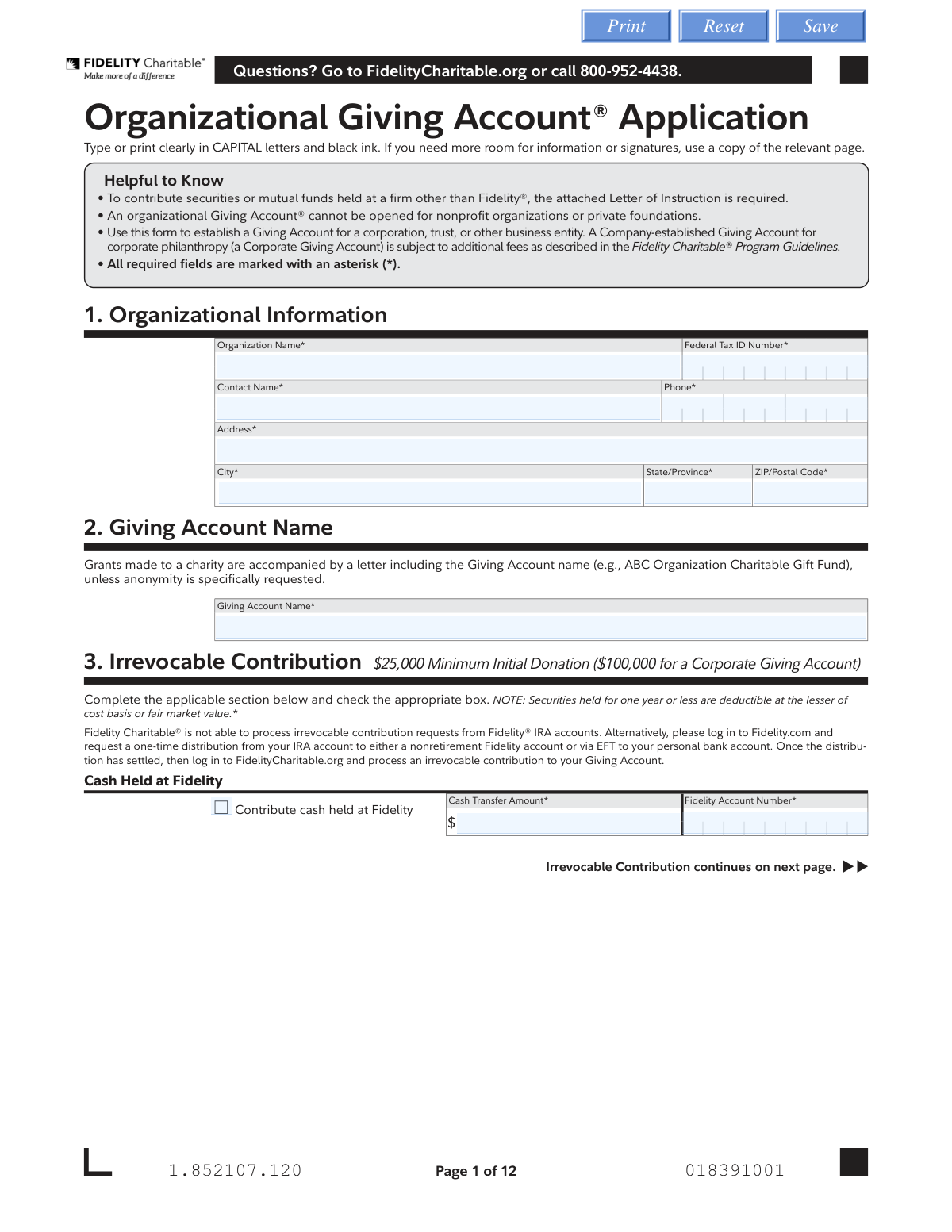
This form is an application for business entities to open an Organizational Giving Account® with Fidelity Charitable, which is a donor-advised fund designed for corporate philanthropy. It allows organizations to make irrevocable contributions of cash or securities, receive a potential tax deduction, and then recommend grants to qualified charities over time. Today, this form can be filled out quickly and accurately using AI-powered services like Instafill.ai, which can also convert non-fillable PDF versions into interactive fillable forms.
Our AI automatically handles information lookup, data retrieval, formatting, and form filling.
It takes less than a minute to fill out Fidelity Charitable Organizational Giving Account Application using our AI form filling.
Securely upload your data. Information is encrypted in transit and deleted immediately after the form is filled out.

Form specifications

Form name: Organizational Giving Account® Application
Number of pages: 1
Language: English
main-image

Instafill Demo: How to fill out PDF forms in seconds with AI

How to Fill Out Fidelity Charitable Organizational Giving Account Application Online for Free in 2026

Are you looking to fill out a FIDELITY CHARITABLE ORGANIZATIONAL GIVING ACCOUNT APPLICATION form online quickly and accurately? Instafill.ai offers the #1 AI-powered PDF filling software of 2026, allowing you to complete your FIDELITY CHARITABLE ORGANIZATIONAL GIVING ACCOUNT APPLICATION form in just 37 seconds or less.
Follow these steps to fill out your FIDELITY CHARITABLE ORGANIZATIONAL GIVING ACCOUNT APPLICATION form online using Instafill.ai:
  1. 1 Navigate to Instafill.ai and upload or select the Fidelity Charitable Organizational Giving Account Application.
  2. 2 Provide your organization's information in Section 1, including the legal name, Federal Tax ID, and primary contact details.
  3. 3 In Section 2, specify the name for your Giving Account, and in Section 3, detail your initial irrevocable contribution, whether it's cash, securities, or another asset type.
  4. 4 Use the AI assistant to complete Section 4 by recommending how your contribution should be allocated across the available investment pools.
  5. 5 Complete Section 5 to certify the organization's authority and designate the authorized individuals who can manage the Giving Account.
  6. 6 Review all the information entered for accuracy, then securely e-sign the application in the required signature blocks in Sections 5 and 7.
  7. 7 Download the completed application and any necessary attachments, such as the Letter of Instruction, and submit them to Fidelity Charitable via mail or fax as instructed on the form.

Our AI-powered system ensures each field is filled out correctly, reducing errors and saving you time.

Why Choose Instafill.ai for Your Fillable Fidelity Charitable Organizational Giving Account Application Form?

Speed

Complete your Fidelity Charitable Organizational Giving Account Application in as little as 37 seconds.

Up-to-Date

Always use the latest 2026 Fidelity Charitable Organizational Giving Account Application form version.

Cost-effective

No need to hire expensive lawyers.

Accuracy

Our AI performs 10 compliance checks to ensure your form is error-free.

Security

Your personal information is protected with bank-level encryption.

Frequently Asked Questions About Form Fidelity Charitable Organizational Giving Account Application

This form is used by corporations, trusts, and other business entities to establish a donor-advised fund, called a Giving Account®, with Fidelity Charitable for their philanthropic activities. It allows the organization to make an irrevocable charitable contribution and then recommend grants to qualified charities over time.

This application is intended for corporations, trusts, or other business entities. It cannot be used to open an account for nonprofit organizations or private foundations.

Yes, there is a minimum initial contribution of $25,000. For a Corporate Giving Account, which is subject to additional fees, the minimum initial donation is $100,000.

You can contribute cash (via check, wire, or from a Fidelity account), securities or mutual funds, and stock certificates. For other assets like restricted stock or real estate, you must call Fidelity Charitable for specific instructions.

The Letter of Instruction is a separate form required only if you are contributing securities or mutual funds held at a financial firm other than Fidelity. It authorizes the transfer of those assets to your Fidelity Charitable Giving Account.

If you do not make a recommendation for how to invest your initial contribution, it will automatically be allocated to the 'Asset Allocation 20% Equity' pool by default.

For each authorized contact, you must provide their full name, date of birth, Social Security or Taxpayer ID number, title, and business contact information. These individuals will be authorized to manage the account and recommend grants.

No, Fidelity Charitable cannot process contribution requests directly from an IRA. You must first request a distribution from your IRA to a non-retirement account and then contribute the funds from there.

You can submit the completed form and any necessary attachments by fax to 877-665-4274 or by mail. The form provides separate addresses for regular and overnight mail.

Each Organizational Giving Account has an annual administrative fee of 0.60% of assets or $500, whichever is greater. Corporate Giving Accounts are also assessed an additional annual administrative fee of $10,000.

If you are the sole officer, you can check the 'Sole Officer' box in Part I of Section 5. This allows you to sign the certification even if you are also listed as an authorized contact in Part II.

Yes, services like Instafill.ai use AI to accurately auto-fill form fields with your saved information, which can save you significant time and help prevent errors.

If the PDF is not fillable, you can use a service like Instafill.ai. It can convert flat, non-fillable PDFs into interactive forms that you can easily complete and sign online.

Simply upload the Organizational Giving Account Application PDF to Instafill.ai. The platform will make the form fillable, and you can use its AI-powered tools to auto-fill your organization's information before downloading or printing the completed document.

Compliance Fidelity Charitable Organizational Giving Account Application
Validation Checks by Instafill.ai

1
Validates Federal Tax ID Number Format
This check ensures that the Federal Tax ID Number entered in Section 1 is in the standard nine-digit format (XX-XXXXXXX). This is crucial for correctly identifying the organization for tax and legal purposes with the IRS. If the format is incorrect, the submission will be rejected, as it would prevent the proper establishment and reporting of the account.
2
Ensures Minimum Initial Contribution Amount
This validation verifies that the total value of the irrevocable contribution detailed in Section 3 meets the specified minimum. The system checks if the sum of all cash, securities, and other assets is at least $25,000, or $100,000 if it is a Corporate Giving Account. Failure to meet this minimum will prevent the application from being processed, as it does not meet the program's entry requirements.
3
Verifies Investment Pool Allocation Totals 100%
This check confirms that the sum of all percentage allocations across the investment pools in Section 4 equals exactly 100%. This is necessary to ensure the entire initial contribution is allocated according to the donor's wishes, leaving no portion uninvested or misallocated. If the total is not 100%, the form will be flagged for correction before it can be submitted.
4
Checks for Conditional Completeness of Contribution Details
This validation ensures that if a specific contribution method is selected in Section 3, all associated required fields are filled out. For example, if the 'Wire' checkbox is ticked, the 'Wire Amount' and 'Bank Name' fields must not be empty. This prevents incomplete transaction data, which would make it impossible for Fidelity Charitable to process the contribution.
5
Validates Uniqueness of Certifying Officer
This check enforces the rule in Section 5, Part I, that the certifying officer must be different from any individuals listed as Authorized Giving Account Contacts in Part II. An exception is made only if the 'Sole Officer' checkbox is selected. This validation is important for corporate governance and preventing self-authorization, and a mismatch will halt the application pending correction.
6
Validates Social Security or Taxpayer ID Number Format for Contacts
This check ensures that the Social Security Number or Taxpayer ID Number for each authorized contact in Section 5 follows the correct format (e.g., XXX-XX-XXXX for SSN). This information is required for identity verification and compliance with anti-money laundering (AML) regulations. An invalid number will result in a validation error and prevent the contact from being added.
7
Validates Date of Birth for Authorized Contacts
This validation confirms that the Date of Birth for each authorized contact in Section 5 is a valid date in MM DD YYYY format and that the individual is of legal age (e.g., 18 years or older). This is a standard Know Your Customer (KYC) requirement for financial accounts to prevent fraud and ensure the individual has the legal capacity to act on behalf of the organization. An invalid or underage date will cause the submission to fail.
8
Verifies Business Email Address Format
This check ensures that the email address provided for each authorized contact in Section 5 is in a valid format (e.g., [email protected]). A valid email is essential for all account communications, including transaction confirmations, statements, and security alerts. If the format is invalid, the user will be prompted to correct it to ensure they receive important account information.
9
Ensures All Required Fields in Section 1 are Complete
This validation verifies that all fields marked with an asterisk in Section 1 (Organizational Information) have been filled out. This includes the Organization Name, Federal Tax ID, Contact Name, Phone, and full address. Incomplete information would prevent Fidelity Charitable from properly identifying the entity or communicating with it, so the form cannot be processed until this section is complete.
10
Confirms Signature Presence for All Authorized Contacts
This check cross-references the authorized contacts listed in Section 5 with the signatures provided in Section 7. It ensures that every individual designated as a Primary or Additional Authorized Contact has provided a corresponding signature. Missing signatures invalidate the authorization, so the application will be considered incomplete and rejected until all required signatures are present.
11
Validates Consistency Between Printed Name and Signature
This validation ensures the printed name under each signature line in Section 7 matches the name of the corresponding authorized contact from Section 5. This check helps confirm the identity of the person signing and ensures the authorization is legally sound. A mismatch could indicate an error or unauthorized signature, requiring correction before the application can be accepted.
12
Verifies Prerequisite for Non-Fidelity Securities
This check confirms that if the option 'Securities or Mutual Funds Held at a Firm Other than Fidelity' is selected in Section 3, a 'Letter of Instruction' form is also included with the submission. The application cannot be processed without this required letter, as it contains the legal authorization needed to transfer the assets. The system will flag the submission as incomplete if the letter is missing.
13
Ensures At Least One Contribution Method is Selected
This validation confirms that the applicant has selected at least one contribution method in Section 3 and provided the necessary details. Since the entire purpose of the application is to open an account with an initial contribution, the form is not actionable without this information. If no contribution method is chosen, the application will be rejected for being incomplete.
14
Validates Phone Number Format
This check ensures that all phone number fields, such as the 'Phone' in Section 1 and 'Business Phone' in Section 5, adhere to a standard format (e.g., 10 digits, possibly with parentheses, spaces, or hyphens). Correctly formatted phone numbers are essential for communication and identity verification purposes. An invalid format will trigger an error, requiring the user to correct the entry.

Common Mistakes in Completing Fidelity Charitable Organizational Giving Account Application

Investment Pool Allocations Not Totaling 100%

In Section 4, applicants must recommend how their contribution is invested, and the percentages must add up to exactly 100%. A common mistake is a simple math error, where the total is over or under 100%. This forces a processing halt while the firm contacts the applicant for clarification, delaying the account setup and investment of funds. Always double-check your calculations before submitting the form.

Incorrect Signature on Officer Certification

Section 5, Part I requires a certification signature from an officer who is not named as an authorized contact in Part II, unless the 'Sole Officer' box is checked. People often miss this instruction and have the same person sign Part I and act as the primary contact in Part II without being a sole officer. This violates the form's governance rules and will lead to the application being returned for correction.

Using a Notary Instead of a Medallion Signature Guarantee

When contributing physical stock certificates (Section 3), the form requires a Medallion Signature Guarantee, which is a special signature guarantee for transferring securities. Applicants frequently mistake this for a standard notary public stamp, which is not acceptable. Submitting a form with only a notary stamp will cause the stock transfer to be rejected, halting the contribution process entirely.

Forgetting the Letter of Instruction for External Assets

If contributing securities or mutual funds held at a firm other than Fidelity, a separate 'Letter of Instruction' form (pages 9-12) is mandatory. It's common for applicants to perfectly fill out the main application but forget to complete and attach this crucial document. Without it, Fidelity Charitable cannot initiate the transfer of assets, leaving the contribution incomplete until the form is provided.

Using an Individual's SSN for the Organization's Tax ID

In Section 1, the 'Federal Tax ID Number' field requires the organization's Employer Identification Number (EIN). However, the person filling out the form sometimes mistakenly enters their own Social Security Number (SSN). This leads to a mismatch in records and will cause the application to be rejected, as the account must be tied to the legal business entity, not an individual.

Providing Only a Dollar Amount for a Securities Contribution

When contributing securities in Section 3, the 'Number of Shares' is a required field, while the 'Approximate Dollar Amount' is optional. Applicants sometimes only fill in the dollar amount they wish to donate, but the transaction is processed based on shares. This ambiguity forces the processor to contact the applicant for clarification, delaying the trade. Always specify the exact number of shares to ensure a smooth transaction.

Missing Signatures from All Authorized Contacts

Section 7 requires signatures from all individuals listed as authorized contacts in Section 5. If an organization lists a primary contact and two additional contacts, all three must sign the form. A frequent oversight is missing the signature of one or more of the additional contacts, rendering the application incomplete and requiring it to be sent back for the missing signatures.

Submitting an Illegible or Incorrectly Filled-Out Form

The form instructs users to 'print clearly in CAPITAL letters and black ink.' Handwritten forms that are difficult to read, use the wrong ink color, or are filled out in lowercase can lead to data entry errors by the processing team. This can cause mistakes in names, account numbers, or contribution amounts, leading to significant delays. To prevent this, it is best to type directly on the form. Since this is a flat PDF, a tool like Instafill.ai can make it fillable, ensuring all entries are clear and legible.

Attempting an Initial Contribution Below the Minimum

The form clearly states a '$25,000 Minimum Initial Donation' (or $100,000 for a Corporate Giving Account) in Section 3. Applicants sometimes overlook this requirement and specify a contribution amount that is too low. This will result in an automatic rejection of the application, and the applicant will be notified that they must meet the minimum threshold to proceed, causing unnecessary delays.
Saved over 80 hours a year

“I was never sure if my IRS forms like W-9 were filled correctly. Now, I can complete the forms accurately without any external help.”

Kevin Martin Green

Your data stays secure with advanced protection from Instafill and our subprocessors

Robust compliance program

Transparent business model

You’re not the product. You always know where your data is and what it is processed for.

ISO 27001, HIPAA, and GDPR

Our subprocesses adhere to multiple compliance standards, including but not limited to ISO 27001, HIPAA, and GDPR.

Security & privacy by design

We consider security and privacy from the initial design phase of any new service or functionality. It’s not an afterthought, it’s built-in, including support for two-factor authentication (2FA) to further protect your account.

Fill out Fidelity Charitable Organizational Giving Account Application with Instafill.ai

Worried about filling PDFs wrong? Instafill securely fills organizational-giving-account-application forms, ensuring each field is accurate.