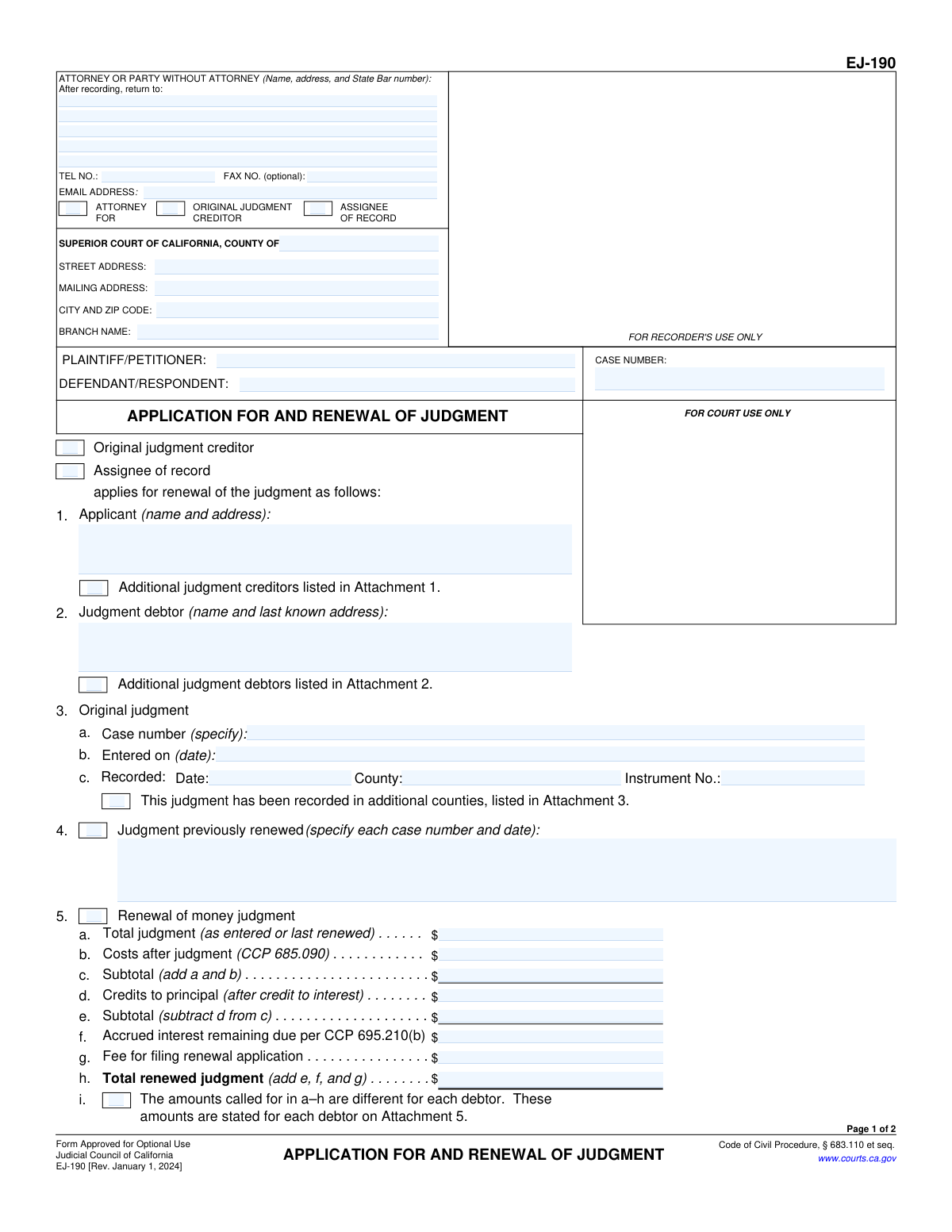
Yes! You can use AI to fill out Form EJ-190, Application for and Renewal of Judgment

Form EJ-190, Application for and Renewal of Judgment, is a legal document used in California by a judgment creditor to extend the enforceability of a court judgment that is nearing its expiration date. Renewing the judgment is crucial for the creditor to continue legal collection efforts for the owed amount. Today, this form can be filled out quickly and accurately using AI-powered services like Instafill.ai, which can also convert non-fillable PDF versions into interactive fillable forms.
EJ-190 is part of the California court forms and judgment enforcement forms categories on Instafill.
Our AI automatically handles information lookup, data retrieval, formatting, and form filling.
It takes less than a minute to fill out EJ-190 using our AI form filling.
Securely upload your data. Information is encrypted in transit and deleted immediately after the form is filled out.

Form specifications

Form name: Form EJ-190, Application for and Renewal of Judgment
Number of fields: 64
Number of pages: 1
Language: English
main-image

Instafill Demo: How to fill out PDF forms in seconds with AI

How to Fill Out EJ-190 Online for Free in 2026

Are you looking to fill out a EJ-190 form online quickly and accurately? Instafill.ai offers the #1 AI-powered PDF filling software of 2026, allowing you to complete your EJ-190 form in just 37 seconds or less.
Follow these steps to fill out your EJ-190 form online using Instafill.ai:
  1. 1 Navigate to Instafill.ai and upload or select the Form EJ-190.
  2. 2 Gather all necessary information, including original case details, judgment debtor and creditor information, and financial records related to the judgment.
  3. 3 Use the AI-powered tool to accurately fill in the applicant's information, court details, party names, and original judgment data in the designated fields.
  4. 4 Complete the 'Renewal of money judgment' section by entering the total judgment, subsequent costs, credits, and accrued interest to calculate the total renewed judgment amount.
  5. 5 Indicate the type of judgment being renewed (e.g., money, possession, sale) and provide details on the terms remaining unsatisfied.
  6. 6 Carefully review all entered information on the completed form to ensure accuracy and completeness.
  7. 7 Electronically or manually sign the declaration under penalty of perjury, then download, print, and file the completed Form EJ-190 with the appropriate California Superior Court.

Our AI-powered system ensures each field is filled out correctly, reducing errors and saving you time.

Why Choose Instafill.ai for Your Fillable EJ-190 Form?

Speed

Complete your EJ-190 in as little as 37 seconds.

Up-to-Date

Always use the latest 2026 EJ-190 form version.

Cost-effective

No need to hire expensive lawyers.

Accuracy

Our AI performs 10 compliance checks to ensure your form is error-free.

Security

Your personal information is protected with bank-level encryption.

Frequently Asked Questions About Form EJ-190

This form, the 'Application for and Renewal of Judgment,' is used by a judgment creditor (the person who is owed money or property) to extend the life of a court judgment. This allows them to continue collection efforts beyond the original expiration date.

The original judgment creditor or an 'assignee of record' (someone to whom the debt has been legally transferred) must fill out this form. It is filed to renew a judgment against the judgment debtor (the person who owes the debt).

You must file this application before the original judgment expires. In California, a money judgment is typically enforceable for 10 years, so you should file within that period to extend it.

You start with the original judgment amount, add any costs incurred after the judgment, subtract any payments made by the debtor, and then add the accrued interest and the fee for filing this application. It is crucial that these calculations are accurate.

A judgment for 'possession' means you have the right to recover specific property, while a judgment for 'sale' orders property to be sold to satisfy the debt. Section 6 is used to renew these types of non-monetary judgments.

California law has special rules that may limit the renewal of judgments for smaller consumer or medical debts against an individual. Answering this section correctly is important to determine if and how the judgment can be renewed.

You only need to use attachments if there are additional judgment creditors (Attachment 1), additional judgment debtors (Attachment 2), or if the judgment was recorded in more counties than you can list in Section 3c.

You must file the application with the Superior Court in the county where the original judgment was entered. After filing, you may also need to record it in any counties where you have a judgment lien.

Once the court clerk enters the renewal, the judgment is extended, and interest continues to accrue on the new total. You must then serve a 'Notice of Renewal of Judgment' (Form EJ-195) on the judgment debtor.

Yes, services like Instafill.ai use AI to accurately auto-fill form fields from your case data, which can save time and help prevent errors. This is especially useful for complex forms with many data points.

You can use a service like Instafill.ai to easily fill out this form online. Simply upload the PDF, and the platform will allow you to enter your information into the correct fields before downloading the completed document.

If you have a non-fillable or 'flat' PDF, you can upload it to Instafill.ai. The service can convert it into an interactive, fillable form that you can complete on your computer.

These are allowable expenses you have incurred in your efforts to enforce the judgment since it was first entered. This can include filing fees, process server costs, and other expenses related to collection activities.

An assignee of record is a person or company that has legally purchased the debt from the original judgment creditor. They must have filed an 'Acknowledgment of Assignment of Judgment' with the court to have the right to renew the judgment.

Compliance EJ-190
Validation Checks by Instafill.ai

1
Case Number Presence and Format
Verifies that the 'CASE NUMBER' field is not empty and conforms to the standard format for California court cases. This number is the primary unique identifier for the legal action, and its accuracy is critical for associating the renewal application with the correct court file. An invalid or missing case number will result in the document being rejected or misfiled.
2
Party Identification Completeness
Ensures that both the 'PLAINTIFF/PETITIONER' and 'DEFENDANT/RESPONDENT' fields are filled. A judgment inherently involves at least two opposing parties. This check confirms that the primary parties to the judgment are clearly identified on the application, which is essential for legal validity and proper notification.
3
Applicant Identity Verification
Validates that in section 1, at least one checkbox ('Original judgment creditor' or 'Assignee of record') is selected and that the corresponding 'Applicant (name and address)' field is completed. This is crucial for establishing the filer's standing and authority to request the renewal. An application with an unidentified applicant is legally deficient.
4
Original Judgment Date Validity
Checks that the 'Entered on (date)' field in section 3b contains a valid date that occurs in the past. This date marks the beginning of the judgment's lifespan and is the basis for determining if the renewal application is timely. A future or invalid date would make it impossible to process the application correctly.
5
Money Judgment Calculation - Subtotal
Performs an arithmetic check on the fields in section 5, ensuring that the value in 'Subtotal' (5c) is exactly equal to the sum of 'Total judgment' (5a) and 'Costs after judgment' (5b). This validation prevents mathematical errors in the calculation of the base amount owed before credits. Incorrect calculations could lead to an invalid renewed judgment amount.
6
Money Judgment Calculation - Total
Performs an arithmetic check on the fields in section 5, ensuring that the 'Total renewed judgment' (5h) is the sum of the principal subtotal (5e), accrued interest (5f), and the filing fee (5g). This is the final and most critical calculation on the form, as it determines the new total amount of the judgment. An error here would render the renewal legally contestable.
7
Monetary Field Formatting
Ensures that all financial fields in section 5 (5a through 5h) contain only valid numeric currency values. The check prohibits non-numeric characters (except for a decimal point) to maintain data integrity and ensure accurate calculations. This prevents data entry errors that could corrupt the financial details of the judgment.
8
Debt Type Selection Requirement
Validates that at least one of the checkboxes in section 5j is selected, specifying the nature of the debt. This information is legally required under Code of Civil Procedure §§ 683.110-683.120 to determine the permissible renewal period, especially for judgments against natural persons. Failure to make a selection makes the application incomplete and may affect the validity of the renewal.
9
Conditional Requirement for Non-Monetary Judgment
Checks that if 'possession' or 'sale' is checked in section 6, then at least one of the corresponding text fields (6a, 6b, or 6c) is filled out. This ensures that when renewing a non-monetary judgment, the specific terms that remain unsatisfied are clearly stated. Omitting these details would make the renewal ambiguous and unenforceable.
10
Declaration Completeness
Verifies that the 'Date', 'SIGNATURE OF DECLARANT', and 'TYPE OR PRINT NAME' fields are all completed at the end of the form. The signature, under penalty of perjury, is a legal requirement for the document's validity. An unsigned or incomplete declaration section will cause the application to be rejected immediately.
11
Declaration Date Logic
Ensures the 'Date' provided in the declaration section is a valid date and is not in the future. This date attests to when the declarant swore to the truthfulness of the application's contents. A future date is logically impossible and would invalidate the declaration.
12
Page 2 Header Consistency
Validates that the 'CASE NUMBER' and 'SHORT TITLE' fields on page 2 match the corresponding 'CASE NUMBER' and party names on page 1. This cross-page check ensures document integrity, especially if pages are handled separately. Mismatched information could lead to confusion or incorrect filing of the second page.
13
Contact Information Format
Validates that the 'TEL NO.' and 'EMAIL ADDRESS' fields in the attorney information section follow standard formats. Phone numbers should match a recognizable pattern, and emails must contain an '@' symbol and a domain. This ensures the court has reliable means to contact the filing party if questions or issues arise.
14
Court County Identification
Ensures that the 'COUNTY OF' field is filled in to identify the specific Superior Court jurisdiction. This is the most fundamental piece of routing information on the form. Without a specified county, the document cannot be filed or processed by the correct court system.

Common Mistakes in Completing EJ-190

Miscalculating the Renewed Judgment Amount

Section 5 requires several calculations, including adding post-judgment costs, subtracting credits, and calculating accrued interest. These calculations are complex, and simple arithmetic errors are very common, especially when calculating years of statutory interest. An incorrect total can lead to the application being rejected or, if accepted, can create legal challenges later. To avoid this, use a spreadsheet or calculator to double-check all math, and consider using AI-powered form filling tools like Instafill.ai that can perform calculations automatically to ensure accuracy.

Using Incorrect Case Number or Party Names

Filers often make typos in the case number or fail to list the plaintiff and defendant names exactly as they appear on the original judgment. This happens due to carelessness or working from memory. An incorrect case number or name will cause the court clerk to reject the filing or misroute the document, leading to significant delays and potentially causing the filer to miss the statutory deadline for renewal. Always reference a copy of the original judgment when filling out these fields.

Entering the Wrong Original Judgment Date

The 'Entered on' date in Section 3b is critical as it starts the 10-year clock for the judgment's validity. Filers may guess the date, use the date the judge signed the order (which can be different), or make a simple typo. Filing an application based on a wrong date could mean you are filing too late, rendering the judgment unenforceable and permanently lost. Always confirm the exact date the judgment was entered by the clerk by looking at the official court record or the Notice of Entry of Judgment.

Improperly Applying Debtor Payments

The form requires filers in Section 5d to list credits (payments made by the debtor) applied to the principal *after* first being applied to accrued interest. Many people mistakenly subtract payments directly from the original principal amount, which incorrectly inflates the remaining interest owed. This can invalidate the renewal amount and open the filer to legal challenges from the debtor. Always apply payments to interest first, then to principal, as required by law.

Failing to Sign and Date the Perjury Declaration

It is a surprisingly common oversight for filers to complete the entire form but forget to sign and date the declaration on page 2. This happens due to haste or distraction. An unsigned or undated application is legally invalid and will be immediately rejected by the court clerk, wasting time and filing fees. Always perform a final review of the form, paying special attention to the signature and date lines before submission.

Misclassifying the Type of Money Judgment

Section 5j requires the applicant to classify the debt (e.g., personal debt under $50k, medical debt under $200k), which filers may not understand or may check the wrong box. This classification is critical because it determines the length of the renewal (5 years for certain consumer debts vs. 10 years for others). An incorrect selection could lead to the judgment expiring sooner than the creditor expects, resulting in a total loss of the remaining debt.

Neglecting to List Previous Judgment Renewals

If a judgment has been renewed before, Section 4 must be completed with the case number and date of that prior renewal. Filers, especially assignees who may have incomplete records, often overlook this step. Failing to disclose a prior renewal can cause the court's records to be inaccurate and may lead to the rejection of the current application. It is essential to review the complete case history to ensure all prior renewals are properly documented on the form.

Omitting or Using an Outdated Debtor Address

The application requires the judgment debtor's 'last known address' in Section 2 for service of the Notice of Renewal. Filers may leave this blank if they don't know the current address or use an old, invalid one. This is a critical error because proper service is required; failure to serve the debtor at their last known address can be grounds for a motion to vacate the renewal. Applicants must make a diligent effort to ascertain the last known address to ensure the renewal is legally sound.

Failing to Include Necessary Attachments

The form explicitly references attachments for listing additional parties, recording information, or debtor-specific amounts. Filers often check a box indicating an attachment is included but then forget to physically attach the document. This results in an incomplete filing that will be rejected or delayed until the missing information is provided. Always double-check that any referenced attachments are completed and included with the main application.

Submitting a Poorly Hand-filled or Scanned Form

Many court forms are available online only as flat, non-fillable PDFs, leading people to print and fill them out by hand. This often results in illegible handwriting, misplaced information, and calculation errors, which can cause the clerk to reject the form. To avoid this, use a tool like Instafill.ai, which can convert a non-fillable PDF into an interactive, fillable version. This ensures the final document is clean, legible, and professional, reducing the chances of rejection.

Entering Incorrect Court Name or Address

The top section of the form requires the specific name and address of the Superior Court branch where the original judgment was entered. Filers might list the main county courthouse instead of the correct branch or use a generic address. This can cause the application to be sent to the wrong location, leading to delays or rejection. Always verify the exact court name and branch from the original case documents to ensure the application is filed in the correct venue.
Saved over 80 hours a year

“I was never sure if my IRS forms like W-9 were filled correctly. Now, I can complete the forms accurately without any external help.”

Kevin Martin Green

Your data stays secure with advanced protection from Instafill and our subprocessors

Robust compliance program

Transparent business model

You’re not the product. You always know where your data is and what it is processed for.

ISO 27001, HIPAA, and GDPR

Our subprocesses adhere to multiple compliance standards, including but not limited to ISO 27001, HIPAA, and GDPR.

Security & privacy by design

We consider security and privacy from the initial design phase of any new service or functionality. It’s not an afterthought, it’s built-in, including support for two-factor authentication (2FA) to further protect your account.

Fill out EJ-190 with Instafill.ai

Worried about filling PDFs wrong? Instafill securely fills form-ej-190-application-for-and-renewal-of-judgment forms, ensuring each field is accurate.

Related forms by category

California court forms Judicial Council of California Form SC-105, Request for Court Order and Answer (Small Claims), Judicial Council of California Form SC-120, Defendant’s Claim and ORDER to Go to Small Claims Court (Small Claims), Judicial Council of California Form SER-001, Request for Sheriff to Serve Court Papers, Judicial Council of California Form SER-001, Request for Sheriff to Serve Court Papers, Affidavit for Collection of Personal Property California Probate Code Section 13100, Form POS-040, Proof of Service—Civil, Declaration of Facts of Death (California Superior Court), declaration-of-marriage-for-court-proceeding-california-family-law, ADOPT-200, Adoption Request, ADOPT-200, Stepparent Adoption Request, ADOPT-210, Adoption Agreement, ADOPT-310, Contact After Adoption Agreement, Judicial Council of California Form ADOPT-200, Adoption Request, Form ADR-107, Mediation Attendance Sheet, Form ADR-110, Order Appointing Referee, Form ADR-109, Stipulation or Motion for Order Appointing Referee, Form ADR-102, Request for Trial De Novo After Judicial Arbitration, Form ADR-108, Referee's Report (Code Civ. Proc., §§ 638, 639), Form ADR-106, Petition to Confirm, Correct, or Vacate Contractual Arbitration Award, Form ADR-104, Rejection of Award and Request for Trial After Attorney-Client Fee Arbitration · + 268 more →
judgment enforcement forms Form AT-180/EJ-185, Notice of Lien (Attachment—Enforcement of Judgment), Form WG-017/EJ-137, Application to Stay Levy or Garnishment (Wage Garnishment—Enforcement of Judgment), Form EJ-141, Application and Order to Appear for Examination—Consumer Debt, Form EJ-150, Notice of Levy (Enforcement of Judgment), Form EJ-158, Declaration Regarding Notice and Service for Ex Parte Application for Order on Deposit Account Exemption, form-ej-100-acknowledgment-of-satisfaction-of-judgment, form-ej-105-application-for-entry-of-judgment-on-sister-state-judgment, form-ej-146-notice-of-motion-and-motion-to-require-examinationconsumer-debt, form-ej-147-application-and-order-to-require-examination-after-submission-of-financial-statementconsumer-debt, form-ej-160-claim-of-exemption-enforcement-of-judgment, form-ej-180-notice-of-hearing-on-right-to-homestead-exemption-enforcement-of-judgment, form-ej-182-declaration-for-rehearing-on-homestead-exemption-enforcement-of-judgment