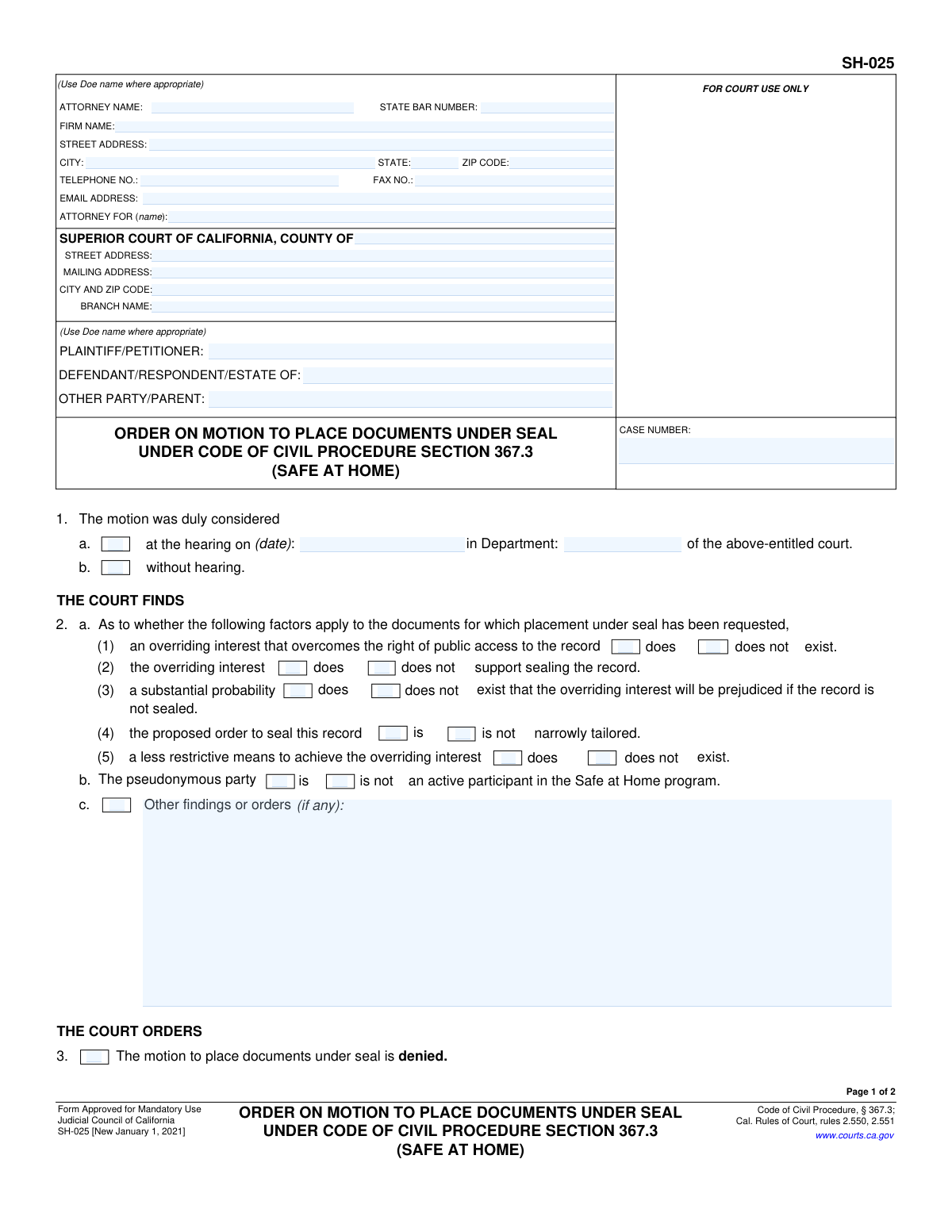
Yes! You can use AI to fill out Judicial Council of California, Form SH-025, Order on Motion to Place Documents Under Seal Under Code of Civil Procedure Section 367.3 (Safe at Home)
Form SH-025 is a mandatory California court form that documents a judge's decision on a motion to seal court records, particularly for participants in the 'Safe at Home' program. This order is crucial for safeguarding the privacy and safety of individuals by preventing their personal details from appearing in public court files. Today, this form can be filled out quickly and accurately using AI-powered services like Instafill.ai, which can also convert non-fillable PDF versions into interactive fillable forms.
SH-025 is part of the
California court forms, California judicial forms, civil court forms, civil procedure forms and Judicial Council forms categories on Instafill.
Our AI automatically handles information lookup, data retrieval, formatting, and form filling.
It takes less than a minute to fill out SH-025 using our AI form filling.
Securely upload your data. Information is encrypted in transit and deleted immediately after the form is filled out.
Form specifications
| Form name: | Judicial Council of California, Form SH-025, Order on Motion to Place Documents Under Seal Under Code of Civil Procedure Section 367.3 (Safe at Home) |
| Number of fields: | 67 |
| Number of pages: | 1 |
| Language: | English |
Instafill Demo: How to fill out PDF forms in seconds with AI
How to Fill Out SH-025 Online for Free in 2026
Are you looking to fill out a SH-025 form online quickly and accurately? Instafill.ai offers the #1 AI-powered PDF filling software of 2026, allowing you to complete your SH-025 form in just 37 seconds or less.
Follow these steps to fill out your SH-025 form online using Instafill.ai:
- 1 Navigate to Instafill.ai and upload your SH-025 PDF or select it from the platform's template library.
- 2 Use the AI tool to automatically populate the header with court, case, and attorney/party information, ensuring pseudonyms (Doe names) are used where appropriate.
- 3 In 'THE COURT FINDS' section (Item 2), accurately check the boxes to reflect the judge's findings on the motion to seal.
- 4 Clearly indicate the court's final decision by checking the box for either 'denied' (Item 3) or 'granted' (Item 4).
- 5 If the motion is granted, specify which documents are to be sealed by checking the corresponding boxes in Item 4a and indicate if redacted versions will be filed publicly.
- 6 If applicable, complete Item 5 to specify how the register of actions should be revised to use a pseudonym.
- 7 Review the entire form for accuracy, enter the date of the order, and add the judicial officer's name before saving or printing the completed document for filing.
Our AI-powered system ensures each field is filled out correctly, reducing errors and saving you time.
Why Choose Instafill.ai for Your Fillable SH-025 Form?
Speed
Complete your SH-025 in as little as 37 seconds.
Up-to-Date
Always use the latest 2026 SH-025 form version.
Cost-effective
No need to hire expensive lawyers.
Accuracy
Our AI performs 10 compliance checks to ensure your form is error-free.
Security
Your personal information is protected with bank-level encryption.
Frequently Asked Questions About Form SH-025
Form SH-025 is the official court order that a judge signs to either grant or deny a motion to seal court documents. It is specifically used for participants in California's "Safe at Home" program to protect their confidential information.
No, you do not fill out this form. Form SH-025 is an order that is completed and signed by a judicial officer (a judge) after they have reviewed your motion to seal documents.
This order is for participants in the Safe at Home program who have filed a motion with the court to keep their personal information, like their name and address, confidential in a court case.
Safe at Home is a confidential address program provided by the California Secretary of State for survivors of domestic violence, stalking, and sexual assault. It allows participants to use a secure address for public records to keep their actual location private and safe.
To get this order, you must first file a 'Motion to Place Documents Under Seal' with the court. The judge will then review your motion and issue their decision using this SH-025 order form.
This instruction means you should use a pseudonym, such as 'Jane Doe' or 'John Doe,' in place of your real name on all public court filings. This is a critical step in protecting your identity throughout the legal proceedings.
If the motion is granted, the judge will check box 4, and the specified documents containing your private information will be kept confidential and out of the public record. A redacted version of the documents must then be filed for the public court file.
A redacted version is a copy of a document where your personal information, like your true name and address, has been blacked out. This copy is made available to the public, while the original unredacted document is kept under seal by the court.
If the judge denies your motion by checking box 3, your documents will not be sealed and will become part of the public record. The judge's findings in section 2 will provide the legal reasons for the denial.
This order can seal key documents like the Complaint, Petition, Summons, and Proof of Service. You can also request to seal other specific documents by identifying them in section 4a(8) of the form.
While you don't fill out the SH-025 order yourself, AI-powered services like Instafill.ai can help you accurately prepare the 'Motion to Place Documents Under Seal' that you must file to request this order. These tools can auto-fill your case information, saving time and reducing errors.
You can upload the PDF forms for your motion to Instafill.ai's platform. The AI will help you fill in the required fields, such as your case number and party information, which you can then review before filing with the court.
Services like Instafill.ai can convert flat, non-fillable PDFs into interactive forms. This allows you to easily type your information into the correct fields online, making the document preparation process much simpler.
Compliance SH-025
Validation Checks by Instafill.ai
1
Case Number Consistency Across Pages
This check verifies that the Case Number entered on page 1 is identical to the Case Number on page 2. Maintaining consistency is crucial for correct document association and filing within the court's case management system. A mismatch could lead to the order being filed incorrectly or rejected, causing delays in processing the sealing request.
2
Exclusive Order Selection (Grant vs. Deny)
This check ensures that either checkbox 3 ('The motion... is denied') or checkbox 4 ('The motion... is granted') is selected, but not both. The order must be unambiguous, either granting or denying the motion in its entirety. Selecting both options would create a logically impossible and unenforceable order, requiring correction and resubmission.
3
Conditional Requirement for Hearing Details
This validation rule confirms that if the box in section 1a is checked, indicating the motion was considered at a hearing, then the corresponding date and department fields must be completed. This information is vital for the official court record, providing a clear reference to the specific proceeding where the decision was made. Failure to provide these details results in an incomplete record of the court's action.
4
Mandatory and Exclusive Findings Selection
This check verifies that for each of the five findings listed in section 2a, exactly one choice (e.g., 'does' or 'does not') is selected. These findings are a legal requirement under Cal. Rules of Court, rule 2.550, and form the basis for the court's decision. Leaving a finding blank or selecting both options makes the order legally deficient and invalid.
5
Specification for 'Other Document' Sealing
This validation ensures that if the 'Other document' checkbox in section 4a(8) is selected, the adjacent text field specifying the document's name is not empty. Ambiguity about which documents are sealed is unacceptable and could lead to either too much or too little information being restricted from public view. This specificity is critical for the court clerk to correctly execute the sealing order.
6
Document Specification on Granted Motion
This check confirms that if the motion to seal is granted (section 4 is checked), at least one document from the list in section 4a is selected for sealing. A granted order with no specified documents is meaningless and cannot be executed by the court clerk. This validation prevents the creation of an incomplete and ineffective order.
7
Required Doe Name Specification for Register Revision
This validation rule ensures that if the court orders the register of actions 'must' be revised (section 5), then at least one of the pseudonym options (e.g., 'John Doe,' 'Jane Doe,' etc.) is also checked. The order must be specific about which pseudonym to use for the clerk to accurately update the public record. An order to revise without specifying the name is incomplete and cannot be executed.
8
Judicial Officer's Signature Date Validity
This validation ensures the date entered in the signature block is a real, correctly formatted date (e.g., MM/DD/YYYY). The signature date is the official date the order becomes effective and is a fundamental component of any legal document. An invalid or missing date would render the order's effective date ambiguous and could lead to its rejection.
9
Logical Date Sequence for Hearing and Order
This check verifies that the judicial officer's signature date is on or after the hearing date specified in section 1a, if provided. An order cannot be signed before the hearing where it was considered has occurred. This logical check prevents chronological errors that would undermine the credibility and validity of the court record.
10
California State Bar Number Format
This validation ensures the State Bar Number is a valid, numeric-only value, typically 6 digits long for California attorneys. Correctly identifying the attorney of record is essential for court communication and verification of credentials. An invalid number could prevent the court from processing the form or contacting the attorney.
11
Attorney Email Address Format
This validation verifies that the provided email address conforms to the standard 'local-part@domain' format. As courts increasingly rely on electronic service and communication, a valid email address is critical for timely and official notifications. An invalid email address would cause communication failures and could jeopardize the attorney's and client's standing in the case.
12
Court Identification Completeness
This check verifies that the 'SUPERIOR COURT OF CALIFORNIA, COUNTY OF' and 'CITY AND ZIP CODE' fields are filled out. This information is essential for identifying the specific court venue where the order is being issued. Omitting this information makes it impossible to determine the order's jurisdiction, rendering it invalid for filing.
13
Exclusive Register of Actions Order
This validation confirms that for section 5, either the 'must' or 'must not' checkbox is selected, but not both. The order to the clerk regarding the revision of the register of actions must be clear and unambiguous. Selecting both options creates a contradictory and unenforceable instruction, requiring clarification.
14
Party Name Consistency Across Pages
This check ensures that the names entered for Plaintiff/Petitioner and Defendant/Respondent in the header of page 1 match the corresponding names on page 2. Consistent party identification is fundamental for document integrity and proper indexing in the case file. Discrepancies can cause confusion and filing errors.
Common Mistakes in Completing SH-025
This form is for participants in the Safe at Home program seeking to protect their identity. A critical error is entering the party's true name in the case caption or 'ATTORNEY FOR' fields instead of the appropriate 'Doe' pseudonym. This mistake completely undermines the purpose of the motion and can expose the very information the filer is trying to protect, leading to immediate rejection of the form or, worse, compromising the party's safety. Always use 'John Doe,' 'Jane Doe,' or another court-approved pseudonym in all public-facing fields as indicated.
The case number and party names must be entered at the top of both page 1 and page 2. Filers often meticulously complete the first page but forget to repeat the information on the second. If the pages become separated during court processing, the second page becomes an orphaned document, causing delays and potential rejection of the entire filing. To prevent this, ensure all header fields on all pages are filled out correctly. AI-powered tools like Instafill.ai can automatically populate repeated fields across a document, eliminating this risk.
In Section 4.a.8, when specifying an 'Other document' to be sealed, filers often use vague terms like 'Exhibits' or 'Attachments.' The form requires specifying the document by its exact name and form number, if applicable. Ambiguous descriptions can lead to the order being unenforceable or the clerk being unable to identify which documents to seal, potentially leaving sensitive information in the public file. Always provide a precise and complete description, such as 'Declaration of Jane Doe in Support of Motion, filed 01/15/2023'.
When preparing a proposed order, filers sometimes check boxes that create logical contradictions, such as checking both 'The motion...is denied' (Section 3) and 'The motion...is granted' (Section 4). This indicates confusion and will result in the clerk rejecting the form for clarification. The person preparing the proposed order should only fill out the sections that reflect the relief they are requesting from the court, which is typically the 'granted' section. The judge will make the final decision and sign the appropriate order.
Section 2 contains the legal findings required to grant the motion. When preparing a proposed order to be granted, the filer must check the boxes that support their request (e.g., 'an overriding interest... does exist,' 'the proposed order... is narrowly tailored'). Some filers leave this section blank, assuming the judge will fill it out, but this makes the proposed order incomplete. Failing to check the correct boxes may lead the judge to question the legal basis for the request, causing delays. The proposed order should be a complete, ready-to-sign document reflecting the desired outcome.
In Section 5, if the order is granted, the filer must specify how the register of actions should be revised. A common mistake is checking 'must be revised' but then failing to check which pseudonym to use (e.g., 'John Doe,' 'Jane Doe') or how to differentiate between multiple Doe parties as per section 5.d. This leaves the court clerk with ambiguous instructions, hindering their ability to properly update the public court record. It is crucial to select the specific pseudonym to ensure the record is updated correctly and confidentially.
Self-represented (Pro Per) litigants often get confused by the 'ATTORNEY' information block. They may leave it blank or enter their name without indicating their Pro Per status, and they may not know what to enter for the 'State Bar Number.' This can cause processing delays. The correct procedure is to enter your name, write 'In Pro Per' or 'Pro Se' in the 'ATTORNEY FOR' field, and write 'N/A' or leave the State Bar Number blank. Using a tool like Instafill.ai can help guide users through these specific fields to ensure correct formatting.
Section 4.b of the order explicitly states that redacted versions of the documents must be placed in the public file. A frequent procedural error is filing the motion to seal without concurrently submitting the proposed redacted (public) versions of the documents. This failure to provide the public-facing copies alongside the confidential ones will halt the process, as the court cannot grant the order without having the redacted documents ready for the public file. This oversight leads to unnecessary delays and potential denial of the motion on procedural grounds.
The form requires the full address of the specific Superior Court, including the county, street address, and branch name. Filers, especially those unfamiliar with the court system, may enter a generic county courthouse address instead of the specific branch handling the case, or they may leave the branch name blank. This can lead to the document being misrouted or rejected. It is essential to verify the exact and complete address for the specific court department or branch where the case is filed. If the form is a non-fillable PDF, a service like Instafill.ai can convert it to a fillable format and help validate address information.
Saved over 80 hours a year
“I was never sure if my IRS forms like W-9 were filled correctly. Now, I can complete the forms accurately without any external help.”
Kevin Martin Green
Your data stays secure with advanced protection from Instafill and our subprocessors

Robust compliance program
Transparent business model
You’re not the product. You always know where your data is and what it is processed for.
ISO 27001, HIPAA, and GDPR
Our subprocesses adhere to multiple compliance standards, including but not limited to ISO 27001, HIPAA, and GDPR.
Security & privacy by design
We consider security and privacy from the initial design phase of any new service or functionality. It’s not an afterthought, it’s built-in, including support for two-factor authentication (2FA) to further protect your account.
Fill out SH-025 with Instafill.ai
Worried about filling PDFs wrong? Instafill securely fills judicial-council-of-california-form-sh-025-order-on-motion-to-place-documents-under-seal-under-code-of-civil-procedure forms, ensuring each field is accurate.