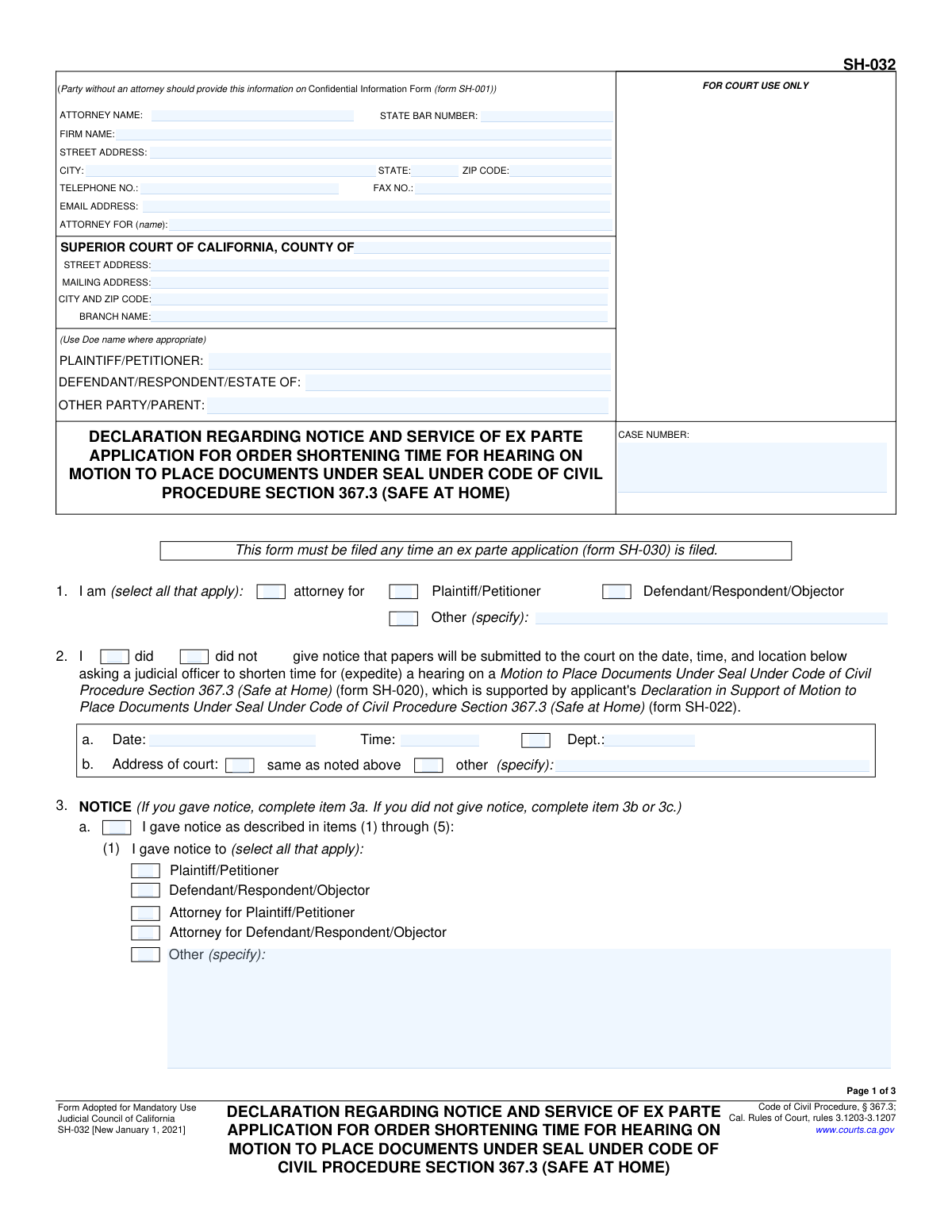
Yes! You can use AI to fill out Form SH-032, Declaration Regarding Notice and Service of Ex Parte Application for Order Shortening Time for Hearing on Motion to Place Documents Under Seal Under Code of Civil Procedure Section 367.3 (Safe at Home)
Form SH-032 is a mandatory California court form filed with an ex parte application to declare how and when opposing parties were notified of the application. It's used specifically when requesting to shorten the time for a hearing on a motion to seal documents for participants in the "Safe at Home" confidentiality program. This declaration is crucial for procedural due process, ensuring the court knows that all parties have been properly informed or why notice was not possible. Today, this form can be filled out quickly and accurately using AI-powered services like Instafill.ai, which can also convert non-fillable PDF versions into interactive fillable forms.
SH-032 is part of the
California court forms, civil court forms, civil procedure forms and civil service forms categories on Instafill.
Our AI automatically handles information lookup, data retrieval, formatting, and form filling.
It takes less than a minute to fill out SH-032 using our AI form filling.
Securely upload your data. Information is encrypted in transit and deleted immediately after the form is filled out.
Form specifications
| Form name: | Form SH-032, Declaration Regarding Notice and Service of Ex Parte Application for Order Shortening Time for Hearing on Motion to Place Documents Under Seal Under Code of Civil Procedure Section 367.3 (Safe at Home) |
| Number of fields: | 109 |
| Number of pages: | 1 |
| Language: | English |
Instafill Demo: How to fill out PDF forms in seconds with AI
How to Fill Out SH-032 Online for Free in 2026
Are you looking to fill out a SH-032 form online quickly and accurately? Instafill.ai offers the #1 AI-powered PDF filling software of 2026, allowing you to complete your SH-032 form in just 37 seconds or less.
Follow these steps to fill out your SH-032 form online using Instafill.ai:
- 1 Navigate to Instafill.ai, upload your SH-032 PDF, or select it from the platform's library of official forms.
- 2 Use the AI assistant to automatically fill in the court and case information, including attorney details, party names, and the case number.
- 3 In Section 1, specify your role in the case (e.g., attorney for Plaintiff/Petitioner).
- 4 Complete Section 2 and 3 to declare whether notice of the ex parte application was given. If so, provide details on the method, date, time, and recipient; if not, explain the exceptional circumstances.
- 5 Fill out Section 4 to detail the service of the related motion documents (Form SH-020), including who was served, when, and by what method.
- 6 Carefully review all the information populated by the AI for accuracy, then proceed to the final section to date and electronically sign the declaration.
- 7 Download the completed, signed Form SH-032, ready for filing with the court alongside the ex parte application.
Our AI-powered system ensures each field is filled out correctly, reducing errors and saving you time.
Why Choose Instafill.ai for Your Fillable SH-032 Form?
Speed
Complete your SH-032 in as little as 37 seconds.
Up-to-Date
Always use the latest 2026 SH-032 form version.
Cost-effective
No need to hire expensive lawyers.
Accuracy
Our AI performs 10 compliance checks to ensure your form is error-free.
Security
Your personal information is protected with bank-level encryption.
Frequently Asked Questions About Form SH-032
This form is a declaration to the court explaining whether you have notified the other party about your emergency (ex parte) request to get a faster hearing date for a motion to keep documents confidential under the Safe at Home program.
You must fill out this form if you are filing an Ex Parte Application for Order Shortening Time (Form SH-030) to expedite a hearing on a Motion to Place Documents Under Seal in a Safe at Home case.
It is an urgent request asking a judge to schedule a court hearing sooner than the law typically requires, due to immediate or pressing circumstances.
A 'Doe name' is a pseudonym used by a participant in the Safe at Home program to protect their real identity and location in court records. You should use your Doe name if you are the protected party and have a Confidential Information Form (SH-001) on file.
Notice (section 3) is the act of informing the other party that you will be making an ex parte request to the court. Service (section 4) is the formal delivery of the actual court documents, like the Motion to Place Documents Under Seal (Form SH-020).
In section 3a, you must specify who you notified, the date and time of the notice, the method used (e.g., phone, email), and what their response was, if any.
If you tried to give notice but were unsuccessful, you must complete section 3c, detailing all the efforts you made to contact the other party.
Yes, in exceptional circumstances, you can ask the court to waive the notice requirement by completing section 3b and explaining why giving notice would be inappropriate or dangerous.
This form must be filed alongside the Ex Parte Application (Form SH-030) and is related to the Motion to Place Documents Under Seal (Form SH-020) and its supporting declaration (Form SH-022).
Yes, services like Instafill.ai use AI to accurately auto-fill form fields with your information, which can save you significant time and help prevent errors.
You can use a service like Instafill.ai to upload the PDF, fill it out in an interactive online interface, and then download or print the completed form.
If you have a non-fillable or 'flat' PDF, you can upload it to a platform like Instafill.ai, which can convert it into an interactive, fillable form for you to complete online.
Compliance SH-032
Validation Checks by Instafill.ai
1
Conditional Logic for Notice Details
This check ensures that the form's logic is followed based on whether notice was given. If the 'did give notice' box is checked in section 2, then section 3a must be completed. Conversely, if 'did not give notice' is checked, then either section 3b or 3c must be completed. This prevents contradictory or incomplete submissions and ensures the court has the correct information regarding notice.
2
Mutually Exclusive Notice Status
Validates that in section 2, only one of the two options, 'did' or 'did not' give notice, is selected. A user cannot select both. This is a fundamental choice that dictates which subsequent sections of the form are required, and selecting both would make the filing logically incoherent.
3
Declarant Role Completeness
Ensures that in section 1, at least one checkbox identifying the declarant's role (e.g., 'attorney for Plaintiff/Petitioner') is selected. If the 'Other' checkbox is selected, the corresponding 'specify' text field must be filled. This is critical for the court to understand who is making the declaration.
4
Justification for Late Notice
In section 3a(3), if the user selects 'after 10 a.m. the court day before this ex parte appearance,' this validation confirms that the 'exceptional circumstances' text field is filled. Court rules require a justification for late notice, and failure to provide one can result in the application being rejected.
5
Justification for Not Giving Notice
If 'did not give notice' is selected in section 2, this check verifies that either section 3b (Request for waiver) or 3c (Unable to provide notice) is completed with a detailed explanation. The court requires a compelling reason to proceed without notice to all parties, and an empty explanation will lead to denial.
6
Service of Documents Logical Path
This validation ensures that the user completes either sections 4a and 4b (indicating documents were served) OR section 4c (indicating documents were not served), but not both. This prevents conflicting information about the service of crucial legal documents, which could invalidate the application.
7
Notice Method Detail Requirement
In section 3a(2), if a checkbox for a method of notice is selected (e.g., 'by telephone', 'by fax'), the corresponding detail field (e.g., 'telephone no.', 'fax no.') must be populated. This provides verifiable proof of how notice was attempted or completed. An incomplete entry makes the declaration of notice insufficient.
8
Service Method Detail Requirement
In section 4b, if a checkbox for a method of service is selected (e.g., 'personally', 'by electronic means'), the corresponding detail field (e.g., 'location', 'electronic service address') must be filled. This is required to create a valid proof of service. Failure to provide these details can render the service invalid.
9
Case Number Consistency Across Pages
Verifies that the 'CASE NUMBER' field is populated and contains the exact same value on all pages of the form. This is a critical data integrity check to ensure all pages of the document are correctly associated with the same court case upon filing. Mismatched case numbers can lead to documents being lost or filed in the wrong case.
10
Mandatory Signature and Date
Ensures that at least one of the two signature blocks at the end of the form is completed with a date and a typed or printed name. A declaration is not valid without a signature and date, and this check prevents the submission of an un-executable and invalid document.
11
Valid State Bar Number Format
Checks that the 'STATE BAR NUMBER' field, if filled, contains only numeric digits. This ensures the data quality for attorney information and allows for correct identification in the court's system. Incorrect formats can cause processing errors or misidentification of the attorney of record.
12
Valid Date Format and Logic
This check validates that all date fields (e.g., notice date, service date, signature date) are in a proper format (e.g., MM/DD/YYYY) and are not future dates. Submitting a form with a future date is a logical error and would invalidate the declaration, as one cannot attest to an action that has not yet occurred.
13
Conditional 'Other' Field Population
This validation runs on multiple sections (1, 3a(1), 4a). It ensures that whenever an 'Other' checkbox is selected, the adjacent 'specify' text field is not left empty. This provides necessary context that is missing from the standard options and is required for the form to be understood correctly.
14
Court County Requirement
Ensures the 'COUNTY OF' field in the court information header is filled out. This specifies the jurisdiction for the filing and is one of the most critical pieces of information for routing the document correctly. A missing county will result in immediate rejection of the filing.
Common Mistakes in Completing SH-032
This form is for 'Safe at Home' participants, requiring the use of a 'Doe' name to protect the party's confidentiality. A common mistake is entering the party's real name in the case caption (Plaintiff/Petitioner, Defendant/Respondent fields). This error completely undermines the purpose of the filing and can lead to the court rejecting the document to protect the filer's safety. Always use the assigned pseudonym in all party name fields as indicated by the form's instructions.
The form requires that the party names and case number be filled in at the top of every page (pages 2 and 3). Filers often complete this information on the first page but forget the subsequent ones. If pages become separated or are not properly scanned, it can cause processing delays or rejection of the entire filing. To avoid this, meticulously check that the header on every single page is filled out correctly before submission.
The form has two distinct signature blocks on page 3: one for the pseudonymous party ('Doe Name') and one for another declarant (like an attorney). Common errors include the attorney signing in the 'Doe' block, the party signing with their real name instead of their pseudonym, or simply signing in the wrong section. An incorrect signature can invalidate the declaration and compromise the party's anonymity, leading to immediate rejection by the court clerk.
In Section 2, the filer must choose between 'did' or 'did not' give notice. A frequent error is creating a contradiction, such as checking 'did not' give notice but then filling out Section 3a, which details how notice was given. This logical inconsistency makes the declaration invalid and will result in the court denying the application, forcing the filer to start over. Carefully select one option in Section 2 and only complete the corresponding subsection in Section 3.
Sections 3a(3), 3b, and 3c require a detailed explanation for giving late notice or for not giving notice at all. Filers often provide vague or insufficient reasons, such as 'could not reach them.' The court requires a description of 'exceptional circumstances' or 'best efforts,' which is a high standard. Failing to provide a specific, compelling, and documented reason will lead to the court denying the request and likely the entire ex parte application.
This form distinguishes between giving 'notice' of the ex parte hearing (Section 3) and 'service' of the motion documents (Section 4). Filers often confuse these two separate legal requirements, filling out only one section or copying the same information for both. This is a procedural defect that can lead to the application being denied or an order being challenged later. Understand that notice is telling someone about the hearing, while service is formally delivering the paperwork.
When indicating how notice was given (Section 3a(2)) or how documents were served (Section 4b), the form requires specific details for the method chosen. For example, checking 'by telephone' requires providing the phone number, and 'by overnight mail' requires the delivery address. A common oversight is checking the method box but leaving the corresponding detail field blank. This makes the declaration of notice or service incomplete and defective.
The top of the first page contains critical contact and case information for the attorney/party and the court. People sometimes rush past this section, leaving fields like the State Bar Number, court branch name, or a complete address blank. This can lead to the filing being rejected at the clerk's window or cause significant delays if the court cannot identify the case or contact the filer. AI-powered tools like Instafill.ai can help prevent this by ensuring all required fields are completed before submission.
Section 1 asks the person signing the form to identify their role (e.g., 'attorney for', 'Plaintiff/Petitioner'). Leaving this section blank creates ambiguity about who is making the sworn declaration. The court needs to know the identity and capacity of the declarant to assess the information provided. Forgetting to check a box in this section is a simple but critical error that can cause the court to question the validity of the entire document.
The form allows for explanations to be continued on attachments (e.g., Attachment 3b, 3c). A frequent mistake is checking a box to indicate an attachment is being used but then failing to physically attach the corresponding document to the filing. Another error is failing to properly label the attachment so the court knows which section it corresponds to. This results in the court disregarding the intended explanation, likely leading to the denial of the request.
Saved over 80 hours a year
“I was never sure if my IRS forms like W-9 were filled correctly. Now, I can complete the forms accurately without any external help.”
Kevin Martin Green
Your data stays secure with advanced protection from Instafill and our subprocessors

Robust compliance program
Transparent business model
You’re not the product. You always know where your data is and what it is processed for.
ISO 27001, HIPAA, and GDPR
Our subprocesses adhere to multiple compliance standards, including but not limited to ISO 27001, HIPAA, and GDPR.
Security & privacy by design
We consider security and privacy from the initial design phase of any new service or functionality. It’s not an afterthought, it’s built-in, including support for two-factor authentication (2FA) to further protect your account.
Fill out SH-032 with Instafill.ai
Worried about filling PDFs wrong? Instafill securely fills form-sh-032-declaration-regarding-notice-and-service-of-ex-parte-application-for-order-shortening-time-for-hearing-on forms, ensuring each field is accurate.