Yes! You can use AI to fill out Waiver of Right to Delay or Overturn Court Action Under the Service Members Civil Relief Act
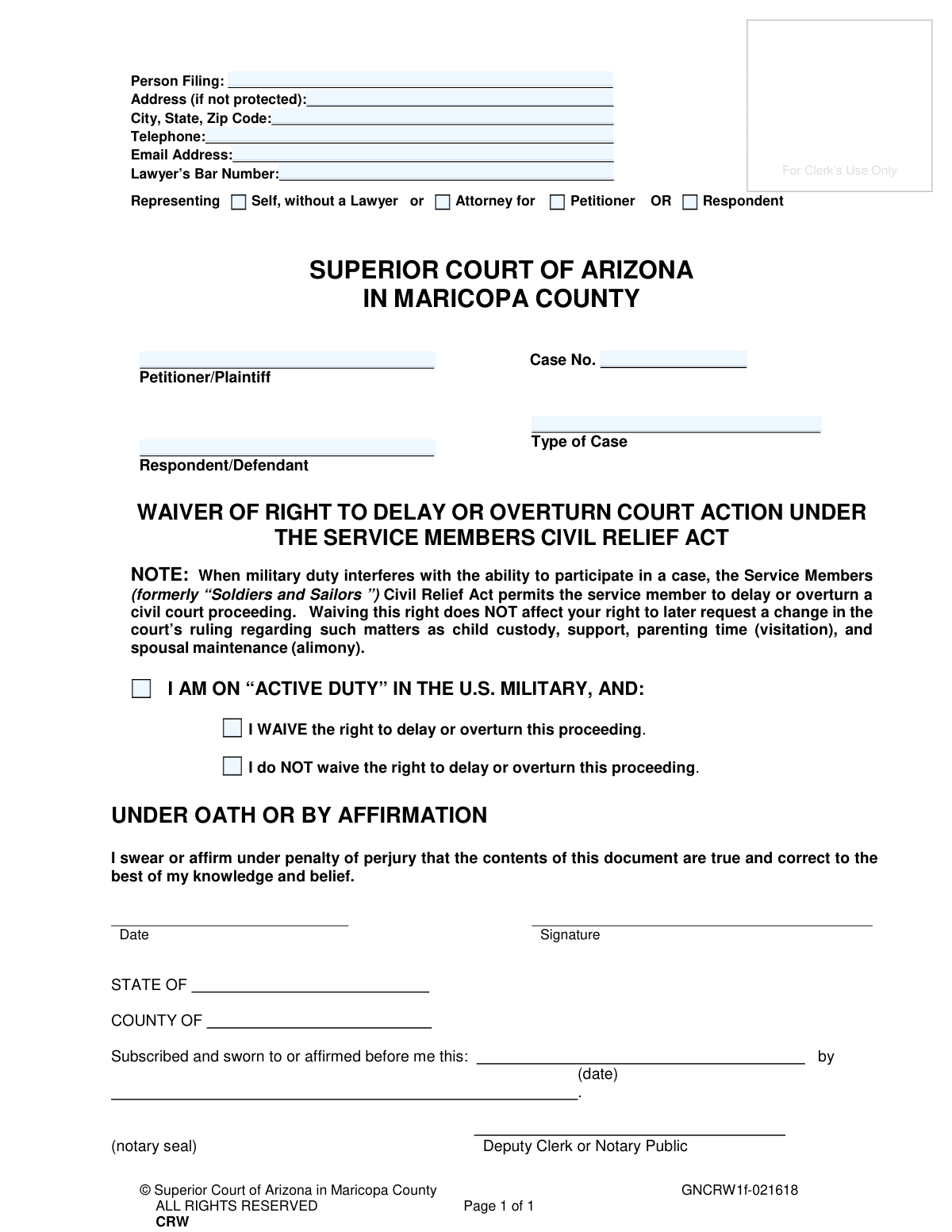
This form is a legal declaration for active-duty military members involved in a civil case in the Superior Court of Arizona, Maricopa County. It allows the service member to voluntarily give up their rights under the Service Members Civil Relief Act (SCRA) to postpone proceedings or overturn a default judgment, thereby allowing the case to move forward without delay. It is a critical document ensuring the timely progression of legal matters involving military personnel. Today, this form can be filled out quickly and accurately using AI-powered services like Instafill.ai, which can also convert non-fillable PDF versions into interactive fillable forms.
GNCRW1f - Service Members Civil Relief Act Waiver is part of the
civil action forms, civil court forms, civil litigation forms, County court forms, superior court forms and civil service forms categories on Instafill.
Our AI automatically handles information lookup, data retrieval, formatting, and form filling.
It takes less than a minute to fill out GNCRW1f - Service Members Civil Relief Act Waiver using our AI form filling.
Securely upload your data. Information is encrypted in transit and deleted immediately after the form is filled out.
Form specifications
| Form name: | Waiver of Right to Delay or Overturn Court Action Under the Service Members Civil Relief Act |
| Number of fields: | 17 |
| Number of pages: | 1 |
| Language: | English |
Instafill Demo: How to fill out PDF forms in seconds with AI
How to Fill Out GNCRW1f - Service Members Civil Relief Act Waiver Online for Free in 2026
Are you looking to fill out a GNCRW1F - SERVICE MEMBERS CIVIL RELIEF ACT WAIVER form online quickly and accurately? Instafill.ai offers the #1 AI-powered PDF filling software of 2026, allowing you to complete your GNCRW1F - SERVICE MEMBERS CIVIL RELIEF ACT WAIVER form in just 37 seconds or less.
Follow these steps to fill out your GNCRW1F - SERVICE MEMBERS CIVIL RELIEF ACT WAIVER form online using Instafill.ai:
- 1 Navigate to Instafill.ai and upload the Service Members Civil Relief Act Waiver form or select it from the template library.
- 2 Use the AI assistant to automatically fill in your personal details, such as name and address, and the specific case information, including the case number and party names.
- 3 Indicate your representation status by selecting whether you are representing yourself or are represented by an attorney.
- 4 Clearly state your intention by checking the appropriate box to either 'WAIVE' or 'do NOT waive' your rights under the SCRA.
- 5 Review all the information entered by the AI for accuracy and make any necessary corrections before proceeding.
- 6 Sign the document electronically under oath or affirmation. The form requires notarization, which can often be completed using an integrated remote online notarization service.
- 7 Download the completed and notarized form to file with the Superior Court of Arizona in Maricopa County.
Our AI-powered system ensures each field is filled out correctly, reducing errors and saving you time.
Why Choose Instafill.ai for Your Fillable GNCRW1f - Service Members Civil Relief Act Waiver Form?
Speed
Complete your GNCRW1f - Service Members Civil Relief Act Waiver in as little as 37 seconds.
Up-to-Date
Always use the latest 2026 GNCRW1f - Service Members Civil Relief Act Waiver form version.
Cost-effective
No need to hire expensive lawyers.
Accuracy
Our AI performs 10 compliance checks to ensure your form is error-free.
Security
Your personal information is protected with bank-level encryption.
Frequently Asked Questions About Form GNCRW1f - Service Members Civil Relief Act Waiver
This form is for active-duty military members to officially inform the court whether they are waiving or not waiving their right to delay a civil court case due to their military service, as granted by the Service Members Civil Relief Act (SCRA).
You need to fill out this form if you are on active duty in the U.S. military and are a party (petitioner or respondent) in a civil case filed in the Superior Court of Arizona in Maricopa County.
By checking 'I WAIVE', you are giving up your right to ask the court to delay the proceedings or overturn a judgment made against you because your military duties prevented you from participating.
Checking this box formally notifies the court that you are preserving your rights under the SCRA. This means you can still request to delay the case later if your military service interferes with your ability to appear in court.
Yes. The form clearly states that waiving your right to delay the case does not affect your future right to request changes to court orders regarding child custody, support, parenting time, or spousal maintenance.
You will need your personal contact details, your court case number, the names of the petitioner and respondent, and the type of case (e.g., Dissolution of Marriage). This information can be found on previous court documents.
The form must be notarized because you are signing it under oath or by affirmation, confirming that the information is true. A notary public or deputy clerk officially witnesses your signature to validate the document.
After you have filled out and notarized the form, you must file it with the Clerk of the Superior Court in Maricopa County for your specific case.
You are not required to have a lawyer and can check the box for 'Representing Self'. However, because you are dealing with legal rights, consulting with an attorney is highly recommended to understand the consequences of your choice.
Yes, services like Instafill.ai use AI to accurately auto-fill form fields, which can save you time and help you avoid common mistakes.
You can upload the PDF of the form to the Instafill.ai website. The platform's AI will make the fields fillable, allowing you to type your information directly before downloading the completed document for printing and notarization.
If you have a non-fillable or 'flat' PDF, you can use a tool like Instafill.ai. It can convert the document into an interactive, fillable form online so you can easily enter your information.
Compliance GNCRW1f - Service Members Civil Relief Act Waiver
Validation Checks by Instafill.ai
1
Exclusive Representation Selection
This check ensures that the filer has selected one and only one representation status, either 'Self, without a Lawyer' or 'Attorney for'. Selecting both or neither would create ambiguity about who is filing the form and in what capacity. If this validation fails, the form submission should be blocked until the user makes a single, clear choice.
2
Conditional Attorney Role Requirement
If the filer indicates they are an 'Attorney for' someone, this validation confirms that they have also selected a role, either 'Petitioner' or 'Respondent'. This is crucial for understanding which party the attorney represents in the case. A failure to specify the role would make the form incomplete and legally unclear.
3
Conditional Lawyer's Bar Number Presence
This validation requires the 'Lawyer’s Bar Number' field to be filled out if the filer has identified as an 'Attorney for' a party. The bar number is a unique identifier that confirms the person is a licensed attorney in good standing. Submitting the form as an attorney without a valid bar number would invalidate the filing.
4
Exclusive Waiver Decision
This check verifies that the service member has selected exactly one of the two waiver options: 'I WAIVE the right...' or 'I do NOT waive the right...'. The entire purpose of this form is to document this specific decision. Selecting both or neither option would render the document meaningless, so the submission must be rejected until a single choice is made.
5
Case Number Presence and Format
This validation ensures that the 'Case No.' field is not empty and, if possible, matches the expected format for Maricopa County Superior Court. The case number is the primary identifier linking this waiver to a specific legal proceeding. Without a valid case number, the court clerk cannot file the document correctly, and it will have no legal effect.
6
Core Case Information Completeness
This check confirms that the 'Petitioner/Plaintiff', 'Respondent/Defendant', and 'Type of Case' fields are all filled out. This information provides essential context and ensures the waiver is associated with the correct parties and legal action. Missing information could lead to the document being misfiled or rejected by the court.
7
Email Address Format Validation
This validation verifies that the value entered in the 'Email Address' field follows the standard '[email protected]' format. An accurate email address is vital for the court or other parties to send notifications and correspondence electronically. An invalid format would lead to communication failures, potentially causing the filer to miss important updates.
8
US Telephone Number Format
This check ensures the 'Telephone' number is entered in a valid 10-digit US format (e.g., XXX-XXX-XXXX or (XXX) XXX-XXXX). A valid phone number is a critical piece of contact information for the court and opposing counsel. If the number is malformed, it prevents timely communication, which can be detrimental in legal proceedings.
9
Signature Date Logic
This validation ensures the 'Date' next to the signature is a valid date and is not set in the future. The signature date establishes the exact moment the filer attested to the document's contents. A future date is logically impossible and would invalidate the legal standing of the sworn statement.
10
Notary Date Consistency
This check verifies that the date in the notary section ('Subscribed and sworn to... this:') is on or after the filer's signature date. A document cannot be legally notarized before it has been signed by the individual. This logical check is critical for ensuring the affidavit is legally valid and properly executed.
11
Person Filing Name Presence
This validation confirms that the 'Person Filing' field is not left blank. This name identifies the individual submitting the document, whether they are a party to the case or an attorney. Without this information, the document lacks a clear author and cannot be processed.
12
ZIP Code Format Validation
This check validates that the ZIP code provided in the 'City, State, Zip Code' field is a valid 5-digit or 9-digit (ZIP+4) format. A correct ZIP code is essential for ensuring any physical mail sent by the court reaches the intended recipient. An incorrect format could lead to returned mail and missed legal notices.
Common Mistakes in Completing GNCRW1f - Service Members Civil Relief Act Waiver
People often mistype the case number or leave it blank. Since this number is the primary identifier linking the waiver to the correct court file, an error will cause the clerk to reject the document or file it incorrectly, leading to significant delays. Always double-check the case number against official court documents; AI-powered tools like Instafill.ai can help by saving and autofilling this critical information to ensure consistency across all related forms.
Users frequently get confused by the checkboxes for representation, sometimes checking 'Self, without a Lawyer' when they have an attorney, or mixing up their 'Petitioner' and 'Respondent' roles. This ambiguity can confuse the court about who is filing the document and in what capacity, potentially causing procedural delays. It is crucial to accurately identify your role as it appears on other official court documents.
A filer might accidentally check both 'I WAIVE' and 'I do NOT waive', or forget to check either box. This creates a fatal ambiguity, making it impossible for the court to determine the service member's intent, and the waiver will be considered invalid and rejected. Carefully read and select only one option that clearly reflects your decision before signing.
Many people sign the document before going to the notary, but the purpose of notarization is for the official to witness the act of signing. Signing beforehand invalidates the notarization, and an un-notarized sworn statement will be rejected by the court. You must sign the document in the physical presence of a licensed Notary Public or Deputy Clerk who then completes the notary section.
The form explicitly says 'Address (if not protected),' but individuals under a protective order sometimes fill in their confidential address out of habit. This mistake can have severe safety consequences by inadvertently disclosing their location to the opposing party. If your address is protected by a court order, you must leave this section blank or follow specific court guidance for protected filers.
This waiver is exclusively for service members currently on 'active duty' as defined by the SCRA. Veterans, inactive reservists, or National Guard members not on federal active duty orders may mistakenly believe the form applies to them. Filing this waiver without the proper status can lead to its rejection and may complicate your legal standing, as the rights being waived would not have applied in the first place.
Filers often use nicknames, initials, or misspell the full legal names of the Petitioner and Respondent. Court systems require precision, and any name that does not exactly match the official case record can lead to filing rejections or delays. Always use the complete and correctly spelled legal names as they appear on the initial petition or complaint.
Forgetting to sign and date the document is a surprisingly common and critical error. An unsigned legal document has no force or effect and will be immediately rejected by the court clerk, as it cannot be considered a valid sworn statement. Before filing, always perform a final review to ensure your signature and the correct date are in the designated spaces.
If an attorney is filing on behalf of the service member, their bar number is required for verification by the court. Forgetting to include this number can halt the processing of the document until the information is provided and verified, causing unnecessary delays. This is a simple but crucial piece of information for any attorney-filed document.
This form is often provided as a non-fillable PDF, requiring users to print it and fill it out by hand, which can lead to illegible handwriting and transcription errors. This can cause the court clerk to misinterpret names, case numbers, or other critical information, leading to rejection. Using a tool like Instafill.ai can convert the form into a fillable version, ensuring all entries are clear, legible, and accurate.
Saved over 80 hours a year
“I was never sure if my IRS forms like W-9 were filled correctly. Now, I can complete the forms accurately without any external help.”
Kevin Martin Green
Your data stays secure with advanced protection from Instafill and our subprocessors

Robust compliance program
Transparent business model
You’re not the product. You always know where your data is and what it is processed for.
ISO 27001, HIPAA, and GDPR
Our subprocesses adhere to multiple compliance standards, including but not limited to ISO 27001, HIPAA, and GDPR.
Security & privacy by design
We consider security and privacy from the initial design phase of any new service or functionality. It’s not an afterthought, it’s built-in, including support for two-factor authentication (2FA) to further protect your account.
Fill out GNCRW1f - Service Members Civil Relief Act Waiver with Instafill.ai
Worried about filling PDFs wrong? Instafill securely fills waiver-of-right-to-delay-or-overturn-court-action-under-the-service-members-civil-relief-act forms, ensuring each field is accurate.