Yes! You can use AI to fill out Superior Court of New Jersey, Civil Action, Completion of Mediation Form
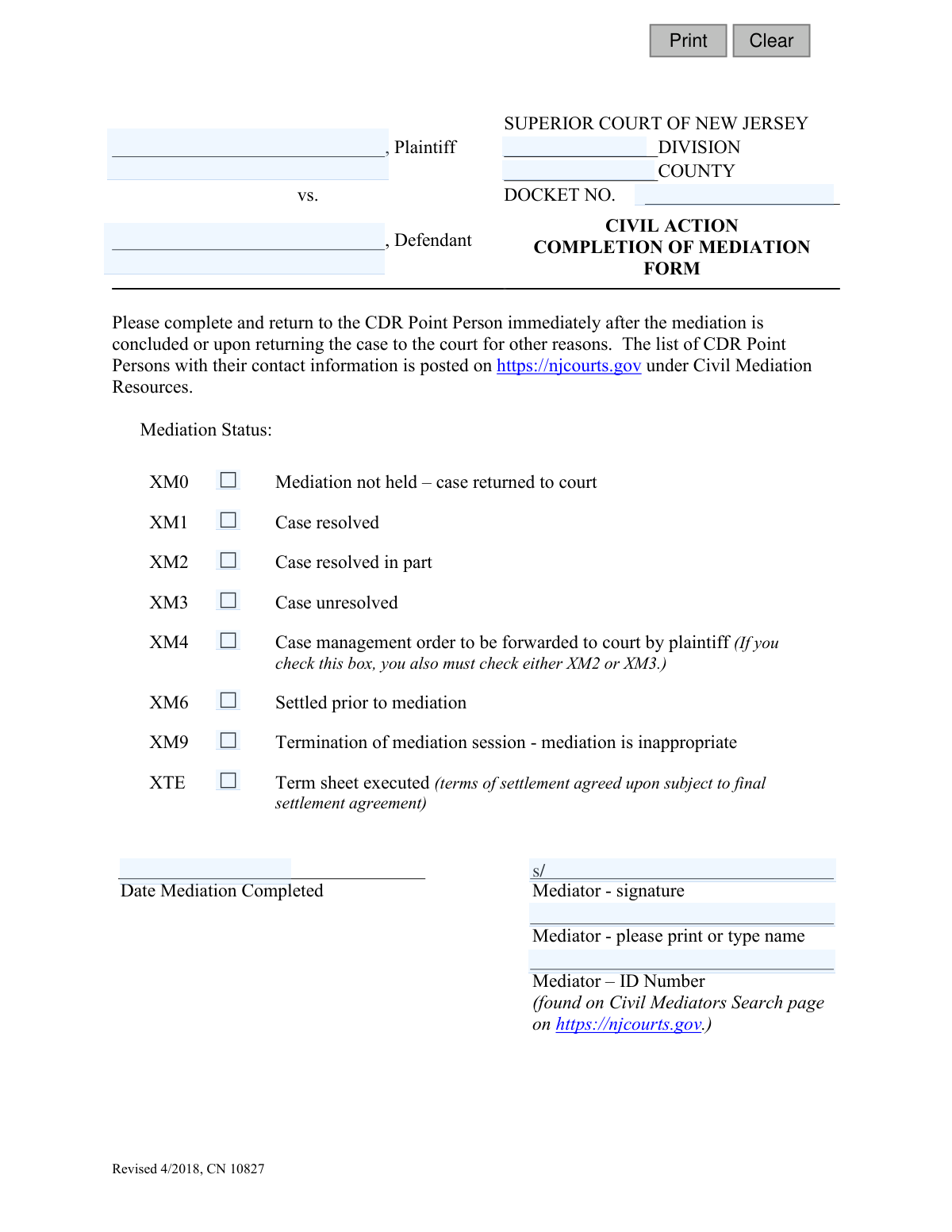
This form, officially known as the Completion of Mediation Form (CN 10827), is a required document for the Superior Court of New Jersey's civil division. It is completed by the mediator to formally notify the court of the status of a mandated mediation, indicating whether the case was resolved, partially resolved, or remains unresolved. Today, this form can be filled out quickly and accurately using AI-powered services like Instafill.ai, which can also convert non-fillable PDF versions into interactive fillable forms.
CN 10827 is part of the
civil action forms, civil court forms, New Jersey forms and superior court forms categories on Instafill.
Our AI automatically handles information lookup, data retrieval, formatting, and form filling.
It takes less than a minute to fill out CN 10827 using our AI form filling.
Securely upload your data. Information is encrypted in transit and deleted immediately after the form is filled out.
Form specifications
| Form name: | Superior Court of New Jersey, Civil Action, Completion of Mediation Form |
| Number of fields: | 19 |
| Number of pages: | 1 |
| Language: | English |
Instafill Demo: How to fill out PDF forms in seconds with AI
How to Fill Out CN 10827 Online for Free in 2026
Are you looking to fill out a CN 10827 form online quickly and accurately? Instafill.ai offers the #1 AI-powered PDF filling software of 2026, allowing you to complete your CN 10827 form in just 37 seconds or less.
Follow these steps to fill out your CN 10827 form online using Instafill.ai:
- 1 Navigate to Instafill.ai and upload or select the NJ Completion of Mediation Form (CN 10827).
- 2 Use the AI assistant to automatically populate case information such as Plaintiff and Defendant names, County, Division, and Docket Number.
- 3 Review the auto-filled case details for accuracy and make any necessary corrections.
- 4 Select the appropriate checkbox to indicate the final mediation status (e.g., 'XM1 Case resolved', 'XM3 Case unresolved').
- 5 Enter the date the mediation was completed and provide your official Mediator ID number.
- 6 Electronically sign and print your name in the designated mediator signature and name fields.
- 7 Download the completed form, ready for submission to the appropriate CDR Point Person for the New Jersey court.
Our AI-powered system ensures each field is filled out correctly, reducing errors and saving you time.
Why Choose Instafill.ai for Your Fillable CN 10827 Form?
Speed
Complete your CN 10827 in as little as 37 seconds.
Up-to-Date
Always use the latest 2026 CN 10827 form version.
Cost-effective
No need to hire expensive lawyers.
Accuracy
Our AI performs 10 compliance checks to ensure your form is error-free.
Security
Your personal information is protected with bank-level encryption.
Frequently Asked Questions About Form CN 10827
This form is used by the mediator to officially report the outcome of a court-ordered mediation to the Superior Court of New Jersey. It informs the court whether the case was resolved, partially resolved, or remains unresolved after the session.
The mediator assigned to the case is responsible for completing and submitting this form. It must be filled out immediately after the mediation is concluded or when the case is returned to the court for other reasons.
The completed form must be sent to the CDR (Complementary Dispute Resolution) Point Person for the appropriate county. You can find the list of CDR Point Persons and their contact information on the njcourts.gov website under Civil Mediation Resources.
The form should be completed and returned to the CDR Point Person immediately after the mediation session is concluded. Prompt submission ensures the court's records are updated in a timely manner.
You will need the Plaintiff and Defendant names, the court Division, County, and the Docket Number. The mediator must also provide their printed name, signature, Mediator ID number, and the date the mediation was completed.
Your Mediator ID number is listed on the Civil Mediators Search page on the official New Jersey Courts website (njcourts.gov). You must include this ID on the form for proper identification.
These codes summarize the mediation's outcome: 'XM1' means the case is fully resolved, 'XM2' means it's partially resolved, and 'XM3' means it's unresolved. You must select the one that best describes the final status.
If only some issues were resolved, you should check the box for 'XM2 - Case resolved in part'. If a case management order will follow, you must also check the 'XM4' box.
If the case was settled by the parties prior to the mediation session, you should check the box for 'XM6 - Settled prior to mediation' and submit the form to notify the court.
In this scenario, you should check 'XTE - Term sheet executed'. This status indicates that the main terms of the settlement have been agreed upon, pending a final, formal settlement agreement.
Yes, services like Instafill.ai use AI to help you accurately auto-fill form fields with case details and your mediator information. This can save time and help prevent common errors.
To fill this form online, you can upload the PDF to a service like Instafill.ai. Their platform makes the document interactive, allowing you to type your information directly into the fields and then download the completed form.
If you have a non-fillable or 'flat' PDF, you can use a tool like Instafill.ai to make it interactive. Simply upload the document, and their service will convert it into a fillable form you can complete on your computer.
Check the 'XM4' box only if a case management order is being prepared and will be forwarded to the court by the plaintiff. The form requires that if you check 'XM4', you must also check either 'XM2' (partially resolved) or 'XM3' (unresolved).
Compliance CN 10827
Validation Checks by Instafill.ai
1
Required Docket Number
This validation ensures that the 'Docket Number' field is not empty. The docket number is a unique identifier for the case within the court system, and its absence would make it impossible to associate this form with the correct legal proceeding. If this check fails, the user should be prompted to enter the mandatory docket number before submission.
2
Mediation Status Completeness
This check verifies that at least one of the 'Mediation Status' checkboxes (XM0, XM1, XM2, etc.) has been selected. The primary purpose of the form is to report the outcome of the mediation, so a status must be provided. A failure would mean the form's core information is missing, and the user must be required to select a status.
3
XM4 Status Dependency Rule
This is a logical consistency check that enforces a rule explicitly stated on the form. If the 'XM4' checkbox ('Case management order to be forwarded') is selected, this validation ensures that either 'XM2' ('Case resolved in part') or 'XM3' ('Case unresolved') is also selected. This prevents an incomplete or illogical status combination from being submitted.
4
Mutually Exclusive Mediation Statuses
This validation prevents the selection of contradictory mediation statuses. For example, a case cannot be simultaneously 'resolved' (XM1) and 'unresolved' (XM3), or 'not held' (XM0) and 'settled' (XM1/XM6). This check ensures the submitted outcome is logical and unambiguous, preventing data corruption and confusion in the case file.
5
Valid Mediation Completion Date Format
This check ensures that the 'Date Mediation Completed' field contains a valid date in a recognized format (e.g., MM/DD/YYYY). It prevents the entry of non-date text or improperly formatted dates, which would cause data processing errors. If the format is invalid, the user should be shown an example of the correct format.
6
Logical Mediation Completion Date
This validation confirms that the 'Date Mediation Completed' is not a future date. A mediation event cannot be completed in the future, so this check prevents simple data entry errors. The date entered must be on or before the current date to be considered valid.
7
Required Mediator ID
This check verifies that the 'Mediator – ID Number' field has been filled out. The Mediator ID is a crucial piece of information used to verify the mediator's credentials and link them to the case for official records. A missing ID would render the form incomplete and potentially invalid.
8
Required Plaintiff Name
This validation ensures the 'Plaintiff' name field is not left blank. The plaintiff's name is a primary identifier for the legal case and is essential for correctly filing the form. Without it, the form cannot be accurately associated with the corresponding court records.
9
Required Defendant Name
This validation ensures the 'Defendant' name field is not left blank. Similar to the plaintiff's name, the defendant's name is a primary identifier for the legal case. This information is mandatory for the form to be correctly filed and processed by the court.
10
Required Mediator Printed Name
This check confirms that the 'Mediator - please print or type name' field is completed. While a signature is required, it may be illegible. The printed name provides a clear, unambiguous record of the mediator who oversaw the session, which is essential for accountability and record-keeping.
11
Valid New Jersey County
This validation checks the 'COUNTY' field against a predefined list of the 21 official counties in New Jersey. This ensures data consistency and prevents errors from typos or abbreviations (e.g., 'Middlesex' vs. 'Middlsex'). An invalid entry would be flagged, prompting the user to select from a valid list.
12
Mediator Signature Presence
This check verifies that the 'Mediator - signature' field contains data, representing a digital or scanned signature. The mediator's signature is what makes the document official and authenticates its contents. A submission without a signature would be considered incomplete and legally non-binding.
13
Distinct Plaintiff and Defendant
This is a data integrity check to ensure the name entered for the 'Plaintiff' is not identical to the name entered for the 'Defendant'. While legally complex scenarios exist, in the vast majority of cases this indicates a copy-paste or data entry error. The system should flag this for user review to confirm the accuracy of the party information.
Common Mistakes in Completing CN 10827
Users often mistype or omit characters from the docket number due to its complex format. An incorrect docket number prevents the court from matching the form to the correct case file, causing significant processing delays and potential rejection of the document. To avoid this, carefully transcribe the number from official court documents and double-check it for accuracy. AI-powered tools like Instafill.ai can help by validating the format and auto-populating this information from previous entries to ensure consistency.
A common error is checking multiple, mutually exclusive boxes, such as 'XM1 Case resolved' and 'XM3 Case unresolved'. This happens when filers are rushed or misunderstand the options, creating ambiguity that requires clarification from the court and delays case processing. Carefully read each option and select only the single most accurate outcome of the mediation to ensure the form is processed correctly.
Mediators frequently check the 'XM4' box without also selecting 'XM2' (Case resolved in part) or 'XM3' (Case unresolved), despite the form's explicit instruction. This oversight renders the submission incomplete, as the court does not know the underlying status of the case. Always follow the on-form instructions; if XM4 is checked, one of the other two required statuses must also be selected to provide a complete picture.
Forgetting to include the official Mediator ID number is a frequent mistake, often because the mediator doesn't have it readily available. Without this ID, the court cannot verify the mediator's credentials or confirm they are on the approved roster, which can lead to the rejection of the mediation report. Mediators should look up and confirm their ID on the NJ Courts website as instructed and keep it accessible for all filings. Tools like Instafill.ai can securely store and automatically fill this recurring information, preventing omissions.
In the rush to complete paperwork, the mediator's signature is sometimes forgotten, which is a critical error. An unsigned form is legally invalid and will be immediately rejected by the court, halting any updates to the case status. Always perform a final review of the entire form before submission, specifically checking for the required signature. If the form is a non-fillable PDF, a tool like Instafill.ai can convert it to a fillable version where a digital signature can be easily applied.
Filers may enter incomplete names, use abbreviations, or make spelling errors when listing the plaintiff and defendant. This creates a mismatch with the official court record, causing confusion and delays while the clerk's office tries to identify the correct case. To prevent this, ensure the names are spelled out fully and exactly as they appear on the original complaint or court docket.
The 'County' and 'Division' fields are essential for routing the form to the correct department within the New Jersey Superior Court system. Leaving them blank or entering the wrong information will cause the document to be misfiled or returned, delaying the update to the case's official status. This information can be found on the original case filing documents and must be entered accurately.
When the mediator's signature is difficult to read, the printed name becomes essential for identification, yet it is often handwritten illegibly. This prevents court staff from verifying the mediator's identity against the official roster, potentially causing delays or rejection. It is crucial to print the name clearly or type it to ensure legibility. Using a form-filling tool like Instafill.ai ensures the name is always typed and perfectly clear.
This status is sometimes incorrectly selected when the parties settle during the mediation session itself. 'XM6' is exclusively for cases where a settlement was reached before the scheduled mediation even began, making the session unnecessary. Misusing this code provides inaccurate data to the court about the mediation program's effectiveness and can cause confusion. If a settlement is reached during the session, 'XM1 Case resolved' is the correct choice.
The form explicitly states it should be returned 'immediately' after the mediation concludes, but mediators often delay submission due to administrative backlog. This delay means the court's records are not up-to-date, which can affect scheduling, deadlines, and further court actions. To comply and ensure timely case management, mediators should have a process to file this form on the same day the mediation ends.
Saved over 80 hours a year
“I was never sure if my IRS forms like W-9 were filled correctly. Now, I can complete the forms accurately without any external help.”
Kevin Martin Green
Your data stays secure with advanced protection from Instafill and our subprocessors

Robust compliance program
Transparent business model
You’re not the product. You always know where your data is and what it is processed for.
ISO 27001, HIPAA, and GDPR
Our subprocesses adhere to multiple compliance standards, including but not limited to ISO 27001, HIPAA, and GDPR.
Security & privacy by design
We consider security and privacy from the initial design phase of any new service or functionality. It’s not an afterthought, it’s built-in, including support for two-factor authentication (2FA) to further protect your account.
Fill out CN 10827 with Instafill.ai
Worried about filling PDFs wrong? Instafill securely fills superior-court-of-new-jersey-civil-action-completion-of-mediation-form forms, ensuring each field is accurate.