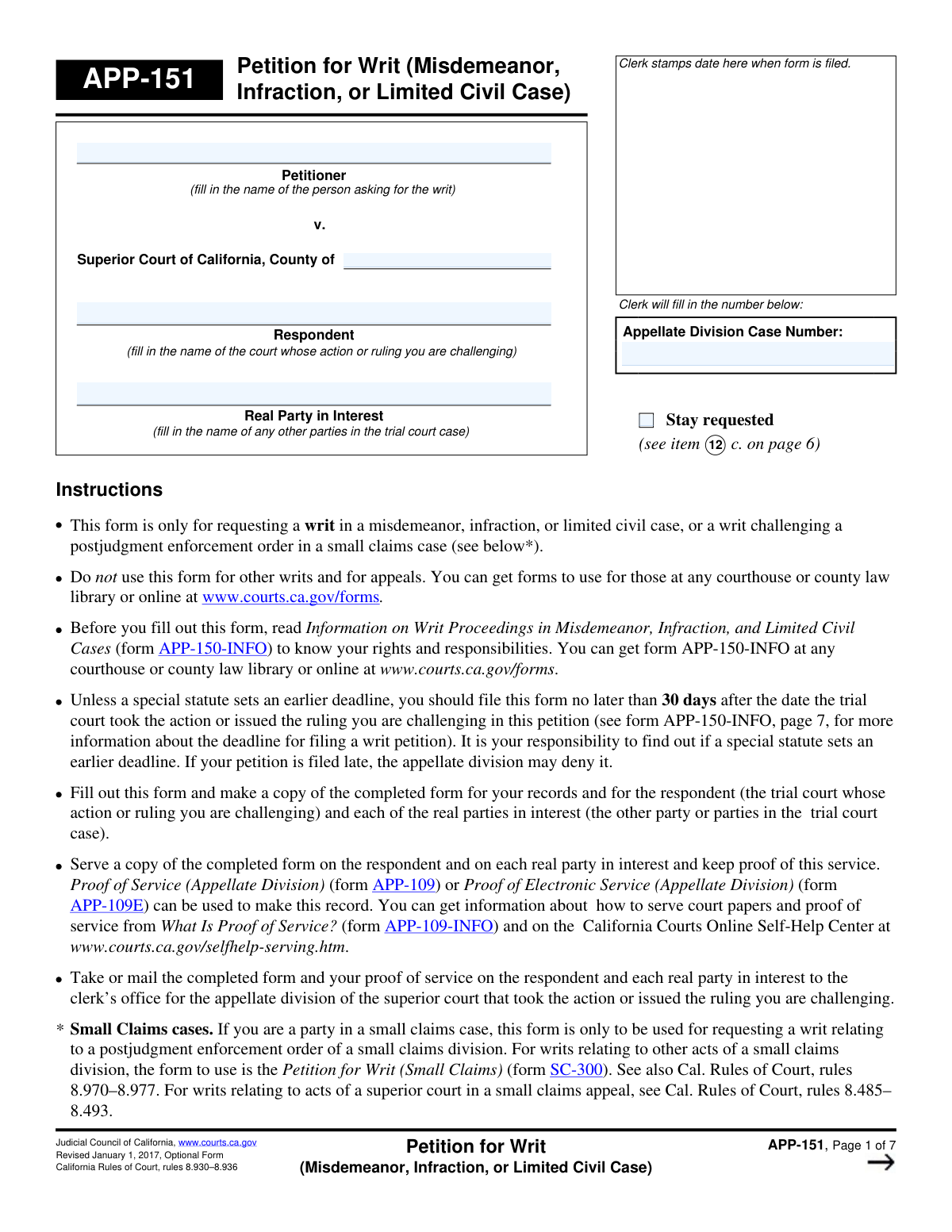
Yes! You can use AI to fill out Form APP-151, Petition for Writ (Misdemeanor, Infraction, or Limited Civil Case)

Form APP-151 is a Petition for Writ used within the California court system to formally request that an appellate division review a decision, action, or inaction of a trial court in a misdemeanor, infraction, or limited civil case. This petition is crucial when a standard appeal is not a sufficient or available remedy, allowing a party to seek an order (a writ) to correct a judicial error or prevent irreparable harm. Today, this form can be filled out quickly and accurately using AI-powered services like Instafill.ai, which can also convert non-fillable PDF versions into interactive fillable forms.
Our AI automatically handles information lookup, data retrieval, formatting, and form filling.
It takes less than a minute to fill out APP-151 using our AI form filling.
Securely upload your data. Information is encrypted in transit and deleted immediately after the form is filled out.

Form specifications

Form name: Form APP-151, Petition for Writ (Misdemeanor, Infraction, or Limited Civil Case)
Number of fields: 102
Number of pages: 7
Language: English
main-image

Instafill Demo: How to fill out PDF forms in seconds with AI

How to Fill Out APP-151 Online for Free in 2026

Are you looking to fill out a APP-151 form online quickly and accurately? Instafill.ai offers the #1 AI-powered PDF filling software of 2026, allowing you to complete your APP-151 form in just 37 seconds or less.
Follow these steps to fill out your APP-151 form online using Instafill.ai:
  1. 1 Navigate to Instafill.ai and upload or select Form APP-151.
  2. 2 Use the AI assistant to accurately fill in the case information, including the petitioner, respondent, real party in interest, and the relevant court and case numbers.
  3. 3 Provide the complete contact information for the petitioner and their legal counsel, if applicable, letting the AI populate recurring details automatically.
  4. 4 Clearly state the trial court action being challenged, the date it occurred, and the legal grounds for the petition (e.g., the court failed to act, acted without power, etc.).
  5. 5 Specify the exact order you are asking the appellate division to make and explain why the writ is necessary and how you would be irreparably harmed without it.
  6. 6 Indicate which supporting documents (like transcripts and trial court rulings) are attached, or provide a declaration explaining their absence, and then complete the verification section.
  7. 7 Review all entered information for accuracy, make any necessary corrections, and then download, save, or print the completed petition for filing.

Our AI-powered system ensures each field is filled out correctly, reducing errors and saving you time.

Why Choose Instafill.ai for Your Fillable APP-151 Form?

Speed

Complete your APP-151 in as little as 37 seconds.

Up-to-Date

Always use the latest 2026 APP-151 form version.

Cost-effective

No need to hire expensive lawyers.

Accuracy

Our AI performs 10 compliance checks to ensure your form is error-free.

Security

Your personal information is protected with bank-level encryption.

Frequently Asked Questions About Form APP-151

This form is a petition for a writ, used to ask an appellate division court to review a specific action, ruling, or failure to act by a lower trial court.

The Petitioner is the person challenging the trial court's decision. The Respondent is the trial court itself, and the Real Party in Interest is any other party involved in the original case.

Requesting a stay means you are formally asking the appellate court to pause the trial court proceedings until your writ petition has been decided. You must explain why this is urgent.

You must attach a record of the trial court proceedings, such as a transcript, along with the trial court ruling you are challenging and any documents that support or oppose that ruling.

If a transcript is unavailable, you must attach a signed declaration explaining why and provide a fair summary of the proceedings, or state that a transcript has been ordered.

You must provide a detailed explanation of the extraordinary circumstances that caused the delay in filing your petition in the 'Explanation for Filing Delay' section.

The form allows you to check a box indicating you need more space and attach separate pages. Be sure to label each attached page with the form number (e.g., APP-151) and the corresponding item number.

No, you only need to fill out the mailing address fields for yourself or your lawyer if they are different from the primary street address already provided.

An appeal is typically filed after a final judgment, while a writ petition challenges a specific court order or inaction while the case may still be ongoing, often for urgent matters.

Yes, services like Instafill.ai use AI to accurately auto-fill form fields from your saved information, which can save you significant time and help prevent errors.

You can upload the form to Instafill.ai, which will make the fields interactive. You can then fill it out online, save your progress, and download or print the completed form.

Services like Instafill.ai can convert flat, non-fillable PDFs into interactive forms. Simply upload the document, and the platform will make it fillable online.

You must provide the full title of the previous petition, the date it was filed, the court it was filed in, and the case number assigned to it.

Compliance APP-151
Validation Checks by Instafill.ai

1
Ensures Core Case Information is Complete
This check verifies that essential fields such as 'Petitioner Name', 'County of Superior Court', 'Respondent Name', and 'Trial Court Case Number' are not empty. These fields are fundamental for identifying the case and the parties involved. If this information is missing, the petition cannot be correctly filed or processed, and the submission will be rejected pending completion.
2
Validates the Format of the State Bar Number
This validation ensures that the 'State Bar Number' field contains a valid, properly formatted number corresponding to the state's bar association registry. This is crucial for verifying the lawyer's credentials and their authority to represent the petitioner. An invalid or missing number will trigger an error, as the court must confirm the lawyer is in good standing.
3
Validates the Format of All Email Addresses
This check confirms that any value entered into 'Petitioner Email Address' and 'Lawyer Email Address' fields follows the standard '[email protected]' format. Correct email addresses are essential for official communication, notifications, and serving documents electronically. An invalid format would prevent successful submission and require the user to correct the entry.
4
Validates the Format of All Zip Code Fields
This check ensures that all zip code fields, including those for the petitioner and their lawyer, contain a valid 5-digit or 9-digit (ZIP+4) numeric format. Accurate zip codes are necessary for mail delivery of legal documents and correspondence. An incorrect format will result in a validation error, prompting the user to enter a valid US zip code.
5
Ensures Challenged Ruling Date is a Valid Past Date
This validation verifies that the 'Date of Challenged Action or Ruling' is a real calendar date and is not in the future. The date is critical for determining the timeliness of the petition and calculating filing deadlines. A future date is logically impossible, and an invalid format would prevent the system from processing the date-related logic, thus failing the submission.
6
Requires Explanation for Filing Delay
This is a conditional logic check that ensures the 'Delay Explanation' field is filled out if the 'Date of Challenged Action or Ruling' is more than 30 days before the current date. Legal rules often impose strict deadlines for filing petitions, and any delay must be justified. If the petition is late and no explanation is provided, the submission will be flagged as incomplete and may be rejected by the court.
7
Requires Details for Previous Petition Filing
This validation checks that if the 'Yes' box is checked for 'Previous Petition Information', then the 'Petition Title', 'Petition Filing Date', and 'Petition Case Number' fields must be completed. This information is vital for the court to understand the case history and avoid duplicative proceedings. Failure to provide these details after indicating a previous filing will result in a validation error.
8
Ensures Mutual Exclusivity of Appeal Status Checkboxes
This check verifies that for the 'Appeal Filing Status' question, only one of the 'Yes' or 'No' checkboxes is selected. Selecting both options creates a logical contradiction that makes the form data ambiguous. The system should prevent the user from checking both boxes or flag an error if both are selected upon submission.
9
Requires Justification for Urgent Stay Request
This validation ensures that if the 'Issue Stay' box is checked, the 'Reason for Stay Urgency' text field must be filled. A stay is a significant legal request that halts trial court proceedings, and the court requires a compelling reason to grant one on an urgent basis. A request for a stay without a justification will be considered incomplete and will fail validation.
10
Requires Explanation for Unattached Documents
This check enforces that if the 'No, documents not attached' box is selected, the 'Reason for Not Attaching Documents' field must be completed. Court rules require specific documents to be submitted with a petition, and their absence must be thoroughly explained. Failing to provide this explanation will result in an incomplete submission and likely cause the petition to be rejected.
11
Requires Impact Description if Client Was Not a Party
This conditional validation ensures that if the 'Client was not a party but affected' box is checked, the 'Client's Negative Impact Description' field is filled out. To have legal standing, a non-party must demonstrate how they are directly harmed by the court's ruling. Without this explanation, the petitioner's right to file the writ is not established, and the form will be considered incomplete.
12
Ensures Consistency of Appellate Division Case Number
This check compares the values entered into all fields named 'Appellate Division Case Number' across the entire form. The case number must be consistent on every page to ensure the document is correctly associated with a single case file. Any discrepancy will trigger a validation error to prevent filing mistakes and administrative confusion.
13
Validates Completeness of Lawyer Information
This validation ensures that if the 'Petitioner's Lawyer Name' field is filled, then the 'State Bar Number' and 'Lawyer Phone Number' fields must also be completed. When a petitioner is represented by counsel, the court requires complete contact and credential information for that lawyer. Missing this key information would halt communication and verification, so the form is considered incomplete without it.
14
Requires Details for 'Other' Requested Action
This check verifies that if the 'Take other action' checkbox is selected, the corresponding 'Other Action Description' text field is not empty. This ensures that any non-standard request made to the court is clearly and explicitly defined. An empty description for a checked 'other' option makes the request meaningless and will cause the submission to fail validation.

Common Mistakes in Completing APP-151

Inconsistent Case Number and Name Entry

The form requires the 'Appellate Division Case Name' and 'Case Number' to be entered multiple times across different pages. Filers often make typos or enter slightly different versions in each section, leading to confusion and potential processing delays. To avoid this, double-check that the information is identical in every instance. AI-powered tools like Instafill.ai can prevent this by auto-populating repeated fields consistently after the first entry.

Confusing 'Respondent' with 'Real Party in Interest'

Petitioners frequently mistake the opposing party in their case for the 'Respondent'. This form specifically defines the 'Respondent' as the court whose ruling is being challenged, while the 'Real Party in Interest' is the other party involved in the trial court case. This error can lead to the petition being rejected for failing to properly name the parties. Carefully read the field descriptions to ensure you are identifying each entity correctly.

Failing to Complete Conditional Explanation Fields

The form contains numerous conditional fields that require a detailed explanation only if a specific box is checked (e.g., explaining a filing delay or why a stay was not requested). A common mistake is to check the box but then leave the corresponding explanation text box empty. This makes the submission incomplete and can lead to rejection or negative inferences by the court. Always provide the required follow-up information when prompted by a conditional question.

Insufficient Explanation for Filing Delay

If the petition is filed more than 30 days after the challenged ruling, the form requires a 'detailed explanation of the extraordinary circumstances' for the delay. Many filers provide a weak or generic reason, which is insufficient to overcome the timeliness requirement and can result in the petition being dismissed without review. To prevent this, provide a specific, compelling, and factual account of the circumstances that made a timely filing impossible.

Vague Justification for Writ and Irreparable Harm

The 'Writ Justification' section is the core of the petition, yet many filers fail to adequately explain why a writ is the only option and what 'irreparable harm' will occur. Generic statements like 'justice requires it' are not persuasive and will likely lead to denial. You must articulate a clear, specific harm that cannot be fixed later through a standard appeal, demonstrating the urgency and necessity of the writ.

Improperly Handling Missing Attachments

When required documents are unavailable, filers often simply omit them without following the form's specific procedure. The correct process is to check the 'No, documents not attached' box and provide a detailed explanation for their absence, a summary of their substance, and the reason for the urgency. Failing to do so can cause the court to deem the record incomplete and reject the petition outright.

Redundant Entry of Mailing Address

The form includes separate sections for a mailing address for both the petitioner and their lawyer, but specifies they should only be filled out if different from the primary address. People often re-enter the same address, creating unnecessary clutter and potential confusion. To avoid this, only complete the mailing address fields if mail should be sent to a location different from the primary street address provided.

Omitting the Lawyer's State Bar Number

Forgetting to enter the 'State Bar Number' for the petitioner's attorney is a simple but frequent oversight. This information is crucial for the court clerk to verify that the attorney is in good standing and eligible to practice before the court. Its omission can halt the filing process until the information is provided, causing unnecessary delays. Using a tool like Instafill.ai can help by saving and auto-filling this type of recurring information for legal professionals.

Failing to Cite Specific Legal Authority

When explaining the reason for the petition (e.g., 'Prohibited Court Action'), the form requires the filer to specify the law, statute, or court decision that supports their claim. Many petitioners describe the court's error but fail to cite the specific legal authority that makes the action unlawful. This significantly weakens the legal argument and may lead the court to conclude the petition lacks merit. Always research and include precise legal citations for your claims.

Incorrectly Handling Non-Fillable PDF Versions

Often, legal forms are only available as flat, non-fillable PDFs, forcing users to print and fill them out by hand, which can lead to illegible entries and errors. This makes it difficult to correct mistakes or ensure consistency across the document's many pages. To avoid this, you can use a service like Instafill.ai, which can convert any non-fillable PDF into an interactive, fillable form, allowing for clean, typed entries and easy revisions.
Saved over 80 hours a year

“I was never sure if my IRS forms like W-9 were filled correctly. Now, I can complete the forms accurately without any external help.”

Kevin Martin Green

Your data stays secure with advanced protection from Instafill and our subprocessors

Robust compliance program

Transparent business model

You’re not the product. You always know where your data is and what it is processed for.

ISO 27001, HIPAA, and GDPR

Our subprocesses adhere to multiple compliance standards, including but not limited to ISO 27001, HIPAA, and GDPR.

Security & privacy by design

We consider security and privacy from the initial design phase of any new service or functionality. It’s not an afterthought, it’s built-in, including support for two-factor authentication (2FA) to further protect your account.

Fill out APP-151 with Instafill.ai

Worried about filling PDFs wrong? Instafill securely fills form-app-151-petition-for-writ-misdemeanor-infraction-or-limited-civil-case forms, ensuring each field is accurate.