Yes! You can use AI to fill out Superior Court of New Jersey Civil Action Order to Delete - eCourts

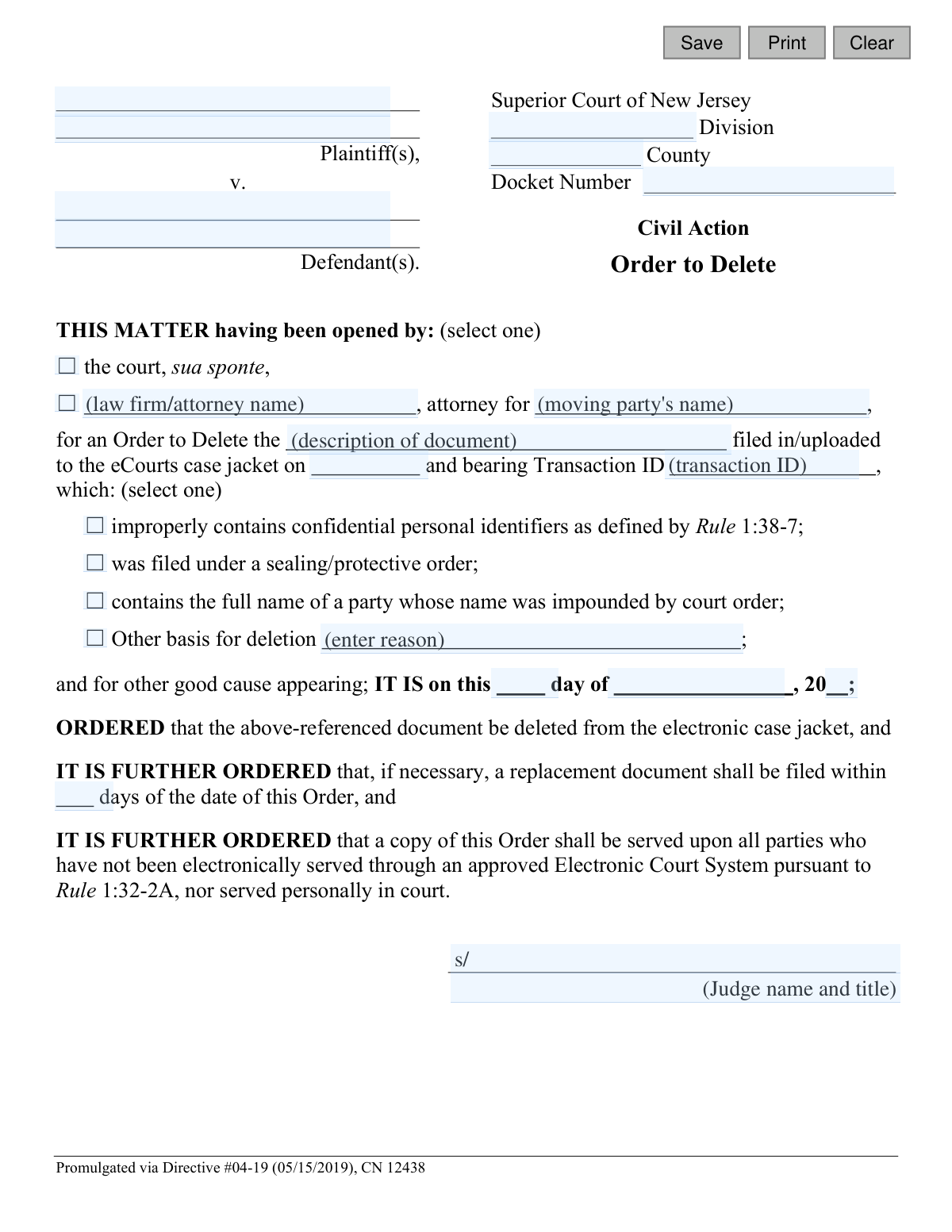
This form is a legal order used in the Superior Court of New Jersey to request the deletion of a specific document from the official electronic court record, known as the eCourts case jacket. It is used when a filed document improperly contains confidential information, was filed under a sealing order, or for other valid reasons requiring its removal. Today, this form can be filled out quickly and accurately using AI-powered services like Instafill.ai, which can also convert non-fillable PDF versions into interactive fillable forms.
Order to Delete - eCourts (CN 12438) is part of the civil action forms, civil court forms, New Jersey forms and superior court forms categories on Instafill.
Our AI automatically handles information lookup, data retrieval, formatting, and form filling.
It takes less than a minute to fill out Order to Delete - eCourts (CN 12438) using our AI form filling.
Securely upload your data. Information is encrypted in transit and deleted immediately after the form is filled out.

Form specifications

Form name: Superior Court of New Jersey Civil Action Order to Delete - eCourts
Number of fields: 28
Number of pages: 1
Language: English
main-image

Instafill Demo: How to fill out PDF forms in seconds with AI

How to Fill Out Order to Delete - eCourts (CN 12438) Online for Free in 2026

Are you looking to fill out a ORDER TO DELETE - ECOURTS (CN 12438) form online quickly and accurately? Instafill.ai offers the #1 AI-powered PDF filling software of 2026, allowing you to complete your ORDER TO DELETE - ECOURTS (CN 12438) form in just 37 seconds or less.
Follow these steps to fill out your ORDER TO DELETE - ECOURTS (CN 12438) form online using Instafill.ai:
  1. 1 Navigate to Instafill.ai and upload or select the 'Order to Delete - eCourts' form.
  2. 2 Use the AI assistant to input the case details, including Plaintiff and Defendant names, County, Division, and Docket Number.
  3. 3 Specify who is opening the matter (the court or an attorney for a specific party).
  4. 4 Provide the details of the document to be deleted, including its description, filing date, and Transaction ID.
  5. 5 Select the appropriate reason for the deletion from the checklist, such as 'improperly contains confidential personal identifiers,' or provide a different basis.
  6. 6 Review all the information populated by the AI for accuracy, including the proposed order details.
  7. 7 Download, print, or electronically file the completed order for submission to the court and service upon all parties.

Our AI-powered system ensures each field is filled out correctly, reducing errors and saving you time.

Why Choose Instafill.ai for Your Fillable Order to Delete - eCourts (CN 12438) Form?

Speed

Complete your Order to Delete - eCourts (CN 12438) in as little as 37 seconds.

Up-to-Date

Always use the latest 2026 Order to Delete - eCourts (CN 12438) form version.

Cost-effective

No need to hire expensive lawyers.

Accuracy

Our AI performs 10 compliance checks to ensure your form is error-free.

Security

Your personal information is protected with bank-level encryption.

Frequently Asked Questions About Form Order to Delete - eCourts (CN 12438)

This form is used to request a judge's approval to permanently remove a document that was improperly filed in the New Jersey Superior Court's electronic filing system, known as eCourts.

An attorney representing a party in the case typically prepares this form for a judge's signature. In some cases, the court may initiate the process on its own, which is known as 'sua sponte'.

You will need the case docket number, plaintiff and defendant names, a description of the document to be deleted, its filing date, and its unique Transaction ID from the eCourts system.

The Transaction ID is generated by eCourts when a document is successfully uploaded. You can find this ID in the filing confirmation notice or by looking at the document's properties within the electronic case jacket.

These are sensitive data points like Social Security numbers, driver's license numbers, and full bank account numbers that must be redacted from public court filings. Filing a document without redacting them is a common reason for deletion.

The proposed order is submitted to a judge for review. If the judge agrees with the request and signs the order, the court clerk will then execute the order by deleting the specified document from the eCourts system.

No, it is not always required. A replacement is necessary only if the original document contained an error but is still needed for the case; the judge will specify a deadline for you to file the corrected version.

Serving the order means you must formally provide a copy to all other parties in the case so they are aware of the court's action. This is usually done electronically through eCourts but may require other methods if a party is not registered.

You should immediately contact your attorney to prepare and file this 'Order to Delete' form. You will need to check the box for 'improperly contains confidential personal identifiers' as the reason for the request.

Yes, services like Instafill.ai use AI to auto-fill form fields accurately and save time. This can help ensure all case information, like docket numbers and party names, is entered correctly.

You can upload the 'Order to Delete' PDF to the Instafill.ai platform. The service will make the form fillable online, allowing you to input your information and download the completed document.

If you have a non-fillable PDF, you can use a tool like Instafill.ai. It can convert flat PDFs into interactive, fillable forms that you can complete on your computer.

'Sua sponte' is a legal term meaning the court is acting on its own initiative. In this context, it means a judge or court staff noticed the improper filing and is ordering the deletion without a request from either party's attorney.

Compliance Order to Delete - eCourts (CN 12438)
Validation Checks by Instafill.ai

1
Validates Docket Number Format
Checks that the 'docketNum' field follows the standard New Jersey docket number format, such as CTY-L-123456-23. This is crucial for correctly identifying the case file within the eCourts system. An incorrect format will prevent the order from being associated with the right case, leading to processing failure or rejection.
2
Ensures Core Case Information is Complete
Verifies that the 'divName' (Division), 'typeCty' (County), 'docketNum', 'plaName' (Plaintiff), and 'defName' (Defendant) fields are all filled. This information is the minimum required to uniquely identify the case to which this order applies. Missing any of these fields makes the order ambiguous and unenforceable.
3
Validates 'Opened By' Section Completeness
Ensures that if the matter was opened by an attorney, the attorney's name ('firmName') and the party they represent ('partyName') are both completed. This check is conditional on the 'attorney for' option being selected. This is important for accountability and to clarify who initiated the deletion request on behalf of a party.
4
Requires a Single 'Opened By' Source
Validates that only one option is selected in the 'THIS MATTER having been opened by' section (either 'the court, sua sponte' or the attorney option). The form structure implies a mutually exclusive choice. Allowing multiple selections would create ambiguity about the origin of the request and could halt processing.
5
Verifies Full Document Identification
Checks that the 'docDesc' (document description), 'fileDt' (filing date), and 'transId' (Transaction ID) are all provided. These three pieces of information are essential to uniquely and unambiguously identify the specific document to be deleted from the eCourts case jacket. Failure to provide all three could lead to the wrong document being deleted or the request being rejected.
6
Validates Document Filing Date is in the Past
Ensures the 'fileDt' is a valid date that occurs on or before the current date. A document cannot be ordered for deletion if it was supposedly filed in the future. This logical check prevents data entry errors and ensures the request is plausible and factually correct.
7
Requires at Least One Reason for Deletion
Validates that at least one checkbox is selected from the list of reasons for deletion (e.g., 'improperly contains confidential personal identifiers', 'Other basis'). An order to delete must have a legal basis. This check ensures that a justification is provided for the action being requested, which is a mandatory component of the order.
8
Requires Explanation for 'Other' Deletion Reason
If the 'Other basis for deletion' checkbox is selected, this validation ensures that the corresponding text field ('delDesc') is not empty. This is a conditional requirement to guarantee that a custom reason is fully explained, providing the court with the necessary context to approve the order. An empty field would render the 'Other' selection meaningless.
9
Validates the Order Date
Checks that the combination of 'orderDay', 'orderMo', and 'orderYr' forms a valid calendar date. It should also check that this date is not unreasonably far in the past or future, typically on or around the submission date. This ensures the official date of the order is accurate and legitimate.
10
Validates Format of 'Days for Replacement' Field
Verifies that the 'numDays' field, if filled, contains a positive integer. This field specifies the deadline for filing a replacement document. The value must be a whole number (e.g., 10, 30) to represent a clear timeframe; text, decimals, or negative numbers are invalid and would create an unenforceable deadline.
11
Ensures Judge's Signature Information is Provided
Validates that the 'jdgSigName' (Judge's typed name) is completed before the order can be finalized. An order is not legally binding without the judge's affirmation. This check is a critical final step to ensure the document's authority and validity.
12
Validates County and Division Selections
Checks that the values provided for 'typeCty' (County) and 'divName' (Division) correspond to a valid, pre-defined list of New Jersey Superior Court counties and divisions. This prevents typos and ensures the order is routed to the correct jurisdiction. An invalid county or division would cause immediate processing and filing errors.

Common Mistakes in Completing Order to Delete - eCourts (CN 12438)

Incorrect or Incomplete Docket Number

Users often enter the docket number with typos, omit the required division prefix (e.g., 'L-' for Law Division), or leave it blank entirely. This is a critical error as the docket number is the primary identifier for the case file, and a mistake will lead to the order being rejected or applied to the wrong case. To prevent this, always double-check the docket number against official court documents for accuracy, or use a tool like Instafill.ai which can save and correctly auto-populate case information.

Vague or Ambiguous Document Description

Filers frequently provide a generic description like 'the document' or 'the filing' in the 'docDesc' field, which is insufficient. This ambiguity forces court staff to search the case jacket, wasting time and risking the deletion of the wrong file. The description must be specific, such as 'Defendant's Answer to the Complaint,' to ensure the correct document is targeted for deletion.

Missing or Incorrect eCourts Transaction ID

The Transaction ID ('transId') is a unique identifier from the eCourts system essential for locating the exact document to be deleted. Many filers omit this ID or make typos, making it nearly impossible for the court to process the deletion. This mistake guarantees rejection and requires refiling, so it's crucial to copy the ID exactly as it appears in the eCourts case jacket.

Failure to Specify the Represented Party

When an attorney initiates the order, they often fill in their name but forget to specify which party they represent (e.g., 'attorney for Plaintiff Jane Doe'). The form has a dedicated space for the 'partyName' being represented. Omitting this creates ambiguity about who is requesting the action, which can lead to the court rejecting the order for clarification.

Inconsistent or Incomplete Party Names

Filers may misspell, abbreviate, or use inconsistent names for the Plaintiff(s) and Defendant(s) compared to the official case caption. For example, writing 'John S.' instead of 'John Smith' can cause filing discrepancies and search difficulties. To avoid this, names must match the official court record exactly. AI-powered form filling tools like Instafill.ai can help prevent these errors by saving and auto-populating correct case information across multiple forms.

Improper Use of the 'Other' Deletion Reason

A common error is checking the box for 'Other basis for deletion' but failing to provide a clear and concise explanation in the corresponding text field ('delDesc'). Conversely, some may provide a description without checking the 'Other' box. The court requires a specific justification if none of the pre-defined reasons apply, and failing to provide one will result in the order being denied.

Filling in Fields Reserved for the Judge

Inexperienced filers or pro se litigants sometimes mistakenly fill in the sections reserved for the judge, such as the order date ('orderDay', 'orderMo', 'orderYr') or the signature line ('jdgSigName'). This is improper procedure and will cause the form to be immediately rejected by the clerk's office. These fields must always be left blank for the court to complete.

Omitting the County or Division

The top of the form requires the specific Superior Court Division (e.g., Civil, Family) and County where the case is venued. In a rush, filers often leave these fields ('divName', 'typeCty') blank. This information is essential for routing the document to the correct courthouse and judicial staff, and its absence will cause processing delays or outright rejection.

Not Proposing a Deadline for Replacement Document

The form includes a clause ordering that a replacement document 'shall be filed within ___ days.' Filers often leave this number ('numDays') blank, missing the opportunity to propose a reasonable timeframe. While the judge has the final say, failing to propose a number can result in the court imposing an unworkable deadline or returning the form for completion.

Using an Incorrect Document Filing Date

In the 'fileDt' field, filers must enter the exact date the document to be deleted was originally filed in eCourts, not the current date. People often guess or use the wrong date, which complicates the clerk's ability to locate the document. This error, especially when combined with a missing Transaction ID, makes the order impossible to fulfill and leads to rejection.
Saved over 80 hours a year

“I was never sure if my IRS forms like W-9 were filled correctly. Now, I can complete the forms accurately without any external help.”

Kevin Martin Green

Your data stays secure with advanced protection from Instafill and our subprocessors

Robust compliance program

Transparent business model

You’re not the product. You always know where your data is and what it is processed for.

ISO 27001, HIPAA, and GDPR

Our subprocesses adhere to multiple compliance standards, including but not limited to ISO 27001, HIPAA, and GDPR.

Security & privacy by design

We consider security and privacy from the initial design phase of any new service or functionality. It’s not an afterthought, it’s built-in, including support for two-factor authentication (2FA) to further protect your account.

Fill out Order to Delete - eCourts (CN 12438) with Instafill.ai

Worried about filling PDFs wrong? Instafill securely fills superior-court-of-new-jersey-civil-action-order-to-delete-ecourts forms, ensuring each field is accurate.

Related forms by category

civil action forms AO 440, Summons in a Civil Action, Form AO 85, Notice, Consent, and Reference of a Civil Action to a Magistrate Judge, Form APP-151, Petition for Writ (Misdemeanor, Infraction, or Limited Civil Case), AO 88B, Subpoena to Produce Documents, Information, or Objects or to Permit Inspection of Premises in a Civil Action, Superior Court of New Jersey, Civil Action, Order to Show Cause Summary Action, Voluntary Binding Arbitration - Civil Action Consent Order of Dismissal, Superior Court of New Jersey, Civil Action, Completion of Mediation Form, Superior Court of New Jersey Civil Action Order for Summary Jury Trial (CN 10878), Superior Court of New Jersey Civil Action Complaint, Superior Court of New Jersey, Civil Action Summons, Appendix XI-A(1), Superior Court of New Jersey, Civil Action, Order to Correct Data - eCourts
civil court forms Petition for Leave to Proceed In Forma Pauperis (Court of Common Pleas of Lehigh County, Pennsylvania, Civil Division), Designation of Record on Appeal (Civil) (Maricopa County Justice Courts, Arizona) (Form APP 8150-702), Certificate of Service (Civil Court Claim), Pfändungs- und Überweisungsbeschluss (Garnishment and Transfer Order) – German Civil Enforcement Court Form, AOPC 308A, Civil Complaint, Form MC 03, Answer, Civil, Form POS-040, Proof of Service—Civil, ONTARIO Form 8: Application (General), Form ATJ 601.9, Application for Waiver of Court Fees (Civil), Nevada Justice / Municipal Civil Court Cover Sheet, Form MC 01, Summons, Form MC 10, Judgment, Civil, Form MC 99, Motion and Affidavit to Set Aside Default (Civil), Form MC 281a, Civil Mediator Application, Ex Parte Motion and Order to Renew Civil Judgment, AO 88B, Subpoena to Produce Documents, Information, or Objects or to Permit Inspection of Premises in a Civil Action, Form APP-031A, Application for Extension of Time to File Brief (Civil Case), Civil Appeal Case Information Statement, Form APP-014, Appellant's Proposed Statement on Appeal (Unlimited Civil Case), form-app-015-respondents-proposed-corrections-toadditions-to-appellants-proposed-settled-statement-unlimited-civil-case · + 94 more →
New Jersey forms State of New Jersey Alternate Benefit Program Withdrawal Request Acknowledgement Receipt, Horizon Blue Cross Blue Shield of New Jersey Applied Behavior Analysis Supplemental Information Form, State of New Jersey Application for Employment (Form DPF-663), New Jersey Judiciary Plea Form (Plea 01), Supplemental Plea Form for Certain Sexual Offenses: Megan’s Law/Parole Supervision for Life/Community Supervision for Life (Plea 05), Financial Questionnaire to Establish Indigency, New Jersey Judiciary Resource Family Information Form, Foreclosure Case Information Statement (FCIS) - Appendix XII-B2, New Jersey Judiciary Records Request Form, Superior Court of New Jersey, Application for Appeal and Order, FL Certification of Requested Background Checks for Kinship Legal Guardianship, Certification of Caregiver as to Knowledge of Identity and/or Location of Parents, FL Order Judgment for Kinship Legal Guardianship, New Jersey Judiciary Certification of Repair and Plea of Guilty, Uniform Summary Support Order (USSO), New Jersey Judiciary Volunteer Application (CN 10293), Application to Take the New Jersey Court Interpreter Oral Examination, New Jersey Judiciary Attorney Fee Arbitration Request, Order to Show Cause with Temporary Restraints Pursuant to Rule 4:52, Tax Court of New Jersey, State Tax Complaint · + 271 more →
superior court forms FW-003, Order on Court Fee Waiver (Superior Court), FW-003, Order on Court Fee Waiver (Superior Court), Form FW-003, Order on Court Fee Waiver (Superior Court), Declaration of Facts of Death (California Superior Court), Form FW-003-GC, Order on Court Fee Waiver (Superior Court) (Ward or Conservatee), Superior Court of Chatham County, Georgia, Hearing Request Form, Form FW-006, Request for Hearing About Court Fee Waiver Order (Superior Court), Form FW-002, Request to Waive Additional Court Fees (Superior Court), Form FW-008, Order on Court Fee Waiver After Hearing (Superior Court), Form FW-002-GC, Request to Waive Additional Court Fees (Superior Court) (Ward or Conservatee), Form REC-001(N), Notice of Intent to Destroy Superior Court Records; Offer to Transfer Possession, Form REC-001(R), Request for Transfer or Extension of Time for Retention of Superior Court Records, Notice of Hearing on Request for Transfer or Extension of Time for Retention of Superior Court Records; Court Order; Release and Receipt of Superior Court Records, Form REC-002(R), Release and Receipt of Superior Court Records, Superior Court of New Jersey, Application for Appeal and Order, Superior Court of New Jersey Dissolution (FM) Case Management Order, New Jersey Judiciary – Superior Court, Appellate Division Application for Permission to File Emergent Motion, New Jersey Judiciary Superior Court - Appellate Division Civil Case Information Statement, New Jersey Judiciary Superior Court - Appellate Division Criminal Case Information Statement, New Jersey Judiciary Superior Court - Appellate Division Notice of Appeal (CN: 10502) · + 41 more →