Yes! You can use AI to fill out Superior Court of New Jersey, Civil Action, Order to Correct Data - eCourts
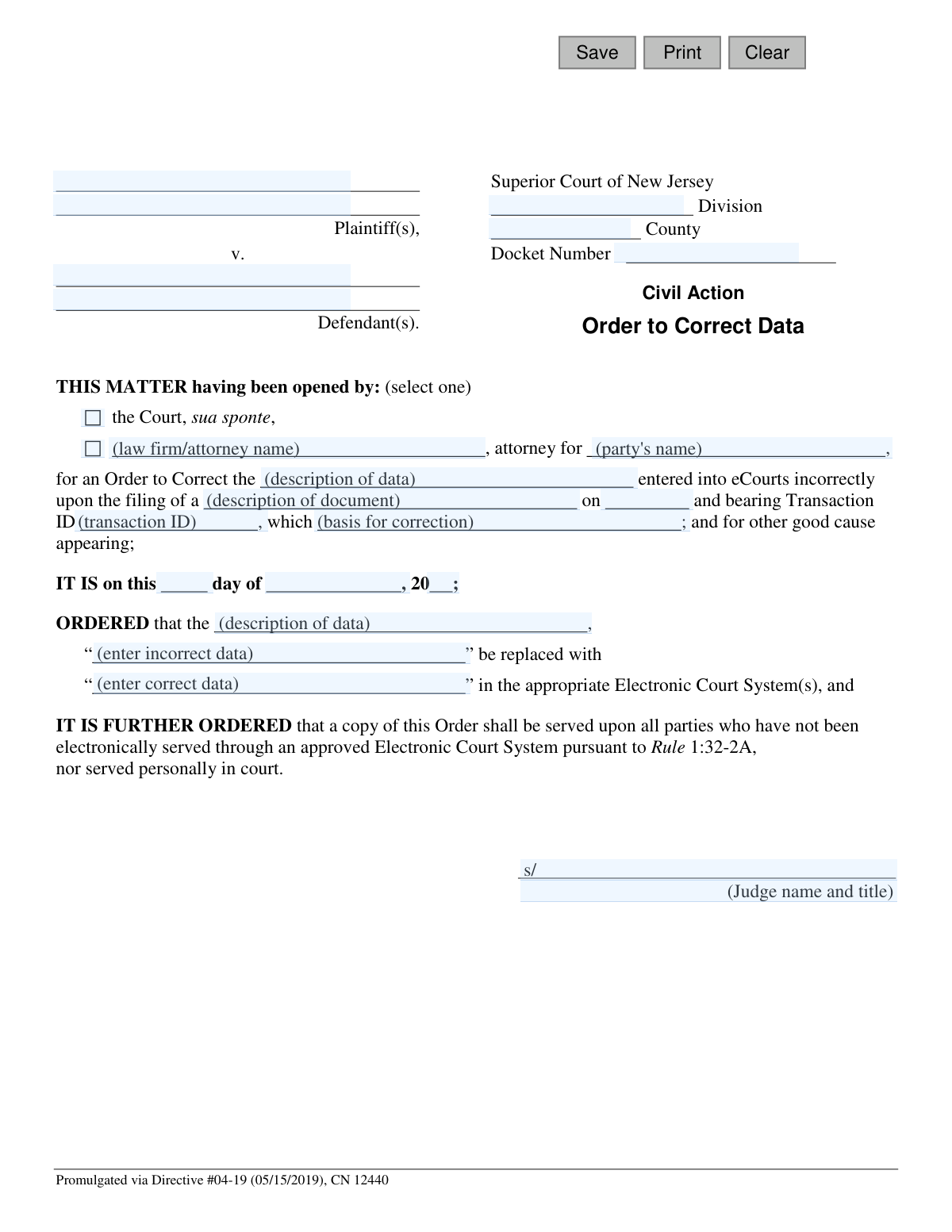
This form, officially known as the Order to Correct Data - eCourts, is a legal document filed in the Superior Court of New Jersey. Its purpose is to formally request the correction of erroneous data that was entered into the state's electronic court records system. Ensuring the accuracy of court records is critical for the integrity of legal proceedings. Today, this form can be filled out quickly and accurately using AI-powered services like Instafill.ai, which can also convert non-fillable PDF versions into interactive fillable forms.
CN 12440 is part of the
civil action forms, civil court forms, New Jersey forms and superior court forms categories on Instafill.
Our AI automatically handles information lookup, data retrieval, formatting, and form filling.
It takes less than a minute to fill out CN 12440 using our AI form filling.
Securely upload your data. Information is encrypted in transit and deleted immediately after the form is filled out.
Form specifications
| Form name: | Superior Court of New Jersey, Civil Action, Order to Correct Data - eCourts |
| Number of fields: | 27 |
| Number of pages: | 1 |
| Language: | English |
Instafill Demo: How to fill out PDF forms in seconds with AI
How to Fill Out CN 12440 Online for Free in 2026
Are you looking to fill out a CN 12440 form online quickly and accurately? Instafill.ai offers the #1 AI-powered PDF filling software of 2026, allowing you to complete your CN 12440 form in just 37 seconds or less.
Follow these steps to fill out your CN 12440 form online using Instafill.ai:
- 1 Navigate to Instafill.ai and upload or select the New Jersey 'Order to Correct Data' form.
- 2 Provide the case information, including Plaintiff/Defendant names, Court Division, County, and Docket Number.
- 3 Specify who initiated the request for correction (e.g., the Court or an attorney for a party).
- 4 Identify the specific document that was filed incorrectly, providing its filing date and Transaction ID.
- 5 Clearly state the incorrect data as it appears in the system and then provide the correct data that should replace it.
- 6 Use the AI to review the entire form for completeness and accuracy, making any necessary adjustments.
- 7 Download the completed order for filing with the court, either electronically or in person as required.
Our AI-powered system ensures each field is filled out correctly, reducing errors and saving you time.
Why Choose Instafill.ai for Your Fillable CN 12440 Form?
Speed
Complete your CN 12440 in as little as 37 seconds.
Up-to-Date
Always use the latest 2026 CN 12440 form version.
Cost-effective
No need to hire expensive lawyers.
Accuracy
Our AI performs 10 compliance checks to ensure your form is error-free.
Security
Your personal information is protected with bank-level encryption.
Frequently Asked Questions About Form CN 12440
This form is a proposed court order used to formally request the correction of information that was entered incorrectly into the New Jersey Superior Court's electronic filing system, known as eCourts.
This order is typically prepared by an attorney for one of the parties in the case. The court can also initiate the correction on its own, which is known as 'sua sponte'.
You will need the case details (Division, County, Docket Number), the names of the parties, the Transaction ID of the incorrect filing, and the specific data that needs to be corrected.
The Transaction ID is a unique number assigned to every document filed through the eCourts system. You can find this ID on the filing confirmation notice you received when the original document was submitted.
'Sua sponte' is a legal term meaning the court is acting on its own initiative. This means the court identified the data error and is issuing the order to fix it without a request from either party.
You must first describe the data field (e.g., 'Plaintiff's Name'), then state the exact incorrect entry, and finally provide the correct information that should replace it.
Yes, this form is specifically designed to correct data entry errors that appear in the eCourts system, such as misspelled names, incorrect dates, or other clerical mistakes made during filing.
A Superior Court Judge must sign this form to make it an official court order. The prepared form is submitted to the court for the judge's review and signature.
Once the order is signed and filed, court staff will access the electronic court system and make the specific correction as directed by the order. The change will then be reflected on the official case docket.
This clause mandates that a copy of the signed order must be delivered to any party in the case who is not registered to receive court documents electronically. This ensures all parties are officially notified of the correction.
Yes, services like Instafill.ai use AI to help you accurately auto-fill form fields with your case information, which saves time and helps prevent further data entry errors.
You can use a service like Instafill.ai to upload the 'Order to Correct Data' PDF. The platform allows you to fill out all the required fields interactively on your computer before printing or filing.
If you have a non-fillable or 'flat' PDF, you can upload it to a platform like Instafill.ai. The service's technology can convert the document into an interactive, fillable form for you to complete online.
Compliance CN 12440
Validation Checks by Instafill.ai
1
Validates New Jersey Docket Number Format
Checks if the `docketNo` field follows the standard New Jersey court format, which typically includes a prefix, numbers, and a year (e.g., L-1234-20). This validation is crucial for ensuring the order can be correctly associated with its case file in the eCourts system. An invalid format would prevent the system from locating the case, causing the correction to fail.
2
Ensures at least one Plaintiff and Defendant are listed
Verifies that at least one plaintiff field (`plaName`) and one defendant field (`defName`) are filled out. A court case requires opposing parties for it to be valid and identifiable. Submitting a form without this core information would result in an incomplete and legally insufficient order that cannot be filed.
3
Validates 'Attorney' and 'Party' fields are filled if 'Opened By' is an attorney
Checks that if the matter was opened by an attorney, then the `firmName` and `partyName` fields must be completed. This is crucial for identifying who initiated the correction request and on whose behalf they are acting. Failure to provide this information would leave the order's origin ambiguous and could lead to its rejection.
4
Ensures Filing Date is a valid past or present date
Validates that the `fileDt` is a real calendar date and is not set in the future. A document can only be filed on or before the current date, so this check prevents logical errors. Referencing a document with a future filing date would make the correction order nonsensical and invalid.
5
Ensures Order Date is on or after the Filing Date
Performs a logical check to ensure the date of the order (`orderDay`, `orderMo`, `orderYr`) is on or after the date the original document was filed (`fileDt`). An order to correct something cannot predate the item it is correcting. This validation prevents chronological impossibilities and ensures the legal timeline is logical.
6
Validates a complete and valid Order Date
Verifies that all three components of the order date (`orderDay`, `orderMo`, `orderYr`) are filled in and combine to form a valid calendar date (e.g., it would reject 'February 30'). An incomplete or invalid date makes the order legally unenforceable and creates ambiguity about when it takes effect, preventing it from being processed.
7
Validates County is a valid New Jersey County
Ensures the value entered in the `typeCounty` field corresponds to one of the 21 official counties in New Jersey. This is critical for routing the order to the correct courthouse and associating it with the proper jurisdiction. An invalid county would cause the document to be misfiled or rejected entirely.
8
Ensures both Incorrect and Correct data fields are completed
Checks that both the `dataIncorrect` and `dataCorrect` fields contain text. The entire purpose of the order is to replace one piece of data with another. If either field is empty, the order's instruction is ambiguous, making it impossible for court staff to execute the correction.
9
Verifies that Incorrect and Correct data are not identical
Compares the `dataIncorrect` and `dataCorrect` fields to ensure they do not contain the exact same value. Submitting an order where the 'correct' data is identical to the 'incorrect' data is a pointless action and likely a user error. This check prevents unnecessary processing and prompts the user to verify their entry.
10
Ensures all descriptive context fields are filled
Validates that the `docDesc` (document description), `basisDesc` (basis for correction), and `dataDesc` (data description) fields are not empty. These fields provide essential context for the judge and court clerks to understand what is being corrected and why. Missing this information could lead to the rejection of the order due to insufficient justification.
11
Validates Transaction ID Presence
Checks if the `transId` field is populated. The Transaction ID is a key identifier for the original electronic filing in eCourts. A missing ID would make it difficult or impossible for clerks to locate the specific transaction that needs correction, thereby halting the entire process.
12
Ensures Division is a valid Superior Court Division
Validates that the `divName` field contains a valid New Jersey Superior Court division, such as 'Civil Action,' 'Chancery,' or 'Family.' This is essential for proper case management and routing within the court system. An incorrect division would lead to administrative delays and potential misfiling of the order.
13
Validates Judge's Signature and Printed Name are present
Checks that the judge's signature (`jdgSig`) and printed name (`jdgSigName`) are both present before final submission. An order is not legally binding until it is signed by a judge. This validation ensures the form is not processed as a final order without the necessary judicial authorization.
14
Ensures an 'Opened By' option is selected
Verifies that one of the two 'Opened By' options (either 'the Court, sua sponte' or the attorney option) has been selected. This information is mandatory to establish the origin and authority behind the request for correction. An order with no specified initiator is incomplete and cannot be processed.
Common Mistakes in Completing CN 12440
Users often enter the docket number with typos, transposed digits, or in an incorrect format (e.g., forgetting the county prefix like 'L-' or 'C-'). This is a critical error as the docket number is the primary identifier for the case file. An incorrect number will cause the order to be rejected by the clerk or filed in the wrong case, leading to significant delays and requiring resubmission.
This form can be initiated by the court or by a party's attorney. Filers frequently forget to select 'the Court, sua sponte' or fail to completely fill in their firm name and the party they represent. This ambiguity forces the court clerk to guess the origin of the request, which can lead to rejection or delays while they seek clarification.
The form requires the description, filing date, and Transaction ID of the document with the error. A common mistake is providing a generic description like 'the complaint' without the specific Transaction ID from the eCourts system. Without this precise information, the court clerk cannot locate the specific electronic entry that needs correction, rendering the order ineffective.
The section 'IT IS on this day of , 20' is often mistakenly filled out by the filer with the date they are preparing the form. This date field is reserved for the judge to enter the date they actually sign the order. Submitting a form with this date pre-filled is improper and may require the clerk to manually correct it or, in some cases, reject the filing.
Filers often fail to be specific in the 'ORDERED that...' section, which details the correction. They might neglect to state what type of data is wrong (e.g., 'Defendant Name') or provide unclear 'from' and 'to' values. This forces the clerk to interpret the request, risking correction of the wrong information or an inability to perform the correction at all.
Misspelling plaintiff or defendant names, or omitting 'et al.' for cases with multiple parties, is a frequent error. An incorrect case caption makes the legal document technically inaccurate and can lead to filing rejections. It creates confusion about which parties are subject to the order, potentially causing future legal challenges.
The form includes a space to explain why the data was entered incorrectly ('...which [basis for correction]'). Many filers provide a vague reason like 'was a typo' or leave it blank. A clear, concise explanation is necessary for the judge to understand the context and approve the order; a weak justification may lead to denial.
Entering the incorrect Superior Court Division (e.g., Law, Chancery) or County is a serious mistake, often due to managing multiple cases. This results in the order being filed in the wrong jurisdiction entirely. The filing will be rejected, and the filer must start the process over in the correct court, wasting time and potentially missing deadlines.
Often, court forms are only available as flat, non-fillable PDFs, leading to manual, error-prone data entry. People may try to type over the lines, resulting in misaligned and unprofessional-looking documents. AI-powered tools like Instafill.ai can convert these non-fillable PDFs into interactive forms, ensuring data is placed correctly and legibly.
The form explicitly states that a copy of the signed order must be served on all parties not served through the electronic system. A common oversight is assuming that filing the order with the court automatically notifies all parties. Failure to properly serve the order violates procedural rules and can be grounds for the order to be challenged or vacated later.
Saved over 80 hours a year
“I was never sure if my IRS forms like W-9 were filled correctly. Now, I can complete the forms accurately without any external help.”
Kevin Martin Green
Your data stays secure with advanced protection from Instafill and our subprocessors

Robust compliance program
Transparent business model
You’re not the product. You always know where your data is and what it is processed for.
ISO 27001, HIPAA, and GDPR
Our subprocesses adhere to multiple compliance standards, including but not limited to ISO 27001, HIPAA, and GDPR.
Security & privacy by design
We consider security and privacy from the initial design phase of any new service or functionality. It’s not an afterthought, it’s built-in, including support for two-factor authentication (2FA) to further protect your account.
Fill out CN 12440 with Instafill.ai
Worried about filling PDFs wrong? Instafill securely fills superior-court-of-new-jersey-civil-action-order-to-correct-data-ecourts forms, ensuring each field is accurate.