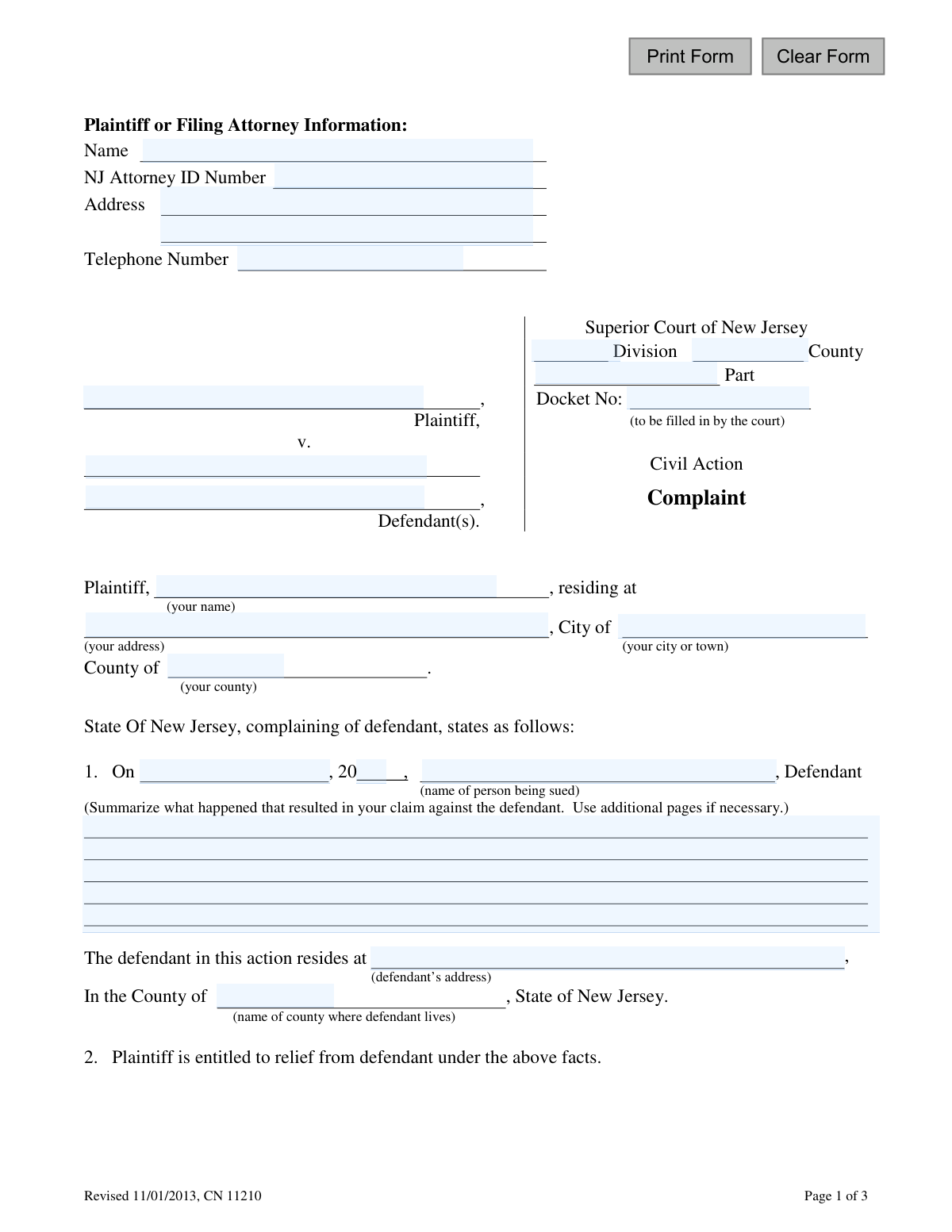
Yes! You can use AI to fill out Superior Court of New Jersey Civil Action Complaint
This form, officially known as the Civil Action Complaint for the Superior Court of New Jersey, is the initial document filed by a plaintiff to start a civil lawsuit. It outlines the plaintiff's allegations against the defendant, the legal basis for the claim, and the relief or damages being sought from the court. Today, this form can be filled out quickly and accurately using AI-powered services like Instafill.ai, which can also convert non-fillable PDF versions into interactive fillable forms.
CN 11210 is part of the
civil action forms, civil complaint forms, civil court forms, New Jersey forms and superior court forms categories on Instafill.
Our AI automatically handles information lookup, data retrieval, formatting, and form filling.
It takes less than a minute to fill out CN 11210 using our AI form filling.
Securely upload your data. Information is encrypted in transit and deleted immediately after the form is filled out.
Form specifications
| Form name: | Superior Court of New Jersey Civil Action Complaint |
| Number of fields: | 29 |
| Number of pages: | 1 |
| Language: | English |
Instafill Demo: How to fill out PDF forms in seconds with AI
How to Fill Out CN 11210 Online for Free in 2026
Are you looking to fill out a CN 11210 form online quickly and accurately? Instafill.ai offers the #1 AI-powered PDF filling software of 2026, allowing you to complete your CN 11210 form in just 37 seconds or less.
Follow these steps to fill out your CN 11210 form online using Instafill.ai:
- 1 Navigate to Instafill.ai and upload or select the New Jersey Civil Action Complaint form (CN 11210).
- 2 Enter the plaintiff's information, including your full name, address, and attorney details if applicable.
- 3 Provide the defendant's full name and address, and specify the court division and county.
- 4 Describe the events that led to the complaint, including the date and a summary of what happened.
- 5 List the specific harms, damages, or injuries that resulted from the defendant's actions.
- 6 Carefully read and sign the 'Certification of No Other Actions' to confirm the case is not pending elsewhere.
- 7 Decide whether to demand a jury trial, sign if desired, and then review the entire document for accuracy before downloading for filing.
Our AI-powered system ensures each field is filled out correctly, reducing errors and saving you time.
Why Choose Instafill.ai for Your Fillable CN 11210 Form?
Speed
Complete your CN 11210 in as little as 37 seconds.
Up-to-Date
Always use the latest 2026 CN 11210 form version.
Cost-effective
No need to hire expensive lawyers.
Accuracy
Our AI performs 10 compliance checks to ensure your form is error-free.
Security
Your personal information is protected with bank-level encryption.
Frequently Asked Questions About Form CN 11210
This form is used to initiate a civil lawsuit in the Superior Court of New Jersey. It allows you, the plaintiff, to formally state your legal claim against another person or entity, the defendant.
The 'plaintiff' is the person filing the lawsuit (you), and the 'defendant' is the person or entity you are suing. You will provide your information as the plaintiff and the defendant's information where indicated.
You will need your full name and address, the full name and address of the defendant, and a clear summary of the incident that led to your claim. You should also be prepared to list the specific damages or injuries you suffered.
In this section, provide a clear and concise description of the events that caused your dispute. Include the date of the incident and explain what the defendant did that you believe was legally wrong.
List the specific negative consequences you experienced because of the defendant's actions. This can include financial losses, property damage, physical injuries, or other tangible harm.
An accurate address is crucial for the defendant to be properly served with the lawsuit. If you don't know it, you may need to do some research, as the court requires a valid address to proceed with the case.
This is your sworn statement confirming that your legal dispute is not already part of another lawsuit or arbitration proceeding. By signing, you also confirm that you have included all necessary parties in the lawsuit.
This section allows you to request that your case be decided by a jury instead of only a judge. If you want a jury trial, you must sign and date this specific part of the form; otherwise, leave it blank.
You only need to fill out the attorney information fields if you are an attorney filing this complaint on behalf of a client. If you are representing yourself, you can leave this section blank.
You should leave the 'Docket No.' field blank. The court clerk will assign a docket number to your case after you have successfully filed the complaint.
You must file this complaint with the Clerk of the Superior Court in the New Jersey county where the defendant lives or where the incident occurred. Check the specific filing procedures and fees for that county's court.
Yes, services like Instafill.ai use AI to help you accurately auto-fill form fields, which can save time and reduce errors. However, AI cannot provide legal advice, so you should consult an attorney for help with your legal claims.
Simply upload the form to the Instafill.ai platform. The AI will identify the fields, allowing you to type your information directly into an interactive version of the form before downloading the completed document.
If you have a flat or non-fillable PDF, you can upload it to a service like Instafill.ai. The platform can convert it into an interactive, fillable form that you can easily complete on your computer.
Compliance CN 11210
Validation Checks by Instafill.ai
1
Plaintiff Name Completeness
This check ensures that the plaintiff's full name field ('plaNameFull') is not empty. The plaintiff is the primary party filing the complaint, and their identity is fundamental for the legal proceeding. A missing plaintiff name would render the document invalid and unprocessable by the court.
2
Defendant Name Completeness
This validation verifies that the defendant's name ('defNameFull') has been provided. A lawsuit must be directed at a specific individual or entity. Failure to name a defendant makes it impossible for the court to issue summons or proceed with the case.
3
Incident Date Validity
This check ensures the date of the incident ('claimMoDay', 'claimYr') is a valid, logical date that is not in the future. This date is critical for establishing the timeline of events and determining if the claim is within the statute of limitations. An invalid or future date would be rejected.
4
Claim Description Presence
This validation ensures the 'ClaimDesc' field, which summarizes the complaint, is not empty. The court requires a statement of facts to understand the basis of the lawsuit and the nature of the claim. Without this description, the complaint has no substance and cannot be evaluated.
5
Harm Description Requirement
This check verifies that at least one of the harm/damage description fields ('harmDesc1', 'harmDesc2', 'harmDesc3') is filled out. To seek relief, the plaintiff must specify the damages or injuries they suffered as a result of the defendant's actions. A complaint without stated damages fails to establish a key element of the legal claim.
6
Defendant County of Residence
This validation ensures the 'defCounty' field is filled with a valid New Jersey county name. The defendant's county of residence is a primary factor in determining the proper venue (the specific court location) for the lawsuit. Filing in the wrong venue can lead to dismissal or transfer of the case.
7
Docket Number Pre-fill Check
This check validates that the 'typeDocket' field is empty upon submission by the plaintiff. The form explicitly states this number is 'to be filled in by the court'. Submitting a value in this field could cause processing errors or imply an attempt to file into an existing, unrelated case.
8
NJ Attorney ID Format
This validation checks the 'NJAttorneyIDNumber' field. If a value is present, it should conform to the expected format for New Jersey attorney identification numbers. This ensures that if an attorney is filing, they are properly identified for the court's records and communications.
9
Filing Contact Phone Number Format
This check ensures the 'FrmPhone' field contains a validly formatted telephone number. This contact information is essential for the court to communicate with the plaintiff or their attorney regarding the case. An invalid number could lead to missed notifications and deadlines.
10
Main Complaint Signature Date Logic
This validation verifies that the main signature date ('sigDt') is a valid date and is not in the future. The signature date attests to when the document was finalized and signed by the plaintiff. A future or invalid date would call the document's authenticity and timing into question.
11
Certification Signature Date Logic
This check ensures the 'sigDtCert' for the 'Certification of No Other Actions' is a valid, non-future date. This certification is a sworn statement, and its date must be accurate to be legally binding. The date should logically align with the main complaint's signature date.
12
Jury Demand Signature and Date Co-dependency
This validation checks that if the optional Jury Demand is signed, the corresponding date field ('sigDtJury') is also filled with a valid, non-future date. The demand for a jury trial is a significant legal step that must be executed correctly. A missing date could invalidate the request.
13
Plaintiff Address Completeness
This check ensures the plaintiff's street address ('plaAddrStr') and city ('plaAddrCity') are provided. This information is required for official court correspondence and is also used to help establish jurisdiction and venue. Incomplete address information can delay the case and cause communication failures.
14
Court Division and County Completeness
This validation verifies that the 'divisionType' and 'typeCounty' fields for the Superior Court are filled out. The plaintiff must specify which court division (e.g., Civil, Family) and county they are filing in. Omitting this information would make it impossible for the court clerk to route and process the complaint.
Common Mistakes in Completing CN 11210
Plaintiffs often attempt to fill in the 'Docket No:' field, which is explicitly marked '(to be filled in by the court)'. This number is assigned by the court clerk only after the complaint is successfully filed. Entering information here can cause processing delays or rejection of the filing. Always leave fields designated for court use completely blank.
A common error is using a nickname, an incomplete name, or misspelling the defendant's full legal name. This is a critical mistake because it can make legally 'serving' the complaint difficult or impossible, a required step for a lawsuit to proceed. To avoid this, use the defendant's full, correct legal name as it would appear on official documents like a driver's license or corporate registration.
In the section summarizing what happened, filers often write a narrative that is emotional or lacks specific, factual details. A complaint must state a clear, concise set of facts that legally entitle the plaintiff to relief, not just express frustration. Failing to do so can lead to the complaint being dismissed for 'failure to state a claim.' Focus on dates, locations, actions taken by the defendant, and the direct results of those actions.
The form requires the defendant's full address and county, which is essential for serving the legal documents and establishing the correct court venue. Providing a partial address or a P.O. Box when a physical address is needed will halt the case before it begins. You must verify the defendant's current residential or business address before filing to ensure service of process can be completed.
This form has up to three separate signature lines: one for the complaint itself (Page 2), one for the 'Certification of No Other Actions' (Page 3), and one for the optional 'Jury Demand' (Page 3). Forgetting to sign the complaint or the mandatory certification will invalidate the filing. Carefully review each page and sign and date every required section before submitting.
Plaintiffs may not understand the implications of the 'Jury Demand' section and either sign it by mistake or fail to sign when they want a jury. Requesting a jury trial involves additional fees and different procedures, while not signing it means you waive the right to a jury. You should only sign this section if you have made a conscious decision to have your case heard by a jury and are prepared for the associated requirements.
The form provides a numbered list to detail each item of damage and injury, but filers often write a single, general statement like 'financial loss.' This weakens the claim by not specifying the exact harms suffered, such as medical bills, lost wages, or property damage costs. To properly fill this out, list each distinct harm or financial loss on a separate line to clearly justify the relief you are requesting.
Plaintiffs must correctly identify the 'Division' (e.g., Law, Chancery) and 'County' for the court. Filing in the wrong county (venue) can result in the case being dismissed or transferred, causing significant delays and extra costs. The correct county is typically where the defendant resides or where the key events of the dispute occurred; research the proper venue for your specific case before filing.
Individuals representing themselves (pro se litigants) are often confused by the 'NJ Attorney ID Number' field. If you are not an attorney, you must still fill in your own name, address, and phone number in this section, and simply leave the 'NJ Attorney ID Number' field blank. This contact information is crucial for the court and other parties to communicate with you about your case.
Since this form is a non-fillable PDF, people often print and complete it by hand, leading to illegible entries. Unclear handwriting can cause clerks to misenter names, addresses, or other critical data, leading to returned mail or filing errors. To prevent this, it's best to use a tool like Instafill.ai that can convert the flat PDF into a fillable format, allowing you to type your entries clearly and ensure the document is professional and easy to process.
Saved over 80 hours a year
“I was never sure if my IRS forms like W-9 were filled correctly. Now, I can complete the forms accurately without any external help.”
Kevin Martin Green
Your data stays secure with advanced protection from Instafill and our subprocessors

Robust compliance program
Transparent business model
You’re not the product. You always know where your data is and what it is processed for.
ISO 27001, HIPAA, and GDPR
Our subprocesses adhere to multiple compliance standards, including but not limited to ISO 27001, HIPAA, and GDPR.
Security & privacy by design
We consider security and privacy from the initial design phase of any new service or functionality. It’s not an afterthought, it’s built-in, including support for two-factor authentication (2FA) to further protect your account.
Fill out CN 11210 with Instafill.ai
Worried about filling PDFs wrong? Instafill securely fills superior-court-of-new-jersey-civil-action-complaint forms, ensuring each field is accurate.