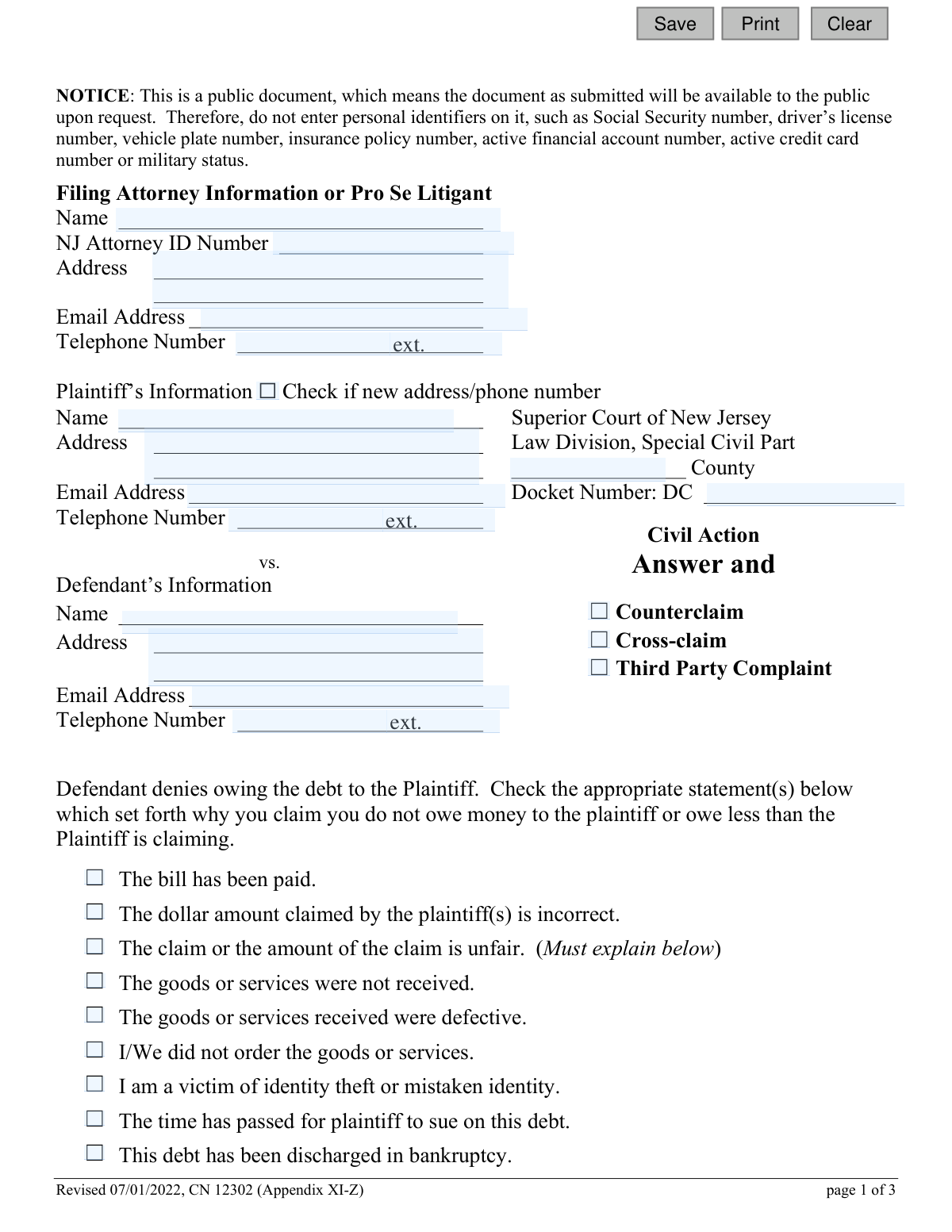
Yes! You can use AI to fill out Special Civil Answer and Counterclaim, Cross-claim, Third Party Complaint - Appendix XI-Z
Appendix XI-Z is a legal document used in the Superior Court of New Jersey's Special Civil Part. It allows a defendant to formally respond to a civil lawsuit by denying the plaintiff's allegations and to assert their own claims, such as a counterclaim against the plaintiff, a cross-claim against a co-defendant, or a third-party complaint against a new party. Today, this form can be filled out quickly and accurately using AI-powered services like Instafill.ai, which can also convert non-fillable PDF versions into interactive fillable forms.
Appendix XI-Z is part of the
civil complaint forms, civil court forms, court claim forms and New Jersey forms categories on Instafill.
Our AI automatically handles information lookup, data retrieval, formatting, and form filling.
It takes less than a minute to fill out Appendix XI-Z using our AI form filling.
Securely upload your data. Information is encrypted in transit and deleted immediately after the form is filled out.
Form specifications
| Form name: | Special Civil Answer and Counterclaim, Cross-claim, Third Party Complaint - Appendix XI-Z |
| Number of fields: | 62 |
| Number of pages: | 1 |
| Language: | English |
Instafill Demo: How to fill out PDF forms in seconds with AI
How to Fill Out Appendix XI-Z Online for Free in 2026
Are you looking to fill out a APPENDIX XI-Z form online quickly and accurately? Instafill.ai offers the #1 AI-powered PDF filling software of 2026, allowing you to complete your APPENDIX XI-Z form in just 37 seconds or less.
Follow these steps to fill out your APPENDIX XI-Z form online using Instafill.ai:
- 1 Navigate to Instafill.ai and upload or select the 'Special Civil Answer and Counterclaim, Cross-claim, Third Party Complaint' form.
- 2 Provide your information as the defendant or filing attorney, including name, address, and contact details.
- 3 Enter the case information, including the plaintiff's details, court county, and the docket number.
- 4 Select the appropriate checkboxes to indicate your defenses against the plaintiff's claims, providing explanations where required.
- 5 If you are filing a counterclaim, cross-claim, or third-party complaint, check the relevant box and provide a detailed statement of facts and the amount demanded.
- 6 Complete the certification section regarding other pending actions and additional parties, and check the box if you are demanding the production of documents.
- 7 Carefully review all the information, then digitally sign and date the form before filing it with the court and serving it upon all parties.
Our AI-powered system ensures each field is filled out correctly, reducing errors and saving you time.
Why Choose Instafill.ai for Your Fillable Appendix XI-Z Form?
Speed
Complete your Appendix XI-Z in as little as 37 seconds.
Up-to-Date
Always use the latest 2026 Appendix XI-Z form version.
Cost-effective
No need to hire expensive lawyers.
Accuracy
Our AI performs 10 compliance checks to ensure your form is error-free.
Security
Your personal information is protected with bank-level encryption.
Frequently Asked Questions About Form Appendix XI-Z
This form is used by a defendant in the New Jersey Special Civil Part to respond to a lawsuit. You use it to deny the plaintiff's claims, explain why you don't owe the money, and potentially file your own claim against the plaintiff or another party.
You need to fill out this form if you have been sued in the Special Civil Part of the New Jersey Superior Court and you want to formally respond to the lawsuit and defend yourself.
To protect your privacy, you must not include sensitive information like your Social Security number, driver's license number, bank account numbers, or insurance policy numbers. The form is a public document, so this information would be accessible to anyone upon request.
In the main section of the form, check the box or boxes that best describe your defense, such as 'The bill has been paid' or 'The goods or services were defective.' If a reason requires more detail, you must provide a written explanation in the space provided.
A Counterclaim is a claim you file back against the plaintiff who sued you. A Cross-claim is a claim you file against another defendant in the same lawsuit. A Third-Party Complaint is a claim you file against a new person or entity who you believe is responsible for the debt.
Yes, you can request a trial by jury by checking the appropriate box on the form. There is a $100 fee for this request, which you must submit with your form, or you can apply for a fee waiver if you cannot afford it.
You must file the completed form with the Superior Court of New Jersey, Law Division, Special Civil Part in the county where the lawsuit was filed. The county and docket number should be listed on the original complaint you received.
By checking this box, you are formally requesting that the plaintiff provide you with copies of all documents or papers they mentioned in their complaint. They are required to provide these documents to you within 5 days of your demand.
In this section, you are certifying that the case is not already being handled in another court, that all necessary parties have been included, and that you have removed all confidential personal information from the documents.
The form includes a specific checkbox for 'I am a victim of identity theft or mistaken identity.' You should check this box and be prepared to provide any supporting documentation, like a police report, to the court.
There is a checkbox on the form that says 'This debt has been discharged in bankruptcy.' Check this box and be ready to provide your bankruptcy case number and discharge order as proof to the court.
Yes, services like Instafill.ai use AI to help you accurately auto-fill form fields, which can save you time and reduce errors. This is especially helpful for repetitive information like your name, address, and case details.
Simply upload the form to the Instafill.ai platform. The AI will identify the fields, and you can then provide your information once to have it automatically and accurately placed throughout the document.
If you have a non-fillable or 'flat' PDF, you can use a service like Instafill.ai to make it interactive. The platform can convert the static document into a fillable form, allowing you to type your answers directly into the fields before printing.
Compliance Appendix XI-Z
Validation Checks by Instafill.ai
1
Validates Docket Number Format
This check ensures the 'Docket Number' field follows the court-mandated format, which appears to be prefixed with 'DC'. The validation verifies the prefix and the structure of the subsequent characters, likely a combination of numbers and possibly the year. This is critical for correctly associating the answer with the existing case file in the court's system, and failure to match the format could lead to the document being rejected or misfiled.
2
Ensures Mandatory Defendant Information is Complete
This validation confirms that the 'Defendant’s Name' and 'Defendant’s Address' fields are not empty. As this form is an answer from the defendant, this information is fundamental for identifying the responding party. An incomplete submission would be legally insufficient and would be rejected by the court clerk, delaying the legal process.
3
Requires Explanation for 'Other' Denial Reason
This check enforces a conditional requirement: if the defendant checks the box for 'Other – Set forth any other reasons...', the corresponding text area ('debtOtherDesc') must be filled out. The court requires a specific, articulated defense rather than a vague assertion. If the box is checked but no explanation is provided, the form submission should be blocked with a message prompting the user to provide the necessary details for their defense.
4
Requires Third-Party Defendant Details for Third-Party Complaint
This validation ensures that if the 'Third Party Complaint' checkbox ('claimThird') is selected, the 'Third-Party Defendant’s Name' and 'Address' fields must be completed. Filing a complaint against a new party requires identifying them for legal service and for the court record. Failure to provide this information would make the third-party complaint invalid and unenforceable, so the system should prevent submission until the details are entered.
5
Requires Statement of Facts for Any New Claim
This check verifies that if a 'Counterclaim', 'Cross-claim', or 'Third-Party Complaint' is initiated, the 'statement of facts' text area ('claimDesc') is not empty. The court requires a factual basis for any new claim being introduced into the lawsuit. Submitting a claim without this statement would result in its dismissal, so the system must enforce its completion.
6
Validates Format of 'Defendant's Demand' Amount
This check ensures that the value entered in the 'I have a claim and demand judgment for $' field ('demandAmt') is a valid, positive numerical or currency format. The demand amount is a critical component of a counterclaim, defining the monetary damages sought. An invalid format (e.g., text, negative numbers) would make the demand ambiguous and legally void, so the system must reject improper entries.
7
Enforces Selection in Mandatory 'Other Actions' Certification
This validation confirms that one of the two options in the 'other court action or arbitration proceeding' certification section ('otherAction') has been selected, as indicated by 'Must check one'. This certification is a required disclosure to prevent duplicate litigation and inform the court of related proceedings. The form cannot be considered complete and should not be submitted until the user makes a selection.
8
Requires Description for Pending 'Other Actions' Certification
This check is a conditional rule for the certification section. If the user certifies 'that the following actions or arbitration proceedings are pending or contemplated', the corresponding description field ('otherActionDesc') must be filled in. This detail is crucial for the court to understand the context of related legal matters. The system should prevent submission if this option is selected without the required explanation.
9
Validates Signature Date is Not in the Future
This check ensures the 'Dated' field ('sigDt') contains a valid date that is not in the future. Legal documents must be dated accurately to reflect when they were signed, which has significance for deadlines and procedural timing. A future date is invalid and would cause the document to be rejected, so the system should flag this error before submission.
10
Ensures Signature and Printed Name are Provided
This validation verifies that both the 'Defendant’s Signature' ('sigName') and 'Defendant's Name - Typed or Printed' ('sigPrinted') fields are completed. The signature certifies the truthfulness of the statements and the filer's identity, making it a non-negotiable element for a valid legal filing. An unsigned document has no legal effect and would be rejected by the court.
11
Scans for Prohibited Personal Identifiers
Based on the explicit notice on the form, this validation scans all text input fields for patterns matching personal identifiers like Social Security numbers, driver's license numbers, or financial account numbers. This is a critical security and privacy measure to protect individuals from identity theft, as the document becomes public record. If a potential identifier is found, the system should warn the user and require them to redact it before submission.
12
Validates NJ Attorney ID Number Format
This check verifies that the 'NJ Attorney ID Number' ('attyId'), if provided, conforms to the expected format (e.g., a specific number of digits). This ID uniquely identifies a licensed attorney within the state, ensuring that legal representation is properly recorded. An incorrect ID could cause filing issues or misattribution, so the system should validate its structure.
13
Validates Email Address Format
This check ensures that all email address fields ('attyEmail', 'plaEmail', 'defEmail', 'ThirdPartyEmail') contain a value that conforms to the standard email format (e.g., '[email protected]'). Correct email addresses are essential for electronic communication and service of documents between parties and the court. An invalid format would lead to communication failures, so the system should catch these errors upon entry.
14
Ensures County is a Valid NJ County
This validation checks the 'County' field ('typeCty') against a predefined list of New Jersey's 21 counties. Filing in the correct county (venue) is a fundamental jurisdictional requirement. An incorrect or misspelled county name could lead to the case being filed in the wrong court, causing significant delays and potential dismissal.
Common Mistakes in Completing Appendix XI-Z
The Docket Number is the unique identifier for a court case, and it must be entered precisely as it appears on the summons and complaint. People often make typos, omit the 'DC' prefix, or leave the field blank entirely. An incorrect docket number can lead to the court rejecting the filing or misdirecting it, causing significant delays and potentially resulting in a default judgment against the defendant.
The form explicitly warns against including personal identifiers like Social Security or bank account numbers to protect privacy in a public document. Filers, often in a rush, may accidentally include this sensitive information in their explanations or attached documents. This exposes them to identity theft and violates court rules, potentially leading to the document being rejected.
Several checkboxes, such as 'The claim or the amount of the claim is unfair' or 'Plaintiff did not file this lawsuit in the proper place,' explicitly state 'Must explain below.' A common mistake is to check the box but provide no supporting details in the space provided. Without a factual explanation, the defense is considered conclusory and may be disregarded by the court, severely weakening the defendant's case.
When a defendant wishes to sue the plaintiff back (Counterclaim) or another defendant (Cross-claim), they must do more than check a box. Filers frequently check the box but fail to provide a clear 'statement of facts' explaining the claim and neglect to enter a specific monetary amount in the 'Defendant's Demand'. An incomplete claim is legally insufficient and will likely be dismissed by the court.
The certification on page 3 contains two separate 'Must check one' sections and requires a signature and date. Filers often miss one of the required checkboxes, forget to sign, or fail to date the document. An incomplete or unsigned certification can invalidate the entire filing, rendering the answer void and putting the defendant at risk of a default judgment.
Requesting a jury trial requires checking a box and submitting a $100 fee or a fee waiver application. A frequent error is checking the box without including the payment or the waiver form. This procedural failure results in the request being denied and the defendant forfeiting their right to have the case heard by a jury.
Individuals representing themselves ('Pro Se') must complete the 'Filing Attorney Information or Pro Se Litigant' section with their own contact details. Some filers mistakenly believe this section is only for lawyers and leave it blank. This omission can cause communication problems with the court and opposing party, as there is no official contact information on record for the defendant.
The form allows for a Counterclaim (against the plaintiff), Cross-claim (against a co-defendant), or Third-Party Complaint (against a new party). Defendants without legal knowledge often confuse these terms, for instance, filing a 'Cross-claim' against the plaintiff. This fundamental error can lead to the claim being procedurally defective and dismissed, forcing the defendant to start over or lose the opportunity to bring their claim.
The certification requires the filer to confirm they have 'served' (sent a copy of) the answer to all other parties in the lawsuit. A critical mistake is filing the document with the court but forgetting to mail a copy to the plaintiff or their attorney. Failure to properly serve the answer is a violation of court procedure and can lead to motions against the defendant and other legal complications.
The form provides limited space for explaining defenses or claims, which is often insufficient for complex cases. A common mistake is trying to cram illegible, abbreviated text into the small boxes instead of neatly typing or writing the full explanation on a separate sheet and referencing it on the form (e.g., 'See Attached Sheet A'). This can make the defense difficult to understand and less persuasive to the court. AI-powered tools like Instafill.ai can help by converting flat PDFs into fillable forms with expandable text fields to avoid this issue.
Saved over 80 hours a year
“I was never sure if my IRS forms like W-9 were filled correctly. Now, I can complete the forms accurately without any external help.”
Kevin Martin Green
Your data stays secure with advanced protection from Instafill and our subprocessors

Robust compliance program
Transparent business model
You’re not the product. You always know where your data is and what it is processed for.
ISO 27001, HIPAA, and GDPR
Our subprocesses adhere to multiple compliance standards, including but not limited to ISO 27001, HIPAA, and GDPR.
Security & privacy by design
We consider security and privacy from the initial design phase of any new service or functionality. It’s not an afterthought, it’s built-in, including support for two-factor authentication (2FA) to further protect your account.
Fill out Appendix XI-Z with Instafill.ai
Worried about filling PDFs wrong? Instafill securely fills special-civil-answer-and-counterclaim-cross-claim-third-party-complaint-appendix-xi-z forms, ensuring each field is accurate.