Yes! You can use AI to fill out CV-GENERIC-200 Generic Civil Order

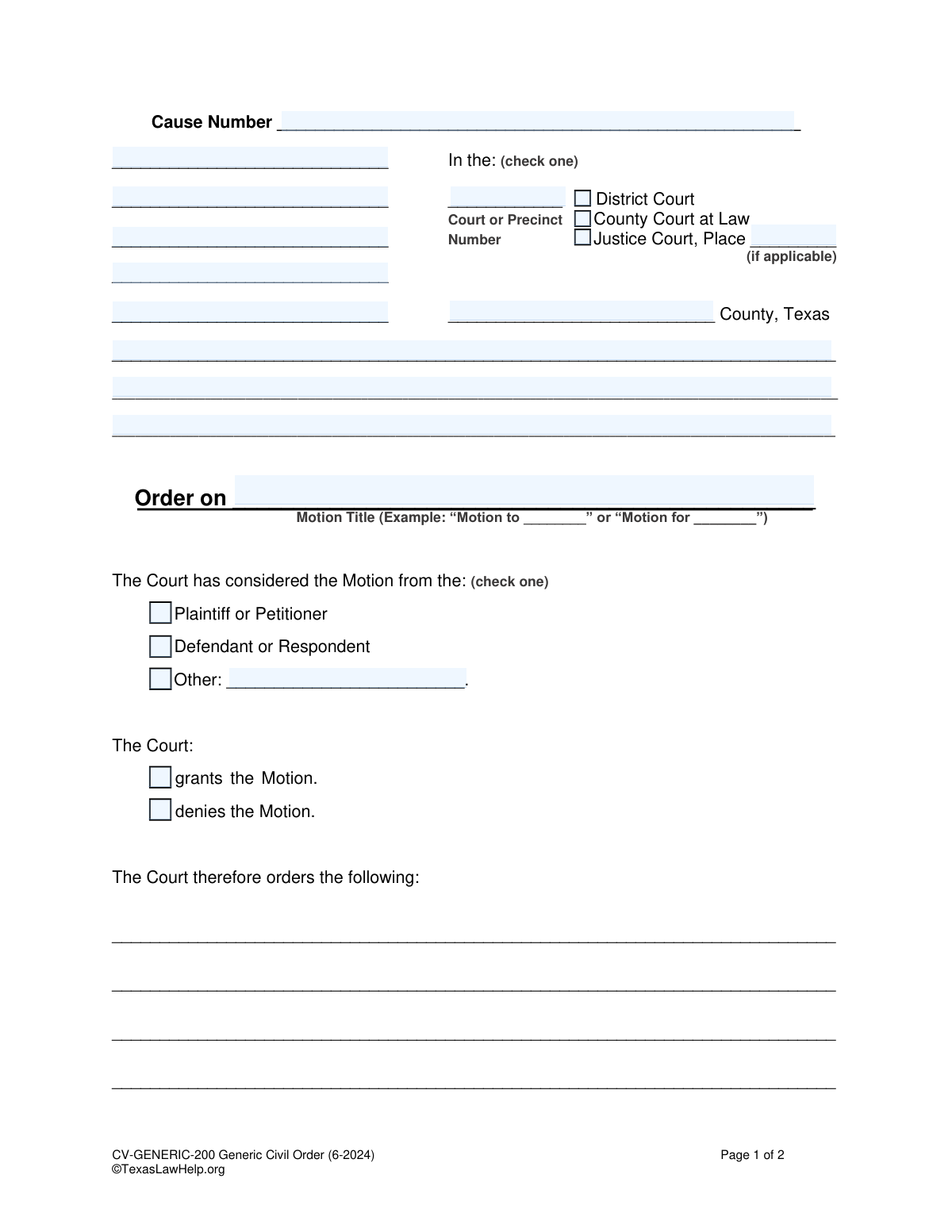
The Generic Civil Order (CV-GENERIC-200) is a legal document used in Texas courts to formalize a judge's decision regarding a motion filed by a party in a civil lawsuit. This form serves as the official record of whether a motion was granted or denied and outlines the specific orders issued by the court. Today, this form can be filled out quickly and accurately using AI-powered services like Instafill.ai, which can also convert non-fillable PDF versions into interactive fillable forms.
CV-GENERIC-200 is part of the civil litigation forms category on Instafill.
Our AI automatically handles information lookup, data retrieval, formatting, and form filling.
It takes less than a minute to fill out CV-GENERIC-200 using our AI form filling.
Securely upload your data. Information is encrypted in transit and deleted immediately after the form is filled out.

Form specifications

Form name: CV-GENERIC-200 Generic Civil Order
Number of fields: 22
Number of pages: 1
Language: English
main-image

Instafill Demo: How to fill out PDF forms in seconds with AI

How to Fill Out CV-GENERIC-200 Online for Free in 2026

Are you looking to fill out a CV-GENERIC-200 form online quickly and accurately? Instafill.ai offers the #1 AI-powered PDF filling software of 2026, allowing you to complete your CV-GENERIC-200 form in just 37 seconds or less.
Follow these steps to fill out your CV-GENERIC-200 form online using Instafill.ai:
  1. 1 Navigate to Instafill.ai and upload or select the CV-GENERIC-200 Generic Civil Order form.
  2. 2 Use the AI assistant to input the case information, including the Cause Number, Court, and County.
  3. 3 Enter the names of the parties involved in the case as prompted.
  4. 4 Specify the title of the motion being ruled upon and indicate which party filed it (Plaintiff, Defendant, or Other).
  5. 5 Select whether the motion is being granted or denied by the court.
  6. 6 Clearly write out the specific orders the court is making in the designated section.
  7. 7 Review the entire document for accuracy, then download the completed order, ready for the judge's signature and filing.

Our AI-powered system ensures each field is filled out correctly, reducing errors and saving you time.

Why Choose Instafill.ai for Your Fillable CV-GENERIC-200 Form?

Speed

Complete your CV-GENERIC-200 in as little as 37 seconds.

Up-to-Date

Always use the latest 2026 CV-GENERIC-200 form version.

Cost-effective

No need to hire expensive lawyers.

Accuracy

Our AI performs 10 compliance checks to ensure your form is error-free.

Security

Your personal information is protected with bank-level encryption.

Frequently Asked Questions About Form CV-GENERIC-200

This form is a template used to create a formal, written order for a judge to sign in a Texas civil case. It documents the court's decision on a motion that was filed by a party in the case.

Typically, the party who filed the motion prepares a proposed order for the judge to review and sign. The judge makes the final decision and is the only one who signs the form to make it official.

You will need your case's Cause Number, the full name of the court, the county, the names of the parties, and the exact title of the motion this order is about.

Copy the Cause Number, party names (Plaintiff/Defendant), and court details exactly as they appear on other official documents filed in your case. Check the box for the correct court type (District, County, or Justice Court).

On this line, you should write the full, exact title of the motion that the judge is ruling on. For example, if the motion was titled 'Defendant's Motion to Compel Discovery,' you would write that here.

It is best to leave these boxes unchecked for the judge to fill in. You can also prepare two separate versions of the order—one granting the motion and one denying it—and bring both to the hearing.

In this section, you should clearly and concisely write out the specific actions the court is being asked to order. This text should reflect the relief you requested in your motion.

No, you must not sign the form. The signature line for 'JUDGE PRESIDING' is reserved exclusively for the judge to sign, which makes the order legally binding.

After preparing the proposed order, you should bring it to the court hearing for your motion. The judge may sign it in court, or you may be instructed to file it with the clerk for the judge's signature.

Yes, this is a generic form designed for a wide range of civil matters in Texas courts. However, for certain specific situations, like in family law, there may be more specialized forms available that you should use instead.

Yes, services like Instafill.ai use AI to help you accurately auto-fill form fields with your case information, such as the cause number, court, and party names, saving you time and helping to prevent errors.

To use Instafill.ai, you upload the Generic Civil Order PDF to their platform. The AI will identify the fillable fields, allowing you to easily enter your information and generate a completed, professional-looking document.

If you have a non-fillable or 'flat' PDF, you can use a service like Instafill.ai. It can convert the document into an interactive, fillable form so you can type your information directly into the fields online.

Compliance CV-GENERIC-200
Validation Checks by Instafill.ai

1
Ensures Cause Number is Provided
This validation checks that the 'cause_number' field is not empty. The Cause Number is a unique identifier for the court case and is essential for filing and record-keeping. Without it, the order cannot be associated with the correct legal proceeding, leading to rejection by the court clerk.
2
Exclusive Court Type Selection
Validates that exactly one court type checkbox ('district_check', 'county_check', or 'jp_check') is selected. The order must be filed in a specific court, and selecting multiple or none creates ambiguity about the court's jurisdiction. A failed validation would require the user to select one and only one court type.
3
Conditional Requirement for Justice Court Place Number
This check ensures that if 'Justice Court' ('jp_check') is selected as the court type, the 'place_number' field is filled in. Justice Courts are designated by a specific place or precinct number within a county. Omitting this number for a Justice Court filing would make it impossible to direct the order to the correct court.
4
Ensures Court County is Specified
Verifies that the 'court_county' field is not blank. This specifies the county in Texas where the court is located, which is a fundamental part of the court's identity and jurisdiction. An order without a county cannot be properly filed or enforced.
5
Requires a Motion Title
Checks that the 'motion_title' field is completed. This title clarifies what specific motion the court is ruling on (e.g., 'Motion to Compel Discovery'). Without a title, the context and subject of the order are unclear, making it legally insufficient and potentially unenforceable.
6
Exclusive Motion Filer Selection
Validates that the party who filed the motion is identified by selecting one and only one option: Plaintiff/Petitioner ('pet_check'), Defendant/Respondent ('def_check'), or Other ('other_check'). It is crucial to know which party's motion is being addressed by the court. Selecting none or multiple options creates ambiguity.
7
Conditional Requirement for 'Other' Filer Description
This rule ensures that if the 'other_check' checkbox is selected to identify the motion's filer, the corresponding text field ('Text4') must be filled out. This is necessary to specify the identity of the filer when they are not the primary Plaintiff or Defendant (e.g., an Intervenor). An empty field would leave the filer's identity unknown.
8
Exclusive Court Decision Selection
Verifies that the court's decision on the motion is clearly indicated by selecting either 'grant_check' or 'deny_check', but not both or neither. The fundamental purpose of the order is to communicate the court's ruling. An ambiguous or missing decision renders the document legally ineffective.
9
Ensures Order Details are Provided
Checks that the main text area detailing the court's specific orders is not empty. This section contains the substantive commands of the court (e.g., 'Defendant is ordered to produce documents within 10 days'). An order without these details is meaningless and has no legal effect.
10
Requires a Signature Date
Validates that the date the judge signed the order is provided. The signature date is critical as it establishes when the order becomes effective and starts the clock for any deadlines or appeal periods. An undated order can lead to significant legal disputes about its validity and timing.
11
Validates Signature Date Format
Ensures the 'SIGNED on' date is entered in a valid format (e.g., MM/DD/YYYY) and represents a real calendar date that is not in the future. An improperly formatted or nonsensical date would invalidate the order. This check prevents data entry errors and ensures the document's legal integrity.
12
Ensures Case Caption is Provided
Verifies that at least one of the caption lines ('caption_line1' through 'caption_line5') is filled in. The caption identifies the parties in the lawsuit and is required to correctly identify the case to which the order applies. An order without a caption cannot be properly associated with the legal proceeding.
13
Validates Cause Number Format
Checks that the 'cause_number' field contains a plausible format, typically consisting of numbers, letters, and hyphens, and is not just random characters. This helps prevent simple typos and ensures the entered value is likely a valid case identifier. An incorrectly formatted cause number could lead to the order being misfiled or rejected.
14
Conditional Requirement for Court Number
This check ensures that if the selected court is a District Court or County Court at Law, the 'court_number' field is populated. Many counties have multiple courts of the same type, distinguished by number (e.g., 'County Court at Law No. 2'). Omitting this number would create ambiguity about which specific court issued the order.

Common Mistakes in Completing CV-GENERIC-200

Entering an Incorrect or Missing Cause Number

The Cause Number is the unique identifier for a legal case. People often mistype this number or forget to include it altogether, which can lead to the order being misfiled with the wrong case or rejected by the court clerk. To avoid this, carefully copy the exact Cause Number from a previously filed official document in the same case. AI-powered tools like Instafill.ai can help prevent this by saving case information and auto-filling it consistently across all related forms.

Improperly Formatting the Case Caption

The caption section identifies the parties and the court. Common mistakes include reversing the Plaintiff and Defendant, misspelling names, or omitting party information. An incorrect caption can create confusion and may require correction, delaying the legal process. Always use the full, correct caption as it appears on the original petition or other official court filings.

Selecting the Incorrect Court Type or Jurisdiction

This form requires checking whether the case is in a District Court, County Court at Law, or Justice Court, and specifying the county. Selecting the wrong court type is a critical jurisdictional error that can invalidate the order. Fillers must verify the exact court where the case was filed and ensure the correct box is checked and the county name is spelled out correctly.

Using a Vague or Inaccurate Motion Title

The line 'Order on...' must be filled with the precise title of the motion being ruled upon. People often write something generic like 'Motion for Hearing' instead of the specific title, such as 'Plaintiff's Motion to Compel Discovery'. This ambiguity can make it unclear what the order actually resolves, leading to confusion or rejection. Always use the exact title from the motion that was filed.

Misidentifying the Party Who Filed the Motion

The form asks to identify whether the Plaintiff/Petitioner, Defendant/Respondent, or another party filed the motion. Checking the wrong box creates a factually incorrect legal document. This mistake happens due to carelessness and can undermine the order's clarity. Carefully review who submitted the motion before checking the appropriate box.

Omitting Specific and Actionable Details in the Order

The large blank section is for the court's specific directives. A common error is to write vague commands like 'The party must comply' without specifying what they must do, by when, or what the consequences are for failure. An unenforceable order is useless and leads to further litigation. Orders should contain clear, specific, and measurable actions, deadlines, and amounts.

Submitting a Form with Illegible Handwriting or Poor Formatting

Many court forms are distributed as flat, non-fillable PDFs, tempting users to fill them out by hand. Illegible handwriting can cause the clerk to reject the document or lead to critical data entry errors by court staff. To avoid this, it is best to type the information. Tools like Instafill.ai can convert non-fillable PDFs into fillable versions, ensuring all text is typed, legible, and perfectly aligned in the correct fields.

Prematurely Checking the 'Grants' or 'Denies' Box

The 'grants' and 'denies' checkboxes are for the judge to make their ruling. A party submitting a *proposed* order to the court should leave these boxes blank for the judge to complete. Pre-checking a box is improper, as it presumes the judge's decision, and will likely result in the proposed order being rejected.

Forgetting to Include the Court or Place Number

For County Courts at Law and Justice Courts, a specific number (e.g., 'County Court at Law Number 2') or place/precinct is required. People often check the box for the court type but forget to write in the specific number. This omission makes it unclear which specific court is issuing the order, potentially causing filing errors and delays. Always include the specific court number or precinct as listed on other case documents.

Improperly Submitting a Proposed Order

A party filling out this form is creating a 'Proposed Order' for the judge to sign. A common mistake is for the party or their attorney to sign in the 'JUDGE PRESIDING' signature block. This block must be left blank for the judge's signature. Signing it yourself will result in the document being rejected.
Saved over 80 hours a year

“I was never sure if my IRS forms like W-9 were filled correctly. Now, I can complete the forms accurately without any external help.”

Kevin Martin Green

Your data stays secure with advanced protection from Instafill and our subprocessors

Robust compliance program

Transparent business model

You’re not the product. You always know where your data is and what it is processed for.

ISO 27001, HIPAA, and GDPR

Our subprocesses adhere to multiple compliance standards, including but not limited to ISO 27001, HIPAA, and GDPR.

Security & privacy by design

We consider security and privacy from the initial design phase of any new service or functionality. It’s not an afterthought, it’s built-in, including support for two-factor authentication (2FA) to further protect your account.

Fill out CV-GENERIC-200 with Instafill.ai

Worried about filling PDFs wrong? Instafill securely fills cv-generic-200-generic-civil-order forms, ensuring each field is accurate.