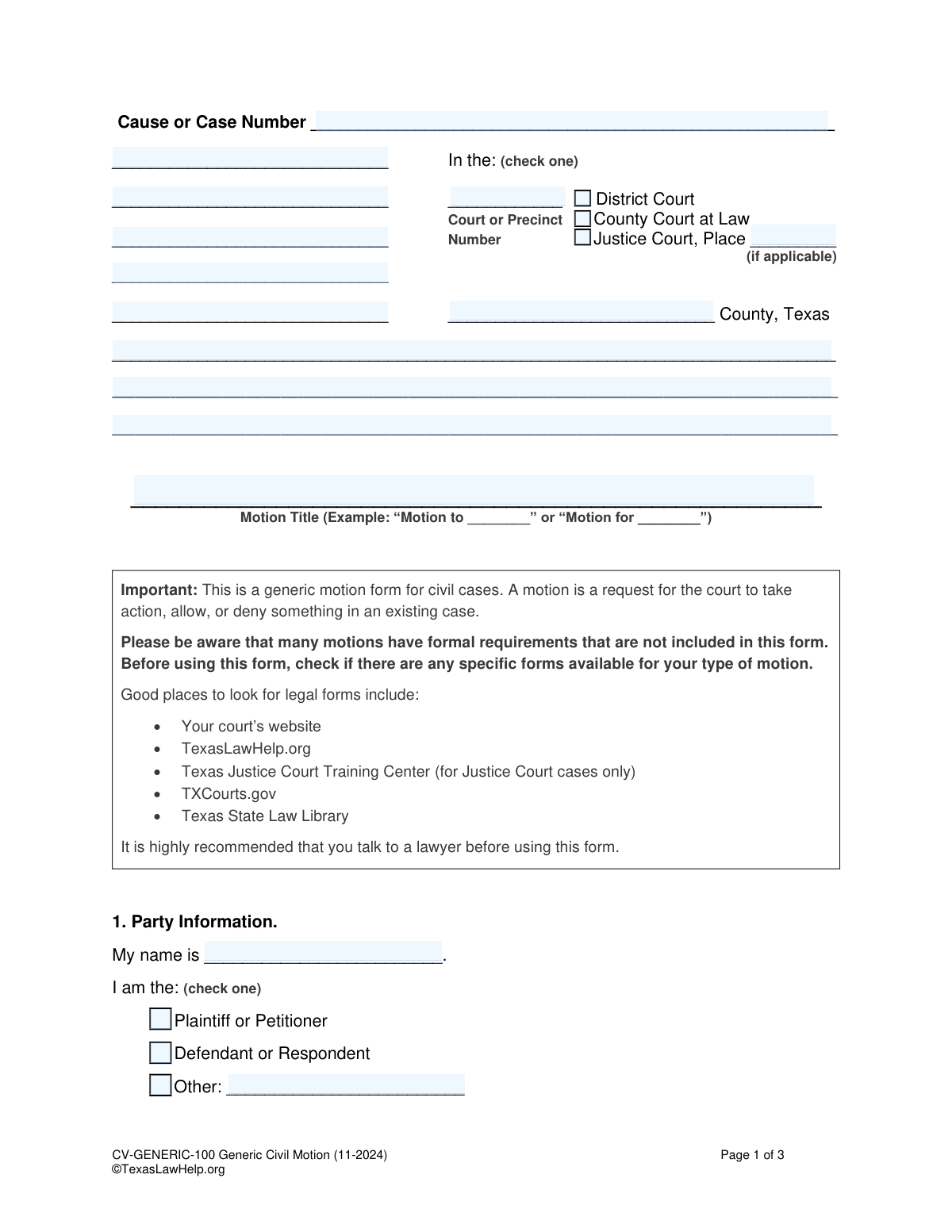
Yes! You can use AI to fill out Form CV-GENERIC-100, Generic Civil Motion
Form CV-GENERIC-100 is a general-purpose motion form for civil cases in Texas courts, allowing a party to request a specific order or ruling from the judge. It's a versatile document for situations where a specific, pre-made motion form isn't available, but users should verify if a more specific form is required for their situation. Today, this form can be filled out quickly and accurately using AI-powered services like Instafill.ai, which can also convert non-fillable PDF versions into interactive fillable forms.
CV-GENERIC-100 is part of the
civil litigation forms category on Instafill.
Our AI automatically handles information lookup, data retrieval, formatting, and form filling.
It takes less than a minute to fill out CV-GENERIC-100 using our AI form filling.
Securely upload your data. Information is encrypted in transit and deleted immediately after the form is filled out.
Form specifications
| Form name: | Form CV-GENERIC-100, Generic Civil Motion |
| Number of fields: | 64 |
| Number of pages: | 1 |
| Language: | English |
Instafill Demo: How to fill out PDF forms in seconds with AI
How to Fill Out CV-GENERIC-100 Online for Free in 2026
Are you looking to fill out a CV-GENERIC-100 form online quickly and accurately? Instafill.ai offers the #1 AI-powered PDF filling software of 2026, allowing you to complete your CV-GENERIC-100 form in just 37 seconds or less.
Follow these steps to fill out your CV-GENERIC-100 form online using Instafill.ai:
- 1 Navigate to Instafill.ai and upload the Generic Civil Motion form or select it from the template library.
- 2 Provide your personal and case information, such as the cause number, court details, and your role (Plaintiff/Defendant), letting the AI populate the fields.
- 3 Clearly state the action or relief you are requesting from the court in the 'Relief Requested' section.
- 4 Review all the information populated by the AI for accuracy, then digitally sign and date the motion in the designated signature block.
- 5 Complete the Certificate of Service section to confirm you have provided a copy of the motion to all other parties in the case, indicating the date and method of delivery.
- 6 Download the completed form and file it with the appropriate court clerk, asking if a hearing needs to be scheduled and completing the 'Notice of Hearing' section if required.
Our AI-powered system ensures each field is filled out correctly, reducing errors and saving you time.
Why Choose Instafill.ai for Your Fillable CV-GENERIC-100 Form?
Speed
Complete your CV-GENERIC-100 in as little as 37 seconds.
Up-to-Date
Always use the latest 2026 CV-GENERIC-100 form version.
Cost-effective
No need to hire expensive lawyers.
Accuracy
Our AI performs 10 compliance checks to ensure your form is error-free.
Security
Your personal information is protected with bank-level encryption.
Frequently Asked Questions About Form CV-GENERIC-100
A motion is a formal request for a court to take a specific action in an existing civil case. You should use this generic form only when a more specific motion form is not available for your particular request.
Any party involved in an existing civil case, such as the Plaintiff, Petitioner, Defendant, or Respondent, can file this form to make a request to the court.
You will need your case number, the court information, your personal contact details, and the contact information for the other party for the Certificate of Service. You must also be able to clearly state the specific request you are making to the court.
In this section, you must clearly and concisely state the specific action you are asking the court to take. For example, you might ask the court to 'grant an extension to file a document' or 'compel the other party to provide discovery responses.'
The other party only needs to sign the motion if they agree with the request you are making. Their signature is not required to file the motion if they do not agree.
The Certificate of Service is your sworn statement that you have sent a copy of the motion to the other party in the case. This is a required step to ensure all parties are properly notified of your request to the court.
After you file the motion, you must ask the court clerk if a hearing is required for your specific request. If one is needed, the clerk will provide you with the date, time, and location to fill in the 'Notice of Hearing' section.
After completing the form, you must file it with the court clerk and send a copy to the other party on the same day. Be sure to ask the clerk about the next steps, such as scheduling a hearing if one is necessary.
Before using this generic form, check for a more specific one on your court's website, TexasLawHelp.org, or the Texas State Law Library. Using a specific form is always preferable when one is available.
While you can file this form yourself, the form strongly recommends that you talk to a lawyer. Legal motions can have complex requirements, and an attorney can ensure your request is properly drafted and follows all procedural rules.
Yes, services like Instafill.ai use AI to help you accurately auto-fill form fields, which can save you time and reduce errors. This is especially helpful for repetitive information like your name, address, and case details.
Simply upload the Generic Civil Motion PDF to the Instafill.ai platform. The AI will identify the fields, allowing you to type your information directly into the interactive form and then download the completed document.
If you have a non-fillable or 'flat' PDF, you can use a service like Instafill.ai to convert it into an interactive, fillable form. This allows you to easily type your information into the correct fields instead of printing and filling it out by hand.
Compliance CV-GENERIC-100
Validation Checks by Instafill.ai
1
Ensures Cause Number is Provided
This validation checks that the 'Cause or Case Number' field is not empty. The cause number is a unique identifier for the case within the court system, and its absence makes it impossible to associate the motion with the correct legal proceeding. If this field is left blank, the form submission will be rejected, and the user will be prompted to enter the correct case number.
2
Validates Court Type Selection
This check ensures that the user has selected exactly one court type from the available options (District Court, County Court at Law, Justice Court). A case can only belong to one court, so selecting none or multiple types is an error. Failure to select a single, valid court type will prevent submission and require the user to correct their selection.
3
Requires Justice Court Place Number
This is a conditional validation that checks if the 'Place Number' field is filled out when 'Justice Court' is selected as the court type. Justice Courts are organized by precinct and place, making this number essential for routing the document correctly. If 'Justice Court' is checked and the place number is missing, the user will be notified that this information is required to proceed.
4
Verifies Motion Title is Complete
This validation ensures the 'Motion Title' field is not left blank. The title clearly and concisely informs the court and other parties about the purpose of the motion, such as 'Motion to Compel Discovery'. An empty title would create ambiguity and processing delays, so the form cannot be submitted without it.
5
Confirms Filer's Role is Selected
This check verifies that the user has identified their role in the case by selecting one option: 'Plaintiff or Petitioner', 'Defendant or Respondent', or 'Other'. This information is fundamental for the court to understand the context of the motion and the filer's standing. The form will be considered incomplete until a single role is chosen.
6
Requires 'Other' Role Specification
This validation is triggered if the user selects 'Other' as their party role. It ensures that the corresponding text field is filled in to specify what that role is, for example, 'Intervenor' or 'Guardian ad Litem'. Without this specification, the 'Other' selection is meaningless and provides insufficient information for the court.
7
Ensures Relief Requested is Detailed
This check confirms that the main text area under 'Relief Requested' is not empty. This section is the core of the motion, where the filer must explain exactly what action they want the court to take. Submitting a motion without a stated request would be pointless, so this field is mandatory for submission.
8
Validates Movant's Signature Date
This validation ensures that the date provided next to the movant's signature is a valid, correctly formatted date (e.g., MM/DD/YYYY). The signature date is legally significant as it marks when the filer attested to the motion's contents. An invalid or missing date can call the document's validity into question, so the system will reject improper formats or empty fields.
9
Validates Movant's Email Format
This check verifies that if an email address is provided in the 'Party 1 (Your information)' section, it conforms to a standard email format like '[email protected]'. This is important for ensuring that court notices and communications sent via email are deliverable. An invalidly formatted email will trigger an error, prompting the user to correct it or remove it.
10
Requires Certificate of Service Date
This validation ensures the 'date' field in the 'Certificate of Service' section is filled out with a valid date. This date certifies when the motion was sent to the other parties, which is a critical procedural requirement. Failure to provide this date makes the certificate incomplete and could invalidate the service.
11
Validates Service Method Selection and Detail
This check ensures that at least one method of service is selected and that the corresponding details (address, fax number, email) are provided. For example, if 'Mail' is checked, the mail address field cannot be empty. This validation is crucial because it provides proof of how and where the other party was notified, which is a cornerstone of due process.
12
Compares Service Date with Signature Date
This is a logical consistency check that verifies the 'Certificate of Service' date is on or after the movant's signature date. A party cannot certify they have served a document before they have signed it. This check prevents logical impossibilities and ensures the timeline of events is plausible.
13
Validates Hearing Date is in the Future
This check applies if a hearing date is entered in the 'Notice of Hearing' section. It validates that the entered date is a real, valid date that occurs in the future, not in the past. Setting a hearing for a past date is a logical error, and this check prevents such mistakes from being submitted to the court.
14
Requires Certificate of Service Signature
This validation ensures the signature field in the 'Certificate of Service' section is not left blank. The signature certifies that the filer has truthfully sent a copy of the motion to the other parties as stated. Without a signature, the certificate is invalid and provides no proof of service.
Common Mistakes in Completing CV-GENERIC-100
Users often enter the Cause or Case Number incorrectly due to a typo or by referencing the wrong document. This is a critical error because this number is the primary identifier for the case file. An incorrect number can lead to the motion being rejected by the clerk, filed in the wrong case, or lost entirely, causing significant delays and preventing the judge from ever seeing the request. To avoid this, meticulously double-check the number against official court documents like the original petition or a previous court order. AI-powered form fillers like Instafill.ai can help by saving case information and auto-populating it correctly on all related documents.
A common mistake is writing a non-descriptive motion title like "Motion" or "Request to Court." This happens when the filer is unsure what to call their request. A vague title forces the court clerk, judge, and opposing counsel to read the entire document to understand its purpose, slowing down the judicial process. It can lead to incorrect docketing or the motion being overlooked. The title should be short but specific, such as "Motion for Continuance" or "Motion to Compel Discovery," clearly signaling the document's intent.
In the "Relief Requested" section, many filers write a long, emotional narrative instead of a clear, actionable request. This occurs because they may not be familiar with legal standards or how to frame a request for a judge. The consequence is that the judge may not understand what is being asked, or may deny the motion because it lacks a clear legal basis or the necessary supporting facts. To avoid this, state precisely what you want the court to do and briefly explain why, referencing specific facts. Consulting a lawyer is highly recommended for this section.
The filer (Party 1) mistakenly fills out the signature block for Party 2, assuming it's required information. The form explicitly states this section is for the other party to complete only if they agree with the motion. Filling it out yourself can be seen as a misrepresentation to the court and can create significant confusion. It may even lead a judge to question the filer's credibility. This section should always be left completely blank by the person filing the motion.
Filers often fill in a hearing date and time themselves, assuming they are supposed to schedule it. However, the form clearly instructs the filer to get this information from the court clerk after filing. Setting a date unilaterally can result in the motion never being officially scheduled, or the filer showing up for a hearing that isn't on the court's docket. Always leave this section blank when you file the motion, then ask the clerk for the correct information and procedure for setting a hearing.
Many self-represented litigants either forget to fill out the Certificate of Service or fail to understand its importance. This section is the official proof that you have legally notified the other party of your motion. Without a properly completed and signed Certificate of Service, the court cannot and will not consider the motion, as it would violate the other party's due process rights. The motion will be denied outright. Always complete this section accurately on the same day you send a copy of the motion to the other party.
A frequent error is checking the "Email" box for service without having the other party's explicit consent. The form and Texas court rules require that the other party must have agreed in writing to accept service at a specific email address. Simply knowing their email is not enough. Improper service is the same as no service, and the court will deny the motion for lack of notice. Unless you have prior written consent, you must use another method like mail or personal delivery.
In the rush to complete the form, a surprising number of people forget the final, crucial step: signing the document. An unsigned motion is legally invalid and has no effect. The clerk may reject it upon filing, or if it is accepted, a judge will strike it down, forcing the filer to start over and causing significant delays. Before filing, always do a final check specifically for required signatures and dates. This simple oversight can completely derail your request.
Filers can be confused by the court system and may check the wrong box (District, County, Justice Court) or write the wrong court number or county. This often happens when a case has connections to multiple locations or the filer is unfamiliar with court jurisdiction. Filing in the wrong court leads to immediate rejection by the clerk or dismissal by the judge for lack of jurisdiction, wasting time and filing fees. The exact court information must be copied perfectly from previous official case documents.
The form warns users to only provide an email they check every day, but people often list a secondary or infrequently used address. By providing an email, you are legally consenting to receive official court notices and deadlines at that address. Missing a critical email about a hearing date or a judge's order can have disastrous consequences for your case, including having your motion denied or your entire case dismissed without you even knowing. If you cannot check an email daily, it is safer to leave this field blank and rely on physical mail.
Saved over 80 hours a year
“I was never sure if my IRS forms like W-9 were filled correctly. Now, I can complete the forms accurately without any external help.”
Kevin Martin Green
Your data stays secure with advanced protection from Instafill and our subprocessors

Robust compliance program
Transparent business model
You’re not the product. You always know where your data is and what it is processed for.
ISO 27001, HIPAA, and GDPR
Our subprocesses adhere to multiple compliance standards, including but not limited to ISO 27001, HIPAA, and GDPR.
Security & privacy by design
We consider security and privacy from the initial design phase of any new service or functionality. It’s not an afterthought, it’s built-in, including support for two-factor authentication (2FA) to further protect your account.
Fill out CV-GENERIC-100 with Instafill.ai
Worried about filling PDFs wrong? Instafill securely fills form-cv-generic-100-generic-civil-motion forms, ensuring each field is accurate.