Yes! You can use AI to fill out Superior Court of Arizona, Maricopa County - Motion for More Time to Serve the Other Party
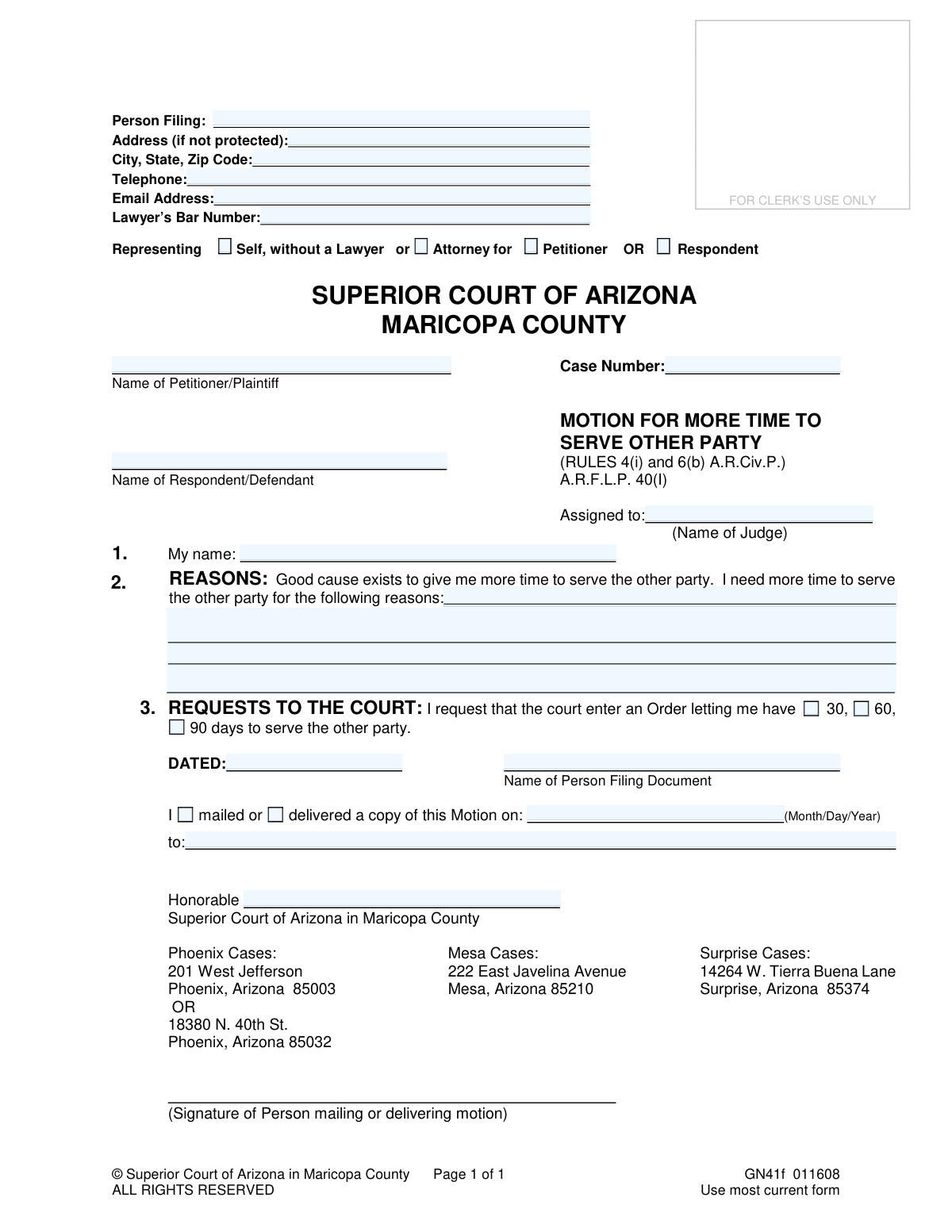
The Motion for More Time to Serve the Other Party is a formal request submitted to the Superior Court of Arizona in Maricopa County. It is used by a plaintiff or petitioner who has been unable to formally deliver legal documents to the opposing party within the court-mandated deadline and is facing dismissal of their case. Filing this motion is crucial to prevent the case from being thrown out and to get a new deadline for service. Today, this form can be filled out quickly and accurately using AI-powered services like Instafill.ai, which can also convert non-fillable PDF versions into interactive fillable forms.
GN41f is part of the
civil court forms, civil litigation forms, County court forms and superior court forms categories on Instafill.
Our AI automatically handles information lookup, data retrieval, formatting, and form filling.
It takes less than a minute to fill out GN41f using our AI form filling.
Securely upload your data. Information is encrypted in transit and deleted immediately after the form is filled out.
Form specifications
| Form name: | Superior Court of Arizona, Maricopa County - Motion for More Time to Serve the Other Party |
| Number of fields: | 45 |
| Number of pages: | 1 |
| Language: | English |
Instafill Demo: How to fill out PDF forms in seconds with AI
How to Fill Out GN41f Online for Free in 2026
Are you looking to fill out a GN41F form online quickly and accurately? Instafill.ai offers the #1 AI-powered PDF filling software of 2026, allowing you to complete your GN41F form in just 37 seconds or less.
Follow these steps to fill out your GN41F form online using Instafill.ai:
- 1 Navigate to Instafill.ai and upload or select the 'Motion for More Time to Serve the Other Party' form.
- 2 Use the AI assistant to accurately fill in your personal details, including your name and address, as well as the case number and assigned judge.
- 3 Clearly identify yourself as the Petitioner/Plaintiff or Respondent/Defendant and provide the full name of the other party in the case.
- 4 In the 'REASONS' section, provide a clear and detailed explanation for why you need more time to serve the other party, establishing 'good cause' for the extension.
- 5 Select the amount of additional time you are requesting (e.g., 30, 60, or 90 days) to complete the service of process.
- 6 Review all the information for accuracy, then electronically sign and date the motion before finalizing.
- 7 Download the completed motion and follow the court's specific instructions for filing it with the Clerk of the Court and delivering a copy to the judge.
Our AI-powered system ensures each field is filled out correctly, reducing errors and saving you time.
Why Choose Instafill.ai for Your Fillable GN41f Form?
Speed
Complete your GN41f in as little as 37 seconds.
Up-to-Date
Always use the latest 2026 GN41f form version.
Cost-effective
No need to hire expensive lawyers.
Accuracy
Our AI performs 10 compliance checks to ensure your form is error-free.
Security
Your personal information is protected with bank-level encryption.
Frequently Asked Questions About Form GN41f
This form is used to officially ask the court for an extension on the deadline to legally notify (serve) the other party in your case. It should be used if you have received a court notice that your case is at risk of dismissal for failure to serve.
Anyone involved in a court case who has been unable to serve the other party with legal documents within the required timeframe should fill out this form to avoid having their case dismissed.
You must provide a 'good cause' or valid reason for the delay, such as explaining the specific steps you have taken to locate and serve the other party and why those attempts have been unsuccessful so far.
If the judge does not grant your request, your case will likely be dismissed. The court instructions advise you to consult with a lawyer immediately if your motion is denied.
You must file the original motion with the Clerk of the Court, deliver a copy of the motion and a proposed Order to the assigned judge's administration office, and keep a stamped copy for your records.
Yes, you must attach a self-addressed, stamped envelope with your filing. The court will use this to mail you a copy of the judge's signed Order or decision.
The form allows you to request an extension of 30, 60, or 90 days. You should select the amount of time you reasonably believe is necessary to complete service.
No, this motion must be filed before the dismissal date. If your case has already been dismissed, you must file a 'Motion to Reinstate the Case' instead.
You will need your case number, the name of the judge assigned to your case, and your personal contact information. You must also be prepared to explain your reasons for needing the extension.
The judge will either sign the Order you provided or issue a 'Minute Entry' detailing the decision. You will receive a copy of this decision in the mail.
Yes, services like Instafill.ai use AI to accurately auto-fill form fields with your personal information, which can save time and help prevent errors on official documents.
Simply upload the PDF of the motion to the Instafill.ai website. The platform will make the document interactive, allowing you to type your answers directly into the fields and then download the completed form.
You can use a service like Instafill.ai to convert the non-fillable PDF into an interactive, fillable form. This allows you to complete it digitally instead of having to print it and fill it out by hand.
Yes, you must prepare the 'Order for More Time to Serve the Other Party' form and submit it along with your motion. The judge will sign this document to formalize their decision on your request.
Compliance GN41f
Validation Checks by Instafill.ai
1
Case Number Presence and Format
Verifies that the 'Case Number' field is not empty and follows the standard Maricopa County format (e.g., FC-prefix or CV-prefix followed by numbers). This is a critical identifier for routing the document to the correct case file. A missing or malformed case number will result in the filing being rejected or misfiled, causing significant delays.
2
Representation Status Logic
Ensures that if the 'Self, without a Lawyer' box is checked, the 'Lawyer’s Bar Number' field is empty. Conversely, if 'Attorney for' is checked, the 'Lawyer’s Bar Number' field must be populated. This check prevents contradictory information and ensures the filer's representation status is clear to the court. An inconsistency would require manual clarification.
3
Lawyer's Bar Number Validation
Checks that if a 'Lawyer’s Bar Number' is provided, it conforms to the expected format for an Arizona Bar Number (e.g., a 6-digit number). This helps validate the attorney's credentials and ensures the number is recorded correctly in the case management system. An invalid format could indicate a typo or an invalid submission.
4
Party Names Completeness
Validates that both the 'Name of Petitioner/Plaintiff' and 'Name of Respondent/Defendant' fields are filled out. These names are essential for identifying the parties in the case and are required for the motion to be legally sufficient. A submission with missing party names is incomplete and cannot be processed.
5
Filer Name Consistency
Confirms that the name entered in the 'Person Filing' field at the top of the form matches the name in the 'My name' field (Section 1). This ensures consistency and clearly identifies the individual submitting the motion. Discrepancies could create confusion about who is making the request to the court.
6
Reason for Extension Requirement
Ensures the 'REASONS' text field is not empty and contains a minimum number of characters to prevent one-word answers. The form explicitly states that 'good cause' must be shown, so a blank or trivial reason would lead to an automatic denial of the motion. This validation forces the filer to provide the necessary justification for the judge's review.
7
Exclusive Time Request Selection
Verifies that exactly one of the time extension checkboxes (30, 60, or 90 days) is selected. The court needs a specific, unambiguous request to rule on. If zero or multiple boxes are checked, the request is unclear and the form would be returned for correction.
8
Signature Date Presence
Checks that the 'DATED' field, where the filer signs, contains a valid date. This date is legally important as it establishes when the motion was formally attested to by the filer. A missing date can render the document invalid or require it to be returned.
9
Mailing/Delivery Certification Completeness
Validates that the date in the 'mailed or delivered a copy of this Motion on' field is present and that the 'Honorable' field (Judge's name) is filled. This section certifies that a copy was sent to the judge as required by procedure. Failure to complete this section means the filer has not certified proper delivery, which could halt the motion's progress.
10
Valid Email Address Format
Checks that if a value is entered in the 'Email Address' field, it adheres to a standard email format (e.g., '[email protected]'). This is important for ensuring that any electronic communications or notices from the court are deliverable. An invalid email address would lead to failed communication and potential missed deadlines.
11
Telephone Number Format
Validates that the 'Telephone' number field, if filled, contains a valid 10-digit phone number format. This ensures the court has a reliable method of contacting the filer if urgent questions arise. An improperly formatted number would be useless for communication.
12
Assigned Judge Name Presence
Verifies that the 'Assigned to: (Name of Judge)' field is populated. Knowing the assigned judge is crucial for routing the document to the correct judicial officer for review and decision. Submitting a motion without the judge's name will cause processing delays while court staff look up the information.
Common Mistakes in Completing GN41f
Filers often underestimate the level of detail required for the 'REASONS' section, simply stating they need more time. The court requires a specific 'good cause,' such as detailing the multiple attempts made to locate and serve the other party. A weak or vague reason will likely result in the judge denying the motion, leading to the case being dismissed as scheduled.
This motion is time-sensitive and must be filed before the dismissal date noted in the court's warning. Many people misunderstand the urgency and file after the deadline has passed. Once the case is dismissed, this motion is moot, and the filer must then pursue a more complex and less certain 'Motion to Reinstate'.
The procedures explicitly require a self-addressed stamped envelope to be submitted with the judge's copy. This is a very common oversight. Without it, the court staff has no way to mail the signed Order back to the filer, causing significant delays in learning the outcome and the new service deadline.
The case number and assigned judge's name are critical identifiers for routing the document correctly. Filers may forget this information or not know how to find it, despite instructions providing a phone number. An incorrect or missing case number will cause the Clerk to reject the filing, while a missing judge's name means the motion may never reach the decision-maker in time.
In the case caption, filers frequently mix up who is the 'Petitioner/Plaintiff' and who is the 'Respondent/Defendant'. This creates confusion and can lead to an inaccurate court record. To avoid this, remember that the person who initiated the original lawsuit is always the Petitioner/Plaintiff for all subsequent filings in that case.
The form requires a signature and date in two separate places: one for the motion itself and another certifying its delivery to the judge. An unsigned motion is legally invalid and will be rejected outright. Forgetting to date the document or the delivery certification can also cause processing delays or questions about timeliness.
In Section 3, the filer must check a box to request a 30, 60, or 90-day extension. It is a common mistake to overlook this simple step while focusing on the written 'Reasons'. Leaving the request ambiguous forces the judge to guess or deny the motion for being incomplete, nullifying the entire effort.
The instructions detail a two-part process: filing the 'Original Motion' with the Clerk of the Court and separately delivering a copy to the judge via the appropriate Court Administration office. Filers often mistakenly submit everything to the Clerk, meaning the judge never receives their required copy for review. This failure in procedure can cause the motion to be ignored.
Court forms are updated periodically, and the footer on each page explicitly states to 'Use most current form.' People often find and use old versions from unofficial websites or previous filings. Submitting an outdated form is a common reason for rejection by the Clerk's office, which can be a critical setback when facing a deadline.
The instructions require the form to be typed or printed in black ink. Submitting a form with illegible handwriting, excessive corrections, or using the wrong color ink can lead to rejection by the clerk. This is a preventable error that causes unnecessary delays. AI-powered tools like Instafill.ai can help by converting the PDF into a fillable version and populating it with clean, typed text.
Saved over 80 hours a year
“I was never sure if my IRS forms like W-9 were filled correctly. Now, I can complete the forms accurately without any external help.”
Kevin Martin Green
Your data stays secure with advanced protection from Instafill and our subprocessors

Robust compliance program
Transparent business model
You’re not the product. You always know where your data is and what it is processed for.
ISO 27001, HIPAA, and GDPR
Our subprocesses adhere to multiple compliance standards, including but not limited to ISO 27001, HIPAA, and GDPR.
Security & privacy by design
We consider security and privacy from the initial design phase of any new service or functionality. It’s not an afterthought, it’s built-in, including support for two-factor authentication (2FA) to further protect your account.
Fill out GN41f with Instafill.ai
Worried about filling PDFs wrong? Instafill securely fills superior-court-of-arizona-maricopa-county-motion-for-more-time-to-serve-the-other-party forms, ensuring each field is accurate.