Yes! You can use AI to fill out PR-DJ-110, Certificate of Last Known Mailing Address
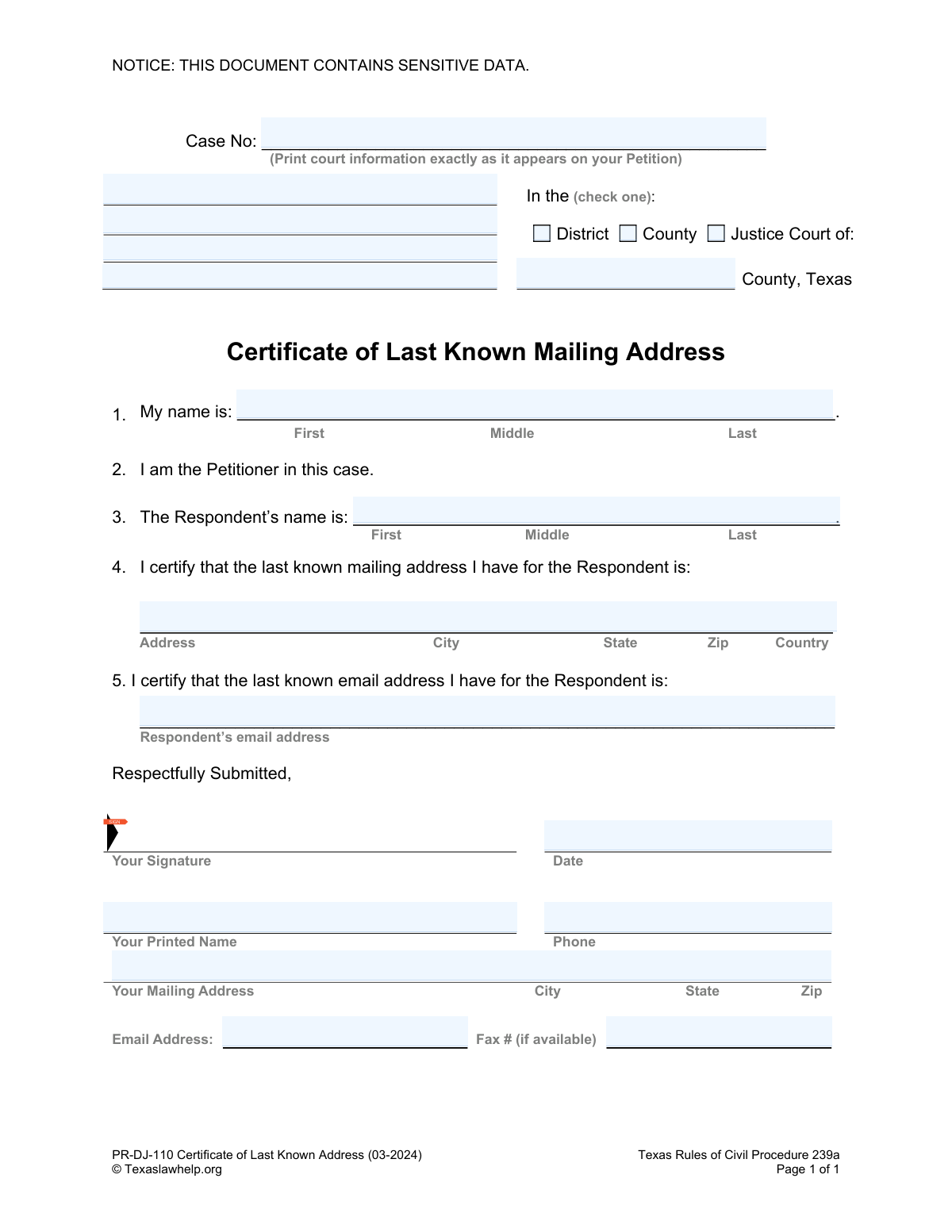
Form PR-DJ-110, the Certificate of Last Known Mailing Address, is a Texas legal document used by a petitioner to formally declare to the court the last known mailing and email address of the respondent in a case. This certification is crucial for ensuring proper legal notice is served, as required by the Texas Rules of Civil Procedure. Today, this form can be filled out quickly and accurately using AI-powered services like Instafill.ai, which can also convert non-fillable PDF versions into interactive fillable forms.
PR-DJ-110 is part of the
civil litigation forms category on Instafill.
Our AI automatically handles information lookup, data retrieval, formatting, and form filling.
It takes less than a minute to fill out PR-DJ-110 using our AI form filling.
Securely upload your data. Information is encrypted in transit and deleted immediately after the form is filled out.
Form specifications
| Form name: | PR-DJ-110, Certificate of Last Known Mailing Address |
| Number of fields: | 20 |
| Number of pages: | 1 |
| Language: | English |
Instafill Demo: How to fill out PDF forms in seconds with AI
How to Fill Out PR-DJ-110 Online for Free in 2026
Are you looking to fill out a PR-DJ-110 form online quickly and accurately? Instafill.ai offers the #1 AI-powered PDF filling software of 2026, allowing you to complete your PR-DJ-110 form in just 37 seconds or less.
Follow these steps to fill out your PR-DJ-110 form online using Instafill.ai:
- 1 Navigate to Instafill.ai and upload or select the Certificate of Last Known Mailing Address (PR-DJ-110) form.
- 2 Provide the case number and specify the court details (District, County, or Justice Court) as they appear on your petition.
- 3 Enter your full name as the Petitioner in the designated field.
- 4 Input the full name of the Respondent.
- 5 Carefully enter the Respondent's complete last known mailing address, including street, city, state, zip, and country, as well as their last known email address.
- 6 Review all the information auto-filled by the AI for accuracy, then digitally or manually sign and date the certificate, and provide your contact details.
- 7 Download the completed, signed form to file with the appropriate Texas court.
Our AI-powered system ensures each field is filled out correctly, reducing errors and saving you time.
Why Choose Instafill.ai for Your Fillable PR-DJ-110 Form?
Speed
Complete your PR-DJ-110 in as little as 37 seconds.
Up-to-Date
Always use the latest 2026 PR-DJ-110 form version.
Cost-effective
No need to hire expensive lawyers.
Accuracy
Our AI performs 10 compliance checks to ensure your form is error-free.
Security
Your personal information is protected with bank-level encryption.
Frequently Asked Questions About Form PR-DJ-110
This form is used to officially certify to the court the last known mailing and email address of the Respondent in your case. It ensures the court has the correct contact information on file for serving legal notices.
The Petitioner, who is the person that initiated the legal case, must complete, sign, and file this form with the court.
You must copy the case number and court information exactly as it appears on the Petition you originally filed with the court. This information is typically found at the top of your court documents.
You need to provide the Respondent's full name, their last known mailing address (including city, state, zip, and country), and their last known email address.
If you do not have the Respondent's email address, you can write 'Unknown' or 'None' in the space provided. You are only required to certify the information that you have.
It means the most recent address you have for the Respondent, based on your knowledge. By signing the form, you are certifying that this is the best and most current information you possess.
After you have filled out, signed, and dated the form, you must file it with the clerk of the court where your case is being heard (District, County, or Justice Court).
The form contains personally identifiable information like names, addresses, and email, which is considered sensitive. You should handle the completed document securely to protect the privacy of everyone involved.
No, providing your fax number is optional. The form indicates it is only needed 'if available,' so you can leave this field blank if you do not have one.
Yes, services like Instafill.ai use AI to help you accurately auto-fill form fields from your saved information, which saves time and reduces the chance of errors.
You can use a service like Instafill.ai to upload the PDF. Their platform allows you to type your information directly into the fields and then download the completed document for printing and signing.
If you have a non-fillable or 'flat' PDF, you can upload it to a platform like Instafill.ai. Their technology can convert the document into an interactive, fillable form that you can easily complete on your computer.
The Petitioner is the person who started the lawsuit by filing a petition. The Respondent is the person who the lawsuit is filed against.
Compliance PR-DJ-110
Validation Checks by Instafill.ai
1
Case Number Presence
This validation ensures that the 'Case No' field is not left empty. The case number is a critical piece of information that links this certificate to the correct legal case in the court's records. A missing case number would make the document impossible to file correctly, leading to its rejection by the court clerk.
2
Exclusive Court Type Selection
This check verifies that the user has selected exactly one court type from the available options (District, County, or Justice). This is crucial for establishing the correct jurisdiction for the case. Failure to select a single, appropriate court type can lead to filing errors and procedural delays.
3
Petitioner Name Completeness
This validation confirms that the petitioner's first and last name fields are filled out. The petitioner's name is required to identify the party submitting the certificate. An incomplete name would render the document legally insufficient as the filer's identity would be ambiguous.
4
Respondent Name Completeness
This check ensures that the respondent's first and last name fields are completed. Clearly identifying the respondent is fundamental to the purpose of the form, which is to certify their last known address for legal notice. Without the respondent's full name, the certificate is invalid and cannot be used for service of process.
5
Respondent's Full Mailing Address Presence
This validation verifies that the respondent's full mailing address, including street, city, state, and zip code, is provided. This address is the primary subject of the certificate and is legally required for serving notice to the respondent. An incomplete address would defeat the entire purpose of the form and could invalidate any subsequent legal actions based on it.
6
Respondent's ZIP Code Format
This check ensures the ZIP code provided for the respondent's address is in a valid 5-digit or 9-digit (ZIP+4) format. A valid ZIP code is essential for ensuring the mail can be delivered by the postal service. An incorrect or improperly formatted ZIP code could result in failed delivery of legal notices, jeopardizing the case.
7
Respondent's Email Address Format
This validation checks if the text entered into the respondent's email address field follows the standard '[email protected]' format. While this field may be optional, if data is entered, it must be syntactically valid to be useful for electronic communication or service. An invalid format would make the provided email address useless.
8
Signature Presence
This check confirms that the 'Your Signature' field has been filled or digitally signed. A signature is a legal requirement to attest to the truthfulness of the information provided in the document. An unsigned certificate is legally invalid and will be rejected by the court.
9
Date of Signature Format and Validity
This validation ensures the 'Date' field is filled with a valid date in a recognizable format (e.g., MM/DD/YYYY) and is not a future date. The date of signature establishes when the certification was made, which is legally significant. An invalid or missing date can call the document's validity into question.
10
Petitioner Printed Name Consistency
This check compares the 'Your Printed Name' in the signature block against the petitioner's name entered in field #1. This logical check ensures the person signing the document is the same person identified as the petitioner. A mismatch could indicate an error or raise questions about the signatory's identity, potentially invalidating the certificate.
11
Petitioner Phone Number Format
This validation verifies that the petitioner's phone number is in a valid format, such as a 10-digit North American number. This contact information is crucial for the court or opposing parties to communicate with the petitioner. An invalid phone number hinders communication and can delay case proceedings.
12
Petitioner Email Address Format
This check ensures the petitioner's email address is in a valid '[email protected]' format. This provides a reliable method for electronic communication and service of documents from the court. An incorrectly formatted email address would prevent the petitioner from receiving important case-related information.
Common Mistakes in Completing PR-DJ-110
Users often fail to copy the Case Number and court name exactly as they appear on the original Petition. This can lead to the document being rejected by the court clerk or misfiled, causing significant delays in the legal process. To avoid this, double-check the original Petition and copy the information verbatim, including the specific court type (District, County, or Justice) and county name.
The form requires the user to check one box to indicate whether the case is in a District, County, or Justice Court. Forgetting to check a box or checking multiple boxes makes the filing ambiguous and can lead to rejection. Always select one, and only one, court type that matches your case documents.
The form requires the full legal names for both the Petitioner and Respondent. Using nicknames, initials instead of full names, or omitting a middle name can create legal ambiguity and issues with serving notice. Always use the complete First, Middle, and Last names as they appear on official legal documents to ensure proper identification.
A common error is omitting crucial details like an apartment, suite, or unit number from the Respondent's address. This can result in failed mail delivery, which undermines the purpose of the certificate and can halt legal proceedings. Always verify the complete address and include any secondary address information to ensure successful delivery.
An unsigned legal document is invalid. Petitioners sometimes forget to sign the form or print their name in the signature line instead of providing a handwritten signature. This will cause the court to reject the filing immediately, requiring you to resubmit. Always provide a handwritten signature in the designated space before submitting.
The form asks for the Respondent's address in section 4 and the Petitioner's (your) address in the signature block. Users sometimes get these confused and enter their own address in the Respondent's section. This critical error defeats the purpose of the form, which is to certify the Respondent's last known address for service. Carefully read each section to ensure you are providing the correct person's information in the correct field.
The date of signature is a legal requirement that attests to when the certification was made. Users may forget to fill it in or use an ambiguous format like '2/3/24,' which can be interpreted differently. This can lead to questions about the document's timeliness and validity. Always enter the full date in a clear MM/DD/YYYY format to avoid confusion.
A simple typo in the Respondent's or your own email address, such as '.con' instead of '.com' or a misspelled name, renders it useless for electronic service. Since email can be a formal method of contact, an incorrect address can lead to claims of improper notice or missed communications from the court. Meticulously proofread all email addresses for accuracy before submitting the form.
This certificate is a sworn statement about the last address you have on record for the Respondent, even if you suspect they've moved. Some users try to guess a new address or leave it blank if they are uncertain, which is incorrect. The purpose is to document your last known information for the court record, so you must provide the most recent address you have, regardless of its current validity.
When filling out a printed PDF by hand, poor or rushed handwriting can make critical information like names, addresses, and case numbers unreadable. This can lead to data entry errors by the court clerk, misdirected mail, or outright rejection of the form. AI-powered tools like Instafill.ai can solve this by converting a non-fillable PDF into a fillable version, allowing you to type information for perfect clarity.
Saved over 80 hours a year
“I was never sure if my IRS forms like W-9 were filled correctly. Now, I can complete the forms accurately without any external help.”
Kevin Martin Green
Your data stays secure with advanced protection from Instafill and our subprocessors

Robust compliance program
Transparent business model
You’re not the product. You always know where your data is and what it is processed for.
ISO 27001, HIPAA, and GDPR
Our subprocesses adhere to multiple compliance standards, including but not limited to ISO 27001, HIPAA, and GDPR.
Security & privacy by design
We consider security and privacy from the initial design phase of any new service or functionality. It’s not an afterthought, it’s built-in, including support for two-factor authentication (2FA) to further protect your account.
Fill out PR-DJ-110 with Instafill.ai
Worried about filling PDFs wrong? Instafill securely fills pr-dj-110-certificate-of-last-known-mailing-address forms, ensuring each field is accurate.