
Instafill.ai
7 days free
AI form filling · 144 fields · 1 page · done in seconds

Yes! You can use AI to fill out Civil Case Information Sheet

Don't type 144 fields by hand. Tell our AI about yourself, or upload a document you already have, and it fills every field in seconds. You check it, then download, print or sign.
7 days free, then $19.99/month · Cancel anytime
AI fills it, no typingEncrypted, never used to train AICancel in two clicks
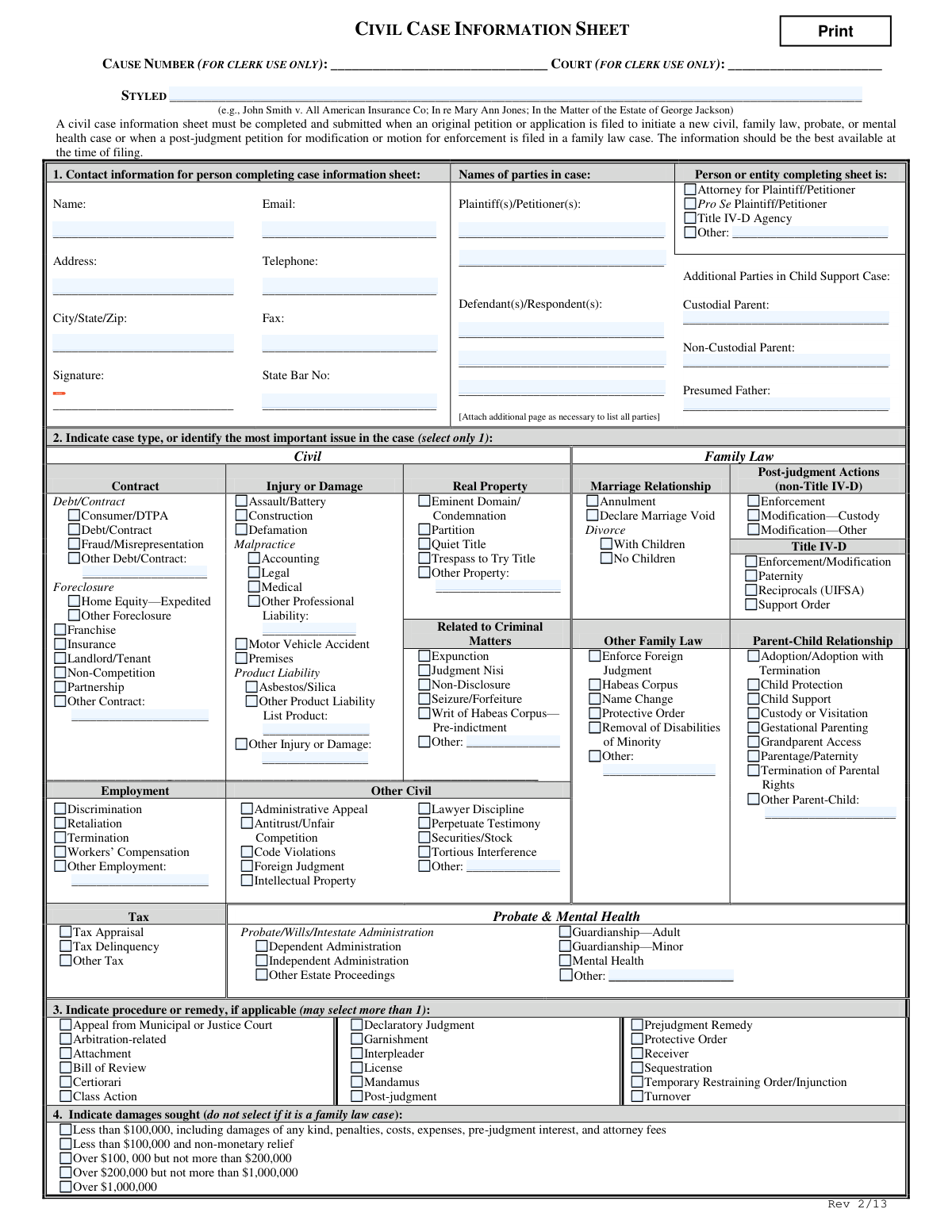
Civil Case Information Sheet, page 1
Moderate · 52/100Form Complexity Index

The AI does the filling. You just check it.

No typing into boxes, nothing to install.

Tell the AI about youAnswer a few questions in plain words, or upload a document you already have. That is all the typing there is.
AI fills every field in secondsIt puts each answer in the right box on every page, checkboxes included.
Check it and downloadReview every field, change anything, then download, print or sign the PDF.

What this form asks for

The AI fills all of it, from your answers or your documents.

A Civil Case Information Sheet is a mandatory form filed with the court when an original petition or application is submitted to start a new civil case. It provides the court with crucial information about the parties involved, the type of case (e.g., contract dispute, family law, personal injury), and the remedies or damages being sought. Today, this form can be filled out quickly and accurately using AI-powered services like Instafill.ai, which can also convert non-fillable PDF versions into interactive fillable forms.
Fillable fields144
Pages1
Form Complexity IndexModerate, 52/100

The AI checks your answers before you download

14 checks built for this form, so a wrong date or a missing answer is caught before anyone else sees it.

Exclusive Case Type Selection

This validation ensures that only one checkbox is selected in the entire 'Indicate case type' section (Section 2). The form explicitly states to 'select only 1', which is critical for correct case classification, routing, and statistical reporting. If more than one box is checked, the submission should be blocked with an error message prompting the user to select the single most important issue.

Conditional State Bar Number Requirement

This check verifies that the 'State Bar No' field is filled if the 'Attorney for Plaintiff/Petitioner' box is checked. This is important for verifying the credentials and identity of the legal representative filing the case. If the filer is an attorney but the State Bar Number is missing, the form should prompt for its entry before submission is allowed.

Damages Section Inapplicable for Family Law

This validation enforces the rule that the 'Indicate damages sought' section (Section 4) must be left blank if a 'Family Law' case type is selected in Section 2. Family law cases have their own specific procedures for financial matters that are distinct from the monetary damages sought in general civil litigation. An error should be displayed if a user selects a family law case type and also attempts to specify a damage amount.

Mandatory Party Identification

This check ensures that at least one 'Plaintiff(s)/Petitioner(s)' and at least one 'Defendant(s)/Respondent(s)' are listed. A lawsuit cannot proceed without opposing parties being clearly identified. If either of these fields is empty, the submission should fail, as this is fundamental information required to style the case.

Specification for 'Other' Categories

This validation checks that if any checkbox labeled 'Other' is selected in Section 2, the corresponding text field for specification is not empty. This prevents the submission of ambiguous or incomplete data, ensuring that the court understands the specific nature of the claim. A failure would highlight the empty text field and require the user to provide a description.

Completer's Contact Information

This check verifies that the Name and Address fields for the person completing the form are filled out. This contact information is essential for the court clerk to communicate regarding any issues with the filing or to serve notices. A submission without this core information would be considered incomplete and should be rejected.

And 8 more checks
  • Valid Email Address Format
  • Filer Role Selection
  • Exclusive Damages Category Selection
  • Child Support Party Consistency
  • Product Specification for Product Liability Cases
  • Signature Field Completion
  • Valid Phone Number Format
  • Completeness of Filer's Address

Let AI fill out your Civil Case Information Sheet

No typing. Every field filled in seconds, checked, ready to sign.

7 days free, then $19.99/month · Cancel anytime

How to Fill Out Civil Case Information Sheet Online for Free in 2026

What the AI walks you through.

  1. Navigate to Instafill.ai and upload or select the Civil Case Information Sheet.
  2. Provide your contact information as the person completing the form in Section 1, and identify all plaintiffs, petitioners, defendants, and respondents.
  3. In Section 2, carefully select the single case type that best describes the most important issue in your case from the provided categories like Civil, Family Law, or Probate.
  4. If applicable, check the boxes in Section 3 to indicate the specific legal procedures or remedies you are seeking, such as a declaratory judgment or temporary restraining order.
  5. For non-family law cases, specify the amount of damages sought in Section 4.
  6. Review all the information populated by the AI for accuracy and completeness, making any necessary corrections.
  7. Sign the form electronically and download the completed document, ready for submission to the court.

Common Mistakes in Completing Civil Case Information Sheet

The ones the AI is built to catch.

Selecting Multiple Primary Case Types
Section 2 explicitly instructs the filer to 'select only 1' case type. Filers often mistakenly check multiple boxes because their case involves several issues. This error can lead to the case being misclassified, assigned to the wrong judge or court division, and cause significant processing delays. To avoid this, carefully identify the single most important issue that defines the case and select only that option.
Incorrectly Formatting the Case Style
The 'STYLED' field at the top of the form requires a specific legal format, such as 'Plaintiff Name v. Defendant Name'. People often just list the names without the 'v.' (versus) or use an incorrect order, which can cause confusion and require correction later. It is crucial to follow the examples provided to ensure the case is docketed correctly from the start. AI-powered tools like Instafill.ai can help automatically format case styles based on party information.
Failing to List All Parties
Filers sometimes omit the names of some plaintiffs or defendants, especially in cases with many parties. The form provides limited space and notes to '[Attach additional page as necessary],' which is easily overlooked. Failing to name all parties can lead to jurisdictional problems and may require filing amended documents, delaying the case. Always double-check that every individual and entity involved is listed correctly.
Indicating Damages in a Family Law Case
Section 4, which asks for the damages sought, clearly states 'do not select if it is a family law case.' However, filers in divorce or custody cases often fill this section out by mistake, leading to confusion. This happens because people skim instructions and fill out any section that seems relevant to money. This error creates incorrect data for the court and may need to be clarified, so it's vital to skip this section for all family law filings.
Forgetting to Specify 'Other' Categories
Throughout Section 2, there are multiple 'Other' checkboxes followed by a blank line for a written description. A common mistake is to check the 'Other' box but forget to write in the specific details. This leaves the court guessing about the nature of the claim, defeating the purpose of the field and potentially leading to misclassification. Always provide a concise description when selecting an 'Other' category.
Incorrectly Identifying the Filer's Role
In Section 1, a person representing themselves (Pro Se) might mistakenly check 'Attorney for Plaintiff/Petitioner' or vice versa. This is a fundamental error regarding the filer's legal status in the case. This mistake can cause confusion in court communications and scheduling. It is essential to accurately identify your role to ensure you receive the correct information and notices from the court.
Forgetting to Sign the Form
The signature line in Section 1 is one of the most critical fields, yet it is frequently left blank. An unsigned form is legally invalid and will be rejected by the court clerk, halting the filing process until a signed copy is submitted. This simple oversight can cause unnecessary delays. Using a tool like Instafill.ai can help by flagging missing required fields, including signatures, before submission.
Miscalculating the Damages Tier
When selecting a damages range in Section 4, filers often only consider the primary amount of the dispute. However, the instructions specify that the amount should include 'damages of any kind, penalties, costs, expenses, pre-judgment interest, and attorney fees.' Underestimating the total amount can place the case in the wrong monetary tier, potentially affecting filing fees or assignment to the proper court jurisdiction.
Filling in 'For Clerk Use Only' Sections
The form contains fields at the top clearly marked 'FOR CLERK USE ONLY,' such as 'Cause Number' and 'Court.' Some filers, attempting to be thorough, write information in these spaces. This interferes with the court's internal administrative processes and can cause confusion or require the clerk to use a new form. These sections should always be left blank for official use.
Submitting an Illegible Handwritten Form
When a form is only available as a non-fillable PDF, people must print and complete it by hand. Poor handwriting can lead to critical data entry errors by court clerks when inputting names, addresses, and case details into the system. This can result in misdirected mail and incorrect court records. To prevent this, it's best to type information whenever possible. Tools like Instafill.ai can convert flat PDFs into fillable forms, ensuring all entries are clear and legible.
Overlooking Specific Family Law Party Fields
In family law cases involving child support, Section 1 includes specific fields for 'Custodial Parent,' 'Non-Custodial Parent,' and 'Presumed Father.' Filers often list the parties as just 'Petitioner' and 'Respondent' and overlook these more specific roles. This missing information is crucial for Title IV-D agencies and the court to properly manage the case, and its absence can delay support-related proceedings.

Frequently Asked Questions About Civil Case Information Sheet


Is it really free for 7 days?
Yes. You pay $0 today. Cancel before Nov 7 and you are never charged. Keep it, and it is $19.99 a month for 5 fills of your Civil Case Information Sheet.
Can I fill other forms too?
This plan is for your Civil Case Information Sheet: your own AI agent fills it as often as 5 times a month. To fill other forms and upload your own, choose a Professional plan from your account.
How do I cancel?
From your account, in two clicks, any time. No email, no call.
How does the AI fill out Civil Case Information Sheet?
You answer a few questions in plain words, or upload a document you already have. The AI reads what you give it and puts each answer into the right field of Civil Case Information Sheet, on every page, in seconds. It checks the answers against the form's own rules, and you review and change anything before you download, print or sign.
What happens to my information?
It is encrypted in transit and at rest, and it is never used to train AI.
How complex is Civil Case Information Sheet to fill out?
Civil Case Information Sheet has a Form Complexity Index of 52 out of 100, in the moderate tier: 144 fillable fields across 1 page. Instafill.ai's AI fills it in under a minute, with every field there for you to review before you download.
What is the purpose of the Civil Case Information Sheet?
This form provides the court with essential details about a new civil, family law, probate, or mental health case. It helps the court system to properly classify, manage, and assign the case upon its initial filing.
Who needs to fill out this form?
This form must be completed and submitted when filing an original petition to start a new case or a post-judgment petition in a family law case. The person filing the case, whether an attorney or a self-represented individual, is responsible for completing it.
What if I don't have all the information requested when I file?
You should provide the best and most accurate information available to you at the time of filing. The court understands that some details may not be fully known when you first initiate a case.
What does the 'Styled' field at the top of the form mean?
The 'Styled' field is for the case style, which is the official name of the case as it will appear on court documents. You should write the names of the plaintiff(s) versus the defendant(s) here, for example, 'John Smith v. All American Insurance Co'.
What should I do if there are more parties in the case than space allows on the form?
If you have more parties than can fit in the designated spaces, you should attach an additional page listing all the plaintiffs/petitioners and defendants/respondents.
In Section 2, how do I choose the case type if my case involves multiple issues?
You must select only one box that identifies the most important issue in your case. Choose the category that best represents the primary legal claim or reason for filing the lawsuit.
Can I select more than one option in Section 3 for 'procedure or remedy'?
Yes, the form allows you to select more than one procedure or remedy if they are applicable to your case. For example, you might be seeking both a Declaratory Judgment and a Temporary Restraining Order.
Should I complete Section 4, 'damages sought,' for my divorce case?
No, the form instructions specify that you should not fill out the damages section if you are filing a family law case. This section is intended for civil cases where monetary damages are being claimed.
What does it mean to check the 'Pro Se Plaintiff/Petitioner' box?
You should check this box if you are the plaintiff or petitioner and are representing yourself in the case without an attorney. 'Pro se' is a legal term that means 'for oneself'.
Where and when do I submit the completed Civil Case Information Sheet?
This form must be submitted to the court clerk at the same time you file your original petition or application to initiate the new case. It is a required part of the initial filing packet.
Can I use an AI tool to help me fill out this form?
Yes, services like Instafill.ai use AI to accurately auto-fill form fields with your information, which can save you time and help reduce errors. This is especially useful for repetitive information like your name and contact details.
How can I fill out this form online using Instafill.ai?
To fill out the form online, you can upload the PDF to Instafill.ai. The platform will make the fields interactive, allowing you to type directly into them or use the AI-powered auto-fill feature to complete the form quickly.
The PDF version of this form I found is not fillable. What can I do?
If you have a non-fillable or 'flat' PDF, you can upload it to a platform like Instafill.ai. The service can convert it into an interactive, fillable form that you can complete, save, and print digitally.
Encrypted in transit and at restNever used to train AIDelete your forms any time

Get your Civil Case Information Sheet filled out by AI

$0 today. Cancel before Nov 7 and you pay nothing.

7 days free, then $19.99/month · Cancel anytime