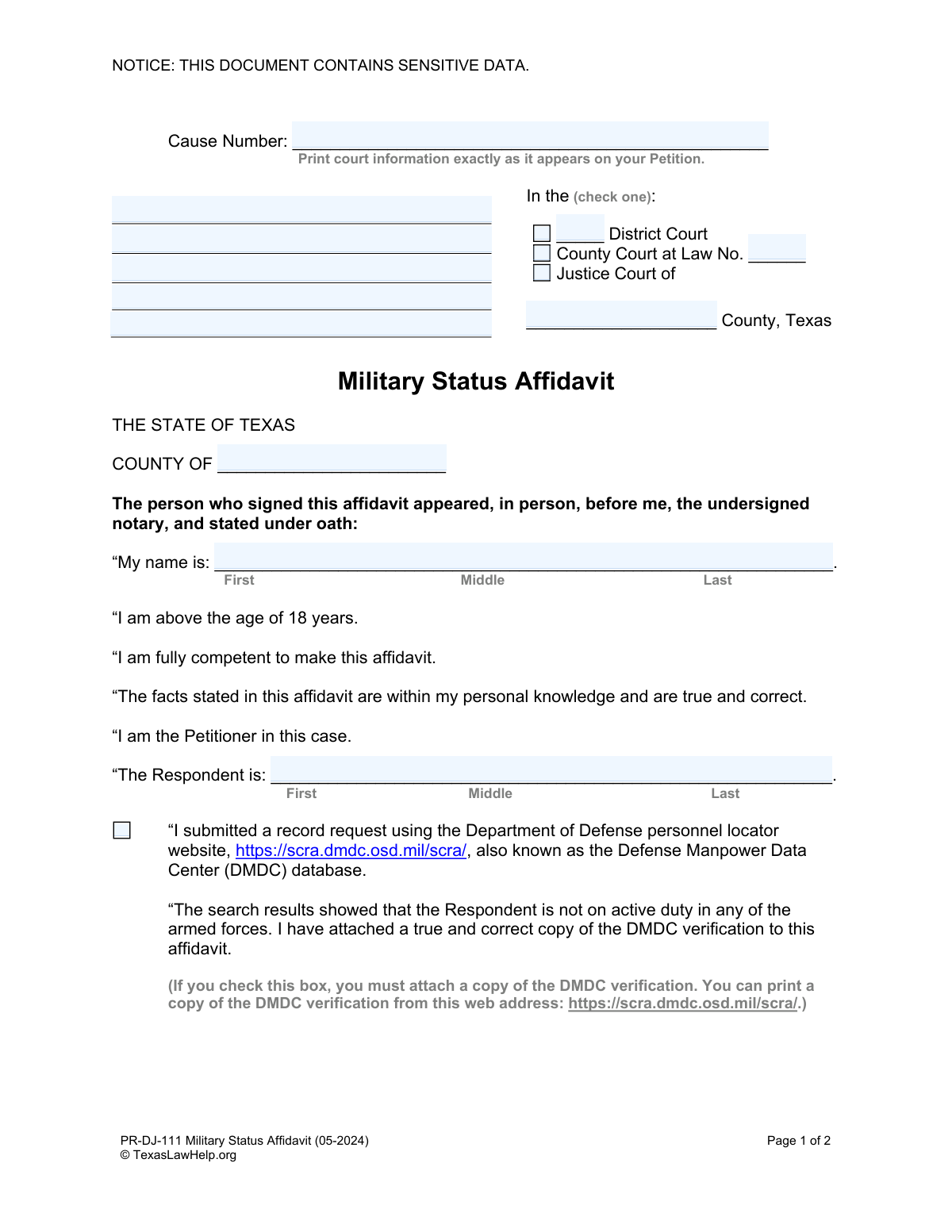
Yes! You can use AI to fill out PR-DJ-111 Military Status Affidavit
The Military Status Affidavit is a sworn statement required in Texas court proceedings to verify if an individual, typically the respondent, is currently serving in the U.S. armed forces. This is essential for complying with the Servicemembers Civil Relief Act (SCRA), which grants legal protections to active-duty personnel. Today, this form can be filled out quickly and accurately using AI-powered services like Instafill.ai, which can also convert non-fillable PDF versions into interactive fillable forms.
PR-DJ-111 is part of the
civil litigation forms category on Instafill.
Our AI automatically handles information lookup, data retrieval, formatting, and form filling.
It takes less than a minute to fill out PR-DJ-111 using our AI form filling.
Securely upload your data. Information is encrypted in transit and deleted immediately after the form is filled out.
Form specifications
| Form name: | PR-DJ-111 Military Status Affidavit |
| Number of fields: | 32 |
| Number of pages: | 1 |
| Language: | English |
Instafill Demo: How to fill out PDF forms in seconds with AI
How to Fill Out PR-DJ-111 Online for Free in 2026
Are you looking to fill out a PR-DJ-111 form online quickly and accurately? Instafill.ai offers the #1 AI-powered PDF filling software of 2026, allowing you to complete your PR-DJ-111 form in just 37 seconds or less.
Follow these steps to fill out your PR-DJ-111 form online using Instafill.ai:
- 1 Navigate to Instafill.ai and upload or select the PR-DJ-111 Military Status Affidavit.
- 2 Provide the court case information, including the Cause Number and the specific court in Texas.
- 3 Enter your full name as the affiant and the full name of the Respondent.
- 4 Indicate the results of your military status search, such as using the Defense Manpower Data Center (DMDC) database, and attach the verification document.
- 5 Review all the information auto-filled by the AI to ensure it is accurate and complete.
- 6 Download the completed affidavit. Do not sign it electronically.
- 7 Print the document and sign it in the physical presence of a Notary Public to have it notarized.
Our AI-powered system ensures each field is filled out correctly, reducing errors and saving you time.
Why Choose Instafill.ai for Your Fillable PR-DJ-111 Form?
Speed
Complete your PR-DJ-111 in as little as 37 seconds.
Up-to-Date
Always use the latest 2026 PR-DJ-111 form version.
Cost-effective
No need to hire expensive lawyers.
Accuracy
Our AI performs 10 compliance checks to ensure your form is error-free.
Security
Your personal information is protected with bank-level encryption.
Frequently Asked Questions About Form PR-DJ-111
This form is used to declare, under oath, whether the other party in your court case (the Respondent) is currently on active duty in the U.S. military. It is required to ensure the legal rights of servicemembers are protected in civil court cases.
The Petitioner, who is the person that started the court case, is responsible for completing, signing, and filing this affidavit with the court.
The DMDC (Defense Manpower Data Center) provides the official Department of Defense website for verifying military status. Using this website is the primary method for checking the Respondent's status, and if you do, you must attach a printed copy of the verification to this affidavit.
To get a result from the DMDC website, you will typically need the Respondent's last name and either their date of birth or Social Security Number.
If you cannot get a result from the DMDC, you can try the other options on the form, such as contacting military locator services or explaining why you know the person is not in the military. If you've tried and still don't know, you can check the box stating that.
The Cause Number is the unique number assigned to your case by the court. You can find this number on other official documents from your case, like the original Petition you filed.
Yes, this is a sworn affidavit that must be signed in the physical presence of a Notary Public. Do not sign the form until you are in front of the notary.
After the form is completed and notarized, you must file the original document with the clerk of the court where your case is being heard.
The form has a specific checkbox for this situation. If you have made a good faith effort to find out but were unsuccessful, you can check the box that says, 'I do not know if the Respondent is in the military now.'
The Respondent is the person against whom you filed the lawsuit. They are the other party in your legal case.
Yes, services like Instafill.ai use AI to help you accurately fill out form fields, saving you time and reducing errors. These tools can pre-fill your information and guide you through complex forms.
Simply upload the Military Status Affidavit to the Instafill.ai platform. The AI will make the document interactive, allowing you to easily click and type your information into the correct fields before printing for notarization.
You can use a service like Instafill.ai, which can convert flat, non-fillable PDFs into interactive forms. Just upload your file, and the platform will make it possible to type your answers directly onto the form.
Compliance PR-DJ-111
Validation Checks by Instafill.ai
1
Ensures Cause Number is Provided
This check verifies that the 'Cause Number' field is not empty. The Cause Number is a unique identifier that links this affidavit to a specific court case, making it essential for proper filing and record-keeping. If this field is left blank, the form submission will be rejected, and the user will be prompted to enter the correct Cause Number from their Petition.
2
Validates Exclusive Court Selection
This validation ensures that exactly one court type (District Court, County Court at Law, or Justice Court) is selected from the checkbox group. Selecting multiple or no court types creates ambiguity and can lead to the document being filed in the wrong jurisdiction or rejected entirely. A validation failure will require the user to select only one option before proceeding.
3
Requires Conditional Court Details
This check is triggered based on the court type selected. If 'County Court at Law' is chosen, the associated number field must be provided; if 'Justice Court' is chosen, the county name must be filled in. This information is critical for identifying the specific court and is a legal requirement for the document's validity. Failure to provide these details will block submission until the required information is entered.
4
Verifies Affiant's Full Name
This validation confirms that the 'My name is' field is completed with at least a first and last name. The affiant's full legal name is required for the affidavit to be legally binding and to properly identify the person making the sworn statement. An incomplete name will result in a validation error, prompting the user to provide their full name.
5
Verifies Respondent's Full Name
This check ensures the 'The Respondent is' field is filled out with at least a first and last name. Correctly identifying the respondent is fundamental to the purpose of the affidavit and the legal proceeding it supports. If the respondent's name is missing or incomplete, the form cannot be processed, as the subject of the affidavit is not clearly defined.
6
Enforces Mutually Exclusive Military Status
This validation checks for logical consistency among the military status checkboxes. A user cannot select contradictory statements, such as both 'Respondent is not on active duty' and 'I do not know if the Respondent is in the military now'. This prevents logically impossible submissions that would be immediately rejected by the court. If a conflict is detected, the user must correct their selections to reflect a single, consistent status.
7
Confirms DMDC Verification Attachment
This rule verifies that a file has been attached if the user checks the box stating they performed a search on the Defense Manpower Data Center (DMDC) website. The form explicitly requires a copy of the DMDC verification to be attached as evidence for this claim. If the box is checked but no file is attached, the submission will be halted with a message instructing the user to upload the required document.
8
Requires Explanation for Personal Knowledge Claim
This check ensures that if the user selects the option 'I know that the Respondent is not now in the military because:', the corresponding text area is filled with an explanation. The court needs to understand the basis for this knowledge to assess its credibility. An empty explanation field will trigger an error, forcing the user to provide the basis for their claim before the affidavit can be completed.
9
Validates Notarization Date
This validation ensures the date provided in the notary section is a complete, valid date and is not a date in the future. The notarization date is a legal requirement that records when the oath was administered, and it must be historically accurate. An invalid or future date would invalidate the notarization, so the system will reject it and require a valid date to be entered.
10
Ensures Notary County is Specified
This check verifies that the 'County of' field within the notarization block is completed. The county specifies the jurisdiction where the notary public administered the oath, which is a critical component of a valid notarization. A missing notary county will cause the submission to fail, as it renders the notarization legally incomplete.
11
Cross-Validates Affiant's Name with Notary Section
This validation compares the name entered in the 'My name is' field with the name printed in the notary section ('PRINT the first and last names of the person who signed'). The names must match to confirm that the person who signed the affidavit is the same person identified at the beginning of the document. A mismatch indicates a serious error and will prevent submission until the names are consistent.
12
Ensures Oath County is Provided
This check validates that the 'COUNTY OF' field at the top of the form, which precedes the oath, is filled in. This field specifies the county in which the affiant is making their sworn statement, establishing the legal venue for the affidavit. Failure to provide this information makes the affidavit legally deficient and will block the submission.
Common Mistakes in Completing PR-DJ-111
This mistake occurs when the affiant signs the document before appearing in person before a notary public. The form explicitly states, 'Do not sign until you are in front of a notary.' A premature signature invalidates the affidavit, as the notary must witness the act of signing to legally notarize the document, leading to rejection by the court and requiring the process to be repeated.
Users often enter the 'Cause Number' or select the court information incorrectly, failing to match it exactly with the original Petition. This can happen due to typos or not having the Petition available for reference. An incorrect cause number or court designation can lead to the affidavit being misfiled, rejected by the clerk, or not associated with the correct case, causing significant delays.
The form requires that if you check the box indicating you used the Defense Manpower Data Center (DMDC) website, you must attach a printed copy of the verification results. People frequently check the box but forget to print and attach the corresponding document. This omission makes the affidavit incomplete and it will be rejected by the court, as there is no proof to support the sworn statement.
Individuals may enter their own name or the Respondent's name using initials, nicknames, or omitting a middle name, instead of the full legal name as required. Legal documents require precise identification to be valid. Using incomplete names can create ambiguity and may lead to the rejection of the affidavit or future challenges to the legal proceeding's validity.
A common error is checking boxes that contradict each other, such as checking the box that the DMDC search showed the Respondent is 'not on active duty' and also checking the box 'I do not know if the Respondent is in the military now.' This indicates confusion and undermines the credibility of the affidavit. The court clerk will likely reject a form with conflicting statements, requiring clarification and resubmission.
After signing in front of the notary, the affiant may leave without confirming the notary has completed their section correctly. This includes the notary's signature, the date, the county, and the official seal. An incomplete or missing notary seal or signature renders the entire affidavit invalid for legal purposes, necessitating a new appointment with the notary.
The notary section requires the affiant's name to be clearly printed so the notary can officially record who appeared before them. People sometimes forget this step, write illegibly, or use a cursive signature instead of printing. This can cause issues for the court clerk when verifying the identity of the signer, potentially leading to the document's rejection.
When filling out the section 'I know that the Respondent is not now in the military because:', users sometimes provide weak or subjective reasons like 'I just know' or 'He told me once.' This section requires a factual basis for your personal knowledge, such as 'I am their current employer and see them daily' or 'I have lived with them for the past five years.' An insufficient explanation can cause a judge to question the validity of the affidavit.
The form presents two methods for verification: an online DMDC search and manual calls to military locator services. Users may get confused, filling out both sections improperly or, more commonly, not performing either verification method and simply guessing. Failing to conduct a good-faith search for the respondent's military status can have serious legal consequences under the Servicemembers Civil Relief Act (SCRA).
Due to oversight or uncertainty, individuals may leave essential fields blank, such as the county where the affidavit is signed, the County Court at Law number, or the Respondent's full name. Each field on a legal form is typically required for a reason, and omissions can render the document legally deficient. AI-powered form-filling tools like Instafill.ai can help prevent this by flagging mandatory fields and ensuring all necessary information is provided before finalization.
Saved over 80 hours a year
“I was never sure if my IRS forms like W-9 were filled correctly. Now, I can complete the forms accurately without any external help.”
Kevin Martin Green
Your data stays secure with advanced protection from Instafill and our subprocessors

Robust compliance program
Transparent business model
You’re not the product. You always know where your data is and what it is processed for.
ISO 27001, HIPAA, and GDPR
Our subprocesses adhere to multiple compliance standards, including but not limited to ISO 27001, HIPAA, and GDPR.
Security & privacy by design
We consider security and privacy from the initial design phase of any new service or functionality. It’s not an afterthought, it’s built-in, including support for two-factor authentication (2FA) to further protect your account.
Fill out PR-DJ-111 with Instafill.ai
Worried about filling PDFs wrong? Instafill securely fills pr-dj-111-military-status-affidavit forms, ensuring each field is accurate.