Yes! You can use AI to fill out Form POS-020(P), Attachment to Proof of Personal Service—Civil (Persons Served)
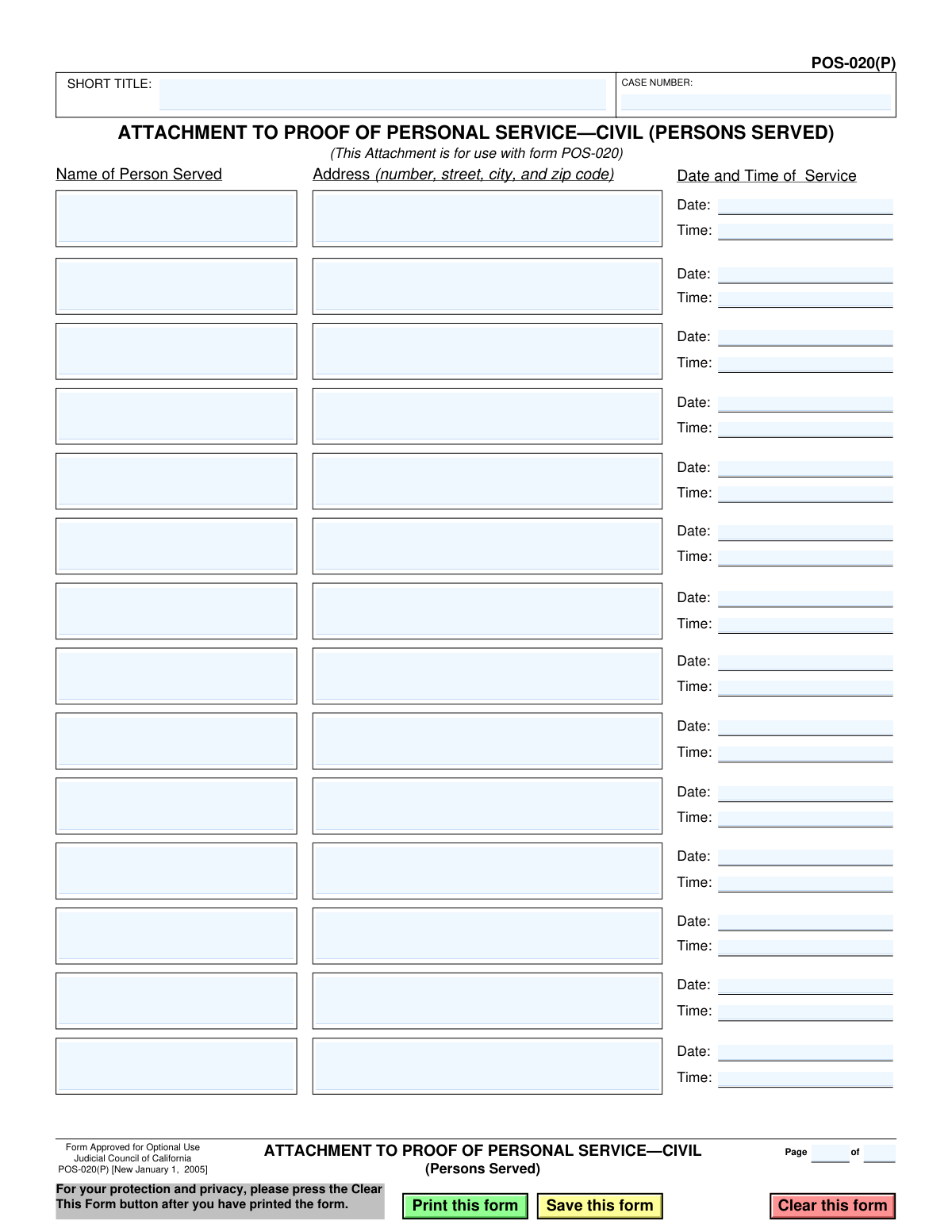
Form POS-020(P) is a legal document used in California civil court proceedings as an attachment to the main Proof of Personal Service (Form POS-020). It is necessary when legal documents have been personally served to more individuals than can be listed on the primary form, ensuring a complete and accurate record for the court. This form provides a clear, itemized list of each person served, their address, and the date and time of service. Today, this form can be filled out quickly and accurately using AI-powered services like Instafill.ai, which can also convert non-fillable PDF versions into interactive fillable forms.
POS-020(P) is part of the
California court forms, civil court forms, proof of service forms and civil service forms categories on Instafill.
Our AI automatically handles information lookup, data retrieval, formatting, and form filling.
It takes less than a minute to fill out POS-020(P) using our AI form filling.
Securely upload your data. Information is encrypted in transit and deleted immediately after the form is filled out.
Form specifications
| Form name: | Form POS-020(P), Attachment to Proof of Personal Service—Civil (Persons Served) |
| Number of fields: | 64 |
| Number of pages: | 1 |
| Language: | English |
Instafill Demo: How to fill out PDF forms in seconds with AI
How to Fill Out POS-020(P) Online for Free in 2026
Are you looking to fill out a POS-020(P) form online quickly and accurately? Instafill.ai offers the #1 AI-powered PDF filling software of 2026, allowing you to complete your POS-020(P) form in just 37 seconds or less.
Follow these steps to fill out your POS-020(P) form online using Instafill.ai:
- 1 Navigate to Instafill.ai and upload or select Form POS-020(P).
- 2 Enter the Case Number and Short Title at the top of the form, ensuring it matches the primary court documents.
- 3 For each person served, input their full name in the 'Name of Person Served' column.
- 4 Provide the complete address where service was completed for each corresponding individual.
- 5 Enter the exact date and time of service for each person listed.
- 6 Review all entries for accuracy, then save or print the completed attachment.
- 7 Attach the signed form to your main Proof of Personal Service (POS-020) before filing with the court.
Our AI-powered system ensures each field is filled out correctly, reducing errors and saving you time.
Why Choose Instafill.ai for Your Fillable POS-020(P) Form?
Speed
Complete your POS-020(P) in as little as 37 seconds.
Up-to-Date
Always use the latest 2026 POS-020(P) form version.
Cost-effective
No need to hire expensive lawyers.
Accuracy
Our AI performs 10 compliance checks to ensure your form is error-free.
Security
Your personal information is protected with bank-level encryption.
Frequently Asked Questions About Form POS-020(P)
Form POS-020(P) is an attachment used in California civil cases to list multiple people who were served legal documents. It is used when there is not enough space on the main Proof of Personal Service form (POS-020).
The person who personally delivered the legal documents (the 'server' or 'process server') is responsible for completing this form. This form is their sworn statement detailing who they served, where, and when.
No, this form is not a standalone document. It is an attachment that must be filed together with the main 'Proof of Personal Service—Civil' form (POS-020).
You will need the court case number, the short title of the case, and for each person served, their full name, the complete address of service, and the specific date and time the service occurred.
In the 'Short Title' field, you should write a shortened version of the case name, for example, 'Smith v. Jones'. This should match the short title used on other documents in your case.
You can use multiple copies of Form POS-020(P). Be sure to number the pages correctly in the 'Page __ of __' section at the top of the form to keep your records organized.
No, you only need to complete the entries for the individuals you actually served. You can leave any remaining lines on the page blank.
Once completed, you must attach this form to the main POS-020 form. The entire package should then be filed with the court clerk for the court where your case is being heard.
Yes, services like Instafill.ai use AI to help you accurately auto-fill form fields with your case information. This can save significant time and help prevent common errors.
To fill this form out online, you can use a service like Instafill.ai. Simply upload the form to the platform, and its AI-powered tools will guide you in filling out the required fields efficiently.
If you have a non-fillable or 'flat' PDF, you can upload it to a service like Instafill.ai. The platform can convert the document into an interactive, fillable form that you can easily complete on your computer.
The form is approved for 'Optional Use'. This means you only need to use it if you are serving multiple people and require extra space than what is provided on the main POS-020 form.
Compliance POS-020(P)
Validation Checks by Instafill.ai
1
Case Number Presence
Verifies that the 'CASE NUMBER' field is not empty. The case number is a unique identifier for the legal proceeding and is essential for associating this proof of service with the correct court file. Failure to provide a case number will result in the form being rejected as it cannot be filed or processed.
2
Short Title Presence
Ensures the 'SHORT TITLE' field has been completed. The short title provides a human-readable identifier for the case, making it easier for court clerks and legal staff to manage documents. Submissions without a short title may be delayed or rejected for being incomplete.
3
Minimum One Person Served
Confirms that at least one complete service record (including Name, Address, Date, and Time) has been entered. As this form's purpose is to list persons served, a submission with no entries is functionally empty and serves no purpose. The form will be considered incomplete if no service details are provided.
4
Complete Service Record for Each Entry
Checks that for any row where a 'Name of Person Served' is entered, the corresponding 'Address', 'Date', and 'Time' of service are also filled out. An incomplete record for a person served is legally insufficient as it lacks the necessary details to prove service was properly executed. The system should flag any partially filled rows as errors.
5
Date of Service Format
Ensures that the 'Date' field for each service entry is in a recognized date format, such as MM/DD/YYYY. Consistent and valid date formatting is essential for legal record-keeping and to avoid ambiguity. Entries with improperly formatted dates will be rejected to prevent data corruption and legal challenges.
6
Date of Service Not in Future
Checks that the 'Date' of service for each entry is not a future date. Proof of service is a record of an event that has already happened, so a future date is logically impossible and legally invalid. This check prevents clerical errors that would render the document void.
7
Time of Service Format
Validates that the 'Time' field for each service entry is in a proper time format, including hours, minutes, and an AM/PM designator (e.g., HH:MM AM/PM). The exact time of service can be a critical detail in legal proceedings. An improperly formatted time is ambiguous and will cause the entry to be flagged as invalid.
8
Complete Service Address
Verifies that the 'Address' field contains a full street address, including a number, street name, city, and ZIP code. A complete and accurate address is required to legally establish the location where service occurred. Incomplete addresses will cause the validation to fail, as the location of service cannot be confirmed.
9
Valid ZIP Code Format in Address
Parses the 'Address' field to identify and validate the ZIP code. The check ensures the ZIP code is a 5-digit or 9-digit (ZIP+4) numeric value. An invalid ZIP code can invalidate the entire address, which is a critical component of the proof of service.
10
Logical Page Numbering
Validates the 'Page X of Y' fields at the top of the form. This check ensures that the current page number (X) is a positive integer and is less than or equal to the total number of pages (Y). Incorrect pagination can lead to confusion and suggests that the full document may be incomplete or assembled incorrectly.
11
Case Number Format Validation
Checks that the 'CASE NUMBER' field conforms to common court case number patterns, which typically include a mix of letters, numbers, and hyphens. While formats vary by jurisdiction, this check helps catch obvious typos or incorrectly entered data. An improperly formatted case number could lead to misfiling of the document.
12
Duplicate Service Record Detection
Scans all entered service records to ensure there are no exact duplicates, meaning the same person, address, date, and time are not listed more than once. Duplicate entries are almost always data entry errors and can create confusion in the court record. The system should warn the user if a potential duplicate is found.
Common Mistakes in Completing POS-020(P)
This mistake occurs when the Case Number or Short Title on this attachment does not exactly match the information on the main POS-020 form and other court documents. This can happen from a simple typo or by copying old information. The consequence is that the court may reject the filing or misfile the document, potentially invalidating the proof of service for all individuals listed and causing significant delays.
Users often leave the 'Page __ of __' fields at the top right blank, especially when only one attachment page is used. If multiple attachment pages are required to list all served parties, missing pagination can lead the court clerk to believe pages are missing. This can result in an incomplete filing status, requiring you to resubmit the documents correctly.
A frequent error is entering a nickname, an initial, or an incomplete legal name in the 'Name of Person Served' field (e.g., 'Dave' instead of 'David Chen'). Legal documents require the full, correct legal name to be valid. An incorrect name gives the opposing party grounds to challenge the service, arguing the correct individual was not properly identified or served.
Filers sometimes omit crucial details from the address, such as a suite/apartment number, city, or zip code. The address listed must be the precise physical location where service was completed. An incomplete or vague address weakens the proof of service and can be challenged, as it becomes difficult to verify that service occurred at the correct location.
Recording the time without specifying AM or PM (e.g., writing '4:15' instead of '4:15 PM') creates ambiguity. The exact time of service can be legally important to prove compliance with service rules (e.g., not serving at an unreasonably late hour). To avoid this, always use a clear format like 'HH:MM AM/PM' to prevent any misinterpretation.
Users may enter dates and times in varying formats throughout the list (e.g., '01/05/2024' on one line and 'Jan 6, 2024' on another). This lack of consistency appears unprofessional and can create confusion for the court clerk. Always use a uniform format, such as MM/DD/YYYY for dates and HH:MM AM/PM for times, for all entries on the form.
A critical error is filing this POS-020(P) form by itself, without the main POS-020 Proof of Personal Service form it is meant to accompany. This document is an attachment and has no legal validity on its own. It will be rejected by the court as an incomplete filing, halting progress in the case until the complete, correct set of documents is submitted.
This data entry error involves accidentally writing a date or time of service that has not yet occurred. A proof of service for an event in the future is logically impossible and will be immediately rejected by the court clerk. To prevent this, carefully review all dates before filing. AI-powered form filling tools like Instafill.ai can help prevent these errors by automatically validating data for logical inconsistencies.
When the form is printed and filled out by hand, poor handwriting can make names, addresses, and dates difficult to decipher. Illegible information can lead to data entry errors by court staff or give the opposing party a reason to contest the validity of the service. If you have a non-fillable PDF, tools like Instafill.ai can convert it into a fillable version, allowing you to type directly into the fields for perfect clarity.
A common misunderstanding is to list a P.O. Box or other mailing-only address in the address field. Personal service, by definition, requires the documents to be physically delivered to the person at a specific physical location. A P.O. Box is not a valid location for personal service, and using one will invalidate that specific entry on the proof of service.
Saved over 80 hours a year
“I was never sure if my IRS forms like W-9 were filled correctly. Now, I can complete the forms accurately without any external help.”
Kevin Martin Green
Your data stays secure with advanced protection from Instafill and our subprocessors

Robust compliance program
Transparent business model
You’re not the product. You always know where your data is and what it is processed for.
ISO 27001, HIPAA, and GDPR
Our subprocesses adhere to multiple compliance standards, including but not limited to ISO 27001, HIPAA, and GDPR.
Security & privacy by design
We consider security and privacy from the initial design phase of any new service or functionality. It’s not an afterthought, it’s built-in, including support for two-factor authentication (2FA) to further protect your account.
Fill out POS-020(P) with Instafill.ai
Worried about filling PDFs wrong? Instafill securely fills form-pos-020p-attachment-to-proof-of-personal-servicecivil-persons-served forms, ensuring each field is accurate.