Yes! You can use AI to fill out Form POS-020(D), Attachment to Proof of Personal Service—Civil (Documents Served)
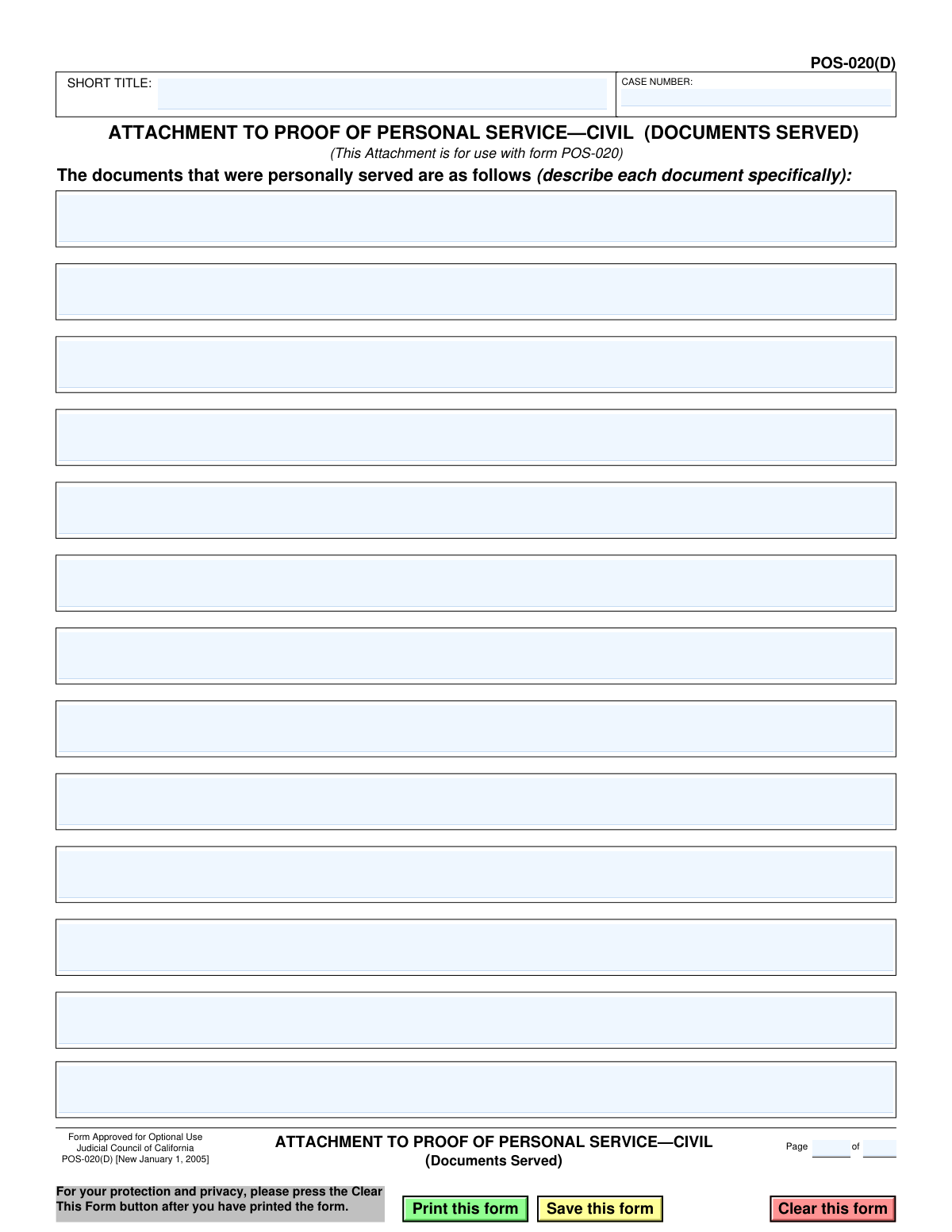
This form, officially titled 'Attachment to Proof of Personal Service—Civil (Documents Served)', is a supplemental document for California's Form POS-020. It is used to provide a detailed, itemized list of all legal documents that were personally delivered to a party in a civil lawsuit, ensuring a complete and accurate record for the court. Today, this form can be filled out quickly and accurately using AI-powered services like Instafill.ai, which can also convert non-fillable PDF versions into interactive fillable forms.
POS-020(D) is part of the
California court forms, civil court forms, proof of service forms and civil service forms categories on Instafill.
Our AI automatically handles information lookup, data retrieval, formatting, and form filling.
It takes less than a minute to fill out POS-020(D) using our AI form filling.
Securely upload your data. Information is encrypted in transit and deleted immediately after the form is filled out.
Form specifications
| Form name: | Form POS-020(D), Attachment to Proof of Personal Service—Civil (Documents Served) |
| Number of fields: | 21 |
| Number of pages: | 1 |
| Language: | English |
Instafill Demo: How to fill out PDF forms in seconds with AI
How to Fill Out POS-020(D) Online for Free in 2026
Are you looking to fill out a POS-020(D) form online quickly and accurately? Instafill.ai offers the #1 AI-powered PDF filling software of 2026, allowing you to complete your POS-020(D) form in just 37 seconds or less.
Follow these steps to fill out your POS-020(D) form online using Instafill.ai:
- 1 Navigate to Instafill.ai and upload or select the POS-020(D) form.
- 2 Enter the case number and short title in the designated header fields to link the attachment to the correct case.
- 3 In the main section, specifically describe each document that was personally served, using one line per document.
- 4 Indicate the page number of the attachment in the footer section.
- 5 Review all the listed documents and case information for accuracy and completeness.
- 6 Download the completed form. Attach it to the main Proof of Personal Service—Civil (Form POS-020) before filing with the court.
Our AI-powered system ensures each field is filled out correctly, reducing errors and saving you time.
Why Choose Instafill.ai for Your Fillable POS-020(D) Form?
Speed
Complete your POS-020(D) in as little as 37 seconds.
Up-to-Date
Always use the latest 2026 POS-020(D) form version.
Cost-effective
No need to hire expensive lawyers.
Accuracy
Our AI performs 10 compliance checks to ensure your form is error-free.
Security
Your personal information is protected with bank-level encryption.
Frequently Asked Questions About Form POS-020(D)
This form is an attachment for the Proof of Personal Service—Civil (POS-020). It is used to list all the documents that were served when there is not enough space on the main POS-020 form.
The person who personally delivered the legal documents (the server) fills out this form. It is part of their declaration to the court detailing which documents were served.
No, this form is for optional use. You only need to use it if you served more documents than can be listed in the space provided on the main Proof of Personal Service form (POS-020).
The Case Number and Short Title (e.g., 'Smith v. Jones') are located on the first page of the court documents you are serving. You must copy this information exactly onto the POS-020(D) form.
You must be specific and list the full, exact title of each document served. For example, write 'Summons (SUM-100),' 'Complaint,' or 'Amended Complaint,' not just 'court papers'.
If you need more space than the 13 lines provided, you can use a second copy of the POS-020(D) form. Be sure to number the pages correctly at the top, for example, 'Page 1 of 2' and 'Page 2 of 2'.
No, this form is an attachment and cannot be filed alone. It must be securely attached to a completed and signed Proof of Personal Service—Civil (POS-020) form before filing.
This refers to the pagination of the attachment itself. If you only use one attachment page, you would write 'Page 1 of 1'. If you use multiple pages, number them sequentially.
Yes, services like Instafill.ai use AI to help you accurately auto-fill form fields. This can save time and reduce errors when entering repetitive information like the case number and short title.
You can use a service like Instafill.ai to fill out the form online. Simply upload the PDF, and the platform will allow you to type your information directly into the fields before downloading or printing.
If you have a non-fillable or 'flat' PDF, you can use a tool like Instafill.ai. It can convert the non-fillable PDF into an interactive form that you can easily complete on your computer.
This attachment, POS-020(D), must be used with the main form POS-020, Proof of Personal Service—Civil. It provides additional space for the list of documents mentioned in the main form.
Compliance POS-020(D)
Validation Checks by Instafill.ai
1
Ensures Case Number is Provided
This check verifies that the 'CASE NUMBER' field (CaseNumber_ft) is not empty. The case number is a critical identifier that links this attachment to the correct legal case file in the court's system. Failure to provide a case number would make the document impossible to file, leading to its rejection by the court clerk.
2
Validates Case Number Format
This validation ensures the 'CASE NUMBER' field contains a plausible format, typically consisting of letters, numbers, and hyphens, and is free of invalid special characters. An incorrectly formatted case number can cause filing errors or result in the document being associated with the wrong case. If the format is invalid, the user should be prompted to correct it before submission.
3
Ensures Short Title is Provided
This check confirms that the 'SHORT TITLE' field (Party_ft) has been filled out. The short title provides a human-readable identifier for the case (e.g., 'Smith v. Jones') and is used for quick reference by court staff. Submitting the form without a short title can lead to processing delays and potential rejection.
4
Verifies At Least One Document is Listed
This validation ensures that at least one of the document description fields ('FillText1' through 'FillText13') contains text. The entire purpose of this attachment is to list documents that were served, so a blank form serves no purpose and is considered an incomplete submission. If all document fields are empty, the user should be notified that the form is not needed.
5
Validates Current Page Number Format
This check verifies that the 'Page' field ('FillText40') contains only a positive integer. This field is essential for proper document assembly and ensuring all pages are accounted for. An invalid entry (e.g., text, zero, or a negative number) would cause confusion and could result in the attachment being considered incomplete or improperly filed.
6
Validates Total Pages Number Format
This validation ensures the 'of' pages field ('FillText41') contains a positive integer. This number indicates the total count of pages in the attachment, which is crucial for the court to verify that the entire document has been received. Non-numeric or invalid entries will trigger an error, requiring the user to input a valid total page count.
7
Logical Check for Page Numbering
This check ensures the current page number ('FillText40') is less than or equal to the total number of pages ('FillText41'). Illogical numbering, such as 'Page 3 of 2', indicates a data entry error that must be corrected. This validation prevents confusion and ensures the document set is coherent and correctly ordered.
8
Enforces Minimum Length for Document Descriptions
This validation checks that any filled document description field (e.g., 'FillText1', 'FillText2') meets a minimum character length (e.g., 5 characters). This prevents vague or useless entries like 'doc' or 'file', ensuring the description is specific enough to be legally meaningful. If an entry is too short, the system should prompt the user for a more specific description.
9
Checks for Sequential Listing of Documents
This validation verifies that the document description fields are filled in sequentially without gaps (e.g., if 'FillText3' is filled, 'FillText1' and 'FillText2' must also be filled). While not a critical legal error, enforcing sequential entry improves readability and organization, reducing the chance of confusion. A warning should be displayed if a gap is detected.
10
Prohibits Placeholder Text in Document List
This check scans the document description fields for common placeholder text such as 'N/A', 'None', or 'See attached'. This form should only be used to list specific documents; if there are none to list, the form should not be submitted at all. Detecting such placeholders prevents the submission of a functionally empty form.
11
Cross-references Case Number with Parent Form
This validation compares the 'CASE NUMBER' on this attachment (POS-020(D)) with the case number on the main 'Proof of Personal Service' form (POS-020). The numbers must match exactly to ensure the attachment is correctly associated with its parent document. A mismatch would cause a critical filing error, potentially separating the attachment from the proof of service it belongs to.
12
Verifies Short Title Consistency
This check ensures the 'SHORT TITLE' on this attachment matches the short title on the parent POS-020 form. Consistency in the short title across all related documents is important for maintaining a clear and organized case file. A discrepancy could cause confusion for court clerks and legal parties, and the user should be prompted to align the titles before submission.
Common Mistakes in Completing POS-020(D)
Users often mistype the case number or forget to enter it entirely, especially when managing multiple legal matters. An incorrect or missing case number will cause the court clerk to reject the filing, as it cannot be associated with the correct case file, leading to delays. To prevent this, carefully double-check the number against the Summons or Complaint, and use AI form-filling tools like Instafill.ai to populate this information accurately from your case data.
Instead of listing specific document titles as required, filers may use generic terms like 'court papers' or 'legal documents.' This is legally insufficient because it fails to prove which specific documents were served, allowing the opposing party to challenge the service's validity. Always list the full, exact title of each document and its form number, if available (e.g., 'Summons (SUM-100)').
The 'Page __ of __' fields are small and easily overlooked but are critical for multi-page attachments. Failing to number the pages can cause confusion about the order of documents or suggest a page is missing, potentially invalidating the proof of service. Always complete this field, even for a single page (e.g., 'Page 1 of 1'), to ensure the filing is clear and complete.
Some users mistakenly believe this form is the complete Proof of Service and file it by itself. This form is only an attachment and lacks the server's declaration, signature, and service details, which are required on the main POS-020 form. Filing this attachment alone is invalid and will be rejected by the court, causing significant delays.
In a rush, a server might accidentally forget to list one or more of the documents that were actually served. This creates a critical gap in the legal record, as there is no official proof that the omitted document was ever delivered to the opposing party. To prevent this, use a checklist to meticulously account for every document served when filling out the form.
Filers may enter an incomplete or incorrect short case title, which can cause filing errors and confusion for court staff trying to match the document to the correct case file. The short title should be consistent and match what is used on other official documents for the case, such as 'Smith v. Jones.' AI-powered tools like Instafill.ai can help maintain consistency by auto-filling this information across all related forms.
When a form is only available as a non-fillable PDF, people must print and fill it out by hand, which can result in illegible entries. If the court clerk cannot read the case number or the names of the documents served, the filing will likely be rejected. To avoid this, always type directly into the fillable PDF; if the form is a flat PDF, a tool like Instafill.ai can convert it into a fillable version.
A filer might erroneously list a document that was intended for service but was not included in the final packet. This is a serious error, as the proof of service is signed under penalty of perjury, and misrepresenting what was served can lead to legal sanctions. The server must physically verify the contents of the service packet and ensure the list on this form is 100% accurate.
This form should only be used when there is not enough space on the main Proof of Service form (POS-020) to list all the documents. Some people attach it out of caution even when it's not needed, sometimes leaving it blank, which can confuse the court clerk. Avoid this by only using and attaching this form if you have more documents to list than will fit on the primary POS-020 form.
Saved over 80 hours a year
“I was never sure if my IRS forms like W-9 were filled correctly. Now, I can complete the forms accurately without any external help.”
Kevin Martin Green
Your data stays secure with advanced protection from Instafill and our subprocessors

Robust compliance program
Transparent business model
You’re not the product. You always know where your data is and what it is processed for.
ISO 27001, HIPAA, and GDPR
Our subprocesses adhere to multiple compliance standards, including but not limited to ISO 27001, HIPAA, and GDPR.
Security & privacy by design
We consider security and privacy from the initial design phase of any new service or functionality. It’s not an afterthought, it’s built-in, including support for two-factor authentication (2FA) to further protect your account.
Fill out POS-020(D) with Instafill.ai
Worried about filling PDFs wrong? Instafill securely fills form-pos-020d-attachment-to-proof-of-personal-servicecivil-documents-served forms, ensuring each field is accurate.