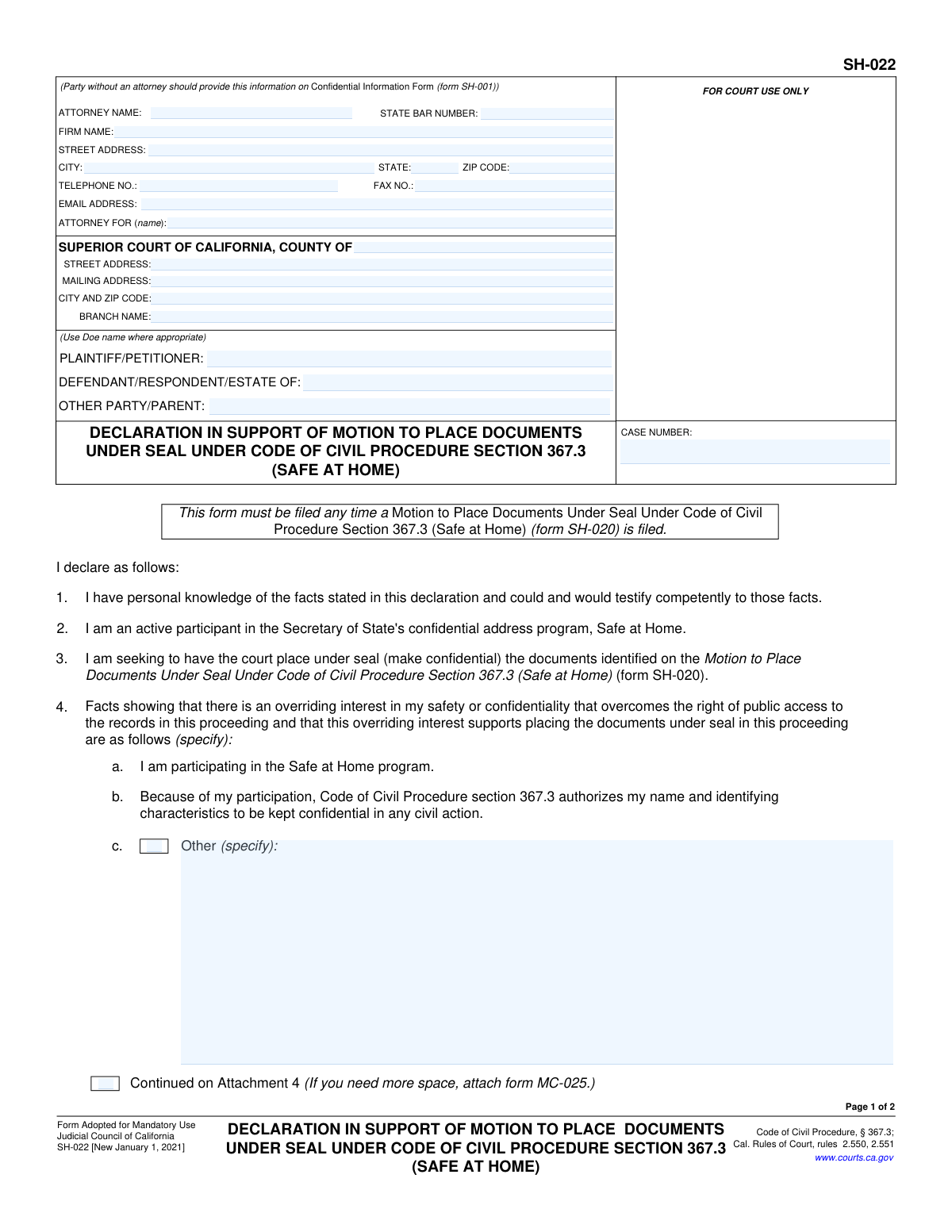
Yes! You can use AI to fill out Form SH-022, Declaration in Support of Motion to Place Documents Under Seal Under Code of Civil Procedure Section 367.3 (Safe at Home)
Form SH-022, the Declaration in Support of Motion to Place Documents Under Seal, is a mandatory California court form filed alongside Form SH-020. It is used by participants of the state's 'Safe at Home' confidential address program to provide a sworn statement explaining why there is an overriding interest in their safety that justifies sealing court records from public access. This declaration is crucial for protecting the identity and location of vulnerable individuals involved in civil litigation. Today, this form can be filled out quickly and accurately using AI-powered services like Instafill.ai, which can also convert non-fillable PDF versions into interactive fillable forms.
SH-022 is part of the
California court forms, civil court forms and civil procedure forms categories on Instafill.
Our AI automatically handles information lookup, data retrieval, formatting, and form filling.
It takes less than a minute to fill out SH-022 using our AI form filling.
Securely upload your data. Information is encrypted in transit and deleted immediately after the form is filled out.
Form specifications
| Form name: | Form SH-022, Declaration in Support of Motion to Place Documents Under Seal Under Code of Civil Procedure Section 367.3 (Safe at Home) |
| Number of fields: | 37 |
| Number of pages: | 1 |
| Language: | English |
Instafill Demo: How to fill out PDF forms in seconds with AI
How to Fill Out SH-022 Online for Free in 2026
Are you looking to fill out a SH-022 form online quickly and accurately? Instafill.ai offers the #1 AI-powered PDF filling software of 2026, allowing you to complete your SH-022 form in just 37 seconds or less.
Follow these steps to fill out your SH-022 form online using Instafill.ai:
- 1 Navigate to Instafill.ai and upload Form SH-022 or select it from the template library.
- 2 Provide the case information, including the court, case number, and party names (using your Doe name where appropriate).
- 3 Confirm your status as an active participant in the Secretary of State's 'Safe at Home' confidential address program.
- 4 Use the AI assistant to help you clearly state the facts showing an overriding interest in your safety and the substantial probability of harm if the records are not sealed.
- 5 Review the pre-filled statements confirming the request is narrowly tailored and that no less restrictive means are available to protect your interest.
- 6 Date and electronically sign the declaration using your assigned Doe name, declaring under penalty of perjury that the information is true and correct.
- 7 Download the completed, signed form, ready for filing with the court along with Form SH-020.
Our AI-powered system ensures each field is filled out correctly, reducing errors and saving you time.
Why Choose Instafill.ai for Your Fillable SH-022 Form?
Speed
Complete your SH-022 in as little as 37 seconds.
Up-to-Date
Always use the latest 2026 SH-022 form version.
Cost-effective
No need to hire expensive lawyers.
Accuracy
Our AI performs 10 compliance checks to ensure your form is error-free.
Security
Your personal information is protected with bank-level encryption.
Frequently Asked Questions About Form SH-022
Form SH-022 is a sworn declaration used to support a motion to keep your personal information confidential in a court case. It explains to the judge why your safety, as a participant in the Safe at Home program, outweighs the public's right to access court records.
You must fill out this form if you are an active participant in California's "Safe at Home" program and are filing a Motion to Place Documents Under Seal (Form SH-020) to protect your identity in a civil case.
This declaration must be filed at the same time as the Motion to Place Documents Under Seal (Form SH-020). This form provides the necessary factual support for the court to consider your motion.
This declaration supports Form SH-020 (Motion to Place Documents Under Seal). You must also have a Confidential Information Form (SH-001) on file with the court, which contains your true name and is not available to the public.
No, do not use your real name on this form. You must sign using your assigned pseudonym or "Doe name" that you are using for the court case, as identified on your confidential Form SH-001.
In Section 5, you need to briefly explain how your safety or confidentiality would be put at risk if your identifying information were made public. Focus on the potential for future harm if your identity is revealed through the court case.
Safe at Home is a confidential address program run by the California Secretary of State. It is designed to help survivors of domestic violence, stalking, and other crimes keep their physical location private and safe.
After you file your motion (SH-020) and this supporting declaration (SH-022), a judge will review your request. The judge will then decide whether to grant your motion and issue an order to seal the documents containing your identifying information.
If you need more space than what is provided on the form, you can use an Attachment form (MC-025). Be sure to label the attachment with the corresponding section number and file it along with your Form SH-022.
Yes, services like Instafill.ai use AI to help you accurately auto-fill form fields, which can save time and reduce errors. You will still need to provide the specific facts for the narrative sections yourself.
You can use a service like Instafill.ai to complete this form online. Simply upload the PDF, and the platform will make it an interactive, fillable document that you can type into, sign, and download from your browser.
If you have a non-fillable or 'flat' PDF, you can use a tool like Instafill.ai to instantly convert it into an interactive, fillable form. This allows you to type your information directly into the fields instead of printing and filling it out by hand.
Compliance SH-022
Validation Checks by Instafill.ai
1
Case Number Consistency Across Pages
This check ensures that the 'CASE NUMBER' entered on page 1 is identical to the 'CASE NUMBER' on page 2. Maintaining consistency is critical for document integrity, ensuring that all pages are correctly associated with the same legal case. If the numbers do not match, the filing may be rejected or misfiled, causing significant delays.
2
California State Bar Number Format
Validates that the 'STATE BAR NUMBER' field contains a number that conforms to the California State Bar's format, which is typically a numeric value. This check helps verify the attorney's credentials and ensures they are licensed to practice in the state. An invalid format could indicate a data entry error or an unauthorized filer, prompting a rejection until corrected.
3
Conditional Attorney Information Completeness
If any part of the attorney information section is filled out (e.g., 'ATTORNEY NAME' or 'STATE BAR NUMBER'), this validation requires that all other essential contact fields in that section (address, city, state, zip, phone) are also completed. This ensures the court has full and accurate contact information for the legal representative on record. An incomplete block will trigger an error, requiring the filer to provide all necessary details.
4
Court County Specification
This check verifies that the 'COUNTY OF' field is filled in, specifying the Superior Court's county. This information is fundamental for routing the document to the correct jurisdiction within the California court system. Failure to specify the county will result in a validation error, as the document cannot be processed or filed without this key piece of location data.
5
Party Name Presence
Ensures that at least one of the primary party fields ('PLAINTIFF/PETITIONER' or 'DEFENDANT/RESPONDENT/ESTATE OF') contains a name, even if it is a 'Doe' pseudonym as instructed. A legal case must have defined parties for the action to proceed. The form will be considered incomplete and rejected if no party names are provided.
6
Declaration Item 4 'Other' Justification
This validation applies to item 4, which provides reasons for sealing documents. If the 'Other' checkbox is selected, this check ensures that the corresponding text field specifying the reason is not empty. This prevents filers from selecting the 'Other' option without providing the required explanation, which is necessary for the judge to evaluate the motion. A failure would prompt the user to either provide a reason or uncheck the box.
7
Declaration Item 5 Justification Completeness
Validates that the declarant has provided the required facts for item 5, which details the potential harm if records are not sealed. The user must either provide text in the specified area or check the box indicating the information is 'Continued on Attachment 5'. This section cannot be left entirely blank, as it contains a critical part of the legal argument for the motion.
8
Attachment Page Count Logic
This check verifies that if any 'Continued on Attachment' checkbox (e.g., for items 4 or 5) is marked, the 'The number of pages attached is' field contains a positive integer. Conversely, if no attachment boxes are checked, this field should be empty or zero. This ensures consistency between the declaration and the physical or digital documents submitted, preventing confusion about the completeness of the filing.
9
Signature Date Presence and Validity
This check ensures the 'Date' field in the signature block is filled with a valid date and that the date is not in the future. The date of signature is legally significant as it marks when the declarant attests to the truth of the statements under penalty of perjury. An invalid or future date would render the declaration invalid and cause the form to be rejected.
10
Printed Doe Name Requirement
Verifies that the field for 'TYPE OR PRINT DOE NAME' is completed. As this form is for a 'Safe at Home' participant, the use of a pseudonym is a core element of the filing's confidentiality. The printed Doe name must be present to properly identify the declarant in a confidential manner, as referenced in the perjury clause.
11
Signature Presence
Ensures that the 'SIGN DOE NAME' field has been signed. A signature is required to execute the declaration under penalty of perjury, making the document legally binding. In a digital system, this validation confirms that a digital signature has been applied or the field has been properly marked as signed, without which the form is legally incomplete.
12
Header Party Name Consistency
This validation confirms that the party names (Plaintiff/Petitioner and Defendant/Respondent) listed in the header of page 1 match the corresponding names in the header of page 2. This cross-page consistency check is crucial for ensuring the integrity and proper assembly of the multi-page document. A mismatch could lead to the document being rejected for clerical errors.
13
Attorney Email Address Format
This check validates that the value entered in the 'EMAIL ADDRESS' field for the attorney follows the standard '[email protected]' format. This is important for ensuring that the court and other parties can reliably send electronic notices and correspondence. An invalid email format would trigger an error, prompting the user to correct it before submission.
14
Procedural Link to Form SH-020
This validation checks that the submission of this declaration (Form SH-022) is associated with a 'Motion to Place Documents Under Seal' (Form SH-020) for the same case number. The form explicitly states it must be filed with an SH-020, so this check enforces a critical procedural rule. A failure would alert the filer that the required motion form may be missing from the submission package.
Common Mistakes in Completing SH-022
The form explicitly requires using a 'Doe' name for the party seeking confidentiality in the case caption and signature line. Filers, especially those new to the process, may mistakenly use their legal name, which completely defeats the purpose of the motion by placing their identity on a public record. To avoid this, always use the court-approved pseudonym in all designated fields and remember to sign with the pseudonym, not your legal signature. AI-powered tools like Instafill.ai can help by flagging fields where a pseudonym is required, preventing accidental disclosure.
Parties without an attorney (pro se litigants) often mistakenly enter their own confidential name and address in the 'ATTORNEY' section at the top of the form. This section is for attorney information only; a party's confidential details must be provided on a separate, non-public form (SH-001). This error can lead to the immediate public disclosure of the very information the motion seeks to protect. Always use Form SH-001 for your personal details and leave the attorney section blank if you are representing yourself.
Sections 4 and 5 require specific facts demonstrating an 'overriding interest' in safety and the 'substantial probability' of harm if records are not sealed. A common mistake is to provide vague, generic, or conclusory statements instead of a detailed, personal narrative explaining the specific threats or risks. A judge may deny the motion for lack of sufficient evidence, leaving the filer's information unprotected. Be specific about the circumstances and potential harm, attaching extra pages (Form MC-025) if necessary.
The signature block at the end of the form is a critical point of error. The instructions clearly state to 'SIGN DOE NAME,' but filers under stress may revert to signing their legal name out of habit. This single mistake invalidates the confidentiality request by placing the filer's legal signature and name on the public document. To prevent this, carefully read the signature block instructions and consciously sign using only the assigned pseudonym.
The top of page two requires the filer to re-enter the Case Number and party names (using the 'Doe' name). It is very common for people to focus on the main content and forget to complete the header on subsequent pages. If the pages are separated, this omission can cause confusion and filing delays, as the second page may not be correctly associated with the case file. Using a tool like Instafill.ai can prevent this by automatically populating recurring information across all pages of a form.
When using additional pages (like Form MC-025) for the detailed statements in sections 4 or 5, filers often make several mistakes. They may forget to check the 'Continued on Attachment' box, fail to write in the total number of pages attached near the signature line, or neglect to attach the documents at all. These errors can result in the court not considering the crucial supplementary information, weakening the motion and potentially leading to its denial.
This declaration (Form SH-022) is not a standalone document; it must be filed in support of the 'Motion to Place Documents Under Seal' (Form SH-020). A frequent error is filing one form without the other, which makes the filing incomplete and will result in its rejection by the court clerk. Always ensure that you are submitting the complete package of required documents (SH-020, SH-022, and the confidential SH-001) together.
A declaration made 'under penalty of perjury' is incomplete and may be considered invalid without a date next to the signature. Filers often complete the entire form but forget to fill in the date field in the final step. An undated declaration can be rejected by the court, causing delays and requiring the form to be refiled. AI form-filling tools can help by validating that all required fields, including the date, are completed before submission.
The case number is the primary identifier for a court filing, and it must be entered correctly and consistently on both pages of the form and on all related documents. A simple typo, such as transposing numbers or letters, can cause the document to be misfiled or rejected by the court clerk, delaying the hearing on the motion. Double-check the case number against other court documents to ensure accuracy. If the form is a non-fillable PDF, a tool like Instafill.ai can convert it to a fillable version and ensure the case number is populated consistently.
Sections 6 and 7 of the form are pre-written statements declaring that the documents submitted to the court for sealing have been 'narrowly tailored' to redact only the party's identifying information. A mistake occurs when the filer submits documents that are either over-redacted (blacking out more than necessary) or under-redacted (leaving some identifying information visible). This contradiction between the declaration and the actual documents can cause a judge to question the filer's diligence and deny the motion.
Saved over 80 hours a year
“I was never sure if my IRS forms like W-9 were filled correctly. Now, I can complete the forms accurately without any external help.”
Kevin Martin Green
Your data stays secure with advanced protection from Instafill and our subprocessors

Robust compliance program
Transparent business model
You’re not the product. You always know where your data is and what it is processed for.
ISO 27001, HIPAA, and GDPR
Our subprocesses adhere to multiple compliance standards, including but not limited to ISO 27001, HIPAA, and GDPR.
Security & privacy by design
We consider security and privacy from the initial design phase of any new service or functionality. It’s not an afterthought, it’s built-in, including support for two-factor authentication (2FA) to further protect your account.
Fill out SH-022 with Instafill.ai
Worried about filling PDFs wrong? Instafill securely fills form-sh-022-declaration-in-support-of-motion-to-place-documents-under-seal-under-code-of-civil-procedure-section-3673 forms, ensuring each field is accurate.