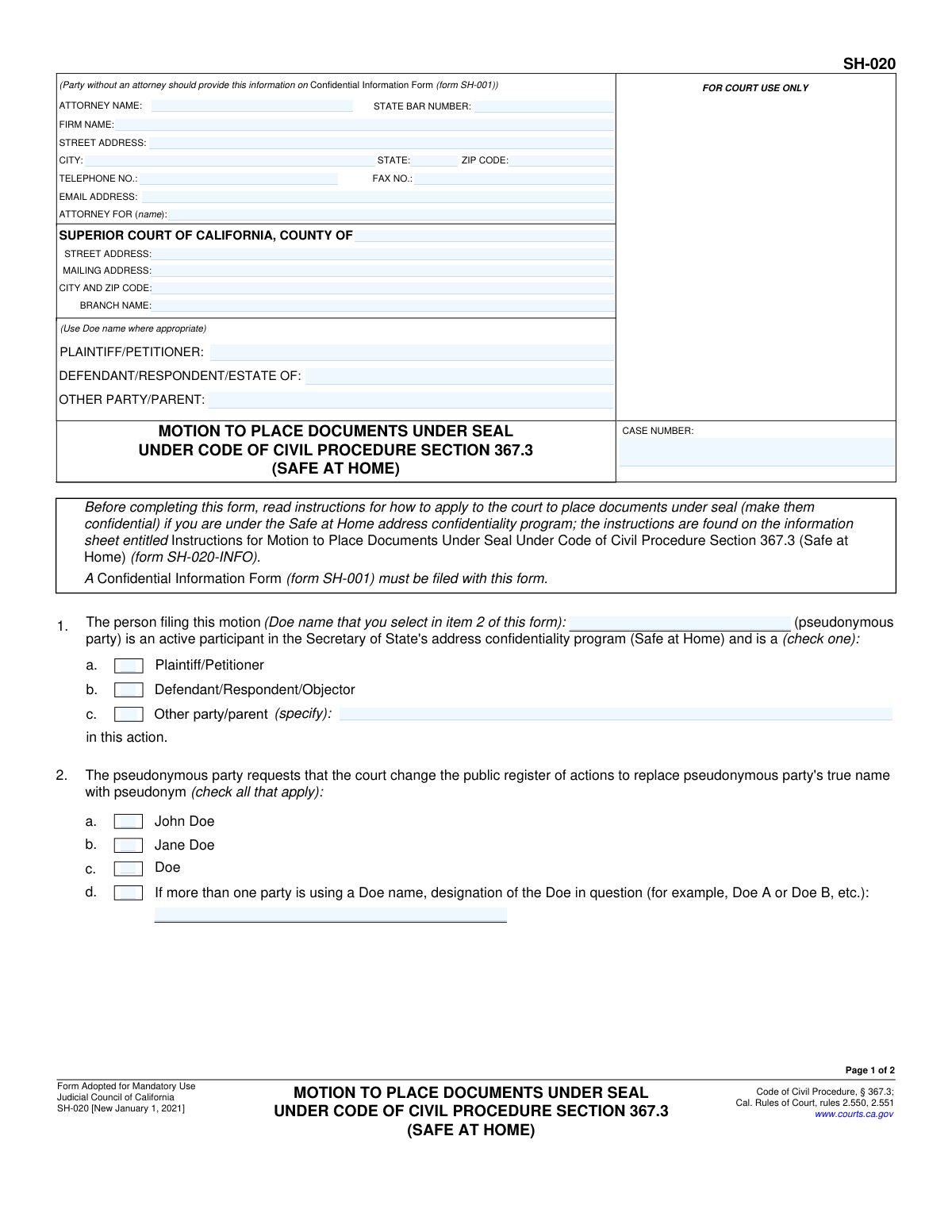
Yes! You can use AI to fill out Form SH-020, Motion to Place Documents Under Seal Under Code of Civil Procedure Section 367.3 (Safe at Home)
This form, SH-020, is a legal motion filed in the Superior Court of California by an individual participating in the state's "Safe at Home" address confidentiality program. Its purpose is to formally request that the court seal specific documents that contain the participant's true name or other identifying characteristics, replacing them with a pseudonym like "Jane Doe" to protect their safety. Today, this form can be filled out quickly and accurately using AI-powered services like Instafill.ai, which can also convert non-fillable PDF versions into interactive fillable forms.
SH-020 is part of the
California court forms, civil court forms and civil procedure forms categories on Instafill.
Our AI automatically handles information lookup, data retrieval, formatting, and form filling.
It takes less than a minute to fill out SH-020 using our AI form filling.
Securely upload your data. Information is encrypted in transit and deleted immediately after the form is filled out.
Form specifications
| Form name: | Form SH-020, Motion to Place Documents Under Seal Under Code of Civil Procedure Section 367.3 (Safe at Home) |
| Number of fields: | 50 |
| Number of pages: | 1 |
| Language: | English |
Instafill Demo: How to fill out PDF forms in seconds with AI
How to Fill Out SH-020 Online for Free in 2026
Are you looking to fill out a SH-020 form online quickly and accurately? Instafill.ai offers the #1 AI-powered PDF filling software of 2026, allowing you to complete your SH-020 form in just 37 seconds or less.
Follow these steps to fill out your SH-020 form online using Instafill.ai:
- 1 Navigate to Instafill.ai and upload or select the SH-020 form.
- 2 Provide your case information, including the case number and the specific Superior Court details, in the header section.
- 3 In section 1, identify yourself as a participant in the Safe at Home program and specify your role in the case (e.g., Plaintiff, Defendant).
- 4 In section 2, select the pseudonym (e.g., Jane Doe) you will use in the court proceedings.
- 5 In section 3, check the boxes for all documents you are requesting to be placed under seal, such as the Complaint, Petition, or Summons.
- 6 Review the completed form for accuracy, then date and sign the motion using your chosen pseudonym.
- 7 Download the completed SH-020, ready for filing with the court along with the required Confidential Information Form (SH-001) and Declaration (SH-022).
Our AI-powered system ensures each field is filled out correctly, reducing errors and saving you time.
Why Choose Instafill.ai for Your Fillable SH-020 Form?
Speed
Complete your SH-020 in as little as 37 seconds.
Up-to-Date
Always use the latest 2026 SH-020 form version.
Cost-effective
No need to hire expensive lawyers.
Accuracy
Our AI performs 10 compliance checks to ensure your form is error-free.
Security
Your personal information is protected with bank-level encryption.
Frequently Asked Questions About Form SH-020
Form SH-020 is a motion used by participants in California's 'Safe at Home' address confidentiality program. It allows them to ask the court to make previously filed court documents confidential (place them under seal) to protect their identity.
You should file this form if you are an active participant in the Safe at Home program and have already filed documents in a court case using your true name. This form requests the court to seal those documents to maintain your confidentiality.
Along with Form SH-020, you must file a Confidential Information Form (SH-001) and a Declaration in Support of Motion (SH-022). You also need to provide the court with redacted versions of the documents you want to be sealed.
A 'Doe name' (e.g., Jane Doe) is a pseudonym, or fictitious name, used to protect your real identity in public court records. The court will use this name in the public file if your motion is granted.
You must sign the form using the 'Doe name' you selected in Item 2 of the form. Do not use your true signature or name on the public motion.
Placing documents under seal means making them confidential and removing them from the public court file. This action protects your true name and other identifying information from being publicly accessible.
A redacted version is a copy of an original document where your personal identifying information, like your true name, has been blacked out. This redacted copy is what will be placed in the public court file.
You should provide your true name and other private information on the separate Confidential Information Form (SH-001). This form is kept confidential by the court and is not part of the public record.
No, it is not too late. This form is specifically designed to address situations where documents containing your true name have already been filed with the court.
The Judicial Council provides a detailed information sheet, Form SH-020-INFO, which you should read before completing this motion. It provides step-by-step guidance for the process.
Yes, services like Instafill.ai use AI to help you accurately auto-fill forms like this one. This can save you time and help reduce errors by populating fields with your case information.
To fill this form online, upload the PDF of Form SH-020 to the Instafill.ai platform. The AI will make the document fillable, and you can provide your information once to have it automatically and accurately placed in all the required fields.
If you have a non-fillable or 'flat' PDF, you can use a service like Instafill.ai. It can convert the non-fillable PDF into an interactive form that you can easily complete and sign online.
Compliance SH-020
Validation Checks by Instafill.ai
1
Case Number Consistency
Ensures the 'CASE NUMBER' field is identical on both page 1 and page 2 of the form. This is critical for ensuring the motion is correctly associated with the case file as it moves through processing. A mismatch could lead to the motion being rejected or filed in the wrong case.
2
State Bar Number Format
Validates that the 'STATE BAR NUMBER' field contains only numeric characters. This check confirms that a valid, properly formatted bar number is provided for the attorney of record. An invalid format can hinder communication and verification of the attorney's status with the State Bar.
3
Exclusive Party Role Selection
Verifies that exactly one checkbox is selected in Section 1 (a, b, or c) to identify the moving party's role. The party must be either a Plaintiff/Petitioner, a Defendant/Respondent, or an 'Other' party, but not multiple roles. Failure to select one and only one option makes the party's standing ambiguous and will halt processing.
4
Conditional 'Other Party' Specification
Checks that if checkbox 1c ('Other party/parent') is selected, the adjacent text field ('specify') is not empty. This is necessary to clarify the role of a party that does not fit the standard plaintiff or defendant labels. If this field is left blank when 1c is checked, the motion is incomplete and cannot be properly docketed.
5
Minimum Pseudonym Selection
Ensures at least one checkbox is selected in Section 2 to designate the pseudonym (e.g., 'John Doe', 'Jane Doe'). The entire purpose of the motion is to use a pseudonym, so failing to select one makes the motion invalid. The system should reject a submission where no pseudonym is chosen.
6
Conditional 'Doe Designation' Specification
Validates that if checkbox 2d ('If more than one party is using a Doe name...') is selected, the corresponding text field for the designation (e.g., 'Doe A') is filled. This is crucial for distinguishing between multiple anonymous parties in the same case. An empty designation field would create confusion in the court record.
7
Minimum Document Selection for Sealing
Verifies that at least one document checkbox is selected in Section 3. The motion must specify which previously filed documents are to be placed under seal. If no documents are selected, the motion has no clear objective and is considered incomplete.
8
Conditional 'Other Document' Specification
Checks that if checkbox 3h ('Other document') is selected, the adjacent text field specifying the document name and form number is completed. This provides the court clerk with the necessary information to locate the correct document. A blank specification makes the request impossible to fulfill.
9
Signature Date Validity
Validates that the 'Date' field in the signature block is a valid, non-future date. This ensures the document is dated correctly at the time of signing. A future date or an invalid format (e.g., 'February 30') would render the signature date invalid and could lead to rejection.
10
Printed Name Presence
Ensures the 'TYPE OR PRINT NAME' field below the signature line is not empty. This field clarifies the identity of the signatory, which, according to form instructions, should be the Doe name for a self-represented party. An empty field makes the signature unidentifiable.
11
Logical Pseudonym Consistency
Cross-references the Doe name entered in the text field in Section 1 with the pseudonym type selected in Section 2. For example, if 'Jane Doe' (2b) is checked, the name in Section 1 must also be 'Jane Doe'. This logical check prevents internal contradictions that would create confusion in the court record.
12
Accompanying Form SH-001 Check
Verifies that a 'Confidential Information Form (form SH-001)' is included with the submission. The form explicitly states this is a mandatory accompaniment, as it contains the confidential true name information required by the court. Missing this form will result in an immediate rejection of the motion.
13
Accompanying Form SH-022 Check
Confirms that the 'Declaration in Support... (form SH-022)' is filed with this motion, as stated in item 5. This declaration contains the factual evidence supporting the need for sealing. Without this supporting declaration, the motion lacks a legal and factual basis and cannot be granted.
14
Attorney Email Format
Validates that the 'EMAIL ADDRESS' field for the attorney follows the standard '[email protected]' format. This ensures the court has a reliable electronic means of communication with the attorney of record. An invalid email address could delay important case notifications.
15
Attorney ZIP Code Format
Ensures the 'ZIP CODE' in the attorney's address is a valid 5-digit or 9-digit (ZIP+4) US postal code. Correct formatting is essential for mail delivery of court notices and documents. An invalid ZIP code could lead to returned mail and missed deadlines.
Common Mistakes in Completing SH-020
A self-represented litigant might mistakenly enter their actual name and address in the top-left attorney information box. This error completely undermines the motion's purpose by placing confidential information on a public document. To avoid this, parties without an attorney must leave this section blank and instead provide their details on the separate, mandatory Confidential Information Form (SH-001).
Filers often incorrectly write the true names of the parties in the 'PLAINTIFF/PETITIONER' or 'DEFENDANT/RESPONDENT' fields. The form explicitly instructs to 'Use Doe name where appropriate' to maintain confidentiality. Using a real name in the caption makes the person's identity public, defeating the goal of the motion. The chosen pseudonym (e.g., 'Jane Doe') must be used consistently in these fields.
This motion (SH-020) is legally insufficient without its companion form, the Declaration in Support (SH-022), as stated in item 5. Filers frequently submit the motion alone, leading to an automatic denial because the court has no factual basis for the request. Always prepare and file form SH-022 concurrently with this motion to provide the necessary evidence.
In the signature block, a self-represented party may instinctively sign and print their real name out of habit. The form specifically directs the 'Pseudonymous party' to sign and print their 'Doe name'. Disclosing the real name at the final step invalidates the confidentiality being sought. It is crucial to use the chosen pseudonym for both the printed name and the signature.
Item 6 requires the filer to 'lodge' redacted copies of the documents listed in item 3, but many filers misunderstand or forget this step. 'Lodging' means submitting the blacked-out versions to the court clerk for the judge's review alongside the motion. Failure to provide these proposed public documents results in an incomplete motion that cannot be granted.
A critical error is failing to check every single document in item 3 that contains the filer's identifying information. Forgetting to include a document like the 'Summons' or 'Proof of Service' means it will remain in the public file, compromising the filer's safety. A thorough review of all previously filed documents is necessary to ensure a comprehensive list.
The instructions state that a Confidential Information Form (SH-001) must be filed with this motion, yet it is often overlooked. This separate, non-public form is how the court obtains the filer's actual contact information to send notices. Without it, the court has no way to communicate with the party, and the filing is considered incomplete.
Filers often remember to enter the case number on the first page but forget to repeat it in the header of page two. This simple oversight can cause the pages to be separated or misfiled by the court clerk. This leads to processing delays and administrative confusion, potentially jeopardizing the motion. AI-powered tools like Instafill.ai can prevent this by auto-populating recurring information across all pages.
In item 1, the filer must write in the pseudonym they choose in item 2, but people often leave it blank or write a different variation. For example, they might write 'Doe' in item 1 but check 'Jane Doe' in item 2. This ambiguity can confuse the court record and requires clarification, delaying the motion. The name must be identical in both sections.
If the filer obtains a non-fillable PDF, they may resort to filling it out by hand, which can result in illegible entries. If court staff cannot decipher the case number, party roles, or document names, it can lead to data entry errors or outright rejection of the form. To ensure clarity, it is best to use a tool like Instafill.ai, which can convert flat PDFs into easily typable, legible documents.
Saved over 80 hours a year
“I was never sure if my IRS forms like W-9 were filled correctly. Now, I can complete the forms accurately without any external help.”
Kevin Martin Green
Your data stays secure with advanced protection from Instafill and our subprocessors

Robust compliance program
Transparent business model
You’re not the product. You always know where your data is and what it is processed for.
ISO 27001, HIPAA, and GDPR
Our subprocesses adhere to multiple compliance standards, including but not limited to ISO 27001, HIPAA, and GDPR.
Security & privacy by design
We consider security and privacy from the initial design phase of any new service or functionality. It’s not an afterthought, it’s built-in, including support for two-factor authentication (2FA) to further protect your account.
Fill out SH-020 with Instafill.ai
Worried about filling PDFs wrong? Instafill securely fills form-sh-020-motion-to-place-documents-under-seal-under-code-of-civil-procedure-section-3673-safe-at-home forms, ensuring each field is accurate.