Yes! You can use AI to fill out Judicial Council of California Form JUD-100, Judgment (Code of Civil Procedure, §§ 585, 664.6)
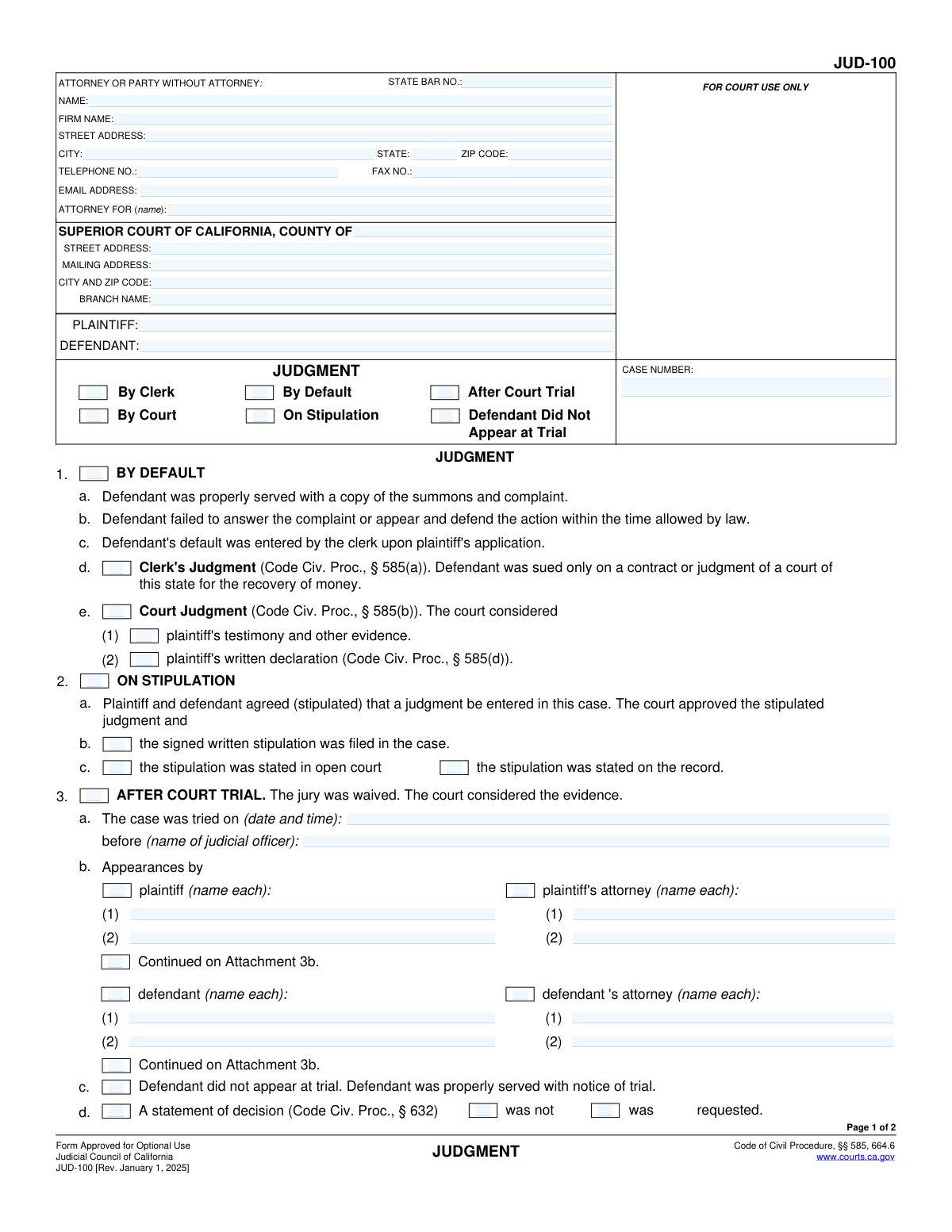
Judicial Council Form JUD-100 is the official California Superior Court judgment form used to memorialize and enter the courtâs final judgment in a civil case, including who wins, against whom, and the amounts awarded (damages, interest, attorney fees, costs, and other relief). It supports multiple judgment pathways such as by default, on stipulation, or after a court trial, and it provides the standardized format courts use for entry by the clerk or the judge. Because the judgment is the enforceable order that can be used for collection and other post-judgment procedures, accuracy and completeness are critical. Today, this form can be filled out quickly and accurately using AI-powered services like Instafill.ai, which can also convert non-fillable PDF versions into interactive fillable forms.
Our AI automatically handles information lookup, data retrieval, formatting, and form filling.
It takes less than a minute to fill out JUD-100 using our AI form filling.
Securely upload your data. Information is encrypted in transit and deleted immediately after the form is filled out.
Form specifications
| Form name: | Judicial Council of California Form JUD-100, Judgment (Code of Civil Procedure, §§ 585, 664.6) |
| Number of pages: | 7 |
| Language: | English |
| Categories: | California court forms, Judicial Council forms, legal forms, civil litigation forms |
Instafill Demo: filling out a legal form in seconds
How to Fill Out JUD-100 Online for Free in 2026
Are you looking to fill out a JUD-100 form online quickly and accurately? Instafill.ai offers the #1 AI-powered PDF filling software of 2026, allowing you to complete your JUD-100 form in just 37 seconds or less.
Follow these steps to fill out your JUD-100 form online using Instafill.ai:
- 1 Go to Instafill.ai and upload the JUD-100 PDF (or search/select “JUD-100 Judgment” from the form library).
- 2 Enter or import the case caption details: court county/branch and addresses, case number, and the plaintiff and defendant names.
- 3 Provide attorney/party information (name, State Bar number if applicable, firm, address, phone, and email) and specify whom the attorney represents.
- 4 Select the judgment basis and entry method (by clerk/by court; by default/on stipulation/after court trial) and complete the related sections (service/default details, stipulation details, or trial details and appearances).
- 5 Complete the parties section identifying who judgment is for/against (including any cross-complainants/cross-defendants) and indicate any attachments used for additional names.
- 6 Enter the monetary amounts and components of the judgment (damages, prejudgment interest rate and amount, attorney fees, costs, other amounts, and totals), plus any required debtor-related designations (e.g., medical expenses/personal debt amounts if applicable).
- 7 Review Instafill.ai’s validation checks, generate the final filled form for signature/date blocks (judicial officer/clerk as applicable), then download/print for filing with the California Superior Court.
Our AI-powered system ensures each field is filled out correctly, reducing errors and saving you time.
Why Choose Instafill.ai for Your Fillable JUD-100 Form?
Speed
Complete your JUD-100 in as little as 37 seconds.
Up-to-Date
Always use the latest 2026 JUD-100 form version.
Cost-effective
No need to hire expensive lawyers.
Accuracy
Our AI performs 10 compliance checks to ensure your form is error-free.
Security
Your personal information is protected with bank-level encryption.
Frequently Asked Questions About Form JUD-100
These are California civil court forms commonly used together to (1) prove the defendant was served (POS-010), (2) ask the clerk to enter the defendantâs default and request a default judgment (CIV-100), and (3) prepare the final judgment document the court or clerk signs/enters (JUD-100). Which forms you need depends on your case stage and whether youâre seeking a default, stipulated judgment, or judgment after trial.
JUD-100 is typically prepared by the party who is asking the court to enter judgment (often the plaintiff or their attorney), or by the court/clerk as directed. It can be used for a default judgment, a stipulated judgment, or a judgment after a court trial.
CIV-100 is used by a plaintiff (or cross-complainant) when the defendant failed to respond on time and you want the clerk to enter default and, if appropriate, enter a clerkâs judgment or request a court judgment. The form specifically notes it is not for actions under the Fair Debt Buying Practices Act (those use CIV-105).
POS-010 is the proof that the summons and complaint (and any other listed documents) were served on each party. A separate POS-010 is required for each party served, and it is often needed before the court will enter default or proceed further.
Youâll generally need the case number, court county/branch information, the exact legal names of all parties, and service details (who served, how served, dates/times/addresses) for POS-010. For CIV-100 and JUD-100, youâll also need the amounts requested (damages, interest, attorney fees, costs) and any supporting basis for those amounts.
Check 'By Clerk' when the clerk is authorized to enter the judgment (commonly certain default judgments on a contract or judgment for money). Check 'By Court' when a judge must enter the judgment, such as many court judgments after review, after trial, or when testimony/declarations are considered.
'By Default' is used when the defendant did not respond and default was entered. 'On Stipulation' is used when both sides agreed in writing or on the record to entry of judgment. 'After Court Trial' is used when the case was tried to the judge (jury waived) and the court is entering judgment based on evidence.
List each category that appliesâdamages, prejudgment interest (rate and amount), attorney fees, costs, and any 'other' amountsâthen calculate and enter the total. Make sure the totals match what you requested/proved in your default package, stipulation, or trial result.
Item 6 is where you declare that a copy of the Request for Entry of Default was mailed to the defendant (or their attorney of record) as required by Code of Civil Procedure section 587. If you do not complete this correctly (including names/addresses and mailing date), the clerk may reject the default request.
For a default judgment, the court generally requires a declaration that the defendant is not in U.S. military service (or an explanation of how you know), due to protections under the Servicemembers Civil Relief Act. CIV-100 item 8 lets you state the basis, including DMDC search results from https://scra.dmdc.osd.mil/.
On POS-010 item 5(b), you must identify the person you left the papers with, indicate whether it was at a business/home/other qualifying address, and then complete the follow-up mailing details (date and city mailed) if required. If you used substituted service, the form also allows attaching a declaration of diligence describing attempts at personal service.
Use the formâs attachment options (for example, 'Continued on Attachment 5a' or 'Attachment 3b') to list additional parties or appearances. Attachments should clearly reference the item number they continue and include the case name and case number.
These forms are filed with the Superior Court of California in the county where your case is pending, using the case number shown on your pleadings. Many counties allow e-filing in civil cases, but rules vary by county and case typeâcheck your courtâs filing options and local rules.
Processing time varies by county and workload; some defaults are processed in days while others take weeks, especially if a court hearing or judicial review is required. Delays are common when mailing/service declarations, amounts, or required attachments are incomplete.
YesâAI tools can help organize your case details and auto-fill form fields to reduce errors and save time; services like Instafill.ai can auto-fill form fields accurately based on the information you provide. If your PDF is not fillable (a flat scan), Instafill.ai can convert it into an interactive fillable form and then guide you to upload the PDF, map fields, and export a completed version for filing.
Compliance JUD-100
Validation Checks by Instafill.ai
1
Case Number Required and Consistent Across All Forms
Validates that a case number is provided and that the same case number is used consistently on JUD-100, CIV-100, and POS-010. This is critical to prevent misfiling documents into the wrong case and to ensure the judgment/default/service records are linked. If the case number is missing or mismatched, the submission should be rejected or routed to manual review with a clear error indicating which forms/fields conflict.
2
Party Names Present and Cross-Form Match (Plaintiff/Petitioner and Defendant/Respondent)
Checks that plaintiff and defendant names are populated and that the names match across the different forms (e.g., JUD-100 caption vs. CIV-100 caption vs. POS-010 caption). This prevents judgments or defaults being entered against the wrong party due to spelling variations or swapped roles. If mismatches are detected beyond minor formatting differences (e.g., punctuation), the system should flag for correction or require confirmation/attachment explaining the discrepancy.
3
Judgment Entry Authority Selection (Court vs. Clerk) Is Exactly One
Ensures that exactly one of 'THE COURT' or 'THE CLERK' is selected on the judgment entry section of JUD-100, and that the earlier 'By Clerk/By Court' indicators do not conflict. This matters because the authority affects processing steps, required findings, and who signs/enters the judgment. If both or neither are selected, validation fails and the user must choose one consistent option.
4
Judgment Basis Selection Is Mutually Exclusive and Complete
Validates that the judgment basis is logically selected: By Default, On Stipulation, After Court Trial, or Defendant Did Not Appear at Trial should not be selected in incompatible combinations, and at least one basis must be indicated. This is important because each pathway has different required supporting details (service, stipulation, trial info). If conflicting boxes are checked (e.g., By Default and After Court Trial), the submission should be blocked until corrected.
5
Default Judgment Prerequisites Completed When 'By Default' Is Selected (JUD-100 Item 1)
When 'By Default' is selected, checks that the required default findings are affirmed (proper service, failure to answer/appear, and default entered by clerk) and that either Clerkâs Judgment or Court Judgment is selected with the appropriate sub-basis (testimony/evidence or written declaration). This ensures statutory compliance under Code Civ. Proc. § 585 and prevents entry of an unsupported default judgment. If any required default elements are missing, the system should reject the filing and identify the missing sub-items.
6
Stipulated Judgment Support When 'On Stipulation' Is Selected (JUD-100 Item 2)
If 'On Stipulation' is selected, validates that at least one method of memorializing the stipulation is indicated (signed written stipulation filed, stated in open court, or stated on the record). This is necessary to show the court has an enforceable stipulation and to support entry under Code Civ. Proc. § 664.6 where applicable. If none of the supporting stipulation indicators are checked, validation fails and the user must provide the missing confirmation.
7
Trial Details Required and Properly Formatted When 'After Court Trial' Is Selected (JUD-100 Item 3)
When 'After Court Trial' is selected, requires a valid trial date/time and the judicial officerâs name, and enforces a recognizable date format (e.g., YYYY-MM-DD) and time format (e.g., HH:MM with AM/PM if used). This is important for the record of proceedings and for ensuring the judgment is tied to an actual trial event. If the date/time is missing or malformed, the system should block submission and prompt for correction.
8
Appearances vs. Nonappearance Are Logically Consistent (JUD-100 Item 3b/3c)
Checks that 'Defendant did not appear at trial' is not selected while defendant appearance names or defendant attorney appearance names are also provided (unless the form explicitly supports multiple defendants and only some failed to appear, in which case an attachment/clarification should be required). This prevents contradictory trial records that can invalidate or complicate enforcement. If inconsistent, the system should require the filer to clarify which parties appeared and, if needed, require Attachment 3b.
9
Statement of Decision Selection Is Not Contradictory (Requested vs. Was/Was Not)
Validates that the statement of decision fields are internally consistent: 'was' and 'was not' cannot both be selected, and 'requested' should not be selected in a way that contradicts the 'was/was not' outcome without explanation. This matters because it affects appellate record and post-trial procedures. If contradictory selections are made, the system should reject the submission and require a single consistent set of selections.
10
Judgment Parties (Item 5) Must Be Specified for the Selected Judgment Direction
Ensures that if judgment is 'for plaintiff' (5a), at least one plaintiff name and at least one defendant name are provided (or the appropriate 'Continued on Attachment' box is checked). Similarly, if judgment is for defendant/cross-complainant/cross-defendant, the corresponding party name fields must be completed. If party names are missing, the judgment is ambiguous and unenforceable; validation should fail and require completion or attachment.
11
Monetary Amount Fields Are Valid Currency and Non-Negative
Validates that all money fields (damages, interest amount, attorney fees, costs, other, totals, credits, balances, service fee, memorandum of costs items) are numeric, non-negative, and limited to two decimal places. This prevents calculation errors, invalid judgments, and downstream accounting issues. If any amount is non-numeric, negative, or has excessive precision, the system should block submission and identify the offending field.
12
Totals and Balances Reconcile (CIV-100 and JUD-100 Amount Sections)
Checks arithmetic consistency where the form implies calculations: in CIV-100, each lineâs Balance should equal Amount minus Credits acknowledged, and TOTALS should equal the sum of line balances; in JUD-100 item 6, TOTAL should equal the sum of selected components (damages + prejudgment interest + attorney fees + costs + other). This is important to prevent entry of an incorrect judgment amount and to reduce clerk rejections. If reconciliation fails beyond a small rounding tolerance, validation should fail and require correction.
13
Prejudgment Interest Rate and Amount Consistency
When prejudgment interest is selected, validates that the annual rate is a valid percentage (e.g., 0 to 100 with reasonable constraints) and that an interest amount is provided; optionally, if principal and dates are available elsewhere, the system can sanity-check the amount. This matters because an invalid rate or missing amount can render the judgment defective or require court correction. If the rate is out of range or required fields are missing, the system should reject the submission.
14
Daily Damages Fields Complete and Valid When Daily Damages Are Claimed (CIV-100 Item 1g)
If a daily damage rate is provided, validates that the rate is a valid currency amount and that the start date is present and in valid date format. This is important because daily damages affect the judgment calculation and must be anchored to a specific start date. If either the rate or date is missing/invalid, the system should block submission or require the filer to remove the daily damages claim.
15
Declaration of Mailing Completeness (CIV-100 Item 6) and Date Validity
Validates that exactly one of 'not mailed (addresses unknown)' or 'mailed first-class' is selected, and if mailed is selected, a mailing date and recipient names/addresses are provided. This is required under Code Civ. Proc. § 587 and is commonly reviewed by clerks before entering default. If the mailing declaration is incomplete or contradictory, the system should reject the filing and prompt for the missing mailing details.
16
Nonmilitary Status Declaration Requires at Least One Basis and Supporting Details (CIV-100 Item 8)
Ensures at least one reason checkbox (DMDC search, regular communication, defendant stated, discharged with date, not eligible with reason) is selected, and that any dependent fields (e.g., discharge date, 'other' reason text) are completed when their option is chosen. This is critical for compliance with the Servicemembers Civil Relief Act and California protections before default judgment. If no basis is selected or required details are missing, validation fails and the system should prevent submission.
Common Mistakes in Completing JUD-100
People often leave the CASE NUMBER, PLAINTIFF, or DEFENDANT fields blank on one of the forms (JUD-100, CIV-100, POS-010) or enter names that donât exactly match the complaint (e.g., abbreviations, missing âInc./LLC,â or different spelling). This can cause the clerk to reject the filing, delay entry of default/judgment, or create enforceability problems if the judgment names donât match the served party. Always copy the caption exactly as it appears on the filed complaint and use the same case number everywhere; AI-powered tools like Instafill.ai can auto-populate and cross-check captions for consistency.
On JUD-100, filers sometimes check multiple incompatible boxes (e.g., âBy Defaultâ and âOn Stipulationâ) or select a pathway that doesnât match what actually happened procedurally. This creates ambiguity about the legal basis for the judgment and can lead to rejection or requests for clarification. Choose only the option that matches the case posture and ensure the supporting sub-items (e.g., default entered, stipulation filed, trial date) are completed; Instafill.ai can help by validating mutually exclusive selections.
On CIV-100 and JUD-100, people frequently misunderstand when the clerk can enter judgment under CCP § 585(a) versus when a judge must enter judgment under § 585(b)/(d). Selecting the wrong type can result in the clerk refusing to enter judgment and requiring a new submission or a hearing/affidavit process. Confirm whether the claim qualifies for clerk judgment (typically certain contract-based sums) and complete the required declarations/attachments for the chosen route; Instafill.ai can flag missing prerequisites based on the selected judgment type.
JUD-100 item 1 requires that the defendant was properly served, failed to respond in time, and that default was enteredâyet filers often check âBy Defaultâ without ensuring these steps are true and documented. If default was not actually entered, or service was defective, the court may deny default judgment or set it aside later. Verify the proof of service is valid (POS-010), confirm the response deadline passed, and confirm the clerk entered default before seeking judgment; Instafill.ai can help track required steps and prevent premature filing.
In JUD-100 item 6 and CIV-100 item 1(e)(3), people often enter numbers that donât reconcile (e.g., TOTAL doesnât equal the sum of damages/interest/fees/costs), omit the prejudgment interest rate, or put amounts in the wrong line (costs vs. attorney fees). Courts/clerk staff may reject the paperwork or require corrections, and errors can also affect enforcement and post-judgment interest calculations. Use a clear worksheet, double-check arithmetic, and ensure each amount is supported by the complaint, memorandum of costs, and any fee basis; Instafill.ai can automatically calculate totals and format currency consistently.
CIV-100 explicitly requires a Memorandum of Costs if a money judgment is requested, but filers frequently leave the costs section blank or forget to itemize filing fees and service fees. This can delay entry of judgment or result in costs being excluded from the judgment. Complete the cost lines (or check âwaivedâ only if truly waived) and ensure the declarant signs under penalty of perjury; Instafill.ai can prompt for required cost details when a money judgment is selected.
On CIV-100 item 6, people often forget that a copy of the Request for Entry of Default must be mailed to the defendant (or properly indicate addresses are unknown) and that the mailing date and addresses must be listed. Without a proper mailing declaration, the clerk may refuse to enter default. Always complete item 6 with the mailing date and the names/addresses exactly as shown on the envelopes, and keep proof of mailing; Instafill.ai can ensure the mailing section is completed whenever default is requested.
CIV-100 item 8 is required for a judgment, but filers sometimes leave it blank, check a box without any real basis, or fail to include the discharge date when claiming discharge. If the defendant is in the military or status is unknown, additional protections apply and the court may deny or delay default judgment. Use the DMDC/SCRA search when possible and check the appropriate basis boxes accurately; Instafill.ai can remind users to complete item 8 and help format the declaration consistently.
Common POS-010 mistakes include checking substituted service but not completing the required follow-up mailing details, listing a P.O. Box where a physical address is required for certain substituted service scenarios, or naming the wrong recipient/relationship for entity service. Defective service can invalidate default and lead to a motion to set aside the judgment. Carefully match the service method to what actually occurred, complete every subpart (dates, times, mailing city/date, diligence attachment if required), and ensure the person served is authorized under the correct CCP section; Instafill.ai can validate that required subfields are filled when a service method is selected.
Across JUD-100, CIV-100, and POS-010, filers often forget to date the form, omit the typed/printed name, or have the wrong person sign (e.g., a party signs the serverâs declaration, or the server doesnât sign under penalty of perjury). Missing or improper signatures can cause rejection or require re-service/re-filing. Confirm the correct declarant signs each declaration section and that every signature line has a date and printed name; Instafill.ai can highlight incomplete signature blocks before you finalize the packet.
When there are multiple plaintiffs/defendants or multiple attorneys/appearances, people often cram names into small fields without checking âContinued on Attachment 3b/5a/5c,â or they check the continuation box but forget to include the attachment. This can create an incomplete judgment that omits parties, which is a serious enforcement problem. If more space is needed, use the specified attachment and ensure it is labeled and consistent with the caption; Instafill.ai can generate properly formatted continuation pages and keep party lists consistent.
Saved over 80 hours a year
âI was never sure if my IRS forms like W-9 were filled correctly. Now, I can complete the forms accurately without any external help.â
Kevin Martin Green
Your data stays secure with advanced protection from Instafill and our subprocessors

Robust compliance program
Transparent business model
Youâre not the product. You always know where your data is and what it is processed for.
ISO 27001, HIPAA, and GDPR
Our subprocesses adhere to multiple compliance standards, including but not limited to ISO 27001, HIPAA, and GDPR.
Security & privacy by design
We consider security and privacy from the initial design phase of any new service or functionality. Itâs not an afterthought, itâs built-in, including support for two-factor authentication (2FA) to further protect your account.
Fill out JUD-100 with Instafill.ai
Worried about filling PDFs wrong? Instafill securely fills judicial-council-of-california-form-jud-100-judgment-code-of-civil-procedure-585-6646 forms, ensuring each field is accurate.