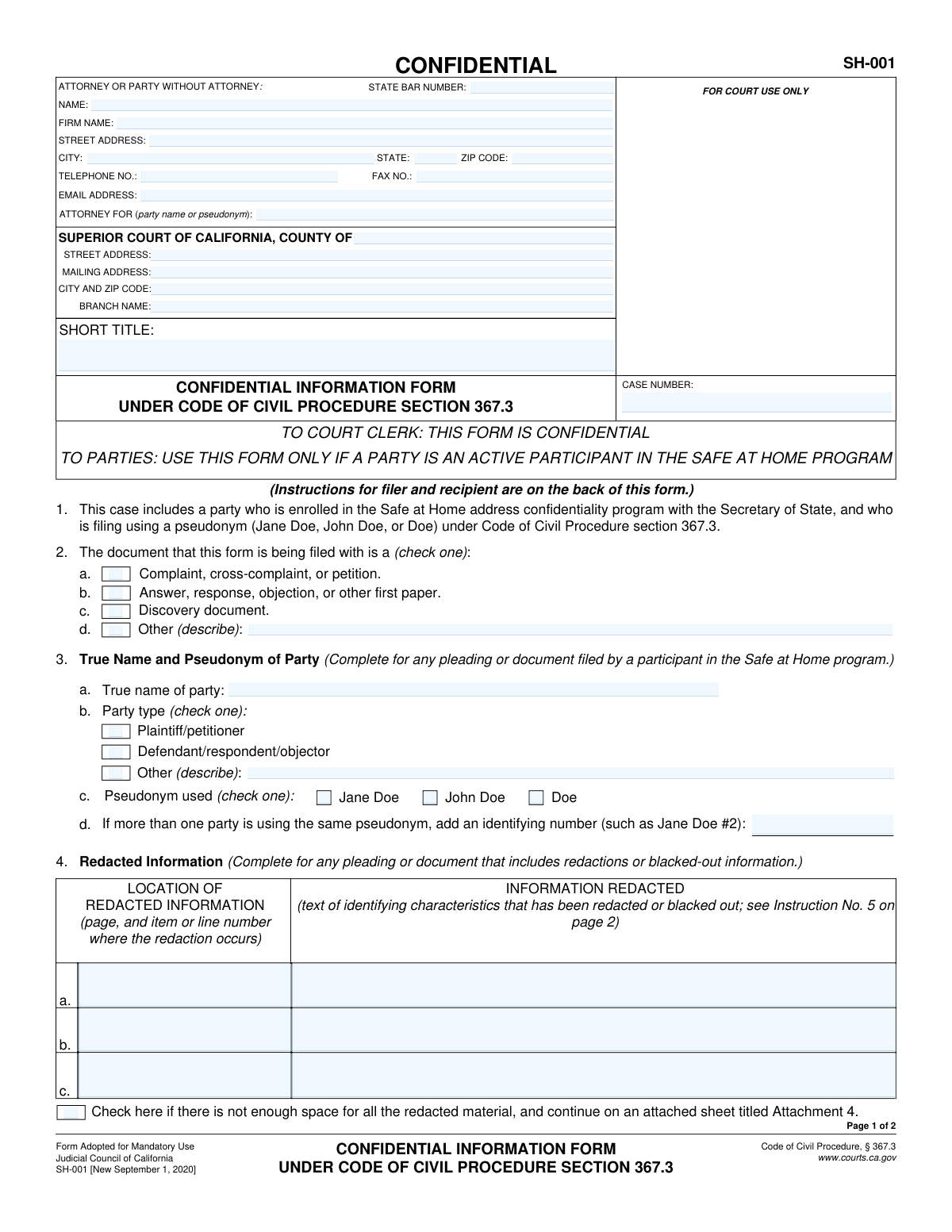
Yes! You can use AI to fill out Form SH-001, Confidential Information Form Under Code of Civil Procedure Section 367.3
California Form SH-001, the Confidential Information Form, is a crucial legal document for participants in the state's Safe at Home address confidentiality program. It allows them to file civil court documents using a pseudonym (like Jane Doe) to protect their identity and safety, while confidentially providing their true name and any redacted information to the court and other parties. This process ensures privacy without impeding legal proceedings. Today, this form can be filled out quickly and accurately using AI-powered services like Instafill.ai, which can also convert non-fillable PDF versions into interactive fillable forms.
SH-001 is part of the
California court forms, civil court forms and civil procedure forms categories on Instafill.
Our AI automatically handles information lookup, data retrieval, formatting, and form filling.
It takes less than a minute to fill out SH-001 using our AI form filling.
Securely upload your data. Information is encrypted in transit and deleted immediately after the form is filled out.
Form specifications
| Form name: | Form SH-001, Confidential Information Form Under Code of Civil Procedure Section 367.3 |
| Number of fields: | 52 |
| Number of pages: | 1 |
| Language: | English |
Instafill Demo: How to fill out PDF forms in seconds with AI
How to Fill Out SH-001 Online for Free in 2026
Are you looking to fill out a SH-001 form online quickly and accurately? Instafill.ai offers the #1 AI-powered PDF filling software of 2026, allowing you to complete your SH-001 form in just 37 seconds or less.
Follow these steps to fill out your SH-001 form online using Instafill.ai:
- 1 Navigate to Instafill.ai and upload or select the SH-001 form.
- 2 Provide the court and case details, including the county, branch, case number, and short title.
- 3 Enter your attorney or personal contact information in the designated section.
- 4 Specify the true name of the party, the pseudonym being used, and the type of document this form accompanies (e.g., complaint, answer).
- 5 If applicable, list all redacted information by detailing the page, line number, and the exact text that was blacked out on the main document.
- 6 Complete the declaration section if you are the party using the pseudonym, including your signature and Safe at Home ID number.
- 7 Review all AI-populated fields for accuracy, then download the completed, confidential form for filing with the court.
Our AI-powered system ensures each field is filled out correctly, reducing errors and saving you time.
Why Choose Instafill.ai for Your Fillable SH-001 Form?
Speed
Complete your SH-001 in as little as 37 seconds.
Up-to-Date
Always use the latest 2026 SH-001 form version.
Cost-effective
No need to hire expensive lawyers.
Accuracy
Our AI performs 10 compliance checks to ensure your form is error-free.
Security
Your personal information is protected with bank-level encryption.
Frequently Asked Questions About Form SH-001
This form is used to confidentially provide the court and other parties with the true name and other private information of a party who is enrolled in the 'Safe at Home' address confidentiality program and is using a pseudonym (like Jane Doe) in a civil case.
A Safe at Home participant using a pseudonym must file this form. Additionally, any other party in the case who files a document with information redacted to protect the participant's identity must also file this form.
The Safe at Home program is an address confidentiality program run by the California Secretary of State. It helps protect victims of domestic violence, stalking, and other crimes by providing a secure substitute address for legal purposes.
This form must be filed and served each time a party files a court document that uses a pseudonym or has identifying information blacked out (redacted) to protect a Safe at Home participant.
You must redact the participant's name, address, age, marital status, phone number, email, and any other 'identifying characteristics' from which their identity could be learned. This redacted information is then listed on Form SH-001.
No, this form is marked 'CONFIDENTIAL'. The information on it is not for public viewing and parties who receive it are legally required to keep the information private.
You are legally required to keep the participant's true name confidential, use their pseudonym in all future court filings, and redact their identifying information from any documents you file with the court.
In this section, you must list the specific information that was blacked out from the main document you are filing. You also need to note the page and line number where each redaction occurs.
The Safe at Home participant must file a separate motion (a formal request) asking the court to seal the records that contain their true name or other identifying information.
Only the party who is an active participant in the Safe at Home program and is using a pseudonym must sign and date the declaration on page 2.
Yes, services like Instafill.ai use AI to help you accurately auto-fill form fields, which can save time and help prevent mistakes.
You can use a service like Instafill.ai to upload the form. Its AI-powered platform allows you to fill in the required information accurately and efficiently directly from your web browser.
You can use a tool like Instafill.ai, which can convert flat, non-fillable PDFs into interactive forms that you can complete and save online.
Compliance SH-001
Validation Checks by Instafill.ai
1
Ensures Case Number Consistency Across Pages
This check verifies that the 'CASE NUMBER' entered in the header of page 1 is identical to the 'CASE NUMBER' entered in the footer of page 2. Maintaining consistency is crucial for correct document association and filing within the court's case management system. A mismatch could lead to the form being rejected or misfiled, causing delays in the legal proceedings.
2
Ensures Short Title Consistency Across Pages
This validation confirms that the 'SHORT TITLE' of the case on page 1 matches the 'SHORT TITLE' on page 2. The short title is a key identifier for the case, and consistency ensures that all pages of the document are correctly recognized as belonging to the same filing. Inconsistent titles can cause confusion and potential filing errors.
3
Mandatory Document Type Selection
Validates that one of the options under item 1, 'The document that this form is being filed with is a (check one):', has been selected. This information is required to contextualize the confidential data for the court clerk and other parties. Failure to select a document type will result in an incomplete form and likely rejection by the court clerk.
4
Conditional Requirement for 'Other' Document Description
If the 'Other (describe):' option is checked in item 1, this validation ensures that the corresponding text field is not empty. The description is necessary for the court to understand the nature of the accompanying document when it doesn't fit the standard categories. An empty description makes the 'Other' selection meaningless and the filing incomplete.
5
Conditional Requirement for 'Other' Party Type Description
This check ensures that if the 'Other (describe):' option is selected for the party type in item 2.b, the associated description field is filled out. This clarifies the party's role in the case when it is not a standard plaintiff or defendant. Without this description, the party's standing is ambiguous, which can complicate proceedings.
6
Validates State Bar Number Format
This check verifies that the 'STATE BAR NUMBER' field contains only numeric characters. A valid State Bar number is essential for identifying and verifying the credentials of the attorney of record. Submitting an invalid or improperly formatted number can lead to rejection of the filing and delays while the attorney's information is corrected.
7
Validates Email Address Format
This validation ensures that the value entered in the 'EMAIL ADDRESS' field follows the standard '[email protected]' format. A valid email address is critical for official electronic communication and service of documents from the court and other parties. An invalid format would prevent the party or attorney from receiving important case updates.
8
Declaration Requirement for Pseudonymous Party
This check confirms that if item 2 ('True Name and Pseudonym of Party') is completed, then item 4 ('Declaration by Pseudonymous (Doe) Party') must be signed and dated. The declaration is a sworn statement under penalty of perjury confirming the party's participation in the Safe at Home program, which is the legal basis for using a pseudonym. An unsigned or undated declaration invalidates the form's purpose.
9
Consistency of True Name
This validation ensures that the 'True name of party' entered in item 2.a is identical to the name printed in the declaration in item 4 and the name in the 'TYPE OR PRINT TRUE NAME' field below the signature line. This consistency is critical to unequivocally link the confidential identity to the sworn declaration. Any discrepancy could call the validity of the declaration into question.
10
Validates Signature Date
This check verifies that the 'Date' in the declaration section (item 4) is a valid calendar date and is not a future date. The signature date establishes when the declaration was made under penalty of perjury. An invalid or future date would render the declaration legally unsound and could lead to the form being rejected by the court.
11
Redacted Information Row Completeness
For each row (a, b, c) in item 3, 'Redacted Information', this validation ensures that if either the 'LOCATION' or the 'INFORMATION REDACTED' field is filled, the other is also filled. Providing only one half of the information is insufficient; the court needs to know both what was redacted and where it was redacted from. Incomplete rows will be rejected as they do not provide the necessary confidential details.
12
Attachment Count for Additional Redactions
This check verifies that if the checkbox in item 3 ('Check here if there is not enough space for all the redacted material...') is marked, the 'Number of pages attached' field on page 2 contains a value greater than zero. This ensures that the filer provides the referenced attachment. Failure to include the attachment or specify the page count would result in missing confidential information.
13
Validates 'Attorney For' Field Content
This validation checks that the 'ATTORNEY FOR (party name or pseudonym)' field contains the pseudonym selected in item 2, not the party's true name. The attorney information block is part of the public-facing record, and using the true name here would defeat the purpose of the confidential form. This check is crucial for protecting the party's identity.
Common Mistakes in Completing SH-001
The most critical error is filing this form as a standard public document. The form is explicitly marked 'CONFIDENTIAL' and contains the very information (true name, redacted details) being protected. Publicly filing it completely defeats the purpose of the Safe at Home program's legal protections and can place the participant in danger. To avoid this, filers must follow specific court procedures for submitting confidential documents, which often involves filing under seal. AI-powered tools like Instafill.ai can flag confidential forms and guide users on proper filing protocols to prevent such catastrophic errors.
In Section 3, under 'INFORMATION REDACTED,' filers sometimes describe the type of information removed (e.g., 'phone number') instead of providing the actual text that was blacked out (e.g., '(555) 123-4567'). The purpose of this section is to confidentially provide the court and parties with the exact information that is missing from the public document. Failing to provide the specific text makes the form useless and can lead to court rejection or requests for clarification. Double-check that the exact redacted words, numbers, or phrases are transcribed into this confidential form.
The declaration in Section 5 must be signed by the actual party who is a participant in the Safe at Home program, not their attorney or another individual. This declaration is a personal statement made under penalty of perjury confirming their program status. An incorrect signature invalidates the declaration and can jeopardize the party's ability to proceed pseudonymously. The participant must personally sign, date, and print their true name on the form.
This form is not a standalone document; it must be filed and served alongside a primary document (like a complaint or motion) that contains redactions. People often mistakenly file the redacted document alone, leaving the court and other parties without the necessary confidential information. This leads to confusion and non-compliance with the statute. Always ensure Form SH-001 is prepared and filed simultaneously with any document from which identifying information has been blacked out.
In Section 3, the form requires the 'page, and item or line number' for each redaction. A common mistake is to provide a vague location, such as 'page 2' or 'in the second paragraph.' This is insufficient and forces the court and opposing counsel to guess where the information was removed. This can delay proceedings and may result in the form being rejected. Always provide a precise location to ensure clarity.
In Section 2, filers may accidentally enter the party's pseudonym (e.g., 'Jane Doe') in the 'True name of party' field. This section is meant to confidentially link the pseudonym to the person's legal name. This error undermines the form's function and can create significant confusion in the court record. The true legal name must be entered in field 2a, and the chosen pseudonym (Jane Doe, John Doe, etc.) selected in field 2c.
In cases with more than one pseudonymous party (e.g., a mother and child), filers often forget to use an identifying number as instructed in Section 2d. Both parties might be listed simply as 'Jane Doe,' making it impossible to distinguish them in filings. The correct procedure is to assign identifiers, such as 'Jane Doe #1' and 'Jane Doe #2,' and use them consistently. This prevents confusion and ensures the record is clear.
This form is exclusively for cases where a party is an active participant in the California Secretary of State's Safe at Home program under C.C.P. § 367.3. It is sometimes mistakenly used by parties who simply wish to be anonymous for general privacy reasons. Using this form incorrectly can lead to immediate rejection by the court clerk and may require the filer to start over with the proper legal procedure for seeking anonymity, such as a motion to seal or file under a pseudonym for other reasons.
Filers often neglect to ensure the 'SHORT TITLE' and 'CASE NUMBER' are filled out identically on both page 1 and page 2 of the form, and that they match the main redacted document being filed. Any discrepancy can cause the confidential form to be misfiled or detached from the main case file, potentially leading to its accidental public disclosure or being lost by the clerk's office. Using a tool like Instafill.ai can prevent this by auto-populating consistent case information across all pages of a document.
In the top 'ATTORNEY FOR' field, an attorney might inadvertently list their client's true name instead of their court-approved pseudonym. The instructions explicitly permit using the pseudonym in this section to maintain confidentiality on the first page. This mistake can compromise the party's identity on the first page of a document intended to protect them. The pseudonym (e.g., 'Jane Doe') should always be used in this field once the party is proceeding under C.C.P. § 367.3.
Saved over 80 hours a year
“I was never sure if my IRS forms like W-9 were filled correctly. Now, I can complete the forms accurately without any external help.”
Kevin Martin Green
Your data stays secure with advanced protection from Instafill and our subprocessors

Robust compliance program
Transparent business model
You’re not the product. You always know where your data is and what it is processed for.
ISO 27001, HIPAA, and GDPR
Our subprocesses adhere to multiple compliance standards, including but not limited to ISO 27001, HIPAA, and GDPR.
Security & privacy by design
We consider security and privacy from the initial design phase of any new service or functionality. It’s not an afterthought, it’s built-in, including support for two-factor authentication (2FA) to further protect your account.
Fill out SH-001 with Instafill.ai
Worried about filling PDFs wrong? Instafill securely fills form-sh-001-confidential-information-form-under-code-of-civil-procedure-section-3673 forms, ensuring each field is accurate.